Sunset Prompt
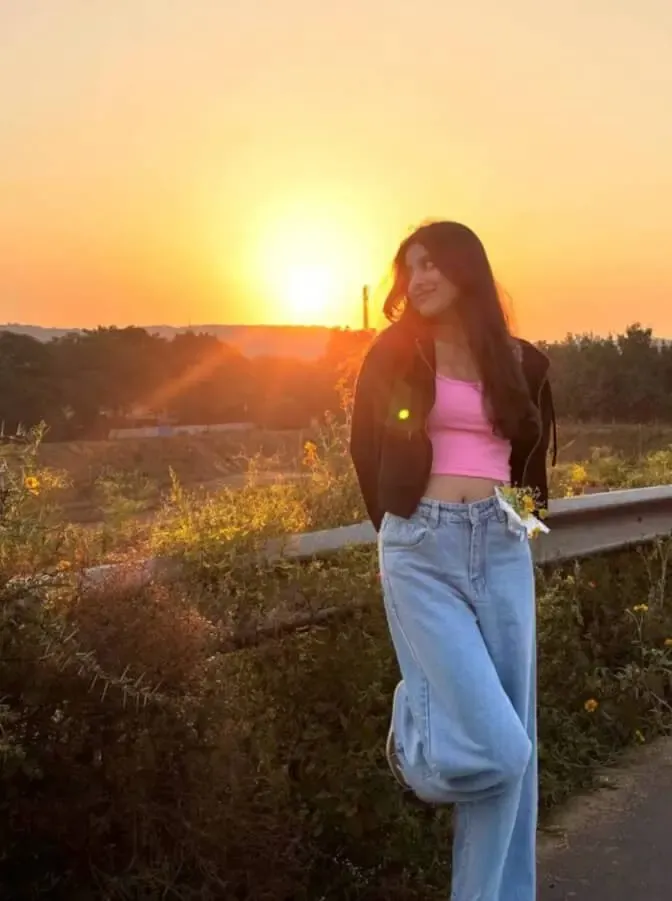
Sunset Prompt क्या है और यह किसके लिए है?
Om Editing Top में यह Sunset Prompt उन लोगों के लिए है जो अपनी फोटो को natural golden-hour look देना चाहते हैं, लेकिन face, skin tone और real appearance को बदलना नहीं चाहते। इस style का सबसे बड़ा फायदा यह है कि आपकी photo में sunset का soft glow, warm colors और cinematic mood आ जाता है, जबकि आपकी original identity safe रहती है।
Read Also: cinematic-style realistic portrait | 2026 New Year
यह खास तौर पर Instagram creators, profile photo users, reels thumbnail makers, photographers, और mobile editing पसंद करने वालों के लिए useful है। अगर आप चाहते हैं कि आपकी फोटो में background ज्यादा attractive लगे, light soft लगे, और overall image premium feel दे, तो यह prompt style बहुत काम आता है।
इस तरह का sunset edit आमतौर पर उन photos पर अच्छा लगता है जिनमें subject clear हो और face पर light balanced हो। इसका goal dramatic fantasy बनाना नहीं, बल्कि aisa realistic sunset effect देना है जो photo को warm, smooth और visually appealing बनाए।
यह Sunset Prompt फोटो में क्या देता है?
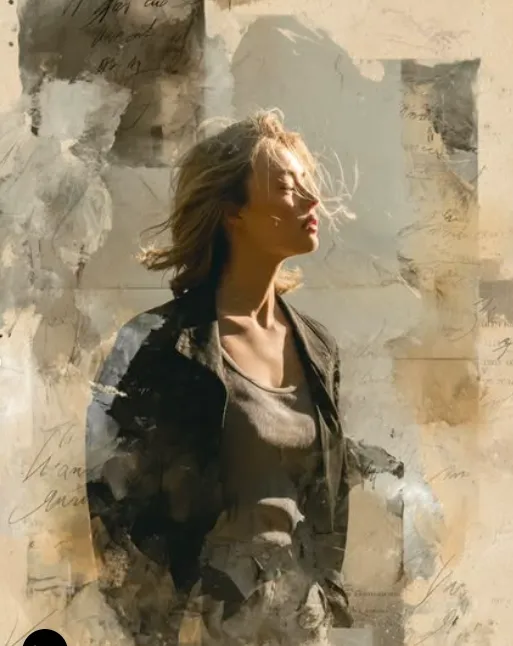
इस style का main output एक soft glowing sunset background होता है, जिसमें warm orange, golden yellow, और हल्की dreamy tones मिलती हैं। Light आमतौर पर natural golden-hour जैसी लगती है, यानी ऐसी रोशनी जो बहुत harsh नहीं होती और face को clean visibility देती है।
Composition के हिसाब से यह prompt photo को center-focused और balanced feel देता है। Subject यानी आप frame में clear रहते हैं, जबकि पीछे का sky sunset mood create करता है। अगर edit सही तरीके से लागू हो, तो photo में cinematic depth, soft atmosphere, और high-quality aesthetic मिलती है।
- Soft sunset glow without overexposure
- Warm orange and golden colour tones
- Dreamy but realistic cinematic mood
- Balanced lighting with clear facial details
- Natural background enhancement without heavy distortion
- Premium social-media style finish
इसमें सबसे important बात realism है। मतलब face, skin texture, body shape और overall appearance natural बने रहते हैं। यह look उन users के लिए अच्छा है जो AI-style overedit नहीं चाहते, बल्कि subtle enhancement चाहते हैं जो फोटो को बेहतर भी बनाए और natural भी रखे।
Sunset Prompt को step-by-step कैसे use करें?
अगर आप mobile पर beginner हैं, तब भी इसे use करना आसान है। सबसे पहले अपनी साफ और clear photo select करें। कोशिश करें कि image में face visible हो, subject blur न हो, और photo बहुत dark न हो। उसके बाद editing app या AI photo tool में prompt section खोलें और available input box में सही prompt style apply करें।
Editing शुरू करने से पहले image को अच्छी तरह check करें। अगर background बहुत busy है या face पर already heavy shadow है, तो result उतना clean नहीं आएगा। इसलिए photo choose करते समय simplicity और clarity पर ध्यान देना बहुत जरूरी है।
- अपनी best photo चुनें जिसमें face साफ दिख रहा हो।
- Image को app में upload करें और prompt/settings section खोलें।
- Sunset-style enhancement mode या natural lighting effect select करें।
- Settings में realism, face preservation, और balanced lighting जैसी options हों तो उन्हें on रखें।
- Preview check करें कि skin tone natural है और face over-bright नहीं हुआ है।
- अगर background बहुत intense लगे, तो effect strength थोड़ा कम करें।
- Final image save करने से पहले zoom करके facial details और edges verify करें।
Best result पाने के लिए edit को एकदम overdo न करें। Sunset effect का charm तभी आता है जब sunlight soft लगे, shadows smooth हों, और subject का face clearly readable रहे। अगर tool allow करता है, तो subtle enhancement चुनना usually better रहता है।
कौन-सी photos Sunset Prompt के लिए सबसे अच्छी रहती हैं?
हर photo इस style के लिए perfect नहीं होती। सबसे अच्छे results तब आते हैं जब subject naturally front-facing या slight side-angle में हो, क्योंकि इससे face light evenly catch करता है। बहुत low-resolution image में sunset glow तो आ सकता है, लेकिन details soft या noisy दिख सकती हैं।
Lighting भी बहुत important है। अगर आपकी original photo में face पर decent light है, तो sunset transformation ज्यादा natural लगेगा। Outdoor photos, balcony shots, terrace portraits, casual selfies, और portrait mode images इस prompt के साथ अच्छे results दे सकती हैं।
- Angle: front-facing या slight angle वाली photo
- Resolution: clear, high-quality image, preferably sharp face detail
- Lighting: soft daylight या evenly lit photo
- Background: simple background, कम clutter वाली photo
- Clothing: solid colors, earthy tones, white, black, or neutral shades
- Pose: natural posture, relaxed expression, stable framing
Clothing भी final aesthetic को influence करती है। Warm tones, neutral outfits, और simple textures sunset mood के साथ ज्यादा harmonious लगती हैं। बहुत busy patterns या extremely reflective clothes कभी-कभी background glow से clash कर सकती हैं।
अगर आप portrait, reel cover, DP, या thumbnail के लिए edit बना रहे हैं, तो सबसे अच्छा source वही होगा जिसमें आपका face crisp हो, background साफ हो, और lighting already decent हो। ऐसे photo पर Sunset Prompt ज्यादा realistic, elegant और visually strong result देता है।
Pro Tips for the Best Results with Om Editing Top
Om Editing Top se sunset-style edit tabhi zyada natural lagta hai jab aap base photo sahi choose karte ho. Clear face, balanced lighting, aur simple background wali image par golden-hour effect sabse clean dikhai deta hai. Agar original photo already dark hai ya face partially covered hai, to result less realistic ho sakta hai.
Best output ke liye image ka pose bhi matter karta hai. Front-facing ya slightly angled portrait, sharp facial details, aur proper headroom ke saath edit zyada premium lagta hai. Soft sunset light ko aise use karo ki background warm lage, but subject ki identity fully visible rahe.
Practical tips jo output ko aur better banate hain:
- High-resolution photo use karo, taaki facial details crisp रहें.
- Face par heavy shadow na ho; even lighting better blend deti hai.
- Simple background choose karo, taaki sunset glow cleanly stand out kare.
- Natural skin tone maintain karo; over-saturation se image fake lag sakti hai.
- Golden hour effect ko subtle rakho, extreme glow se face overexposed ho sakta hai.
- Portrait crop aisa rakho ki shoulders aur face dono balanced dikhein.
Common Mistakes to Avoid in This Style
Sabse common mistake hoti hai too much effect apply karna. Jab sunset glow bahut strong ho jata hai, to face details dull ya washed out lag sakte hain. Isliye lighting ko enhance karo, but subject ki clarity kabhi compromise mat karo.
Dusri galti inconsistent image selection hai. Agar original photo me motion blur, low quality, ya heavy filters already lage hue hain, to Om Editing Top ka final look uneven ho sakta hai. Natural base photo hamesha zyada polished aur realistic result deti hai.
In mistakes se bachna chahiye:
- Face ko over-edit karna, kyunki isse identity unnatural lagti hai.
- Background ko too bright banana, jisse sun effect fake ho jata hai.
- Extremely noisy or blurry photo use karna, jisse output soft aur muddy dikhe.
- Skin tone ko change kar dena, jo realistic portrait feel ko hurt karta hai.
- Too many effects ek saath use karna, jis se clean cinematic look lose ho jata hai.
Best Use Cases and Creative Ideas for This Style
Om Editing Top ka sunset look bahut versatile hai, isliye isse multiple platforms par use kiya ja sakta hai. Agar aap social media par warm, aesthetic, aur eye-catching visual style chahte ho, to ye edit profile branding aur personal posts dono ke liye kaam aata hai.
Instagram posts aur reels covers me soft golden light bahut attractive lagti hai, especially jab aap emotional, travel, fashion, ya lifestyle content share kar rahe ho. Yeh style profile pictures me bhi premium touch deta hai, kyunki face clear rehta hai aur background cinematic feel create karta hai.
Kuch popular use cases:
- Instagram posts: aesthetic feed aur warm-tone theme ke liye.
- Profile pictures: clean, bright, aur natural-looking DP ke liye.
- Thumbnails: YouTube ya short-video cover ko more clickable banane ke liye.
- Portfolios: creative portrait collections me polished touch ke liye.
- Reels covers: uniform branding aur cinematic sunset mood ke liye.
Agar aap creator ho, to Om Editing Top ka sunset version travel stories, beach content, couple shots, ya solo portraits ke saath aur bhi achha lag sakta hai. Yeh sirf ek background effect nahi, balki overall visual mood ko upgrade karne ka simple aur effective tarika hai.
Variations You Can Try with This Style
Ek hi base idea ko different moods me convert karke aap image ko zyada unique bana sakte ho. This style ka sunset style warm orange tones ke saath kaafi flexible hai, so aap season, time of day, ya emotional vibe ke hisaab se variations try kar sakte ho.
Example ke liye, soft golden sunset romantic feel deta hai, while deeper orange and amber tones zyada dramatic aur cinematic lagte hain. Agar aap calm outdoor mood chahte ho, to light rays ko subtle rakho; aur agar bold, editorial look chahiye, to contrast ko slightly increase kiya ja sakta hai.
Different variations jo aap experiment kar sakte ho:
- Soft pastel sunset: gentle, dreamy, and clean social media look.
- Golden-hour warm glow: natural and bright portrait style.
- Orange sky dramatic mood: cinematic reels cover ya poster feel.
- Beach sunset vibe: travel photos aur vacation content ke liye.
- Monsoon-to-sunset transition: moody but still warm atmosphere ke liye.
- Winter sunset tone: cooler background ke saath warm face lighting contrast ke liye.
Aap colours ke saath bhi play kar sakte ho, jaise amber, honey gold, coral, ya light peach tones. Settings me open sky, horizon line, trees, ya urban skyline add karne se output ka feel completely change ho jata hai, while this prompt ka core aesthetic same rehta hai.
Conclusion: Try This Style for a Clean Sunset Look
This look ka sunset effect un logon ke liye perfect hai jo apni photos ko natural, warm, aur cinematic banana chahte hain without losing real facial details. Sahi image choose karoge, subtle lighting use karoge, aur common mistakes avoid karoge, to final result kaafi polished dikhega.
Agar aap Instagram, DP, thumbnails, ya portfolio ke liye ek elegant golden-hour look chahte ho, to yeh style ek simple aur effective choice hai. Ab different moods aur colour variations try karke dekho aur apni photo ko ek fresh sunset aesthetic do.
FAQ: Sunset Prompt
How do I use the "Sunset Prompt" prompt?
Copy the prompt above, open Gemini or ChatGPT, upload a clear photo of yourself and paste the prompt. Generate the image and adjust the outfit or background if you want a variation.
Is this prompt free?
Yes. This prompt is free to copy and use for Instagram, reels, WhatsApp DP and profile pictures.
Which photo works best?
A sharp, front-facing, well-lit photo with no filter. A clear face helps the AI keep your identity in the final image.
Last updated: 17 August 2026
💬 Comments