Seated on the Floor AI Prompt
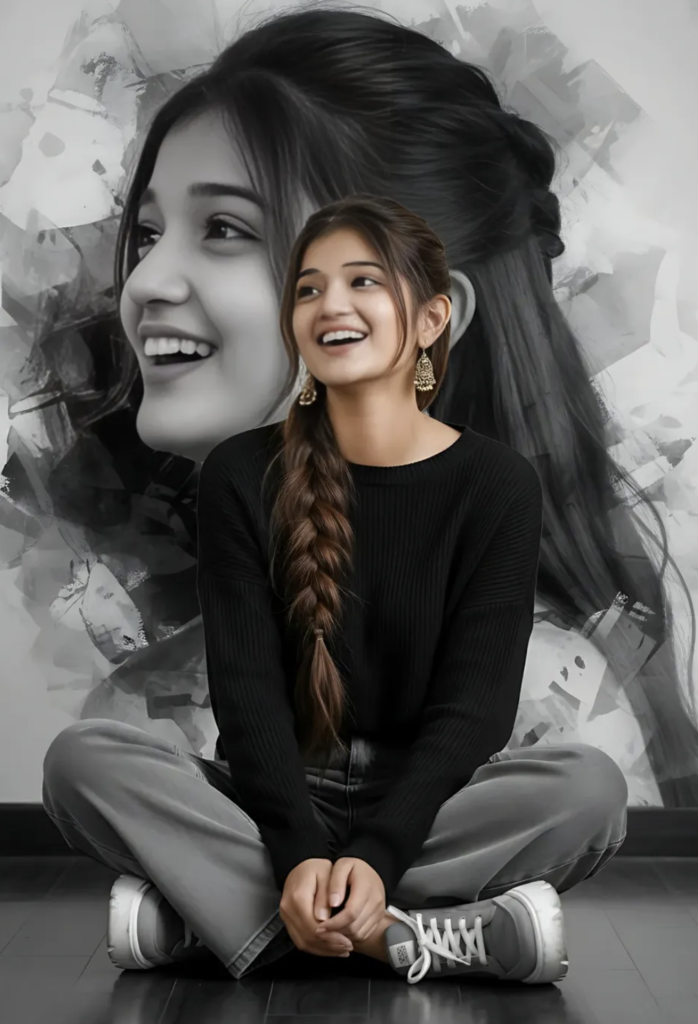
Seated on the Floor AI Prompt: What Is This Portrait Style?
This seated-on-the-floor portrait style is for anyone who wants their normal photo turned into a cinematic, artistic, high-end fashion look. The main purpose is keeping the face the same while professionally polishing the pose, outfit, background, and overall mood.
Read Also: Cinematic Realistic Portrait AI Prompt | 2026 New Year AI Prompt
This look is useful for creators, editors, and social media users who want to turn a selfie or full-body photo into a stylish editorial portrait — presented as if a model is elegantly sitting on the floor in a studio shoot, while the expression stays natural and authentic.
This style’s biggest strength is combining a relaxed pose with fashion-forward aesthetics — making the photo feel more real and more visually premium at once.
What Result This Prompt Style Gives
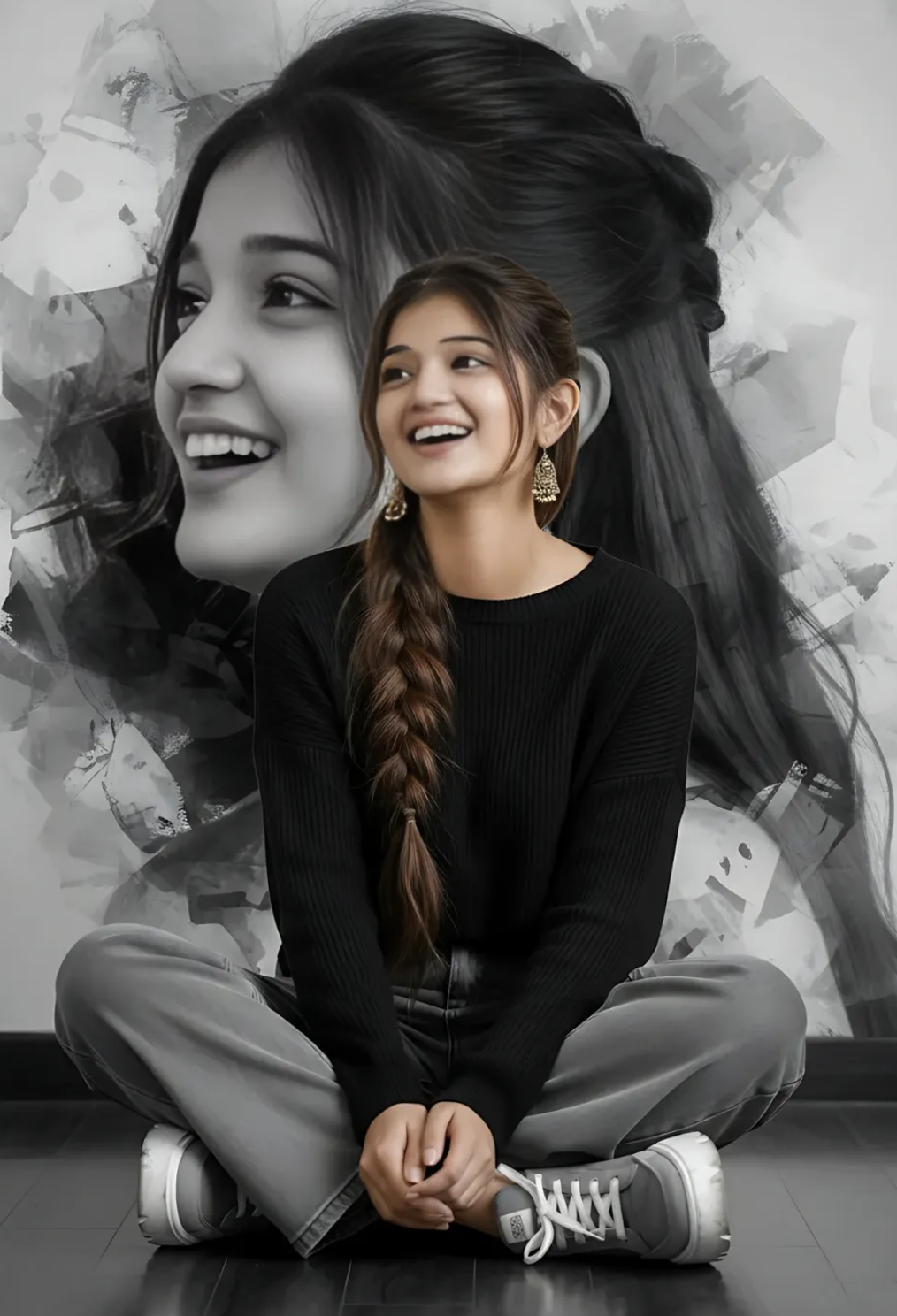
The image’s look is usually soft, clean, artistic. The subject is shown in a seated floor pose, where body language feels natural and facial expressions look more alive, giving the photo both emotion and personality.
Visually, this style focuses a lot on a monochrome background, balanced contrast, and smooth lighting. A black-and-white composition gives the portrait a dramatic edge, while outfit and hair details give the image a modern fashion-editorial feel.
Composition matters a lot here too — face sharp and clear, hair details visible, enough breathing space in the surrounding frame. This keeps the image from looking crowded and directs attention straight to the subject.
- Clean and realistic face preservation
- An elegant seated pose on the floor
- A fashion-editorial black-and-white mood
- Soft, premium lighting with balanced shadows
- A stylish outfit presentation with natural posture
How to Use This Style on Mobile: Step-by-Step
Even beginners can use this style easily. Choose a clear reference photo with the face visible and not blurry, then upload it into a prompt-based editing tool or AI photo editor and apply the desired portrait style.
The best mobile approach is understanding short, clear, specific instructions. The cleaner the original photo, the more accurate the final result. Preserving face identity matters most during editing, so avoid over-edited selfies or heavily filtered images.
- Choose your best original photo with a clear face.
- Open an image editor or AI photo editing tool on mobile.
- Upload the photo and select the seated floor portrait style.
- Apply outfit, pose, and background direction in the prompt or style settings.
- Verify face consistency and expression in the output.
- Adjust brightness, contrast, and crop if needed.
- Save the final image in high quality.
For best results, don’t make too many changes at once — let the base edit finish, then make small refinements if needed. This method works especially smoothly on mobile.
Which Photos Work Best
Both angle and clarity matter when choosing your photo. Front-facing or slightly side-angled portrait photos usually perform well, since face features are easily read. If the face is fully visible, it helps the AI or editor match identity.
Resolution matters too — a high-resolution photo preserves hair texture, skin detail, and facial features more accurately. Soft lighting is ideal, like natural daylight or evenly lit indoor light — hard shadows, overexposed highlights, or dark corners can affect face details.
- Angle: Front or slight side profile
- Resolution: Clear, high-quality original photo
- Lighting: Soft daylight or balanced indoor light
- Background: Plain, uncluttered, simple backdrop
- Clothing: A simple outfit that matches the styling change
- Expression: Natural, open, readable face
Pro Tips for the Best Results
The best results come from giving very clear visual direction. The goal isn’t just describing the pose, but also the feeling, styling, and background mood, keeping the portrait natural and polished. Small details like hair texture, fabric type, and expression help the edit look more realistic and premium.
- Describe the posture clearly, like sitting comfortably on the floor with a relaxed body angle.
- Keep face direction consistent so the portrait feels natural and well-framed.
- Choose clothing details that match the style you want, like modern casual wear or street-style fashion.
- Use soft lighting or a monochrome background for a more editorial look.
- Highlight hair style, expression, and footwear if they matter in the final image.
- Keep the overall prompt clean so the main subject stays the visual focus.
Common Mistakes to Avoid
Overloading the prompt with too many style changes at once is a big mistake — the output can lose focus. For a portrait-based edit, clarity always beats complexity.
- Don’t make the background too complicated, since it can distract from the subject.
- Don’t request too many color themes in one edit — mixed directions confuse the composition.
- Don’t ignore the expression, since face emotion strongly affects the final vibe.
- Don’t overload outfit details if you want the portrait to stay elegant and clean.
- Don’t make the subject’s pose feel unnatural, since stiff body language reduces realism.
Best Use Cases
- Instagram posts: great for aesthetic feeds, fashion updates, and personal branding.
- Profile pictures: useful for a confident, polished portrait.
- Thumbnails: works for creative videos, photo edits, and style-based content.
- Portfolios: suitable for artists, editors, creators showing visual style.
- Reel covers: helps short-form content look more professional and attractive.
Variations You Can Try
- Mood variations: cheerful, dreamy, confident, calm, or fashion-forward.
- Colour variations: monochrome, soft pastels, warm neutrals, or cool gray tones.
- Setting variations: studio-style backdrop, textured wall, indoor creative space, or minimal floor setup.
- Seasonal variations: winter layers, summer brightness, autumn tones, or rainy-day atmosphere.
- Style variations: editorial portrait, casual street look, luxury fashion, or soft creative aesthetic.
Conclusion: Try This Style for a Stylish Artistic Portrait
This is a strong choice when you want a portrait that feels fashionable, expressive, and visually refined. With the right pose, styling, and background direction, you can create an image that looks polished while still keeping the face and identity natural.
FAQ: Seated on the Floor
How do I use the "Seated on the Floor" prompt?
Copy the prompt above, open Gemini or ChatGPT, upload a clear photo of yourself and paste the prompt. Generate the image and adjust the outfit or background if you want a variation.
Is this prompt free?
Yes. This prompt is free to copy and use for Instagram, reels, WhatsApp DP and profile pictures.
Which photo works best?
A sharp, front-facing, well-lit photo with no filter. A clear face helps the AI keep your identity in the final image.
Last updated: 10 September 2026
💬 Comments