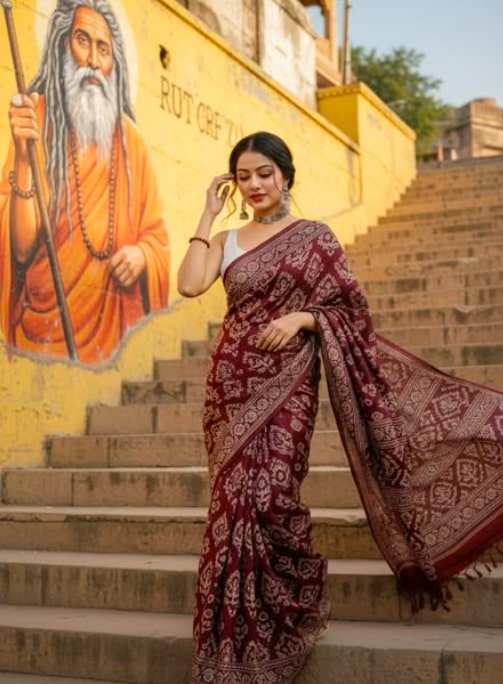
Sunlit Varanasi Ghat Portrait
Om Editing Top: Sunlit Varanasi Ghat Portrait ka style kya hai?
Om Editing Top ka Sunlit Varanasi Ghat Portrait style un logon ke liye hai jo apni photo ko ek cinematic, spiritual aur highly realistic look dena chahte hain. Is style mein subject ko aise frame kiya jata hai jaise woh Varanasi ke ghats par naturally walk kar raha ho, aur poori image mein ek warm, devotional aur culture-rich feel aati hai.
Read Also: cinematic-style realistic portrait | 2026 New Year
Ye prompt-style especially un creators ke kaam aata hai jo Instagram reels, profile visuals, wedding-inspired edits, travel portraits, ya AI photo transformation ke liye ek premium output chahte hain. Isme face realism, clothing detail, background texture aur lighting sab ek saath balance hote hain, isliye result sirf edit nahi lagta, balki ek real cinematic moment jaisa dikhta hai.
Agar aap beginner hain, to is tarah ka prompt aapko samajhne mein help karega ki photo editing mein pose, outfit, light, background aur mood ka kitna bada role hota hai. Om Editing Top ka ye look un users ke liye bhi useful hai jo apni normal photo ko culture-inspired portrait mein convert karna chahte hain bina artificial effect ke.
Ye photo style actually kya output deta hai?
Is style ka sabse strong point hai uska photorealistic cinematic finish. Image mein warm sunlight ka use hota hai jo skin tone ko soft aur natural rakhta hai, saath hi background par gentle shadows create karta hai. Isse photo mein depth aati hai aur subject zyada polished lagta hai.
Colour palette usually earthy aur rich hoti hai. Maroon saree, white blouse, yellow textured wall aur silver jewellery jaise elements ek dusre ko visually support karte hain. Yeh combination image ko elegant, traditional aur vibrant banata hai, bina over-saturated hue.
Composition bhi is prompt ka important part hota hai. Subject walking pose mein hota hai, hair-touching gesture se motion add hoti hai, aur side wall ya street art background frame ko story-like feel deta hai. Result ek aisa portrait hota hai jo casual selfie se kaafi alag, zyada cinematic aur visually meaningful lagta hai.
- Warm golden-hour lighting jo natural softness deti hai
- Ancient spiritual mood jo Varanasi vibe ko strong banata hai
- Detailed outfit rendering for saree folds, blouse texture aur jewellery shine
- Realistic facial features aur skin texture ka clean preservation
- Street-art background ke saath editorial-style framing
This Style prompt ko mobile par kaise use karein
Sabse pehle apni best reference photo select karein. Photo clear honi chahiye, face visible hona chahiye, aur pose aisa ho jisme body aur head dono achhe se dikh rahe hon. Agar aap fullbody output chahte hain, to close-up photo ki jagah medium ya full-length photo zyada useful hoti hai.
Uske baad image editor ya AI editing tool mein prompt paste karna hota hai. Mobile par kaam kar rahe hain to copy-paste ko carefully use karein aur photo upload karne ke baad output settings ko default ya high quality par rakhein. Agar tool background, pose ya outfit control allow karta hai, to usme natural cinematic mode choose karein.
Beginner ke liye sabse important cheez hai variation test karna. Ek hi photo par 2-3 attempts karein agar pehla result perfect na aaye. Kabhi-kabhi face angle, light direction ya body crop change karne se output ka realism kaafi improve ho jata hai.
- Ek clear reference photo choose karein jisme face sharp ho.
- Photo ko app ya editor mein upload karein.
- Prompt ko same style intention ke saath use karein aur extra changes avoid karein.
- High-quality output settings select karein, agar available ho.
- Generate karke face, saree texture aur background details check karein.
- Agar needed ho, angle ya reference photo change karke dobara try karein.
Kaunsi photos sabse best kaam karti hain?
Is style ke liye un photos ka result sabse strong aata hai jisme subject ka posture relaxed ho aur face clearly visible ho. Side-facing ya slight three-quarter angle wali photos aksar better perform karti hain kyunki walking pose aur hair-touch gesture ke saath naturally blend ho jati hain. Straight blurry selfies usually utni realistic nahi lagti.
Resolution bhi important hai. High-resolution image mein saree pattern, jewellery, skin texture aur facial details zyada clean aati hain. Agar input photo too dark, overexposed ya heavily filtered hogi, to final output ki realism affect ho sakti hai. Natural daylight ya soft indoor light best hoti hai.
Background simple rakhein. Plain wall, outdoor walkway, ya softly blurred scene zyada useful hota hai kyunki AI ko subject par focus karne mein help milti hai. Outfit ke liye traditional clothing, especially saree ya ethnic wear, sabse suitable lagti hai. Jewellery bhi clean aur simple ho to portrait zyada elegant dikhta hai.
- Angle: slight side profile ya 3/4 pose
- Resolution: sharp, clear aur high-quality image
- Lighting: natural daylight, golden hour, ya soft warm indoor light
- Background: plain wall, outdoor street, ya lightly textured backdrop
- Clothing: saree, ethnic wear, aur visible jewellery detail
- Pose: relaxed walk, gentle hand placement, natural expression
Om Editing Top ke Pro Tips for Best Results
Om Editing Top style me best output tab milta hai jab aap image ko sirf “beautiful” nahi, balki “story-driven” banate ho. Is type ke sunlit Varanasi ghat portrait me lighting, pose, background texture aur outfit details sab ek saath balanced hone chahiye. Agar aap natural cinematic feel chahte ho, to composition ko simple rakho aur subject ko frame ka hero hone do.
Prompt me chhote but important details ka mention bahut kaam aata hai, jaise walking pose, hair-touch gesture, warm shadows, aur spiritual atmosphere. Isse image zyada authentic lagti hai aur editing me over-processed look nahi aata. Best results ke liye face consistency, saree drape, aur accessories ki clarity par bhi dhyan dena chahiye.
- Lighting ko warm aur soft rakho, taaki ghat ka golden-hour mood natural lage.
- Subject ke pose ko relaxed rakho; walking pose aur light hand gesture image ko lively banate hain.
- Background wall aur street art ko clear mention karo, kyunki ye scene ko unique banata hai.
- Outfit colors ko background se contrast me rakho, jaise maroon saree ke saath yellow wall strong visual impact deti hai.
- Accessories jaise choker aur jhumka ko highlight karo, because they add ethnic elegance.
- Face ko stable aur unchanged rakhne ka emphasis do, taaki identity preserve rahe.
Om Editing Top workflow me ek aur useful tip ye hai ki details ko layered way me socho: subject, outfit, surroundings, aur lighting. Jab aap har layer ko clearly define karte ho, output zyada premium aur polished aata hai. Especially portrait editing me small descriptions, like “ancient spiritual atmosphere” or “soft shadow,” overall result ko elevate kar dete hain.
Common Mistakes to Avoid in This Style Prompts
Sabse common mistake hoti hai prompt ko too generic rakhna. Agar aap sirf “beautiful girl on ghat” likh dete ho, to AI scene ko randomly generate kar sakta hai aur Varanasi ka authentic feel miss ho sakta hai. Om Editing Top ke context me specificity zaroori hai, warna image cinematic ke bajay ordinary lag sakti hai.
Dusri problem hoti hai conflicting instructions dena. Jaise ek hi prompt me bohot saare lighting directions ya pose changes likh dene se output confuse ho jata hai. Isliye focus ek clear vision par rakho, aur unnecessary extra instructions se bachho. Clean prompt hamesha better structure deta hai.
- Too many styles ek saath mat add karo, warna image inconsistent ho sakti hai.
- Background details ko ignore mat karo, kyunki location ka mood photo ka half effect banata hai.
- Face alteration ya mismatch ko lightly mat lo; portrait editing me identity consistency important hoti hai.
- Accessories ko overdescribe mat karo, warna output cluttered feel de sakta hai.
- Lighting ko vague mat chhodo, because sunlit aur warm shadow ka combination hi scene ko rich banata hai.
Ek aur mistake hoti hai composition ko unbalanced rakhna, jahan subject aur background dono equally dominant ho jate hain. Om Editing Top type edits me subject ko foreground me rakho aur background ko supportive element ki tarah use karo. Isse focus clear rehta hai aur portrait zyada professional lagta hai.
Best Use Cases for These Images
Om Editing Top style images ka use sirf one-time post ke liye nahi, balki multiple social media needs ke liye kiya ja sakta hai. Sunlit Varanasi ghat portrait jaise visuals Instagram par eye-catching feed post ban sakte hain, especially jab aap ethnic, travel, aur cinematic content mix karte ho. Is tarah ki image profile picture ke liye bhi strong impression create kar sakti hai, jab subject ka face clear aur elegant ho.
Aise portraits reels cover, thumbnail, aur portfolio showcase ke liye bhi kaafi useful hote hain. Golden-hour feel aur textured wall background video cover me instantly attention grab karte hain. Agar aap fashion, editorial, or cultural photography project bana rahe ho, to Om Editing Top prompt variations se alag-alag visual assets ready kiye ja sakte hain.
- Instagram posts: Ethnic or travel-themed feed me high engagement ke liye.
- Profile pictures: Clean face focus aur elegant styling ke saath.
- Thumbnails: Reels, YouTube shorts, ya story highlights ke cover ke liye.
- Portfolios: Fashion, editorial, and AI portrait collections display karne ke liye.
- Reels covers: Spiritual, cultural, ya city-walk content ke visuals ke liye.
This style images ka ek aur advantage ye hai ki ye storytelling me help karte hain. Varanasi ghat, sadhu mural, maroon saree aur warm sunlight milkar ek narrative create karte hain. Isliye ye sirf portrait nahi, balki ek mood piece bhi ban jata hai jo audience ko context feel karata hai.
This Style Ke Liye Variations You Can Try
Agar aap same base idea ko multiple times use karna chahte ho, to mood aur environment change karke fresh results mil sakte hain. This prompt style me variations create karna easy hai, bas aapko season, time of day, colour palette, aur background texture ke saath experiment karna hota hai. Isse har image alag feel deti hai, even if core concept same ho.
For example, warm sunlight version ke alawa aap softer morning tone, dusky evening tone, ya monsoon-washed look bhi try kar sakte ho. Saree colour bhi subtly change kiya ja sakta hai, jaise deep red, rust, wine, or earthy brown. Background me ghat steps, temple walls, incense smoke, or festive decorations add karke visual variety aur depth dono milte hain.
- Mood variations: serene, devotional, romantic, editorial, dreamy, or vintage cinematic.
- Colour variations: maroon, rust, gold, beige, ivory, or deep green accents.
- Setting variations: riverbank steps, temple corridor, narrow old lane, or mural wall scene.
- Seasonal variations: summer glow, winter mist, monsoon freshness, or festive evening lights.
- Styling variations: heavier jewelry, minimal jewelry, different blouse styles, or more traditional draping.
This look prompts me variations try karte waqt ek cheez yaad rakho: ek hi frame me bahut saari changes mat bhar do. Ek time par 1-2 elements change karna zyada effective hota hai. Isse AI output controlled, realistic, aur visually pleasing rehta hai, aur aapko compare karne ke liye clean versions bhi mil jate hain.
Conclusion: This Style Se Apna Next Portrait Try Karo
Yeh style style ka best part ye hai ki ye simple portrait ko bhi cinematic aur culturally rich bana deta hai. Sunlit Varanasi ghat portrait jaise visuals me story, color, light, aur emotion sab ek saath aate hain, jo image ko memorable banate hain. Agar aap strong social media content ya artistic AI portrait banana chahte ho, to ye style definitely try karne layak hai.
Ab aap different moods, colours, aur settings ke saath experiment karke apna perfect version create kar sakte ho. This edit ke through aap ek hi concept ko multiple fresh looks me transform kar sakte ho, aur har output me ek alag charm la sakte ho. Use it creatively, keep it natural, and let the portrait speak for itself.
💬 Comments