Hand-Painted AI Prompt

Hand-Painted AI Prompt: What Is This Style?
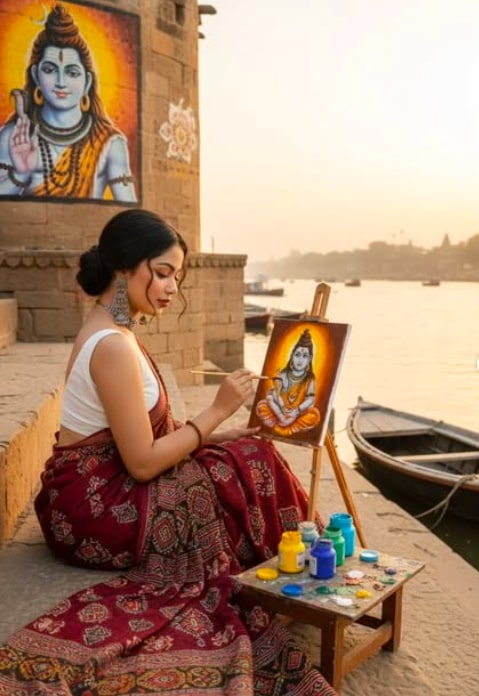
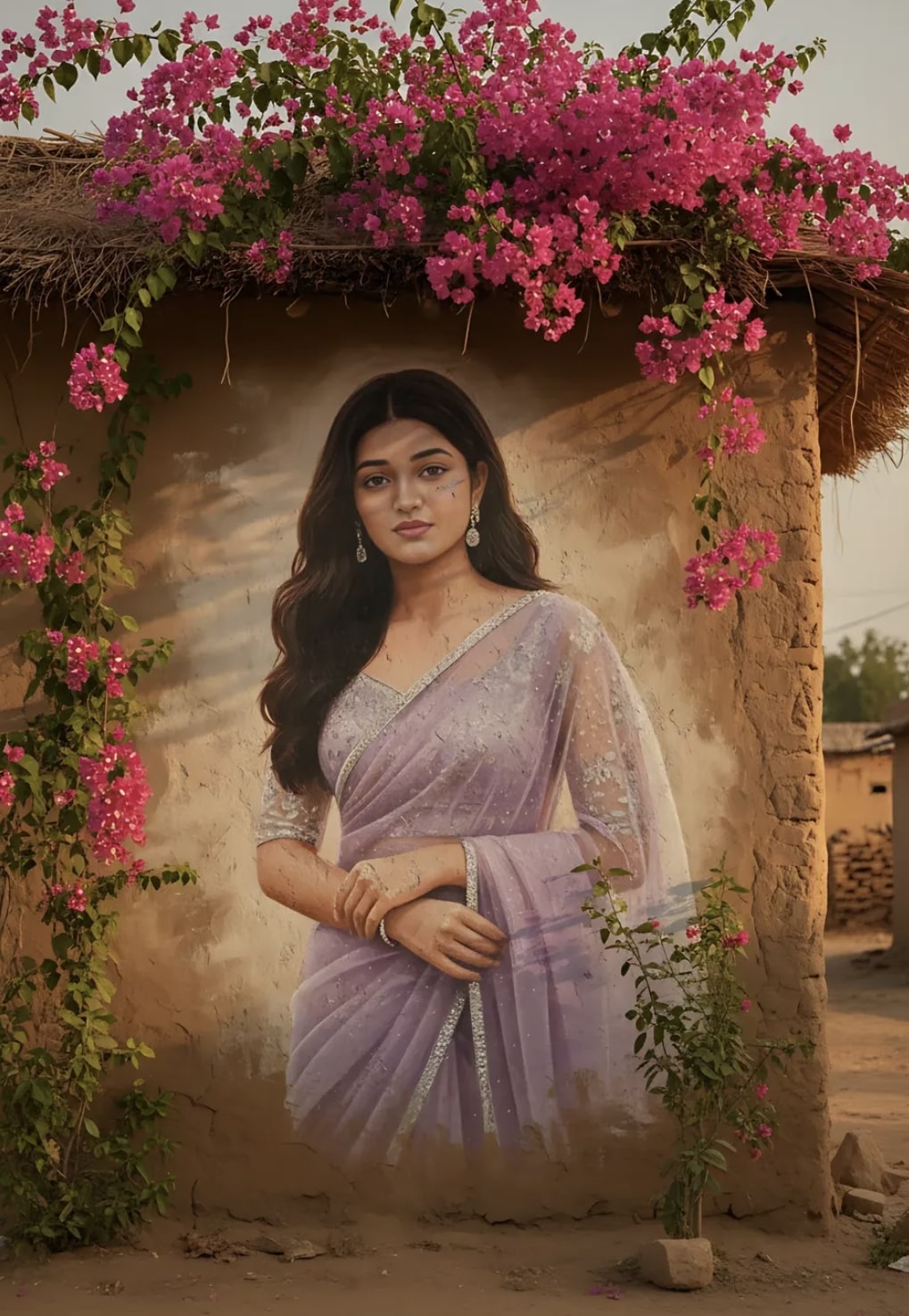
This hand-painted style is for anyone who wants to turn their photo from a simple portrait into a rustic, artistic, mural-like look. This kind of editing gives the photo a feel like it’s a large hand-painted picture on a village wall. This look is especially popular for social media posts, profile edits, creative posters, and personal art portraits.
Read Also: Cinematic Realistic Portrait AI Prompt | 2026 New Year AI Prompt
If you want your photo to have a painted-artwork effect combined with real-life details, this style is genuinely useful. Face details, expression, light, shadow, and background are blended so the image naturally feels like wall art.
This kind of editing doesn’t turn the photo into a simple filter — it gives it a strong visual story. From a distance, the image looks like a hand-painted mural, but up close the subject’s identity and expression stay clear. This balance is what makes it popular.
What This Hand-Painted Effect Gives You
This style gives a warm, textured, highly artistic result. It looks like the subject was painted with large brush strokes onto a village wall. Light mural texture on the wall surface, earthy background tones, and natural sunlight combine to make the whole scene realistic and premium.
Color use matters a lot in this effect. Usually warm sunlight, soft shadows, muted mud-house tones, and vibrant floral accents balance the image. With the right composition, the portrait feels like wall art while the original face identity stays intact — that’s why this style gives a realistic artistic transformation, not a fantasy one.
- A rustic village wall-like background
- Hand-painted mural texture
- Warm golden lighting and soft shadows
- Earthy brown, beige, and natural tones
- A seamless blend of the portrait into the wall surface
- A realistic but artistic finish
How to Use This Style
Even beginners can use this kind of editing easily. Choose a clear photo, then upload it into the right prompt-style workflow. The face should be clear first, so expression and identity are correctly preserved in the final result.
- Select a clear, high-quality portrait photo where the face is visible from the front or a slight angle.
- Upload the photo from your mobile gallery.
- Apply the hand-painted mural style in the prompt/style box.
- Preview the result after generating.
- If background or face clarity feels weak, retry with a better source photo.
Quality doesn’t just depend on the prompt — it depends a lot on the source image too. The clearer your original photo, the more natural the mural blend.
Which Photos Work Best
The best results come from photos where the subject’s face is clear, sharp, and properly lit. Since the output blends the portrait like a wall painting, blurred, dark, or heavily filtered images don’t work as well.
Angle, lighting, and background matter a lot too. A front-facing or slightly turned face is most useful, since it keeps expression clean. Outdoor soft light or daylight images often give better results.
- Angle: front-facing or a slight side angle is best
- Resolution: use a high-resolution image, avoid blurry photos
- Lighting: soft natural light or daylight is better
- Background: choose a simple, uncluttered background
- Clothing: plain or clean-colored clothes look good with the mural look
- Expression: a natural face expression gives a more realistic output
Pro Tips for the Best Results
- Upload a high-resolution photo so face details stay crisp.
- Use a front-facing portrait so expression and features are better preserved.
- Avoid harsh filters, since they can make mural blending unnatural.
- Take a photo in warm daylight, so earthy tones and soft shadows match better.
- Keep clutter low in the image so the hand-painted wall effect looks clean.
- If possible, choose a similar-colored outfit so the overall composition feels harmonious.
Common Mistakes to Avoid
- Using a blurry photo, which loses facial details and makes the portrait hard to recognize.
- Too dark an image, which disrupts shadows and reduces mural realism.
- Extreme angles, where the wall-painting effect can look uneven for side profiles.
- A busy background, which reduces source clarity and makes the final composition cluttered.
- An overexposed image, which washes out skin tones and flattens the artistic texture.
- A random crop, where a cut-off face makes seamless mural blending difficult.
Best Use Cases
- Instagram posts: for artistic feed consistency and aesthetic engagement.
- Profile pictures: for a unique identity and memorable visual impression.
- YouTube thumbnails: for a bold, eye-catching portrait cover style.
- Reel covers: for giving themed content a strong visual identity.
- Portfolios: for showcasing creative editing skills.
- Festive or cultural posts: with village wall, earthy background, and floral elements.
Variations You Can Try
- Mood variation: soft, romantic, cinematic, or traditional.
- Color variation: earthy beige, terracotta, warm orange, pastel pink, or deep green.
- Setting variation: village wall, courtyard wall, rustic home exterior, or heritage-style backdrop.
- Season variation: spring flowers, summer sunlight, monsoon mood, or autumn warmth.
- Texture variation: subtle brush effect, more visible painted strokes, or a smoother mural finish.
Conclusion: Try This Unique Hand-Painted Look
This is a creative, eye-catching style that gives a portrait an artistic personality by turning it into a rustic wall mural. With the right photo, clean composition, and balanced lighting, this effect can become genuinely realistic and share-worthy.
FAQ: Hand-Painted
How do I use the "Hand-Painted" prompt?
Copy the prompt above, open Gemini or ChatGPT, upload a clear photo of yourself and paste the prompt. Generate the image and adjust the outfit or background if you want a variation.
Is this prompt free?
Yes. This prompt is free to copy and use for Instagram, reels, WhatsApp DP and profile pictures.
Which photo works best?
A sharp, front-facing, well-lit photo with no filter. A clear face helps the AI keep your identity in the final image.
Last updated: 10 September 2026
💬 Comments