Traditional Ganesh Puja Portrait AI Prompt For Girls
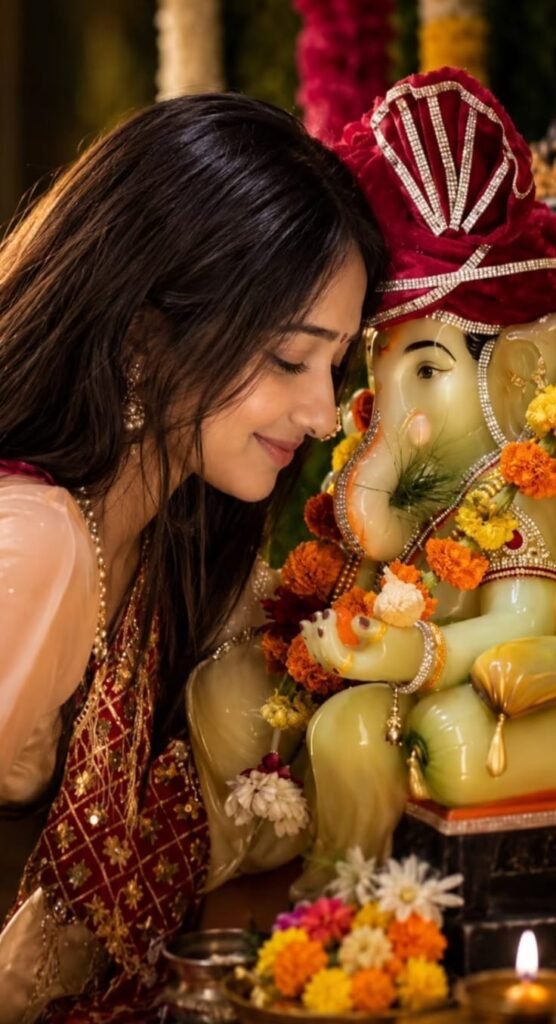
Traditional Ganesh Puja Portrait AI Prompt For Girls: What Om Editing Top Style Means
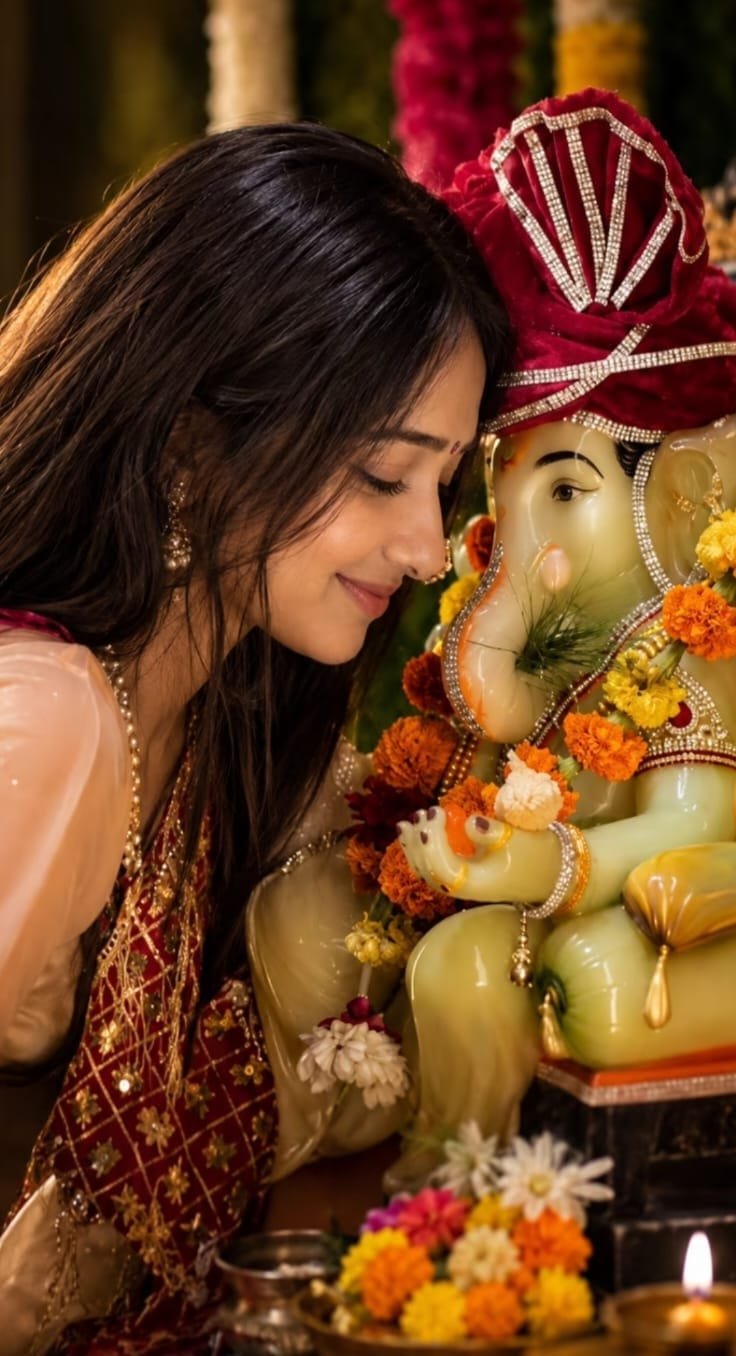
Om Editing Top brings a traditional Ganesh Puja portrait style to life by placing a girl in a warm, devotional setting beside a decorated Ganesha idol. The result is designed to look like a real puja moment rather than an artificial studio composition. It combines cultural details, a graceful portrait pose and careful face preservation so the final image still looks like the person in the original photograph.
Read Also: Om Editing Top Golden Crown Ganesh Ji Card | Om Editing Top Saffron Suit Ganesh Chaturthi
This style is useful for girls who want a festive profile picture, a devotional social media post, a family celebration portrait or a memorable image for Ganesh Puja. It can also help when you have a simple personal photo but want to transform it into a more meaningful traditional scene without arranging a complete photoshoot. The focus remains on the girl, the puja atmosphere and the natural connection between the subject and the Ganesha idol.
The identity-lock approach is especially important in this type of AI photo editing. Instead of changing the person’s face into a generic generated character, the edit aims to preserve familiar facial details such as the face shape, eyes, nose and lips. For the most convincing result, use a clear original photo and check the generated portrait carefully before saving or sharing it.
What This Ganesh Puja Photo Style Actually Gives You
This AI portrait style creates the feeling of a real ritual moment at home or in a traditional puja space. The composition generally shows the girl sitting or posing beside a decorated Ganesha idol, allowing both the person and the devotional setting to remain visible. Decorative elements can support the scene without overpowering the subject, making the final portrait suitable for festive greetings, status updates and personal memories.
Lighting plays a major role in the overall appearance. A warm, natural-looking glow suits a home puja environment and gives the portrait a calm, respectful mood. Instead of harsh artificial brightness, the image should feel softly illuminated, as though light is coming from a nearby window, lamp or well-lit indoor space. This warmer treatment also helps the traditional colours appear rich while keeping the face easy to recognise.
The colour palette is typically connected with Indian festive décor, including warm reds, saffron, gold, orange and other graceful celebratory shades. The composition should remain balanced: the face needs to be clearly visible, the idol should look important but not oversized, and the background should add cultural depth without creating visual clutter. When these elements work together, the portrait feels realistic, devotional and polished rather than heavily filtered.
- Lighting: Soft, warm and natural tones that suit a home Ganesh Puja setting.
- Mood: Peaceful, devotional, festive and respectful instead of dramatic or artificial.
- Colours: Traditional celebratory shades that complement the idol and clothing.
- Composition: A clear portrait view with the girl and decorated Ganesha idol both visible.
- Realism: Natural facial proportions, believable skin texture and an environment that feels like an actual puja moment.
The most important benefit is the combination of traditional presentation and personal identity. A generated image can look attractive, but it becomes more useful when the face still resembles the original person. Always compare the final result with the uploaded photo, particularly around the eyes, nose, lips, jawline and overall face shape.
How to Use the Traditional Ganesh Puja Portrait Style on Mobile
You do not need advanced editing experience to try this style. A mobile phone, one suitable personal photograph and an AI image editing tool are usually enough. Before starting, keep the original image saved in your gallery and choose a tool that allows you to upload a photo and use the provided instructions in the correct input area.
- Choose your original photo: Open your gallery and select a clear, front-facing image in which your face is fully visible. Avoid photos where the face is hidden by hair, sunglasses, stickers or another person.
- Open your AI image tool: Use the image-generation or image-editing option that accepts an existing photo. On mobile, check that you have selected the photo-upload feature rather than a text-only generation mode.
- Upload the photo: Add the chosen image and wait until the tool finishes processing it. Do not close the app or switch away if the upload is still incomplete.
- Use the provided instructions exactly: Paste the supplied instructions into the tool’s prompt field without changing their wording. This helps the tool understand the desired Ganesh Puja scene and the need to preserve the person’s identity.
- Generate the portrait: Start the image creation process and wait for the first result. Processing time can vary depending on the tool, image size and mobile connection.
- Check the face closely: Compare the generated portrait with the original image. Look at the eyes, nose, lips, cheeks, chin and face shape instead of judging only the clothing or background.
- Regenerate when necessary: If the face looks noticeably different, use the regenerate option and review the new version. A second attempt may improve facial accuracy, pose, lighting or the balance between the girl and the idol.
- Save the best version: Download the most natural result only after checking that the portrait looks respectful, realistic and recognisably like the original person.
For beginners, the comparison stage is just as important as the generation stage. AI tools may produce attractive jewellery, clothing or background decorations while slightly changing facial details. Do not choose an image only because the colours look beautiful; identity accuracy should remain the first priority for a personal portrait.
Which Photos Work Best for an Accurate Ganesh Puja Portrait?
A good input photo gives the AI tool enough information to understand the person’s real appearance. The strongest option is a sharp, front-facing photograph taken at a normal distance, with the complete face visible and no strong beauty filter. A high-resolution image is preferable because small details around the eyes, nose and lips remain easier to interpret during editing.
Natural lighting usually produces the most reliable result. Take or select a photo captured in soft daylight, preferably near a window but not directly in intense sunlight. Harsh shadows, coloured lights and strong camera flash can change the appearance of the skin and facial structure. Similarly, avoid images with very dark areas, bright glare or heavy filters because they can make identity preservation more difficult.
Your clothing and background also affect the final composition. Traditional or simple clothing can blend naturally into a festive puja portrait, while a plain background makes it easier for the tool to separate the subject from the surroundings. You do not need a perfect studio photograph, but the face should be unobstructed and the image should contain enough detail for a realistic transformation.
- Choose a front-facing or gently forward-facing angle rather than a strong side profile.
- Use the highest-resolution original photo available on your phone.
- Select soft, unfiltered daylight with even illumination across the face.
- Avoid sunglasses, face masks, hair covering the eyes and large decorative stickers.
- Keep the background simple so the subject can be placed naturally beside the idol.
- Choose clothing that is visible enough for the traditional composition to look balanced.
- Do not use a group photo unless the intended subject is clearly separated from everyone else.
- Reject images with motion blur, extreme shadows, unusual camera distortion or a very tilted angle.
If your first result changes the face, begin with a better source photo before making many repeated attempts. A clean image with balanced lighting and a natural expression gives the Om Editing Top Ganesh Puja portrait style a stronger foundation and usually produces a more believable final result.
Om Editing Top: Pro Tips for the Best Ganesh Puja Portrait Results
For a natural-looking Ganesh Puja portrait, begin with a clear original photo that shows your face properly. A front-facing image with soft, unfiltered light helps the AI preserve your real face while placing you beside the decorated Ganesha idol. Avoid photos with heavy beauty filters, strong shadows, sunglasses, or hair covering important facial features.
After generating the image, compare it carefully with your original photo instead of checking only the overall background. The face should still look like you, including the face shape, eyes, nose, lips, and natural expression. Om Editing Top results become more convincing when the ritual setting looks realistic and your facial identity remains consistent.
- Use a sharp, high-resolution photo with your complete face visible.
- Choose soft daylight or evenly lit indoor lighting for better facial accuracy.
- Keep your head position natural and avoid extreme side angles.
- Check that the Ganesha idol, puja thali, flowers, diya, and other details look balanced.
- Regenerate the image if your facial features appear noticeably different.
- Choose clothing colours that complement the warm tones of the puja setting.
- Review the final image at full size before downloading or sharing it.
Common Mistakes to Avoid in an Om Editing Top AI Portrait
Even a strong Ganesh Puja image idea can lose its realistic quality when the source photo or final composition is not checked properly. The most common problem is focusing on the decoration while ignoring the face. A beautiful idol, bright background, and cinematic lighting cannot make up for an identity mismatch.
Take a few moments to inspect the generated portrait from different parts of the image. Look for unnatural hands, extra jewellery, distorted puja items, unrealistic shadows, or a face that appears overly smooth. Fixing these details before posting will make the result feel more personal and authentic.
- Using a blurry photo: Low-quality input gives the tool fewer facial details to preserve, which can lead to an inaccurate face.
- Choosing a heavily filtered selfie: Filters may change skin tone and facial proportions, making the identity lock less reliable.
- Ignoring unusual facial changes: Small changes to the eyes, nose, lips, or face shape can make the portrait look like another person.
- Adding too many background elements: Excessive decorations can distract from the subject and make the composition look artificial.
- Using dramatic lighting without checking it: Very dark shadows or bright highlights may hide facial details and reduce realism.
- Skipping the final preview: Details such as fingers, diya flames, jewellery, and idol ornaments may need another generation.
- Sharing immediately after generation: A careful comparison with the original photo helps catch problems before the image becomes public.
Best Use Cases and Ideas for These Ganesh Puja Images
A traditional Ganesh Puja portrait works well whenever you want to share a festive moment with a personal touch. The warm ritual setting, traditional outfit, and decorated idol can create an emotional image for celebrations, family posts, and devotional content. You can crop the final portrait according to the platform without losing the central focus on your face and the Ganesha idol.
Before publishing, check the crop, brightness, and image quality for the chosen platform. A vertical composition usually works well for stories and reels, while a square crop is suitable for profile displays. Om Editing Top images can also be adjusted into different formats while keeping the main portrait clear and respectful.
- Instagram posts: Share the portrait as a festive post with a simple Ganesh Puja caption.
- Instagram stories: Use a vertical crop with a date, celebration message, or devotional sticker.
- Profile pictures: Select a close crop where your face and a small part of the idol remain visible.
- Thumbnails: Use the portrait for festival videos, puja guides, or devotional content thumbnails.
- Portfolios: Add it to a photography, AI editing, or creative portrait portfolio as a cultural example.
- Reels covers: Keep the face and idol near the centre so they remain visible after the cover is cropped.
- Family greetings: Turn the portrait into a digital festive greeting for relatives and friends.
Variations You Can Try With the Ganesh Puja Portrait
You do not have to create every image with the same mood. Try a calm devotional expression for a traditional result, or use a gentle smile for a warmer family celebration portrait. You can also experiment with the balance between the subject and the idol: a closer portrait highlights facial identity, while a wider frame shows more of the puja arrangement.
Colour and setting changes can give each version a different visual character without changing the main idea. Keep the overall composition respectful and realistic, then test one variation at a time so you can understand which details improve the result.
- Colours: Try maroon, saffron, pink, green, cream, or royal blue traditional clothing.
- Moods: Experiment with peaceful, joyful, graceful, devotional, or softly smiling expressions.
- Lighting: Use gentle morning light, warm diya light, or balanced indoor festive lighting.
- Settings: Try a decorated home altar, a flower-covered puja corner, or a simple traditional backdrop.
- Seasons: Create a bright monsoon celebration mood, a cosy indoor festival look, or a clean autumn-style festive setting.
- Accessories: Add suitable traditional jewellery, flowers, bangles, or a neat dupatta while keeping the face unobstructed.
- Composition: Compare a close-up portrait, a seated full-frame image, and a balanced three-quarter view.
Try Om Editing Top for Your Traditional Ganesh Puja Portrait
A successful Ganesh Puja portrait depends on more than a decorated background. Use a clear original photo, keep the face visible, review every generated detail, and select the version that preserves your natural identity most accurately. Small changes in lighting, clothing, mood, and framing can help you create a result that feels both personal and festive.
Now you can experiment with Om Editing Top and create a respectful traditional portrait for Instagram, profile pictures, thumbnails, portfolios, or reels covers. Compare each variation with your original photo, choose the most natural result, and share it only after the facial details and puja setting look right.
FAQ – Om Editing Top
What is Om Editing Top for Ganesh Puja portraits?
Om Editing Top is a traditional AI photo-editing style that places a girl in a devotional setting with a decorated Ganesha idol. It is designed to create a warm, natural-looking portrait for festive posts, profile pictures, greetings and personal memories.
How can I create an Om Editing Top Ganesh Puja portrait?
Start with a clear personal photo and use an AI image-editing tool that supports image uploads and detailed instructions. Apply the editing instructions from the page, review the result carefully and regenerate it if the face, pose or puja setting looks unnatural.
What type of photo gives the best Ganesh Puja AI edit?
A sharp, front-facing photo with visible facial features usually produces the most reliable result. Avoid heavily filtered images, dark lighting, blocked faces and extreme side angles because they can reduce facial accuracy.
Does Om Editing Top work on mobile phones?
Yes, Om Editing Top can work on a mobile phone when the chosen AI editing tool offers a mobile app or browser-based editor. Use a stable internet connection and upload the original image at its highest available quality for better results.
Is Om Editing Top free to use?
The style itself does not determine the price because access depends on the AI image tool you choose. Some tools offer free generations or limited credits, while others may require a subscription or payment for additional edits.
Why does my AI Ganesh Puja portrait look different from my original photo?
Face changes can happen when the source image is blurry, poorly lit, heavily angled or partly covered. The AI may also alter features when the scene contains too many details, so compare the result with the original and regenerate using a simpler, clearer photo if needed.
How can I keep my face accurate in a traditional Ganesh portrait?
Use an unfiltered image with good lighting and keep your face clearly visible during editing. Check important features such as facial shape, eyes, nose and lips before downloading or sharing the final image.
Can I share an Om Editing Top portrait on social media?
Yes, you can use the finished portrait for a profile picture, festive status, greeting post or family celebration when you have the necessary rights to the original photo. Review the image for unwanted changes and avoid sharing it if the result misrepresents you or includes private details.
FAQ: Traditional Ganesh Puja Portrait
How do I use the "Traditional Ganesh Puja Portrait" prompt?
Copy the prompt above, open Gemini or ChatGPT, upload a clear photo of yourself and paste the prompt. Generate the image and adjust the outfit or background if you want a variation.
Is this prompt free?
Yes. This prompt is free to copy and use for Instagram, reels, WhatsApp DP and profile pictures.
Which photo works best?
A sharp, front-facing, well-lit photo with no filter. A clear face helps the AI keep your identity in the final image.
Last updated: 12 September 2026
💬 Comments