Colorstorm Muse
Om Editing Top ka Colorstorm Muse style kya hai?
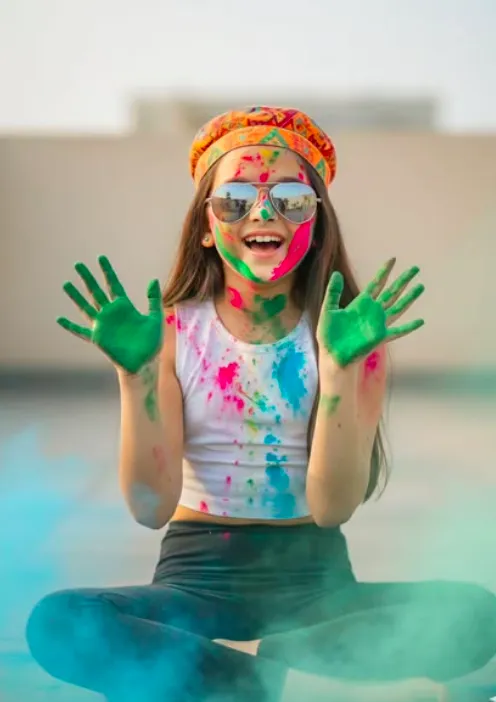
Om Editing Top ka Colorstorm Muse style ek vibrant Holi-inspired portrait look hai jo festive energy, fashion, aur cinematic realism ko ek saath blend karta hai. Is style mein subject ka expression joyful hota hai, pose relaxed hoti hai, aur overall frame aisa lagta hai jaise ek real outdoor festival moment ko high-detail camera ne capture kiya ho.
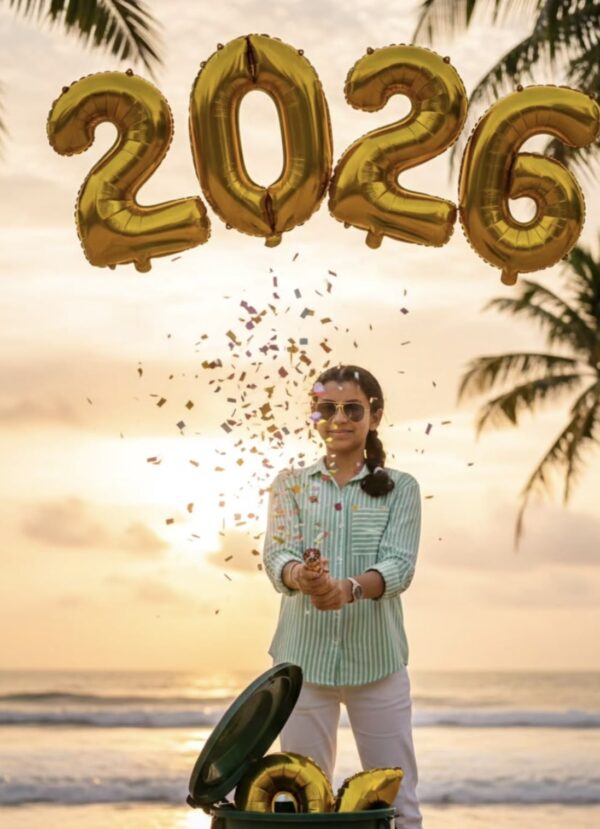
Read Also: cinematic-style realistic portrait | 2026 New Year
Ye look un logon ke liye best hai jo social media par standout profile photos, festival posts, creative edits, ya fashion-based Holi portraits banana chahte hain. Agar aap mobile se AI photo editing, prompt-based portrait generation, ya stylish festival thumbnails create karte hain, to yeh concept aapko ek premium aur eye-catching result de sakta hai.
Is style ka main attraction sirf colors nahi, balki unka realistic placement hai. Powder face, hands, hair, aur outfit par naturally spread hota hua dikhta hai, jisse image over-edited nahi lagti. Saath hi sunglasses, cap, outfit contrast, aur background haze is photo ko modern, youthful, aur highly shareable banate hain.
This Style Colorstorm Muse style kya deta hai?
Is prompt style ka output usually ek energetic, ultra-realistic festival portrait hota hai jisme bright Holi colors dominant hote hain. Pink, green, blue, aur yellow tones together frame ko lively banate hain, jabki soft daylight aur blurred background image ko polished aur cinematic feel dete hain. Result ek aisa portrait hota hai jo festive bhi lagta hai aur fashion editorial jaisa bhi.
Composition ke level par subject center focus mein hota hai, hands lifted pose se dynamic movement aati hai, aur face par open-mouth smile image ko natural joy deti hai. Reflective sunglasses aur colorful cap visual interest badhate hain, jabki white top aur dark leggings color contrast create karte hain. Is tarah ka contrast photo ko aur zyada pop karta hai.
Realism yahan bahut important hota hai. Skin texture visible hoti hai, powder splashes natural dikhte hain, aur foreground haze dream-like cinematic atmosphere add karti hai. Agar aap vibrant Holi photo edit, festive portrait prompt, ya realistic color splash image banana chahte hain, to ye style bahut effective hai.
- Bright Holi powder ka natural spread
- Joyful, candid facial expression
- Fashion-forward festival outfit combination
- Soft daylight with no harsh shadows
- Creamy bokeh aur shallow depth of field
- Editorial-style realism with cinematic mood
This Style ko mobile par kaise use karein?
Beginners ke liye sabse pehle apne mobile me ek clear portrait photo select karna zaroori hai. Aisi image choose karein jisme face clearly visible ho, pose simple ho, aur background zyada cluttered na ho. Agar aap AI editing app ya prompt-based tool use kar rahe hain, to base photo jitni clean hogi, final result utna hi sharp aur realistic aayega.
Uske baad prompt style ko concept ke roop mein samjhein: aapko festive outdoor look, colorful powder effects, stylish accessories, aur natural lighting chahiye. Mobile par edit karte waqt image ratio, subject placement, aur color balance par dhyaan dena important hai. Agar app me strength ya stylization control hai, to medium level se start karein taaki photo artificial na lage.
Step by step process simple rakhein. Pehle photo upload karein, phir portrait enhancement ya festival effect apply karein, aur output ko zoom karke check karein. Face, hands, and clothing par color distribution dekhna zaroori hai. Agar colors too heavy lag rahe hain, to intensity kam karke more natural result le sakte hain.
- Apni best portrait photo mobile gallery se select karein.
- Ensure karein ki face clear ho aur image blur na ho.
- AI editor ya Holi-style photo app open karein.
- Portrait aspect ratio ya vertical format choose karein.
- Festival, color splash, ya cinematic portrait effect apply karein.
- Output me brightness, contrast, aur color intensity adjust karein.
- Final image ko save karke social media ke liye export karein.
Kaunsi photos This Style ke liye best kaam karti hain?
Is style ke liye sabse achhi photos woh hoti hain jisme subject ka face front ya three-quarter angle par ho. Aise angle se sunglasses, smile, aur Holi color splash better dikhte hain. Agar photo me subject thoda relaxed pose me ho, to final edit zyada natural aur stylish lagta hai.
Resolution bhi bahut matter karta hai. High-resolution portrait use karna chahiye, kyunki powder details, skin texture, aur fabric highlights tabhi clean dikhte hain. Low-quality image me color effects muddy ho sakte hain, aur realistic finish lose ho sakti hai. Outdoor daylight ya soft shaded light bhi kaafi helpful hoti hai.
Background aur clothing selection bhi result ko directly impact karte hain. Plain rooftop, terrace, ya open outdoor background best rehta hai, kyunki wahan subject par focus bana rehta hai. White, black, ya neutral clothing Holi colors ke saath strong contrast create karti hai, aur printed cap, sunglasses, ya light accessories style ko aur bhi expressive bana dete hain.
- Front-facing ya slightly angled portrait
- Clear face with sharp focus
- High-resolution image, ideally well-lit
- Outdoor background with simple, blurred setting
- Neutral or contrasting outfit colors
- Natural smile ya candid expression
- Hands visible ho to color effect aur strong lagta hai
Pro Tips for the Best Om Editing Top Results
To get the strongest Om Editing Top output, start with a clear subject and a clean pose. The more specific your visual direction is, the easier it becomes to create a polished, attention-grabbing result that looks intentional rather than random.
For festival-style edits, balance the bold colors with simple styling. A strong background, expressive face, and neat outfit details usually work better than adding too many competing elements. When the composition stays focused, the final image feels sharper, more premium, and more shareable.
- Use a clear subject pose so the face and hands stay the main focus.
- Keep lighting natural and even for a realistic, high-quality finish.
- Choose a background that does not distract from the colors on the subject.
- Mix bright festival tones with one or two neutral elements to keep balance.
- Use sharp, descriptive styling cues for clothes, accessories, and mood.
- Make sure the final frame has enough space for a vertical social-media crop.
- Try expressive emotions like smiling, laughing, or joyful surprise for better engagement.
If you want the image to feel more cinematic, focus on depth of field, soft haze, and realistic color splash placement. These details help the Om Editing Top style stand out on feeds, thumbnails, and profile displays without looking overdone.
Common Mistakes to Avoid in This Style Designs
One of the most common mistakes is overcrowding the composition. Too many accessories, too many color directions, or a busy background can make the edit look messy. A strong Om Editing Top image usually works best when the viewer can instantly understand the subject and the mood.
Another issue is ignoring consistency in colors and styling. If the clothes, background, and festival powders all fight for attention, the result can feel flat or confusing. A better approach is to choose a main color family and support it with softer complementary shades.
- Overloading the frame: Too many visual elements reduce focus and make the subject less impactful.
- Unnatural color mixing: Random color placement can break realism and reduce the premium look.
- Weak facial expression: A flat pose or emotionless face makes the design feel less lively.
- Poor background choice: A cluttered scene can distract from the portrait and weaken the festival vibe.
- Ignoring outfit harmony: Clothes that clash with the theme can make the image feel less cohesive.
- Too much shadow or harsh lighting: This can hide texture and reduce the clean, bright festival effect.
Avoid these mistakes if you want your Om Editing Top visuals to look professional, social-media ready, and easy to use across different platforms. Clean structure always beats unnecessary complexity.
Best Use Cases for These Images
The Om Editing Top style is especially useful for Instagram posts, reels covers, and profile pictures because it instantly grabs attention. Bright colors, expressive styling, and a polished portrait format work very well for eye-catching social content.
It also performs strongly for thumbnails and creative banners, where a bold image needs to communicate energy in just a second. If you want your content to feel festive, stylish, and modern, this type of visual can fit perfectly into your design workflow.
- Instagram posts: Great for festival content, stylish portrait updates, and themed photo drops.
- Profile pictures: Works well when you want a bold, colorful, memorable display image.
- Thumbnails: Useful for reels, YouTube shorts, and creative video covers.
- Portfolios: Adds variety to a personal or digital-art showcase.
- Reels covers: Helps the cover stand out while matching a festive or cinematic theme.
- Event promotions: Can be used for Holi-related posters, social announcements, and celebration content.
Because the style is vivid and expressive, it also suits creators who want a more editorial look. The Om Editing Top format can be adapted for digital art pages, fashion edits, and festival-themed branding without losing its visual punch.
Variations You Can Try with This Style
One of the best things about this style editing is how flexible it can be. By changing the mood, colors, and setting, you can make the same concept feel fresh every time. This is helpful if you want multiple versions for different posts or audience styles.
You can experiment with soft pastel colors for a lighter, dreamier mood, or choose intense primary shades for a louder festival energy. Small changes in background and styling can completely change how the final image feels, even when the pose stays similar.
- Mood variations: joyful, playful, confident, dreamy, or cinematic.
- Colour variations: pink and blue, green and yellow, multicolor splash, or pastel Holi tones.
- Setting variations: rooftop, terrace, open field, street festival, or soft studio-style background.
- Seasonal variations: bright summer daylight, breezy spring look, or warm festive celebration tones.
- Accessory variations: sunglasses, caps, earrings, or minimal styling for a cleaner portrait.
- Outfit variations: white tops, colorful printed looks, black leggings, or simple casual wear.
These changes help you create more than one version of the same this prompt idea without repeating the exact same visual. If you are building a content series, this flexibility can make your feed look more planned and professional.
Conclusion: Try This Style for a Bold Festival Look
this look is a great choice when you want a portrait that feels colorful, modern, and full of personality. With the right balance of pose, color, expression, and background, this style can create a strong visual impact for social media and creative portfolios.
If you want something festive yet polished, this is an easy direction to explore. Try different moods, color mixes, and settings, and use yeh style to build images that feel lively, stylish, and ready to share.
FAQ: Colorstorm Muse
How do I use the "Colorstorm Muse" prompt?
Copy the prompt above, open Gemini or ChatGPT, upload a clear photo of yourself and paste the prompt. Generate the image and adjust the outfit or background if you want a variation.
Is this prompt free?
Yes. This prompt is free to copy and use for Instagram, reels, WhatsApp DP and profile pictures.
Which photo works best?
A sharp, front-facing, well-lit photo with no filter. A clear face helps the AI keep your identity in the final image.
Last updated: 17 August 2026
💬 Comments