Minecraft Reality Merge
Minecraft Reality Merge क्या है और यह किसके लिए है?
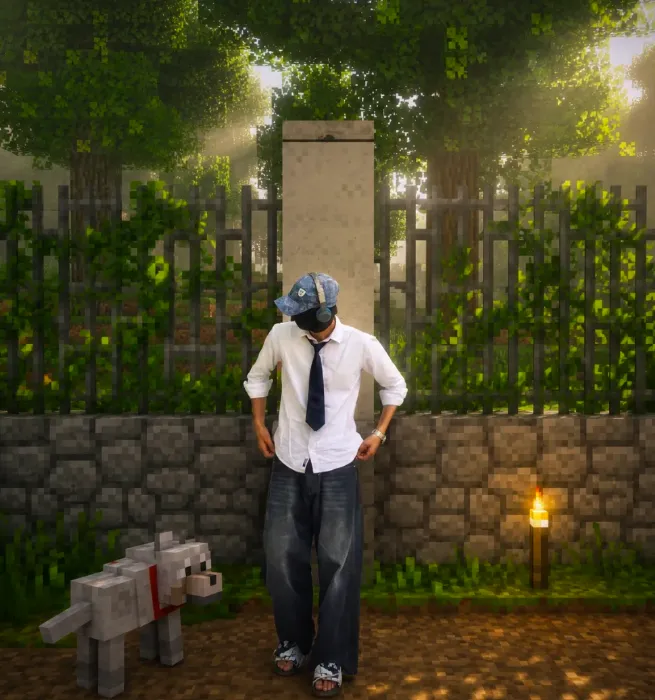
Minecraft Reality Merge एक ऐसा visual editing style है जिसमें real-life photo और Minecraft-inspired world को एक साथ merge किया जाता है। इसमें इंसान की natural photo same रहती है, लेकिन आसपास का environment, objects, terrain और atmosphere blocky, voxel-based Minecraft look में बदल जाता है। यही combination इसे interesting और highly clickable बनाती है।
Read Also: cinematic-style realistic portrait | 2026 New Year
यह style उन लोगों के लिए खास है जो gaming-themed social posts, YouTube thumbnails, profile edits, fan art, creative reels cover, या fantasy-realism photo concepts बनाना चाहते हैं। अगर आप चाहते हैं कि photo real भी लगे और साथ में Minecraft जैसा cinematic feel भी आए, तो यह style बहुत useful है।
इस तरह की editing का सबसे बड़ा फायदा यह है कि यह normal screenshot की तरह नहीं लगती। इसमें real subject, game-like environment, and dramatic visual contrast together काम करते हैं। यही कारण है कि Om Editing Top जैसे creative prompt styles trending visual edits के लिए काफी popular हो सकते हैं।
यह style आपको visually क्या देता है?
Minecraft Reality Merge का result आम तौर पर cinematic, detailed और immersive होता है। Human subject photorealistic रहता है, लेकिन background को Minecraft blocks, cubic trees, pixel-textured terrain, blocky water, and game-like fog के साथ rebuild किया जाता है। इससे image में एक surreal but believable fusion बनता है।
Lighting इस style में बहुत important होती है। Soft misty light, moody shadows, cool forest tones, warm sunset glow, या dramatic game-like contrast पूरे scene को cinematic बनाते हैं। जब composition सही हो, तो photo ऐसा लगता है जैसे real person किसी custom Minecraft world में खड़ा हो।
- Photorealistic human subject with no cartoon effect
- Voxel-style background with block terrain and cubic elements
- Foggy, cinematic, or fantasy-like mood
- Strong color balance between real skin tones and game-like surroundings
- Clean composition that keeps focus on the main subject
इस edit style में realism और game aesthetics का mix बहुत important है। अगर background too busy हो जाए, तो subject lose हो सकता है। लेकिन जब lighting, perspective, और object placement balanced होते हैं, तब result बहुत polished और professional दिखता है।
Step-by-step: इसे mobile पर कैसे use करें?
अगर आप beginner हैं, तो इस style को use करना मुश्किल नहीं है। बस सही photo चुननी है, prompt-style editing को समझना है, और output को carefully review करना है। Mobile users भी इसे आसानी से try कर सकते हैं, बशर्ते उन्हें subject, background, और lighting का basic idea हो।
सबसे पहले एक clear portrait या full-body photo लें। फिर ऐसे editing tool या generator में upload करें जो mixed-media image transformation support करता हो। उसके बाद style apply करें, preview देखें, और जरूरत हो तो composition थोड़ा adjust करें ताकि Minecraft world natural लगे।
- एक clear photo चुनें जिसमें face और body दोनों visible हों।
- Ensure करें कि subject blur या overexposed न हो।
- Image को mobile editor या AI image tool में upload करें।
- Style apply करते समय photorealistic subject preservation पर ध्यान दें।
- Background के लिए blocky environment, fog, and voxel details choose करें।
- Preview check करें कि subject original और sharp बना रहे।
- अगर object हाथ में है, तो देखें कि वह Minecraft-style object में convert हुआ है या नहीं।
- Final image को save करें और जरूरत हो तो crop या color tune करें।
Best results तब मिलते हैं जब आप simple, clean input photo use करते हैं। बहुत cluttered background या motion blur वाला shot इस style में उतना अच्छा नहीं बनता। Proper image selection से final output ज्यादा realistic और cinematic दिखता है।
कौन-सी photos इस style के लिए सबसे अच्छी रहती हैं?
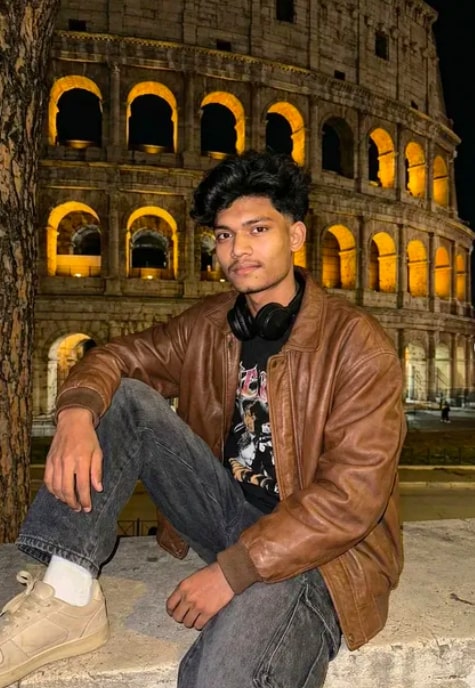
इस editing के लिए सबसे अच्छा वही photo होता है जिसमें subject clearly अलग दिखे और आसपास बहुत ज्यादा distraction न हो। Straight-on, side profile, or slightly angled shots अच्छे रहते हैं क्योंकि इनमें face structure और body outline easily read हो जाती है।
Resolution जितनी high होगी, उतना better detail मिलेगा। अगर photo dark है, तो face details और clothing texture loss हो सकती है। इसी तरह, अगर background already बहुत complex है, तो Minecraft reconstruction muddy लग सकती है। इसलिए simple background वाली clean photo सबसे practical रहती है।
- Angle: Front-facing या slight side angle सबसे effective रहता है
- Resolution: Sharp, high-resolution image चुनें
- Lighting: Natural light या soft indoor light best रहती है
- Background: Clean, uncluttered, and not too colorful
- Clothing: Solid colors या simple outfits ज्यादा अच्छी तरह blend होते हैं
- Pose: Stable pose, minimal motion blur, clear hands and face
अगर subject किसी animal, tool, bag, or other object के साथ फोटो में है, तो यह भी ध्यान रखें कि style के अनुसार non-human contact elements block-based conversion में better काम करें। इससे final merge more believable लगता है। Forest, path, outdoor garden, or open landscape photos इस look के लिए especially strong results दे सकती हैं क्योंकि Minecraft-style background reconstruction naturally fit हो जाती है।
Pro Tips for the Best Results with Minecraft Reality Merge
To get the strongest Minecraft Reality Merge look, start with a reference image that has a clear subject and a simple background. The more readable the original photo is, the easier it becomes to blend a photorealistic person into a voxel world without losing detail. This is especially important if you want a cinematic Minecraft screenshot that still feels natural and polished.
It also helps to think about the mood before creating the image. Do you want a bright daytime scene, a moody forest, or a foggy adventure setting? Matching the lighting, shadows, and colors to the environment makes the final result feel more cohesive. When the human subject, background, and Minecraft elements all share the same visual direction, the edit looks much more intentional.
For the best Om Editing Top results, keep the composition balanced and avoid overcrowding the frame. Let the person remain the focal point, then use the Minecraft terrain, trees, animals, and atmospheric effects to support the scene instead of distracting from it.
- Use a clear, sharp reference photo with good lighting.
- Choose backgrounds that can be translated into blocks, such as forests, paths, hills, or villages.
- Keep the subject’s pose natural so the mixed-media effect feels believable.
- Match the scene’s color palette with the mood you want.
- Use fog, shadows, and depth to create a cinematic Minecraft look.
- Make sure any object touching the subject is converted into a Minecraft-style element.
Common Mistakes to Avoid in Minecraft Reality Merge
One common mistake is overloading the scene with too many Minecraft details. While block textures and voxel elements are the heart of the effect, adding too many distractions can make the image feel cluttered. A clean layout usually works better than trying to force every corner of the frame to look busy.
Another issue is mismatched realism. If the person looks highly photorealistic but the lighting on the block environment feels completely different, the edit can look disconnected. The same is true for shadows, fog, and perspective. Keeping these visual cues aligned is what makes Minecraft Reality Merge feel seamless instead of artificial.
Many people also forget the object conversion rule for items in contact with the subject. If a handheld object or nearby animal stays realistic while everything else becomes block-based, the illusion breaks. Converting those elements into Minecraft mobs or block models helps preserve the style consistency.
- Too much clutter: Overfilled scenes hide the subject and reduce the cinematic impact.
- Wrong lighting: Inconsistent shadows make the subject look pasted in.
- Ignoring contact objects: Real items near the person can break the Minecraft illusion.
- Flat backgrounds: A weak environment makes the edit look unfinished.
- Over-stylizing the face or skin: The human subject should stay photorealistic and unchanged.
Best Use Cases and Ideas for Om Editing Top
Minecraft Reality Merge works especially well for social media content because it instantly grabs attention. The contrast between a real subject and a block-based world makes the image look creative, modern, and highly shareable. This is a strong choice for profile pictures, gaming-themed posts, and fantasy-inspired edits.
It also fits perfectly for Instagram feeds, reels covers, and thumbnails where visual impact matters. If you want your content to stand out in a crowded scroll, a cinematic Minecraft screenshot style can create that “stop and look” effect. The format is also great for personal branding, especially if you want a fun but polished identity.
For creators, this style can be used in portfolios, concept art presentations, event posters, and themed content series. A single edit can look like a movie still, a game crossover, or a fantasy portrait depending on how you frame it. That flexibility is what makes Om Editing Top so practical for both casual and professional use.
- Instagram posts: Great for eye-catching creative edits and profile aesthetics.
- Profile pictures: Works well when you want a unique gaming-inspired identity.
- Thumbnails: Ideal for content that needs strong visual contrast and instant appeal.
- Portfolios: Useful for showing mixed-media and fantasy composition skills.
- Reels covers: Helps set a consistent cinematic theme for short-form videos.
Variations You Can Try with Minecraft Reality Merge
Once you understand the core style, you can experiment with different moods to make each edit feel fresh. A bright daytime version gives the image an adventurous and clean look, while a sunset scene can make it feel warm and cinematic. If you prefer something more dramatic, try a foggy forest or stormy environment with deeper shadows.
Color changes can also completely shift the personality of the image. Earthy greens and browns create a natural survival-world feel, while cooler blues and gray tones can make the edit feel mysterious or emotional. Seasonal variations are another easy way to explore the concept and make the same subject feel new each time.
For the strongest Minecraft Reality Merge experiments, think in themes. You can build around winter, autumn, village life, cave exploration, sunrise adventure, or enchanted forest. Each version keeps the same mixed-media idea but gives you a different story to tell.
- Mood variations: cinematic, moody, heroic, dreamy, adventurous.
- Color variations: warm gold, cool blue, earthy green, dark fantasy.
- Setting variations: forest, village, mountain path, river bank, cave entrance.
- Seasonal variations: summer daylight, autumn leaves, winter fog, spring bloom.
- Lighting variations: sunrise glow, sunset orange, overcast sky, moonlit night.
Conclusion: Try Om Editing Top for Minecraft Reality Merge
Om Editing Top makes Minecraft Reality Merge a fun and powerful style for anyone who wants a cinematic blend of realism and voxel art. With the right reference image, balanced composition, and careful attention to lighting and object conversion, you can create edits that feel immersive and visually striking.
Whether you are making an Instagram post, a profile picture, a thumbnail, or a portfolio piece, this style gives you plenty of room to experiment. Try different moods, colors, and environments until you find the version that best matches your creative idea, and keep refining it until the final image feels truly seamless.
FAQ: Minecraft Reality Merge
How do I use the "Minecraft Reality Merge" prompt?
Copy the prompt above, open Gemini or ChatGPT, upload a clear photo of yourself and paste the prompt. Generate the image and adjust the outfit or background if you want a variation.
Is this prompt free?
Yes. This prompt is free to copy and use for Instagram, reels, WhatsApp DP and profile pictures.
Which photo works best?
A sharp, front-facing, well-lit photo with no filter. A clear face helps the AI keep your identity in the final image.
Last updated: 31 July 2026
💬 Comments