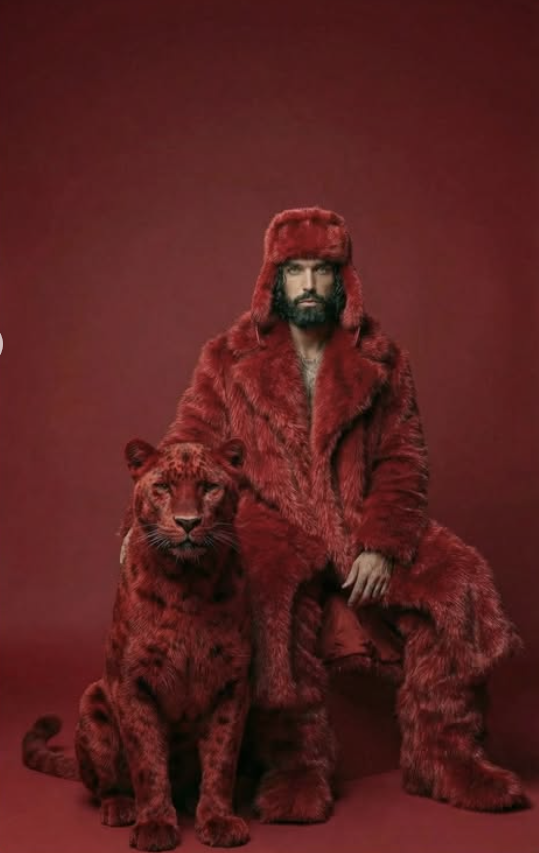
Red Theme With Lion
Om Editing Top: Red Theme With Lion ka premium visual style kya hai?
Om Editing Top ka “Red Theme With Lion” look ek bold, high-fashion, aur cinematic photo style hai jo instantly attention grab karta hai. Is type ki edit un logon ke liye best hoti hai jo apni portrait photo ko royal, dramatic, aur luxury fashion vibe dena chahte hain. Red color yahan sirf background nahi hota, balki poore frame ka mood set karta hai — intense, powerful, aur visually striking.
Read Also: cinematic-style realistic portrait | 2026 New Year
Is style me subject usually ek confident pose me dikhaya jata hai, jahan outfit, background, aur companion element sab ek hi theme ko support karte hain. Lion ya large big-cat element image ko more surreal aur premium feel deta hai. Agar aap social media DP, poster-style portrait, profile banner, ya high-end AI photo edit banana chahte ho, to Om Editing Top ka yeh red theme prompt ek strong choice hai.
Is look ka main purpose simple hai: ek ordinary photo ko aise transform karna ki woh fashion magazine cover jaisa lage. Isme face clarity, fur texture, lighting softness, aur red tonal consistency sab bahut important hote hain. Isi wajah se beginners se lekar creators tak, sab log aisi prompt-based editing ko use karte hain jab unhe ek dramatic yet realistic result chahiye hota hai.
Ye photo style actually kya give karta hai?
“Red Theme With Lion” edit ka sabse bada strength uska visual impact hota hai. Monochrome red palette image ko ek unified aur powerful identity deta hai. Jab background, outfit, aur accessories red family me hote hain, to eye directly subject par jaati hai. Isse photo clutter-free lagti hai aur subject ka confidence aur dominance aur zyada highlight hota hai.
Lighting usually soft studio type hoti hai, jisse face par harsh shadows nahi bante aur fur ya clothing ke details clearly dikhte hain. Color tone deep red, crimson, maroon, ya wine shade me shift ho sakta hai. Composition me subject center ya slightly off-center hota hai, aur lion side me placed hota hai taaki balance bhi bane aur surreal storytelling bhi strong lage.
Realism is style ka important part hai. Fur texture, coat folds, hat edges, aur boots ki detail agar sharp ho to image premium lagti hai. Background simple solid red hone ki wajah se focus distraction-free rehta hai. Result ek aisa portrait hota hai jo bold bhi lagta hai aur polished bhi.
- Lighting: soft studio light, even skin tones, no overexposure
- Mood: royal, intense, cinematic, fashion-forward
- Colors: monochromatic red, deep crimson, rich scarlet, dark red accents
- Composition: clean background, strong subject focus, balanced lion placement
- Realism: high detail, natural face structure, detailed fur and clothing texture
This Style prompt ko mobile par kaise use karein? Step-by-step guide
Agar aap beginner ho aur mobile se edit banana chahte ho, to process ko simple rakhna best hota hai. Sabse pehle apni photo select karo jisme face clear ho aur posture seedha ho. Phir us image ko AI editor, photo generation app, ya editing tool me upload karo jahan prompt-based styling available ho. Yahan Om Editing Top style ka theme apply karke aap similar visual result pa sakte ho.
Uske baad prompt/theme ko carefully use karo aur output settings me quality high rakho. Agar app face consistency ya reference matching ka option deti hai, to use on karna helpful hota hai. Red tone aur fashion look ko preserve karne ke liye background simplicity aur strong subject description important hota hai. Mobile screen par zoom karke preview check karna bhi useful hai, taaki face, fur, aur background ke edges clean dikhें.
Final export se pehle image ko compare karo: kya color uniform hai, kya subject clear hai, kya lion element natural lag raha hai, aur kya face reference ke saath match kar raha hai. Agar result thoda over-saturated lage, to contrast ya color intensity ko lightly adjust kar sakte ho. Beginner users ke liye ye workflow easy hai aur short time me premium edit generate kar deta hai.
- Apni best clear portrait photo select karo.
- Mobile editor ya AI photo app me image upload karo.
- Red fashion theme / lion-style prompt use karo.
- Quality, realism, aur face match settings enable karo.
- Preview me lighting, background, aur subject placement check karo.
- Final image ko high resolution me save karo.
Kaunsi photos is style ke liye sabse best kaam karti hain?
Is type ki edit tab sabse achhi banti hai jab original photo clean aur well-lit ho. Front-facing ya slightly angled portrait photos best rehti hain, kyunki unme face details clearly capture hoti hain. Agar subject ka face blur hai ya motion blur zyada hai, to final result me realism weak ho sakta hai. Isliye sharp, high-resolution image choose karna hamesha better hota hai.
Lighting bhi bahut important hai. Natural daylight ya soft indoor light wali photos ideal hoti hain, especially jab face par harsh shadows na hon. Background simple ho to aur bhi achha hota hai, kyunki AI ya editor ko subject isolate karna easy ho jata hai. Clothing me plain ya fitted outfits zyada kaam aati hain, kyunki prompt ke hisaab se red luxury styling add karna simple ho jata hai.
Agar aap lion theme ke saath strong fashion result chahte ho, to aisi photo choose karo jisme body posture straight ho aur hands/face pose confident ho. Neck-up portrait bhi kaam kar sakta hai, lekin half-body shot zyada flexible rehta hai. Best output ke liye photo me clutter kam aur subject clarity zyada honi chahiye.
- Angle: front-facing ya slight side angle, no extreme tilt
- Resolution: clear, high-quality, sharp image
- Lighting: soft daylight, studio-like, no strong shadow
- Background: plain, uncluttered, easy to replace
- Clothing: simple outfit, visible face and upper body, clean fit
Om Editing Top ke saath Pro Tips for Best Results
अगर आप Om Editing Top style में red theme lion look को ज्यादा premium और clean बनाना चाहते हैं, तो सबसे पहले subject reference को strong रखना बहुत जरूरी है. Face structure, pose, और overall expression जितना clear होगा, final output उतना ही natural और polished लगेगा.
Red fashion edits में lighting, contrast, aur fur details बहुत फर्क डालते हैं. Soft studio light और balanced shadows से coat, hat, aur lion texture अलग-अलग clearly pop करते हैं. इसी वजह से prompt-style edits में composition को simple लेकिन confident रखना best रहता है.
- Clear face reference use करें ताकि identity match stable रहे.
- Confident seated pose चुनें, क्योंकि इससे luxury fashion feel strong आती है.
- Background को clean और solid रखें, ताकि red elements cluttered न लगें.
- Fur texture और coat details को high-contrast but natural रखें.
- Red shades को same family में रखें, जैसे deep red, wine red, aur crimson.
अगर आप thumbnail, profile edit, ya social media post के लिए result चाहते हैं, तो facial clarity और subject separation को priority दें. यही छोटी-छोटी चीजें Om Editing Top look को ordinary edit से अलग बनाती हैं और image को more cinematic feel देती हैं.
Common Mistakes to Avoid in This Edits
सबसे common mistake होता है overloading the design. जब coat, hat, boots, background, aur lion सबमें अलग-अलग intense effects डाल दिए जाते हैं, तो final image messy लग सकती है. Red theme already bold होती है, इसलिए extra elements ko control में रखना चाहिए.
दूसरी mistake है poor light matching. अगर subject on-camera lighting और generated studio light एक-दूसरे से match नहीं करते, तो face and outfit अलग-अलग cut-paste जैसे दिख सकते हैं. इसी तरह, weak shadow placement image को flat बना देती है और luxury fashion mood कम हो जाता है.
- Too many color tones use न करें, वरना monochromatic impact टूट जाता है.
- Face reference को ignore न करें, क्योंकि identity mismatch सबसे जल्दी notice होता है.
- Lion placement को awkward angle में न रखें; composition balanced रहनी चाहिए.
- Background pattern या extra props जोड़कर focus disturb न करें.
- Fur texture को over-sharpen न करें, वरना image artificial लग सकती है.
एक और mistake है outfit realism को ignore करना. Luxurious red fur coat, ushanka hat, aur boots तभी convincing लगते हैं जब material depth सही हो. अगर textures too smooth या too noisy हों, तो this style style का premium finish कमजोर पड़ सकता है.
Best Use Cases for This Style Red Lion Images
इस तरह की red theme lion image सिर्फ fashion edit नहीं होती, बल्कि multiple social media and branding uses के लिए काम आती है. Bold color palette और surreal animal pairing इसे instantly eye-catching बनाती है, इसलिए यह scrolling audience का attention जल्दी पकड़ती है.
Instagram feed, profile picture, reel cover, aur creative portfolio में यह look बहुत effective हो सकता है. खासकर जब आप aisa visual चाहते हैं जो stylish भी लगे और strong personality भी दिखाए, तब this prompt type edit बहुत useful बन जाता है.
- Instagram posts: luxury, fashion, aur bold aesthetic showcase करने के लिए.
- Profile pictures: strong identity aur standout visual presence के लिए.
- Thumbnails: attention-grabbing cover art और high-impact preview के लिए.
- Portfolios: creative editing skills और concept-based work दिखाने के लिए.
- Reels covers: dramatic, premium, aur memorable frame बनाने के लिए.
अगर आप personal branding कर रहे हैं, तो इस image style को campaign visual, fashion teaser, ya announcement post में भी use कर सकते हैं. Red theme का boldness और lion का symbolism image को authority, confidence, aur power का feel देता है.
Variations You Can Try with This Style
एक ही concept को कई moods में try किया जा सकता है, और यही creative flexibility इसे और useful बनाती है. आप color intensity, outfit texture, lighting temperature, aur background tone बदलकर same this look idea को fresh बना सकते हैं.
अगर आप softer look चाहते हैं, तो deep red की जगह maroon या burgundy shades try करें. अगर अधिक dramatic feel चाहिए, तो brighter crimson tones और sharper contrast choose करें. Lion के लिए भी आप calm surreal posture, alert pose, ya slightly regal placement use कर सकते हैं.
- Mood variations: royal, fierce, elegant, mysterious, cinematic.
- Color variations: crimson red, wine red, dark cherry, ruby red.
- Setting variations: studio wall, luxury backdrop, minimal fashion set, spotlight scene.
- Season variations: winter fur-heavy look, festive red look, evening glamour look.
- Style variations: ultra-realistic, editorial, surreal fashion, high-contrast portrait.
आप चाहें तो accessories और pose ke through भी experiment कर सकते हैं. Sometimes a slightly different head tilt, a different boot finish, or a more relaxed lion position पूरी image का vibe बदल देता है. यही experimentation yeh style edits को repetitive होने से बचाती है.
Conclusion: This Style Ko Try Karke Dekhiye
this edit red theme with lion concept उन लोगों के लिए perfect है जो bold, stylish, aur visually powerful edit बनाना चाहते हैं. Proper face match, balanced lighting, clean background, aur premium fur texture के साथ यह look सच में standout करता है.
अगर आप social media par fresh and luxurious visual चाहते हैं, तो इस style को अलग-अलग moods aur color variations ke saath जरूर try करें. सही details और smart composition के साथ this style edit आपके photo ko next-level fashion artwork में बदल सकता है.
💬 Comments