Golden Hour Car Window Portrait
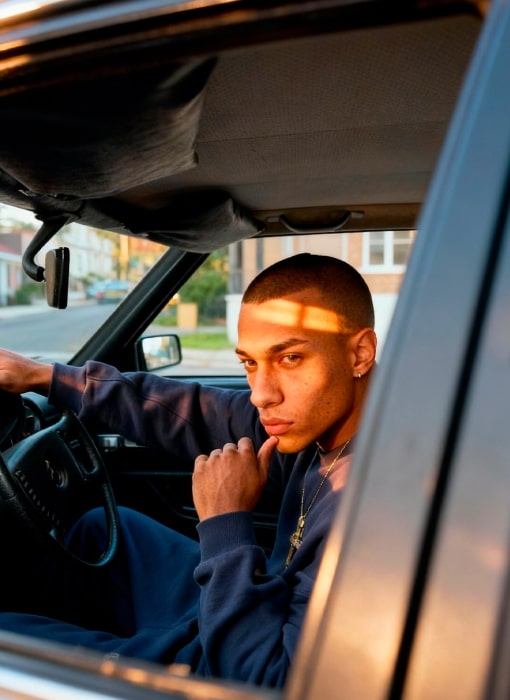
Om Editing Top: Golden Hour Car Window Portrait Ka Mood Kya Hai?
Om Editing Top style ka yeh Golden Hour Car Window Portrait prompt ek cinematic, photorealistic portrait create karne ke liye bana hai, jisme subject car ke andar baitha hota hai aur camera bahar se window ke through shot leta hai. Is tarah ka look un logon ke liye best hai jo Instagram, portfolio, WhatsApp display photo, YouTube thumbnail, ya professional social profile ke liye ek moody aur premium portrait chahte hain.
Read Also: cinematic-style realistic portrait | 2026 New Year
Yeh style especially un users ke liye useful hai jo natural light ke saath dramatic aur realistic result chahte hain. Isme over-editing nahi hoti, balki face texture, light direction, car interior details, aur background blur ko aise balance kiya jata hai ki photo filmy bhi lage aur believable bhi rahe.
Simple words mein, yeh prompt normal car portrait ko ek cinematic story frame mein convert karta hai. Golden hour light, soft shadows, thoughtful expression, aur street-style outfit milkar image ko aisa feel dete hain jaise kisi movie ke still se nikali gayi ho.
Is Photo Style Mein Kya Kya Milta Hai?
Om Editing Top ka yeh car window portrait style mainly warm late-afternoon light par based hota hai. Sunlight windshield se andar aakar face par ek horizontal band banati hai, jo cheekbones, jawline, aur skin texture ko highlight karti hai. Is wajah se image flat nahi lagti; usme depth aur natural contrast aata hai.
Colour tone generally warm aur cinematic hota hai. Highlights golden side par rehte hain, jabki shadows neutral ya soft dark tone mein dikhte hain. Yeh combination photo ko realistic banata hai, especially jab car interior purana, slightly worn, aur authentic feel de. Textured roof fabric, steering wheel details, aur subtle imperfections image ko aur genuine banate hain.
Mood ki baat karein to yeh style calm, introspective, aur slightly guarded vibe deta hai. Subject ka direct eye contact image ko powerful banata hai, aur thoughtful hand pose portrait ko more expressive bana deta hai. Composition bhi simple hoti hai, lekin strong: frame ke andar face, window line, steering wheel, aur blurred outdoor background sab naturally balanced rehte hain.
- Lighting: natural golden hour light, no flash
- Mood: calm, cinematic, reflective
- Colours: warm highlights, neutral shadows, realistic skin tones
- Composition: eye-level, outside-the-car window framing
- Realism: visible skin texture, natural imperfections, soft grain
This Style Prompt Ko Mobile Par Kaise Use Karein?
Agar aap beginner hain aur mobile se is tarah ka portrait banana chahte hain, to process ko simple rakhna best hai. Sabse pehle apni ek aisi photo choose karein jisme face clear ho aur pose natural lage. Uske baad edit tool ya AI editor mein prompt apply karein, aur ensure karein ki image ratio aur framing car window portrait ke mood se match karein.
Prompt use karte waqt sabse important cheez reference photo ka structure hota hai. Agar subject already car ke andar hai ya window ke paas baitha hai, to result zyada realistic aayega. Mobile par editing karte hue aapko bas image upload karni hoti hai, style choose karna hota hai, aur generation ya enhancement process ko run karna hota hai.
Beginners ke liye yeh step-by-step method useful rahega:
- Ek clear portrait photo select karein jisme face blurry na ho.
- Camera angle aisa ho jo seedha ya slightly side profile ho.
- Photo ko editor mein upload karein.
- Golden hour, cinematic portrait, car window, natural light jaise style elements use karein.
- Output preview check karein aur agar face detail ya lighting mismatch ho to regenerate karein.
- Final image ko save karne se pehle contrast aur sharpness lightly adjust karein.
Mobile editing mein sabse achha result tab aata hai jab aap short aur specific input use karte hain. Extra clutter ya unrelated styling se portrait ka realism kam ho sakta hai, isliye clean subject photo aur clear lighting direction par focus karein.
Kaunsi Photos Is Style Ke Liye Sabse Best Hain?
Om Editing Top ke Golden Hour Car Window Portrait ke liye sabse achhi photos woh hoti hain jisme subject ka face clearly visible ho aur pose natural ho. Side-angle ya slight front-angle shots usually best kaam karte hain, kyunki car window framing ke saath face structure zyada elegant dikhta hai. Seedha close-up bhi chal sakta hai, lekin thoda space around the face ho to composition zyada cinematic lagti hai.
Resolution high rakhna bahut important hai. Low-quality ya heavily compressed image mein skin texture, eye detail, aur sunlight shadow line properly retain nahi hoti. Agar original photo daylight mein li gayi ho ya window ke paas natural illumination ho, to AI style transfer aur bhi smooth aata hai.
Clothing aur background bhi result ko affect karte hain. Dark navy, black, grey, ya muted streetwear tones is style ke saath best match karte hain. Background mein clean residential street, soft greenery, ya blurred houses jaisa environment ho to overall frame more believable dikhta hai.
- Angle: eye-level ya slightly angled side shot
- Resolution: clear, high-quality, no heavy blur
- Lighting: natural daylight, especially late afternoon
- Background: simple, suburban, softly blurred
- Clothing: oversized sweatshirt, muted streetwear, dark tones
- Face detail: visible skin texture aur natural expression
Pro Tips for the Best Results with Om Editing Top
To get the strongest output from Om Editing Top, focus on clarity, realism, and balance in the prompt structure. The best results usually come when you describe the subject, lighting, camera angle, and background in a simple but specific way. That helps the final image feel polished, cinematic, and natural instead of overly edited or confusing.
Another smart approach is to keep the main subject as the center of attention while adding only the most useful details. If you want a portrait to feel premium, mention things like warm sunlight, soft shadows, shallow depth of field, textured skin, or a realistic car interior. These small additions can make a big difference in the final visual quality.
- Use clear subject details: describe the person’s pose, expression, outfit, and eye contact so the composition stays focused.
- Specify lighting conditions: terms like golden hour, natural light, soft contrast, and warm highlights help create a cinematic tone.
- Keep the background simple: a blurred street, soft greenery, or muted houses can make the portrait look cleaner and more professional.
- Include texture cues: details such as freckles, pores, worn fabric, or older car surfaces make the image feel more realistic.
- Think like a photographer: mention framing, angle, and lens style to guide the image toward a more authentic result.
If you are using Om Editing Top for social media-ready images, try testing one variable at a time. For example, keep the pose the same but change the lighting from warm sunlight to cooler evening light. This makes it easier to understand what improves the image and what changes the mood too much.
Common Mistakes to Avoid in This Style
One of the biggest mistakes people make with Om Editing Top is overloading the prompt with too many conflicting ideas. When you add too many styles, colors, or scenes at once, the image can lose realism and become visually messy. A clean, focused prompt usually performs better than a long list of unrelated details.
Another common issue is being too vague. If the prompt does not clearly explain the pose, lighting, or environment, the output may look generic and less intentional. On the other hand, if you overdo the effects, the image may feel artificial instead of cinematic. The goal is to guide the result, not overpower it.
- Too many style directions: mixing cinematic, studio, vintage, and hyper-realistic instructions can confuse the final look.
- Weak lighting description: without lighting details, the image may lose depth, mood, and visual consistency.
- Overcrowded backgrounds: too many objects in the scene can distract from the main subject and reduce impact.
- Unnatural facial or pose instructions: extreme or awkward directions can make the portrait feel less believable.
- Ignoring texture and realism: skipping small details can make the image look flat or overly smooth.
To avoid these problems, keep your prompt organized and intentional. Start with the subject, then add lighting, then finish with setting and camera perspective. This structure works especially well for Om Editing Top when you want clean, Instagram-friendly portraits that still feel artistic.
Best Use Cases and Ideas for This Style
Om Editing Top works especially well for portraits that need a strong mood and a premium visual identity. Since the style combines natural light, cinematic framing, and realistic texture, it is perfect for content that should look modern but still feel personal. The car-window setup also gives a cool, editorial feel that stands out on social feeds.
You can use these images in many ways depending on your platform and purpose. They work well for profile photos, lifestyle posts, story covers, creative portfolios, and even music or fashion branding. If you want a photo that feels thoughtful, stylish, and slightly dramatic, this kind of image direction is a strong choice.
- Instagram posts: ideal for portrait feeds, aesthetic grids, and moody lifestyle content.
- Profile pictures: useful for a polished, confident look that still feels natural.
- YouTube thumbnails: great for face-focused thumbnails where expression and lighting matter.
- Portfolio images: helpful for photographers, editors, and creators showcasing cinematic portrait work.
- Reels covers: works well for attention-grabbing cover frames with a strong visual hook.
You can also use the same visual idea for fashion branding, men’s style pages, editorial concepts, or car-inspired visual storytelling. Because the scene feels real and intimate, it can support both personal branding and creative content. That makes this style flexible enough for casual posts and more professional use cases alike.
Variations You Can Try with This Style
One of the best things about this prompt is that you can experiment with different moods without losing the core style. By changing the light, season, color tone, or environment, you can create entirely different emotions while keeping the same cinematic portrait foundation. This is useful if you want multiple versions for social media or testing which look performs best.
For example, a warm golden-hour version feels soft and reflective, while a cooler evening version can look more serious and modern. You can also adjust the outfit and setting to make the portrait feel more streetwear-focused, more editorial, or more minimal. Small changes often create the biggest visual shift.
- Mood variations: calm, confident, brooding, reflective, mysterious, or relaxed.
- Colour variations: warm gold, muted neutrals, cool blue tones, earthy browns, or soft desaturated tones.
- Setting variations: older car interior, city street, suburban background, roadside parking, or parked near trees.
- Seasonal variations: summer sunlight, autumn warmth, winter cool light, or spring greenery.
- Style variations: editorial, street portrait, lifestyle, minimal, or film-inspired visual direction.
You can even adjust the time of day to shape the story. Morning light can feel fresh and clean, midday light can feel sharper and more direct, and sunset light can make the image feel emotional and cinematic. With this look, these variations help you create a full set of looks from one core idea.
Conclusion: Try This Style for Cinematic Portraits
If you want portraits that feel realistic, stylish, and visually strong, yeh style is a great direction to explore. It works especially well when you want natural light, expressive detail, and a cinematic atmosphere without losing authenticity. The combination of subject focus, warm lighting, and subtle background blur makes the result feel polished and memorable.
Whether you are making content for Instagram, a profile picture, a thumbnail, or a creative portfolio, this style gives you plenty of room to experiment. Try different moods, lighting setups, and seasonal variations to find the version that matches your aesthetic best. The more you refine your approach, the more powerful your this edit results will become.
FAQ: Golden Hour Car Window Portrait
How do I use the "Golden Hour Car Window Portrait" prompt?
Copy the prompt above, open Gemini or ChatGPT, upload a clear photo of yourself and paste the prompt. Generate the image and adjust the outfit or background if you want a variation.
Is this prompt free?
Yes. This prompt is free to copy and use for Instagram, reels, WhatsApp DP and profile pictures.
Which photo works best?
A sharp, front-facing, well-lit photo with no filter. A clear face helps the AI keep your identity in the final image.
Last updated: 17 August 2026

💬 Comments