hyper-realistic tiny planet fisheye
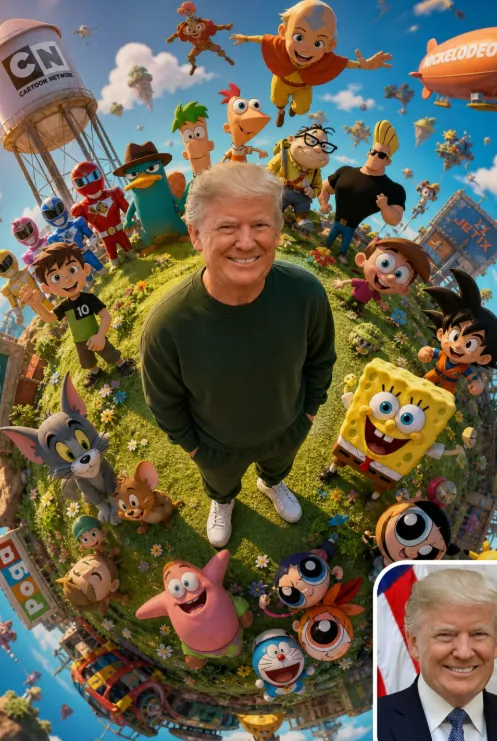
Om Editing Top ke saath hyper-realistic tiny planet fisheye style kya hai?
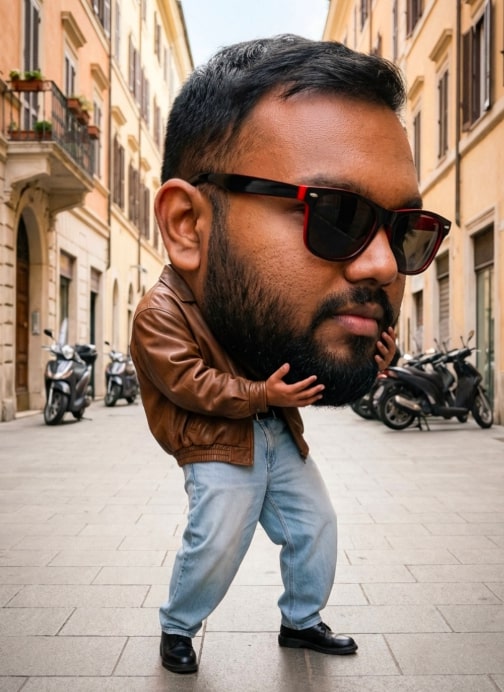
Om Editing Top style ka hyper-realistic tiny planet fisheye prompt un users ke liye hai jo ek normal portrait ko cinematic, playful, aur visually striking 3D world mein badalna chahte hain. Is type ke edit mein subject center mein hota hai aur poori scene ek miniature planet jaisi lagti hai, jahan wide fisheye distortion, curved horizon, aur detailed environment ek dramatic effect create karta hai.
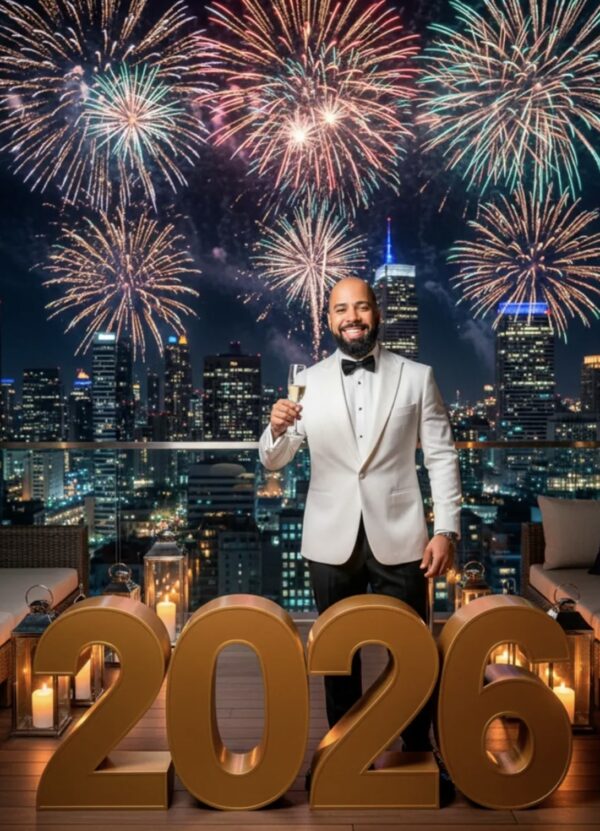
Read Also: cinematic-style realistic portrait | 2026 New Year
Ye style un creators ke liye best hai jo social media posts, profile edits, fan-art inspired visuals, ya standout thumbnail design banana chahte hain. Agar aapko aisa result chahiye jisme realism bhi ho aur fantasy feel bhi, to yeh prompt-style edit ek strong choice hai. Ismein face ko natural aur consistent rakha jata hai, jabki surrounding world ko stylized, colorful aur energetic look diya jata hai.
Simple words mein, yeh ek “tiny planet” composition hai jisme insaan center hero hota hai aur aas-paas ka environment ek imaginative universe ki tarah fold ho jata hai. Isi wajah se Om Editing Top style trending ho sakta hai for creators who want a mix of cinematic portrait, creative photo manipulation, aur animated aesthetic.
Is prompt style se aapko kya visual result milta hai?
Om Editing Top tiny planet fisheye effect ka sabse bada highlight uska unique composition hai. Subject usually frame ke center mein khada hota hai, aur surroundings ek circular planet ya globe jaisi feel deti hain. Fisheye lens effect ki wajah se edges curved dikhte hain, jo image ko more immersive aur surreal banata hai.
Visual mood generally warm, vibrant, aur nostalgic hota hai. Soft sunlight, natural tones, cinematic depth of field, aur lush green textures image ko realistic base dete hain. Saath hi fantasy lighting aur stylized companions ka blend ek dreamy crossover atmosphere create karta hai, jahan real photo aur animated world ek saath merge ho jate hain.
Is style mein aapko commonly ye details milti hain:
- Lighting: soft daylight, warm highlights, cinematic glow
- Mood: cheerful, nostalgic, playful, fantasy-inspired
- Colours: vibrant greens, warm skin tones, colorful accent elements
- Composition: center-focused subject, circular planet-like framing
- Realism: natural face detail, realistic textures, believable shadows
- Style blend: photo-real portrait + stylized 3D animated environment
Yeh look especially tab strong lagta hai jab aapka source photo clear ho aur background simple ho. Fir AI-style editing ya compositing ko subject par focus karne mein asani hoti hai, aur final image zyada polished aur professional feel karti hai.
This Style prompt ko mobile par step-by-step kaise use karein
Agar aap beginner ho, to is style ko use karna complicated lag sakta hai. Lekin mobile par bhi yeh process easy hai, bas aapko sahi photo aur clear instructions ki zarurat hoti hai. Sabse pehle apni best reference image select karein, phir editing tool ya AI image generator mein upload karke desired tiny planet fisheye concept apply karein.
Best results ke liye ek clean workflow follow karein. Is tarah aap face likeness, outfit, aur composition ko zyada accurately preserve kar sakte ho. Mobile user ke liye sabse important cheez hai: photo clear ho, face visible ho, aur crop theek ho.
Follow karne ke liye simple steps:
- Apni best portrait photo choose karein jisme face clearly visible ho.
- Image ko crop na karein aise ki head ya shoulders cut ho jayein.
- Editing app ya AI tool open karein jo image generation support karta ho.
- Reference image upload karein aur style/result section mein tiny planet fisheye look select karein.
- Focus phrase ko concept ke hisaab se set karein: center subject, miniature world, cinematic lighting, realistic face.
- Result preview check karein aur agar face distortion ho to settings adjust karein.
- Sharpening, brightness, aur colour balance lightly tune karein.
- Final image ko high quality mein save karein, taaki texture aur details loss na ho.
Ek practical tip: agar first output perfect na aaye, to same photo ke saath different crop ratio try karein. Kabhi-kabhi thoda sa wider frame ya better face alignment image ko bahut better bana deta hai. Mobile par patience aur small adjustments final quality ko kaafi improve kar dete hain.
Kaunsi photos This Style tiny planet look ke liye sabse achchi hoti hain?
Is style ke liye best photo woh hoti hai jisme subject front-facing ya slight three-quarter angle mein ho. Face jitna clear hoga, final likeness utni hi strong rahegi. Fisheye and tiny planet transformation ke baad bhi natural expression maintain rehna chahiye, isliye blurred, dark, ya overexposed images avoid karna better hota hai.
Clothing bhi important role play karti hai. Is specific style mein dark green sweatshirt, sweatpants, aur white sneakers jaisi simple, clean outfit combinations visually balanced lagti hain. Plain ya solid-color clothing AI rendering mein achchi tarah read hoti hai aur subject ko background se alag highlight karti hai.
Photo select karte waqt ye practical points yaad rakhein:
- Angle: face forward ya slight side angle, extreme tilt nahi
- Resolution: high-resolution image, low-quality screenshots avoid karein
- Lighting: natural daylight ya soft indoor light best hoti hai
- Background: simple, uncluttered, aur non-distracting background choose karein
- Clothing: clear, well-defined outfit with visible folds and colours
- Expression: happy, relaxed, ya confident expression zyada effective hota hai
- Pose: body full or half-body visible ho to composition better banti hai
Agar aap chahte hain ki final edit zyada realistic lage, to aisi photo use karein jisme shadows soft hon aur face par harsh flash na ho. Clean source photo se AI ya editing workflow ko texture, skin detail, aur outfit information accurately preserve karne mein help milti hai. Isi wajah se Om Editing Top style mein source image quality directly final output quality ko affect karti hai.
Pro tips for the best results with Om Editing Top
To get the strongest output from Om Editing Top, start with a clear reference image and a prompt that describes the subject in simple, direct language. When the face, outfit, and pose are specified well, the final image usually looks more natural and consistent. For a tiny planet fisheye style, the composition matters a lot too, so always mention the central subject, surrounding environment, and the overall mood you want.
If you want a more polished result, think like a visual director. Add details about lighting, camera feel, and background style so the generator understands the scene better. Small creative choices such as “warm sunlight,” “cinematic depth of field,” or “vibrant fantasy lighting” can make the image feel more professional and immersive without overcomplicating the prompt.
Here are a few practical do’s that usually improve results:
- Use a sharp reference photo with the face clearly visible.
- Describe the subject’s outfit, expression, and posture as clearly as possible.
- Keep the main character centered if you want a true tiny planet look.
- Add environment cues like grass, sky, city lights, or fantasy elements.
- Use mood words such as nostalgic, cinematic, dreamy, vibrant, or playful.
- Test small prompt changes instead of rewriting the entire idea every time.
Another useful tip for Om Editing Top is to balance realism with stylized detail. If you want the face to stay close to the original image, keep the prompt focused on consistency and natural appearance. At the same time, allow the scene to become imaginative through the background, colours, and surrounding world, because that contrast is what makes tiny planet edits look eye-catching.
Common mistakes to avoid in This Style
One of the biggest mistakes is giving too many conflicting instructions. If the prompt asks for realism, animation, cinematic effects, and multiple visual styles all at once, the output may become messy or lose focus. A good Om Editing Top prompt should be specific, but not overloaded.
Another common issue is ignoring the reference image quality. A blurred, low-light, or heavily cropped photo can make it harder to keep facial identity accurate. Since this style depends on a strong central character, the source image should be clean enough for the model to understand the subject properly.
Watch out for these errors because they can hurt the final image:
- Vague subject description: the model may change the face, pose, or outfit too much.
- Too many style references: the result may feel crowded or inconsistent.
- Poor reference image: facial details and identity can become less accurate.
- Overstuffed background: too many elements can distract from the tiny planet composition.
- Unclear lighting instructions: the scene may look flat or less cinematic.
- Forgetting the main focus: the subject can get lost inside the environment.
It also helps to avoid changing too many variables at once. If the first version is close but not perfect, refine one thing at a time, such as lighting, colour tone, or background density. That way, you can understand what actually improves your Om Editing Top result instead of guessing.
Best use cases and creative ideas for This Style
The tiny planet fisheye look works especially well when you want something fun, cinematic, and highly shareable. With Om Editing Top, these edits can be used across social media and personal branding because they stand out immediately in a feed. The miniature-world effect makes ordinary portraits feel like a fantasy poster or a collectible cover image.
This style is also a strong choice for profile pictures, because the central subject stays memorable while the world around them adds personality. If you want to use it for content creation, the same visual can be adapted into thumbnails, reels covers, or story highlights. The bold composition helps it catch attention even at small sizes.
Some practical places to use these images include:
- Instagram posts: for a dramatic, creative portrait that looks different from standard edits.
- Profile pictures: for a stylized identity image with a playful cinematic vibe.
- YouTube thumbnails: to make a video topic feel more exciting and clickable.
- Reels covers: for consistent branding across short-form content.
- Portfolios: to show creative editing skills and AI art experimentation.
- Wallpaper-style art: for personal phone or desktop backgrounds.
You can also use this effect for themed edits like birthday posters, fandom-inspired fan art, travel memories, or seasonal social posts. Because this style supports both realism and imagination, it works well for creators who want their portraits to feel personal but still visually dramatic. It is especially useful when you want one image to tell a story, not just show a face.
Variations you can try with This Style
Once you have the basic tiny planet concept working, you can experiment with different moods and colour schemes to make each version feel fresh. A major strength of this prompt is that the same subject can look completely different just by changing the atmosphere around them. This makes it easy to create multiple edits from the same reference image.
You can try warm golden-hour tones for a soft and nostalgic result, or switch to cooler blue and purple lighting for a more dreamy, futuristic look. If you want the image to feel energetic, use brighter saturation and sharper contrast. If you want it to feel emotional or cinematic, reduce the harshness and focus on smooth natural tones.
Here are some variation ideas you can explore:
- Different moods: happy, heroic, dreamy, calm, retro, epic, or playful.
- Different colours: warm orange, neon pink, pastel blue, forest green, or deep sunset tones.
- Different settings: grassy field, cosmic sky, city rooftop, beach scene, or fantasy garden.
- Different seasons: spring flowers, summer sunlight, autumn leaves, or winter snow.
- Different energy levels: relaxed poses, action poses, celebration scenes, or travel-inspired compositions.
You can also change the surrounding world without losing the core tiny planet idea. For example, one version can feel like a bright childhood memory, while another can feel like a dramatic hero poster. That flexibility is what makes this look so useful for experimentation, because it lets you build a whole set of visually distinct images from one concept.
Conclusion: try This Style for your next tiny planet edit
When you want a bold, creative portrait with a miniature world effect, yeh style is a strong direction to explore. It combines realistic subject details, cinematic atmosphere, and playful visual storytelling in one striking image style. That balance makes it ideal for people who want their edits to feel personal, stylish, and memorable.
If you experiment with clear prompts, strong reference images, and thoughtful variations in mood and colour, you can create results that look polished and unique. Try this edit with different settings, expressions, and backgrounds to see how much the same idea can change. With a few careful adjustments, your tiny planet fisheye edit can become something that truly stands out.
FAQ: hyper-realistic tiny planet fisheye
How do I use the "hyper-realistic tiny planet fisheye" prompt?
Copy the prompt above, open Gemini or ChatGPT, upload a clear photo of yourself and paste the prompt. Generate the image and adjust the outfit or background if you want a variation.
Is this prompt free?
Yes. This prompt is free to copy and use for Instagram, reels, WhatsApp DP and profile pictures.
Which photo works best?
A sharp, front-facing, well-lit photo with no filter. A clear face helps the AI keep your identity in the final image.
Last updated: 17 August 2026
💬 Comments