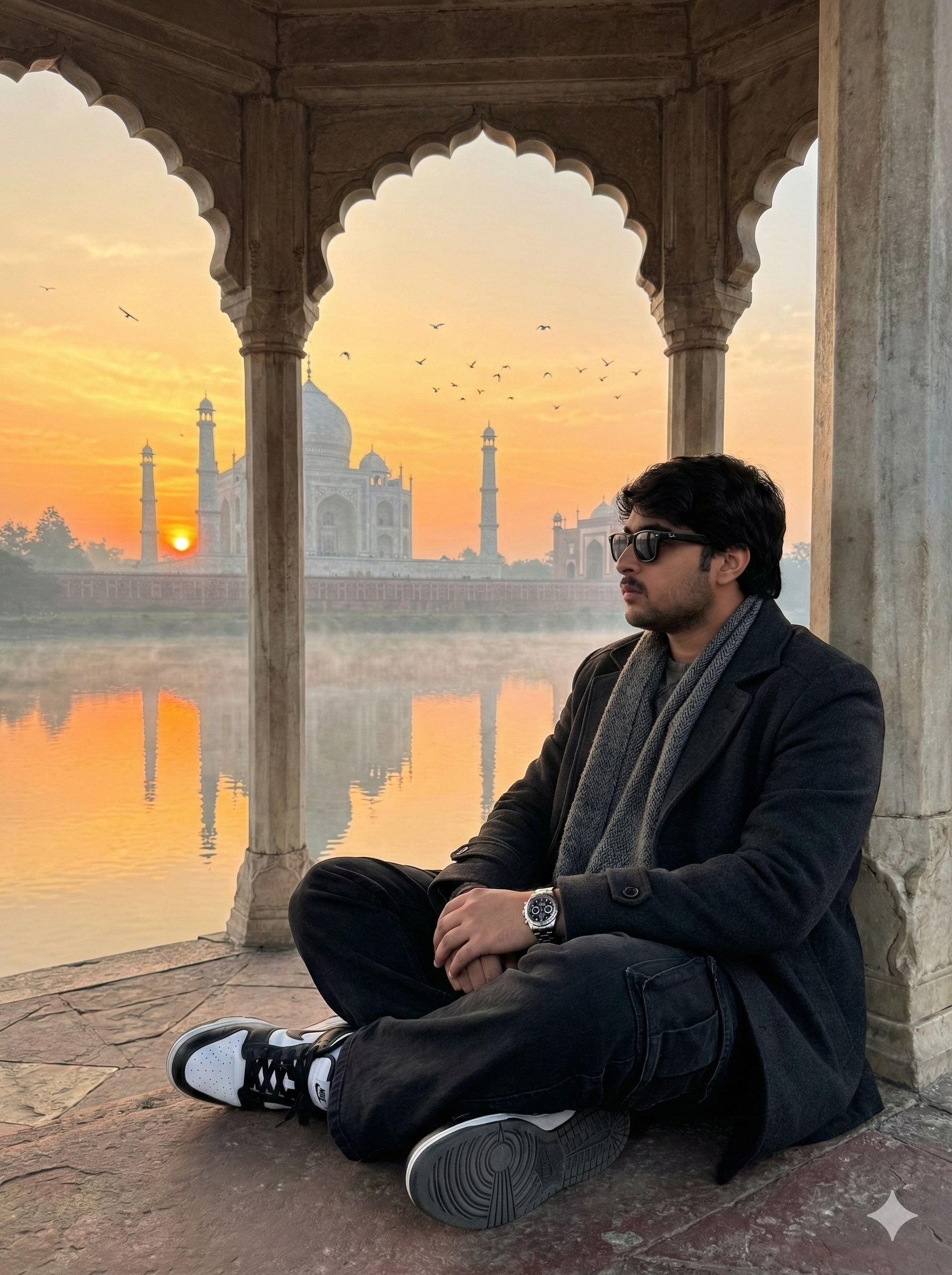
Tajmahal View
Om Editing Top ke saath Tajmahal View ka cinematic look
Om Editing Top style ka Tajmahal View edit un creators ke liye hai jo apni photo ko ek dreamy, premium aur emotionally strong travel shot mein badalna chahte hain. Is tarah ka edit sirf ek monument photo nahi hota, balki ek complete mood create karta hai — jisme sunrise, soft mist, river reflection aur calm spiritual feeling sab ek frame mein aati hai.
Read Also: cinematic-style realistic portrait | 2026 New Year
Ye style un logon ke liye perfect hai jo apni portrait photo ko iconic heritage background ke saath dramatic banana chahte hain. Agar aap Instagram reel, DP, travel post ya AI-generated editing concept ke liye content bana rahe hain, to Om Editing Top inspired Tajmahal View look aapko ek clean, realistic aur eye-catching result de sakta hai.
Is edit ki sabse badi strength hai iska visual balance: subject ko strong tarah se foreground mein rakha jata hai, jabki background mein Taj Mahal ka grand view, river ke upar soft reflection aur morning haze image ko cinematic depth dete hain. Isi wajah se ye style beginners aur advanced editors, dono ke liye kaafi useful hota hai.
Is photo style mein kya special milta hai
Tajmahal View style ka output usually aisa lagta hai jaise photo ek real sunrise trip ke dauran li gayi ho. Warm orange-yellow sky, water par light reflection, aur halki fog image ko soft yet premium feel deti hai. Dark winter outfit aur sunglasses jaise elements subject ko bold aur fashionable look dete hain, jabki background spiritual aur historic atmosphere maintain karta hai.
Composition ke level par ye style kaafi strong hota hai. Subject ko pavilion ya stone floor par seated pose mein rakhna frame ko natural banata hai, aur Taj Mahal ke samne direct facing pose image mein intent aur connection create karta hai. Birds, mist aur soft sunlight jaise details photo ko simple edit se upar le jaati hain.
Realism is style ka sabse important part hai. Achha Tajmahal View edit tabhi impressive lagta hai jab skin tone natural rahe, shadows soft hon, aur background ke colors over-saturated na hon. Om Editing Top style mein usually premium texture, balanced contrast aur clean edges ka feel diya jata hai, taaki image mobile screen par bhi sharp dikhe.
- Soft sunrise lighting for warm cinematic feel
- Orange, yellow aur light mist tones for realistic atmosphere
- Water reflection for depth and symmetry
- Dark outfit contrast for stronger subject focus
- Ultra-realistic texture for premium travel-photo look
This Style ka use kaise karein: step-by-step guide
Agar aap beginner hain, to is style ko use karna complicated nahi hai. Mobile par bhi aap ek strong Tajmahal View edit bana sakte hain, bas aapko photo selection aur framing par dhyan dena hoga. Sabse pehle apni original image choose karein, phir usko aise crop karein ki subject clear dikhe aur background ke liye enough space bache.
Uske baad photo ko us editing workflow mein open karein jahan aap background, lighting aur subject placement adjust kar sakte hain. Om Editing Top style mein key cheez hoti hai mood set karna — yani image ko sunrise tone, soft mist aur calm atmosphere ke according balance karna. Mobile par aapko sliders ya AI-style adjustments se natural warmth aur depth create karni chahiye.
Step-by-step approach se aap fast aur clean result paa sakte hain. Niche simple process diya gaya hai jo beginner ko bhi follow karna easy lagega.
- Apni best portrait photo select karein jisme face clear ho.
- Subject ko centered ya slightly off-center position mein rakhein.
- Background mein Taj Mahal ya similar heritage view add karein.
- Lighting ko sunrise style warm tones mein adjust karein.
- Soft mist, birds aur water reflection jaise details add karein.
- Clothes aur accessories ka dark premium look maintain karein.
- Final export se pehle sharpness, contrast aur skin tone check karein.
Mobile editing mein best result tab aata hai jab aap ek hi time par sab kuch heavy na karein. Pehle basic composition set karein, phir color tone aur atmosphere add karein. Isse image artificial nahi lagegi aur Tajmahal View ka natural cinematic feel bana rahega.
Kaunsi photos is style ke liye sabse best kaam karti hain
Is tarah ke edit ke liye sabse important hai aisi photo lena jisme subject ka pose stable ho aur face clearly visible ho. Half-body ya full-body seated shots kaafi achhe kaam karte hain, especially jab person stone floor, pavilion ya terrace jaisi location mein ho. Isse background ke saath scale aur depth achhe se set hoti hai.
Resolution bhi important hai. High-resolution photo use karne se skin texture, scarf details, sunglasses edges aur clothing folds zyada realistic dikhte hain. Low-quality image mein Taj Mahal background add karne par cutout rough lag sakta hai, isliye sharp source image hamesha better hoti hai. Light bhi soft honi chahiye, kyunki hard shadows sunrise atmosphere ko weak kar dete hain.
Clothing ke case mein dark winter wear, textured scarf, black cargo jeans aur clean shoes jaisi styling is concept ke saath bahut achhi lagti hai. Background simple ho to subject aur monument dono highlight hote hain. Agar original photo mein already busy background hai, to editing ke baad result cluttered lag sakta hai. Best output ke liye ye points follow karein:
- Face aur body dono clear hon, blur na ho
- Photo high resolution aur well-lit ho
- Seated ya calm standing pose ho
- Simple background ho ya easy cutout possible ho
- Dark, premium clothing ho jo sunrise colors se contrast kare
- Natural expression ho, taaki spiritual mood real lage
Agar aap Tajmahal View ko Om Editing Top style mein use karte hain, to aapko sirf ek normal photo nahi milti — aapko ek cinematic heritage portrait milta hai jo travel, luxury aur emotion teeno ko ek frame mein jod deta hai.
Om Editing Top ke Best Results Ke Liye Pro Tips
Om Editing Top style ya kisi bhi Tajmahal View edit ko natural aur premium dikhane ke liye sabse pehle composition par dhyan dena chahiye. Subject ko aise place karein ki Taj Mahal, river reflection, aur sunrise background teeno elements balance me rahen. Agar face reference same rakhna hai, to lighting aur angle ko consistent rakhna aur bhi important ho jata hai, kyunki wahi edit ko realistic banata hai.
Color grading bhi final result ko bahut uplift karta hai. Warm sunrise tones, soft orange highlights, aur gentle shadows use karne se image cinematic lagti hai. Agar aap Instagram ya portfolio ke liye image bana rahe hain, to thoda sa contrast aur clarity add karna useful hota hai, lekin over-sharpening se bachna chahiye. Soft mist aur water reflection ko preserve karna edit ki depth ko aur strong banata hai.
- Subject ko foreground me clean aur centered ya rule-of-thirds composition me rakhein.
- Sunrise light ko warm tone me balance karein taaki natural glow aaye.
- River reflection aur mist details ko lightly enhance karein, overwrite nahi.
- Clothing textures jaise scarf, shoes, aur fabric folds ko crisp rakhein.
- Background monument ko sharp aur clean dikhane ke liye unwanted noise kam karein.
- Overall mood ko calm, spiritual, aur premium feel ke saath maintain karein.
Common Mistakes Jo This Style Output Ko Kharab Kar Deti Hain
Sabse common mistake hoti hai over-editing. Jab colors bahut zyada saturated ho jate hain ya contrast unnecessarily strong ho jata hai, to Taj Mahal View ki soft morning feel khatam ho jati hai. Is tarah ka output artificial lagne lagta hai, especially jab sunrise aur mist jaise delicate elements present hon.
Dusri problem hoti hai subject aur background ka mismatch. Agar lighting direction alag ho, shadows inconsistent ho, ya face details reference se disturb ho jayein, to image realistic nahi dikhegi. Similarly, clothing, sunglasses, aur watch jaise details ko blur kar dena bhi quality ko low feel karata hai, kyunki premium street-style look inhi cheezon se banta hai.
- Bahut zyada saturation use karna, jisse sunrise natural nahi lagta.
- Strong sharpening, jo skin aur stone textures ko harsh bana deti hai.
- Reflection ko ignore karna, kyunki water scene ki realism wahi se aati hai.
- Mist ko over-remove karna, jisse atmosphere flat ho jata hai.
- Background monument ko overexpose karna, jis se details lose ho jati hain.
- Clothes ke dark tones ko completely black crush kar dena, jisse texture gayab ho jata hai.
Best Use Cases Aur Creative Ideas for This Style
Om Editing Top style Tajmahal View images ka use kaafi versatile hota hai. Ye images Instagram reels cover, story post, profile photo concept, ya aesthetic feed post ke liye bahut achchi lagti hain. Agar aap personal branding kar rahe hain, to aisi premium travel-inspired edit aapke profile ko classy aur cinematic vibe deti hai.
Content creators ke liye bhi ye style useful hai, especially thumbnails aur banner visuals me. Sunrise, river, aur iconic monument ka combination instantly attention grab karta hai. Portfolio presentation me bhi ye look strong hota hai, kyunki isme fashion, travel, and editorial mood ek saath aa jata hai. Agar aap reels covers banana chahte hain, to subject ka cross-legged pose aur calm setting ek unique storytelling frame create karta hai.
- Instagram posts: aesthetic travel aur premium portrait vibe ke liye.
- Profile pictures: clean, stylish, aur memorable identity ke liye.
- Thumbnails: high-contrast yet elegant visual impact ke liye.
- Portfolios: fashion, portrait, aur AI edit showcases ke liye.
- Reels covers: calm cinematic story feel create karne ke liye.
This Style Me Try Karne Wali Variations
Agar aap same concept ko multiple versions me experiment karna chahte hain, to mood, weather, aur lighting ko change karke bahut interesting results mil sakte hain. Ek version me soft golden sunrise rakhein, dusre me cooler dawn tone use karein, aur ek aur version me slight haze ya fog zyada add karein. Isse same composition me alag-alag emotional feel aa jati hai.
Seasonal variations bhi kaafi useful hoti hain. Winter morning me scarf aur dark winter clothes zyada impactful lagte hain, jabki monsoon mood me wet reflections aur dramatic sky extra depth dete hain. Aap setting me bhi small changes try kar sakte hain, jaise stone pavilion shadows, wider river view, ya slightly closer monument framing. Is tarah this style style ka output repetitive nahi lagta aur har version fresh feel deta hai.
- Mood variations: calm, royal, cinematic, spiritual, nostalgic.
- Color variations: warm orange, soft yellow, muted gold, cool blue dawn.
- Weather variations: misty morning, clear sunrise, light fog, monsoon haze.
- Season variations: winter chill, spring freshness, autumn warmth.
- Setting variations: wider river framing, closer pavilion crop, stronger reflection focus.
Conclusion: This Style Se Best Final Look Kaise Milega
Overall, this prompt ka real charm tab aata hai jab subject, architecture, light, aur atmosphere ek saath harmonize karte hain. Tajmahal View jaise concept me natural realism aur cinematic beauty dono important hote hain, isliye edit ko soft, balanced, aur detail-rich rakhna chahiye. Jab composition sahi ho aur mood consistent ho, tab final image instantly premium lagti hai.
Agar aap apne next edit me this look style try kar rahe hain, to warm sunrise tones, misty reflection, aur clean fashion details ke saath experiment karein. Thoda patience aur fine-tuning se aap ek aisa result bana sakte hain jo Instagram, portfolio, aur reels covers sab me standout kare. Yeh style ko try karke aap apni image ko ek calm, royal, aur unforgettable look de sakte hain.
💬 Comments