Books Library AI Prompt
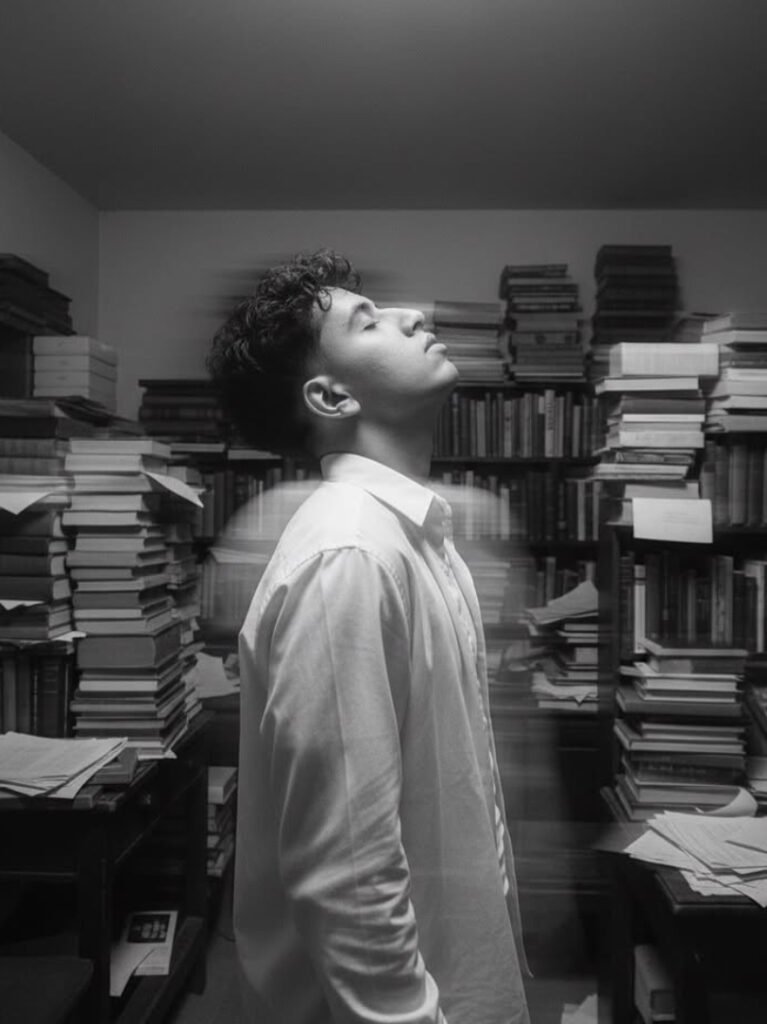
Books Library AI Prompt: What Is This Style?
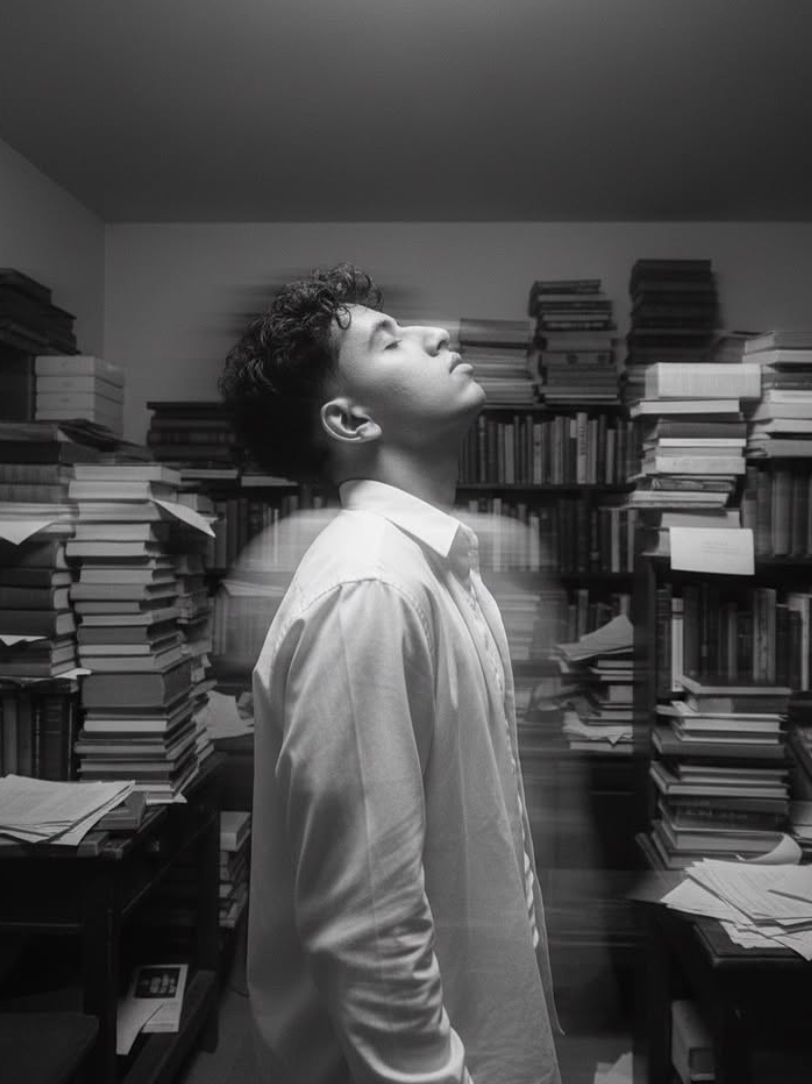
This books library AI prompt style is a cinematic, high-contrast black-and-white portrait concept that instantly highlights a study, creative, and deep-thinking vibe. It’s ideal for anyone who wants to turn a normal photo into a dramatic, intelligent, artistic frame.
Read Also: Cinematic Realistic Portrait AI Prompt | 2026 New Year AI Prompt
The subject is usually shown in dim light, surrounded by stacks of books, papers, and an old-study ambience. The face stays natural and realistic while the composition feels film-like, so the photo reads like a story rather than a simple edit.
This style is especially useful for students, creators, writers, Instagram profile users, and anyone who enjoys AI photo editing. If you want a classy, moody, visually powerful portrait, this books-library prompt is a strong option.
What This Photo Style Delivers
The biggest feature of this style is its fine black-and-white finish. Shades, shadows, and highlights define the scene instead of color, making the photo feel artistic and timeless. A motion blur effect adds movement to the background and the subject’s edges, making the image even more cinematic.
Mood plays a huge role here. Dim light, a thoughtful expression, a tilted head, and a cluttered study-room background create an intense creative atmosphere. This look stands apart from a simple portrait because it treats emotion and environment as equally important.
- High-contrast black-and-white tones
- Soft but dramatic lighting
- Rich background of books, papers, and a study table
- Realistic skin detail and face clarity
- Motion blur for cinematic depth
- Serious, reflective, creative mood
How to Use This Style: Step-by-Step Guide
This style is easy to use even on mobile. Start with a clear portrait photo where the face is properly visible, then upload it into your editing app, AI image editor, or prompt-based tool.
The main editing goal is keeping the subject the same while changing the atmosphere — face consistency, lighting control, and background transformation all need to be applied carefully.
- Choose your best portrait photo.
- Crop or frame it so the face stays clear.
- Upload the image in your editing app.
- Apply the books-library / black-and-white cinematic style.
- Keep lighting dim and contrast balanced.
- Add books, papers, or a study-room feel to the background.
- Keep face details natural and realistic.
- Zoom in on the final image to check blur, shadows, and edge quality.
For best results, try a few variations in one go — a different head tilt, light intensity, or background density can produce a noticeably more impressive output.
Which Photos Work Best
Not every photo suits this books-library effect equally. Best results come when the original image has a clean face, the subject faces the camera straight-on or at a slight side angle, and the quality is good. Blurry or low-resolution images won’t render the detailed black-and-white effect as sharply.
Lighting matters a lot — harsh shadows or overexposure in the original photo can lose face detail in the final edit, so natural or soft indoor light works better. A simple background makes it easier for the AI to build the books-library ambience.
- Face clear and centered
- High resolution, to preserve detail
- Soft lighting, not extreme dark
- Plain or less cluttered background
- Simple clothing, like a shirt or collared outfit
- Natural pose, especially a head tilt or thoughtful expression
- Shoulders and upper body visible for balanced composition
A white shirt or simple formal look works especially well with this editing if you want a study, creative, or intellectual vibe — it adds elegance and seriousness that make this style feel even more premium.
Pro Tips for the Best Results
Image quality matters most. The clearer the reference photo, the more naturally face details are preserved, and the more premium the final black-and-white look feels. The study-like background, books, papers, and dim light effect only come through strongly when the subject is properly visible in the base image.
Pose and expression matter too — a head tilt, thoughtful expression, and loose shirt make the image more cinematic. Don’t overdo the background blur; keep the subject sharp while the surrounding area carries artistic movement.
- Use a clear front-facing or slightly angled reference image for a better face match.
- Keep lighting soft and even, especially for the black-and-white aesthetic.
- Place books, papers, and study elements naturally in the background.
- Keep motion blur subtle so the subject’s face and body shape don’t distort.
- Match the shirt, pose, and mood to the image’s overall story.
- Export a high-resolution output, especially for posts or a portfolio.
Common Mistakes to Avoid
The most common mistake is choosing the wrong source image. If the face is already blurry, overexposed, or distorted by heavy filters, a “keep my face 100% match” aesthetic can’t be properly maintained. Realism matters here, so the more natural the base photo, the better the result.
- Using a low-quality image: weakens face details and hurts realism.
- Adding too much motion blur: can distort the subject’s natural shape and expression.
- Overfilling the background: makes the library/study scene look messy.
- Over-sharpening every element: kills the soft cinematic feel.
- Ignoring lighting: light direction is the most important factor in black-and-white edits.
Best Use Cases
This style can become a complete visual identity, not just a single edit. Use it as an artistic Instagram portrait where monochrome instantly grabs attention, or to make your profile more premium and memorable.
- Instagram posts: for a cinematic black-and-white portrait feed aesthetic.
- Profile pictures: stylish, moody, standout personal branding.
- YouTube thumbnails: a thoughtful, dramatic, creator-style visual appeal.
- Portfolio pages: artistic photography showcase and premium presentation.
- Reel covers: a consistent theme with an eye-catching cover design.
Variations to Try
- Serious mood: deeper shadows and intense expression.
- Soft reflective mood: lighter contrast and gentle blur.
- Vintage library feel: old books, textured walls, a classic chair vibe.
- Modern study look: cleaner desk, minimal clutter, sharp portrait focus.
- Seasonal variation: winter mist, monsoon window light, or autumn-toned background cues.
- Creative portrait style: more motion blur and dramatic composition.
Conclusion: Try This Style
This books-library-inspired black-and-white portrait style gives a cinematic, thoughtful, premium look. Balance face realism, moody lighting, and elegant background blur for a genuinely impressive result — ideal for anyone who wants their images to feel artistic and standout.
FAQ: Books Library
How do I use the "Books Library" prompt?
Copy the prompt above, open Gemini or ChatGPT, upload a clear photo of yourself and paste the prompt. Generate the image and adjust the outfit or background if you want a variation.
Is this prompt free?
Yes. This prompt is free to copy and use for Instagram, reels, WhatsApp DP and profile pictures.
Which photo works best?
A sharp, front-facing, well-lit photo with no filter. A clear face helps the AI keep your identity in the final image.
Last updated: 8 October 2026



💬 Comments