Dragons Avatar
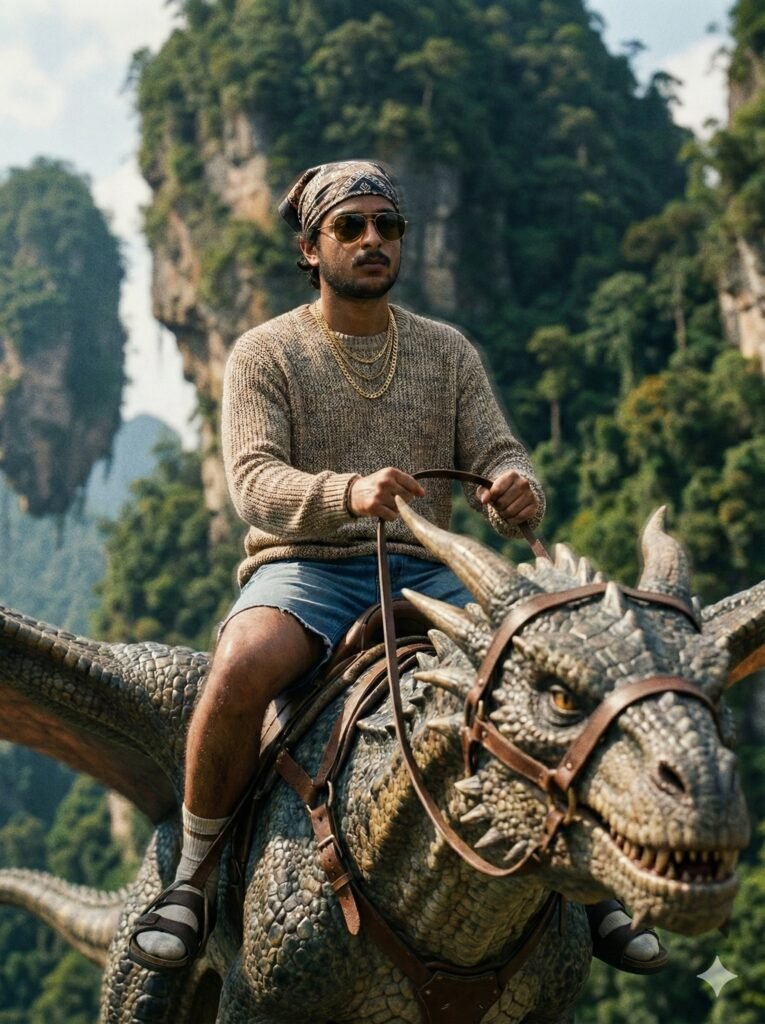
Dragons Avatar: cinematic fantasy portrait ke liye ek powerful editing style
Dragons Avatar ek aisa photo editing concept hai jo normal portrait ko high-end cinematic fantasy frame me transform kar deta hai. Is style ka main focus realism hota hai, jahan subject ka face naturally scene me blend ho aur overall image kisi real movie still jaisi लगे.
Read Also: cinematic-style realistic portrait | 2026 New Year
Ye look un logon ke liye perfect hai jo apni selfie, portrait ya travel photo ko dramatic avatar-style edit me badalna chahte hain. Creator, editors, social media users aur AI photo prompt lovers ke liye yeh style especially useful hai kyunki isme fantasy aur realism ka balance hota hai.
Is type ke edit me dragon-like flying creature, cinematic atmosphere, dramatic landscape aur strong lighting ek saath aate hain. Result ek aisi image hoti hai jo eye-catching bhi hoti hai aur premium movie-poster feel bhi deti hai.
Dragons Avatar style actually kya deta hai?
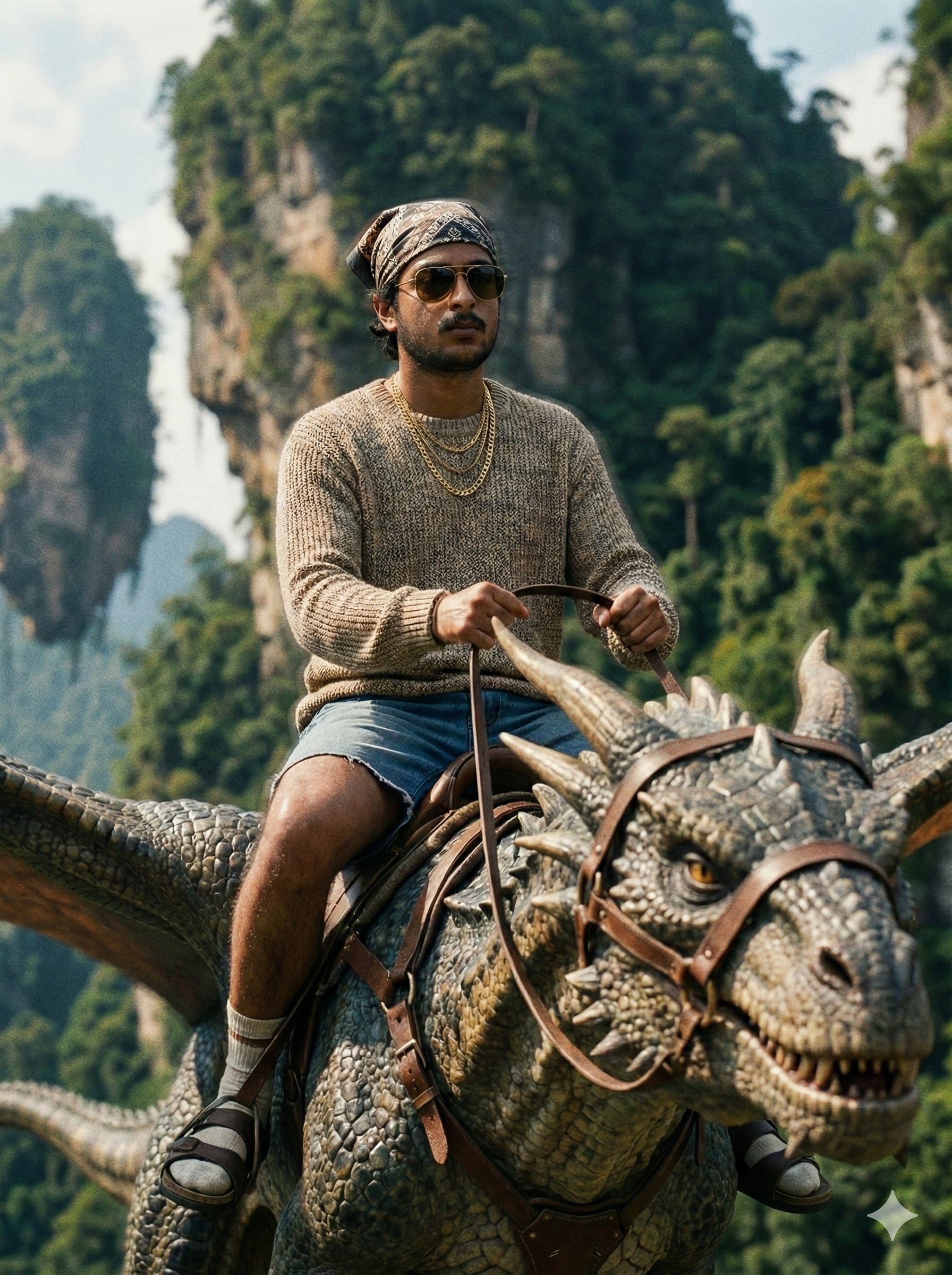
Is prompt/photo style ka सबसे बड़ा advantage hai uska hyper-realistic cinematic look. Image me soft natural daylight, deep shadows, film grain, aur rich color grading milta hai jo overall frame ko expensive and polished banata hai. Background me floating mountains, jungle depth aur fantasy atmosphere image ko visually grand banate hain.
Realistic composition bhi is style ki core strength hai. Subject ko dragon-like flying creature par confidently ride karte dikhaya jata hai, jisse scene action-packed lagta hai, lekin face aur body proportions natural rehte hain. Skin texture, shadow direction, lens depth aur lighting match hone ki wajah se output edited nahi, real live-action shot jaisa feel hota hai.
Is type ke result me usually ye visual elements prominent hote hain:
- Cinematic lighting: soft daylight bounce aur realistic volumetric atmosphere
- Fantasy depth: floating mountains aur jungle layers se epic scale
- Natural realism: pores, texture, shadows aur facial alignment
- Film look: shallow depth of field aur subtle grain
- Stylish outfit details: bandana, sunglasses, gold chains aur casual layered clothing
Dragons Avatar kaise use karein: beginner-friendly step-by-step guide
Agar aap bilkul beginner hain aur mobile se edit banana chahte hain, to process ko simple rakhna best hota hai. Sabse pehle ek clear face photo select karein jahan aapka face front ya slightly angled ho aur lighting balanced ho. Phir us photo ko editor ya AI image tool me upload karein.
Uske baad Dragons Avatar concept ko apply karte hue scene ko fantasy-movie style me generate ya edit karein. Agar tool me reference photo support hai, to face placement aur pose alignment ko carefully check karein. Output dekhkar ye ensure karein ki face natural लगे, skin tones match हों aur creature riding pose believable लगे.
Mobile par better results ke liye in steps ko follow karein:
- Ek high-quality portrait ya selfie choose karein.
- Photo me face clear ho, blur ya heavy shadows na hon.
- Editor/app me image upload karein.
- Fantasy dragon rider style select ya apply karein.
- Lighting aur realism settings ko natural rakhein.
- Preview me face, hands aur clothing details check karein.
- Agar zarurat ho to contrast, saturation aur sharpness thoda adjust karein.
- Final image ko high resolution me save karein.
Ek useful tip: jahan possible ho, background ko clutter-free rakhein aur subject ko centered ya rule-of-thirds position me place karein. Isse dragon scene zyada cinematic aur balanced dikhta hai.
Kaun si photos Dragons Avatar ke liye sabse achchi hoti hain?
Best results ke liye photo selection sabse important step hai. Aisi image choose karein jisme face clearly visible ho, eye contact strong ho aur resolution decent ho. Low-quality ya heavily filtered photo se cinematic realism lose ho sakta hai, kyunki face details aur texture properly map nahi hote.
Lighting bhi bahut matter karti hai. Natural daylight ya soft indoor light wali photo zyada useful hoti hai, kyunki isme skin tone accurate rehta hai. Agar photo me harsh shadows ya overexposure hogi, to final composite unnatural lag sakta hai. Background simple ho to face aur outfit par focus banta hai.
Practical selection tips:
- Angle: front-facing ya 3/4 angle best hota hai
- Resolution: clear, high-resolution image choose karein
- Lighting: even light, no extreme darkness or overexposure
- Background: plain ya lightly blurred background better rahega
- Clothing: simple outfit ho to fantasy styling zyada natural lagegi
- Face clarity: sunglasses ya heavy obstruction avoid karein
- Expression: confident aur neutral expression dramatic look deta hai
Agar aap chahte hain ki output zyada movie-like lage, to aisi photo use karein jisme shoulders bhi visible hon. Isse layered clothing, accessories aur riding pose ka fit zyada believable ban jata hai.
Om Editing Top: Pro Tips for the Best Results
अगर आप Om Editing Top style में सबसे natural और impressive result चाहते हैं, तो सबसे पहले image quality पर ध्यान दें। Face photo साफ, front-facing, और अच्छी lighting वाली होनी चाहिए, ताकि face replacement believable लगे और details smooth blend हों।
Best output के लिए background, outfit, और pose का match भी important है। जब source photo में expression calm हो और angles balanced हों, तो cinematic dragon avatar effect ज्यादा real लगता है। इस तरह आपका final image सिर्फ edited नहीं, बल्कि visually premium दिखता है।
नीचे कुछ practical do’s दिए गए हैं जो output को noticeably better बनाते हैं:
- High-resolution face photo इस्तेमाल करें, ताकि skin texture और eyes sharp रहें।
- Clear lighting वाली photo चुनें, जिससे shadow direction naturally match हो सके।
- Simple facial expression रखें, बहुत ज्यादा tilt या blur avoid करें।
- Outfit details को clean और visible रखें, ताकि cinematic costume look strong लगे।
- Background elements जैसे mountains, jungle, and flying creature को balanced रखें ताकि subject dominate करे।
- Final image को upload करने से पहले edges, hairline, and face blend जरूर check करें।
अगर आप Instagram, reels, या profile branding के लिए काम कर रहे हैं, तो extra polish बहुत important है। छोटे improvements जैसे contrast adjustment, shadow correction, और color harmony output को more professional बनाते हैं। यही वह step है जो average edit और Om Editing Top level result के बीच फर्क पैदा करता है।
Common Mistakes to Avoid
बहुत लोग same face photo हर style के लिए use कर देते हैं, लेकिन यही सबसे common mistake है। अगर source image में face blurry है या lighting uneven है, तो final result synthetic या mismatched लग सकता है।
एक और mistake है over-editing. जब shadows, highlights, और saturation बहुत ज्यादा बढ़ जाते हैं, तो cinematic feel की जगह artificial look आ जाता है। Om Editing Top style का goal यही है कि image dramatic भी लगे और believable भी रहे।
इन mistakes से बचना चाहिए:
- Blurry face photo use करना: इससे facial details weak हो जाती हैं और realism कम होता है।
- Wrong lighting direction चुनना: अगर face और scene की light match नहीं करेगी, तो composite fake लगेगा।
- Too many filters लगाना: इससे texture disappear हो सकता है और image plastic जैसी दिख सकती है।
- Unbalanced composition: अगर dragon, rider, और background cluttered हो, तो focus टूट जाता है।
- Low-detail clothing: Fabric texture visible नहीं होगी तो final image flat लगेगी।
- Ignoring shadows and depth: Real cinematic look के लिए depth cues बहुत जरूरी हैं।
इन छोटी गलतियों को ठीक करके आप अपने result को instantly better बना सकते हैं। खासकर जब image social media पर share करनी हो, तो viewer सबसे पहले realism notice करता है। इसलिए editing में patience और precision दोनों रखना जरू��ी है।
Best Use Cases and Creative Ideas
Om Editing Top style dragon avatar images का सबसे अच्छा use social media branding में होता है। Instagram profile picture, reel cover, और story highlight cover में यह look बहुत eye-catching लगता है। Fantasy theme होने की वजह से यह instantly attention grab करता है।
Creators इसे thumbnails, portfolio graphics, और gaming-style personal branding के लिए भी use कर सकते हैं। अगर आप अपने content को cinematic and premium feel देना चाहते हैं, तो यह avatar concept बहुत effective है। Live-action fantasy look audience को strong first impression देता है।
कुछ best use cases और ideas:
- Instagram profile picture: bold और memorable avatar impression के लिए।
- YouTube thumbnails: fantasy, adventure, or cinematic content में visual impact बढ़ाने के लिए।
- Reels covers: scroll-stopping look पाने के लिए।
- Portfolio showcase: editing skills को premium style में present करने के लिए।
- Digital identity branding: personal page या creator persona को unique बनाने के लिए।
आप इसे different content themes के साथ भी use कर सकते हैं। उदाहरण के लिए, travel creator profile, fantasy fan page, or cinematic promo post में यह style अलग-अलग purpose serve कर सकता है। Strong subject placement और realistic creature design इसे versatile बनाते हैं।
Variations You Can Try with Om Editing Top
अगर आप एक ही base idea पर multiple versions बनाना चाहते हैं, तो mood और environment बदलकर बहुत interesting results मिल सकते हैं। Om Editing Top style में छोटे changes भी image का entire vibe बदल देते हैं, इसलिए experiment करना worthwhile होता है।
Color palette, season, and lighting को adjust करके आप same dragon avatar concept को fresh बना सकते हैं। इससे आपके पास profile use, story post, और featured banner के लिए अलग-अलग variations ready रहेंगे।
Try करने लायक कुछ variations:
- Golden sunset mood: warm tones और epic sky backdrop के साथ।
- Stormy sky version: dark clouds, dramatic light rays, और intense fantasy feel के लिए।
- Winter edition: icy mountains, cool blue tones, और sharper atmosphere के साथ।
- Monsoon jungle look: wet textures, mist, and lush green depth के लिए।
- Night cinematic version: moonlight, glowing highlights, और mysterious aura के लिए।
- Desert fantasy style: sandy cliffs और warm dust haze के साथ अलग visual identity के लिए।
आप outfit details के साथ भी variations try कर सकते हैं, जैसे darker sunglasses vibe, more casual streetwear, या stronger gold accessories. इसी तरह composition बदलकर close-up, mid-shot, या wide cinematic frame भी create किया जा सकता है। यही flexibility Om Editing Top concept को और useful बनाती है।
Conclusion: Try Om Editing Top for a Cinematic Dragon Avatar Look
अगर आप एक bold, fantasy-inspired, और realistic avatar चाहते हैं, तो Om Editing Top style एक शानदार option है। सही face photo, balanced lighting, और strong composition के साथ आप ऐसा result पा सकते हैं जो social media पर instantly stand out करे।
चाहे आपका goal profile picture हो, thumbnail हो, या personal branding, यह dragon avatar concept एक cinematic edge देता है। अब आप variations test करके अपने लिए सबसे powerful look चुन सकते हैं और अपने edit को next level पर ले जा सकते हैं।
FAQ: Dragons Avatar
How do I use the "Dragons Avatar" prompt?
Copy the prompt above, open Gemini or ChatGPT, upload a clear photo of yourself and paste the prompt. Generate the image and adjust the outfit or background if you want a variation.
Is this prompt free?
Yes. This prompt is free to copy and use for Instagram, reels, WhatsApp DP and profile pictures.
Which photo works best?
A sharp, front-facing, well-lit photo with no filter. A clear face helps the AI keep your identity in the final image.
Last updated: 31 July 2026
💬 Comments