2025 Good Bye
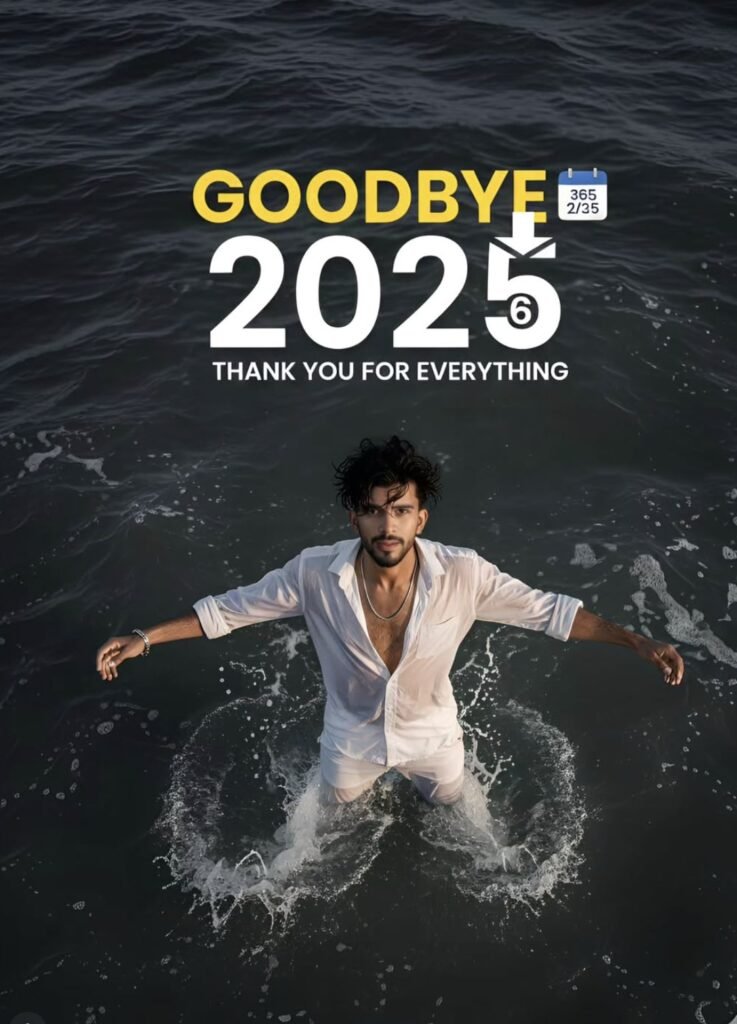
Om Editing Top ka 2025 Goodbye style kya hai?
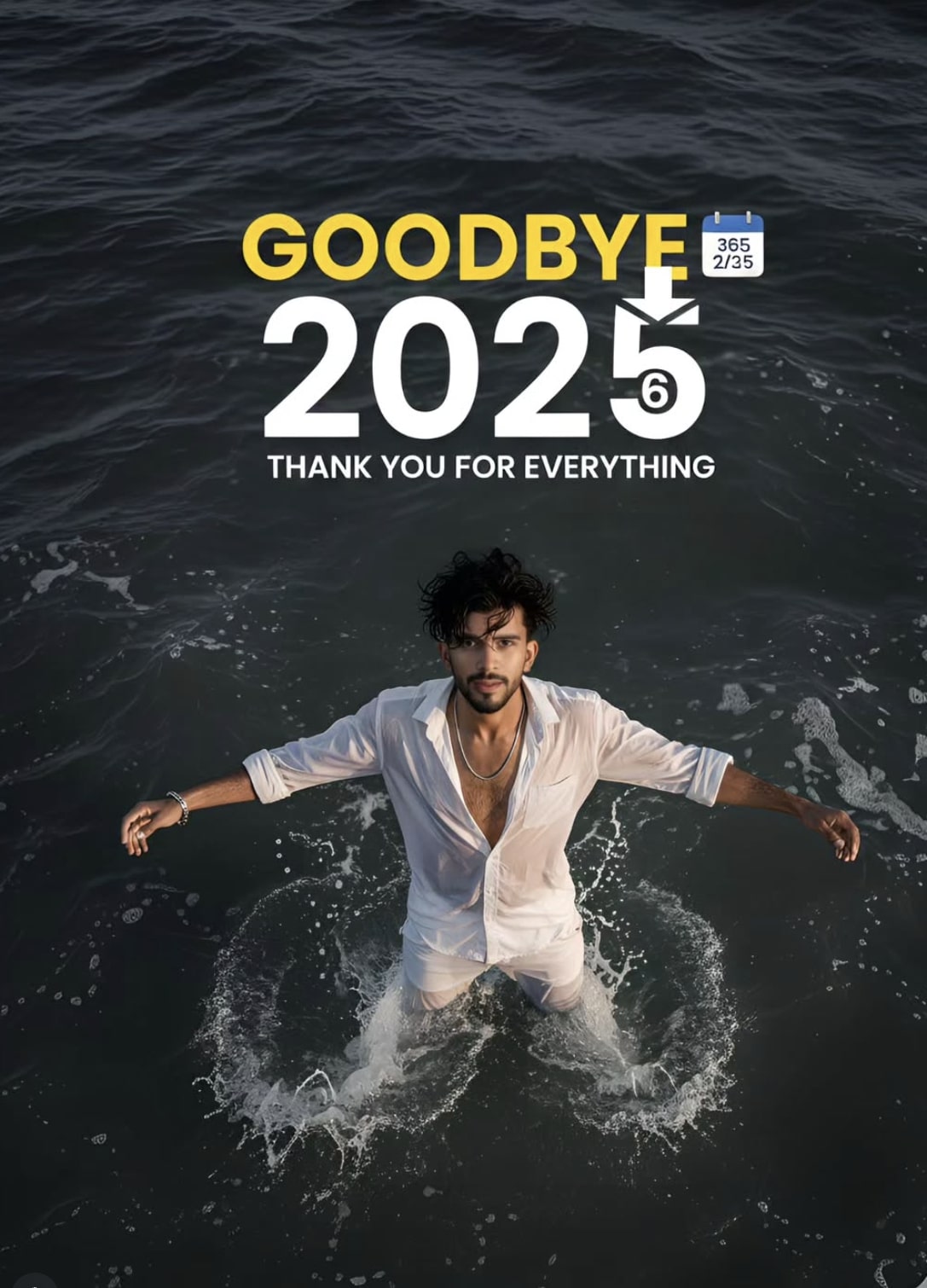
Om Editing Top style ka ye 2025 Goodbye concept ek cinematic photo-editing prompt jaisa look deta hai, jisme dramatic atmosphere, strong typography, aur emotional visual storytelling ek saath aata hai. Ye un users ke liye best hai jo apni normal portrait photo ko trending social media post, farewell edit, ya year-transition graphic me convert karna chahte hain.
Read Also: cinematic-style realistic portrait | 2026 New Year
Is style ka main purpose sirf photo ko pretty banana nahi hota, balki usme ek feeling add karna hota hai. Isme modern typography, moody ocean-like background, wet-clothing effect, top-down framing, aur high-contrast finish jaise elements use hote hain, jo image ko cinematic aur premium bana dete hain. Agar aap Instagram, Facebook, WhatsApp status, ya creative thumbnail ke liye unique edit dhundh rahe ho, to ye style kaafi useful ho sakta hai.
Ye especially un logon ke liye kaam aata hai jo AI photo editing, prompt-based editing, ya stylish farewell poster banana chahte hain. Beginner ho ya advanced editor, agar aapko ek bold aur emotional visual chahiye jo instantly attention grab kare, to Om Editing Top ka ye type of edit ek strong choice hai.
Ye prompt/photo style actually kya deta hai?
Is style ka sabse strong point iska cinematic mood hai. Image me usually dark aur desaturated tones ke saath golden-hour lighting ka use hota hai, jis se ek emotional contrast create hota hai. Ocean waves, foamy water, aur black sand jaise elements scene ko dramatic banate hain, jabki soft warm sky overall frame ko balanced feel deta hai.
Composition bhi is style me bahut important hoti hai. Subject generally centered ya top-down angle me dikhaya jata hai, jis se image poster-like lagti hai. Ye look ek normal portrait se kaafi different hota hai, kyunki isme fashion-edit, movie-poster vibe, aur farewell message ka mix milta hai. Typography bhi iski identity ka part hoti hai, jahan year number aur goodbye text visually dominant hote hain.
Visual result me aapko ye cheezein mil sakti hain:
- High-contrast, premium cinematic finish
- Moody but stylish color palette
- Realistic skin texture aur hair detail
- Fashion-forward clothing effect
- Poster-style text placement for strong social media impact
Is look ka use aap farewell theme, new-year transition, profile branding, ya creative reel cover ke liye kar sakte ho. Agar aap chahte ho ki image instantly “designed” aur “story-driven” lage, to ye style us requirement ko perfectly support karta hai.
This Style ko use kaise karein? Step-by-step guide
Agar aap beginner ho, to pehle basic source photo ready karo. Photo clear honi chahiye aur subject ka face visible hona chahiye. Mobile par edit karte waqt agar aap seedhe AI editor ya photo editor me jaate ho, to pehle apni original image ko select karke reference/base photo ke roop me upload karo.
Uske baad style elements ko carefully apply karo. Top-down ya wide-angle cinematic feel, moody lighting, aur background transformation jaise parts ko one by one set karna better hota hai. Agar editor me prompt-based tool hai, to structure simple rakho: subject, pose, lighting, background, outfit, aur text placement.
Beginner-friendly mobile steps:
- Apni best clear portrait photo choose karo.
- Photo editor ya AI editing app open karo.
- Image upload karke crop/fit check karo.
- Background ko cinematic ya dramatic scene me transform karo.
- Lighting ko warm, soft, aur high-contrast style me set karo.
- Subject ke clothing aur overall tone ko realistic rakhte hue adjust karo.
- Text overlay me year aur goodbye message add karo.
- Final image ko zoom karke face, edges, aur typography verify karo.
- Jab sab sahi lage, tab high quality me export karo.
Mobile editing me sabse important cheez ye hai ki aap ek hi baar me over-edit na karo. Har step ke baad preview check karo, kyunki cinematic edits me thoda balance bigad gaya to image artificial lag sakti hai. Isliye slow aur controlled editing better result deti hai.
Kaun si photos is style ke liye sabse achchi hoti hain?
Is type ke edit ke liye sabse pehle photo ki clarity matter karti hai. Face sharp hona chahiye, aur subject ka body posture aisa ho jo dramatic cropping ko support kare. Front-facing ya slightly angled portrait photos kaam kar sakti hain, lekin agar photo me face clearly visible ho to result aur better aata hai.
Lighting ke case me natural daylight ya soft indoor lighting best hoti hai. Bahut zyada dark, blurry, ya overexposed images se detail loss hota hai, aur cinematic finish weak pad sakti hai. Background simple ho to editing aur smooth hoti hai, kyunki busy background replace karna mushkil hota hai.
Practical photo tips:
- High resolution photo use karo, ideally clear and sharp
- Face par shadows bahut heavy na hon
- Background plain ho ya easily remove ho sake
- Clothing simple ho, taaki new style naturally fit ho
- Camera angle balanced ho; face distort na ho
- Full-body ya half-body photo dono chal sakte hain, but subject clearly visible hona chahiye
Agar aap fashion look, farewell poster, ya AI cinematic portrait banana chahte ho, to aisi photo choose karo jisme expression calm ho aur subject centered ho. Isse final output zyada premium, realistic, aur Om Editing Top style ke closer dikhega.
Om Editing Top ke liye Pro Tips: Best Results Kaise Payen
Agar aap Om Editing Top style ka output clean, cinematic aur eye-catching chahte hain, to sabse pehle composition par dhyan dena zaroori hai. Subject ko centered ya balanced frame mein rakhna, background ko simple rakhna, aur lighting ko dramatic banana image ko instantly premium look deta hai.
Is type ki editing mein chhoti details ka bada impact hota hai. Hair texture, shirt folds, water reflections, sky tone aur typography placement — ye sab milkar final visual ko strong banate hain. Agar aap prompt ya creative direction ko subtle but clear rakhte hain, to result zyada realistic aur usable lagta hai.
- Lighting ko cinematic rakhein: golden hour, soft glow, ya moody contrast image ko more professional banata hai.
- Subject focus clear rakhein: main face ya person ko frame ka hero banayein, taaki attention wahi rahe.
- Typography clean rakhein: bold aur readable text use karein, especially agar year-based design ho.
- Color palette limited rakhein: 2–3 matching colors use karne se output polished lagta hai.
- Natural details add karein: wet skin, fabric texture, foam, shadows, ya wind effect realism badhate hain.
Ek aur important tip ye hai ki reference image aur concept dono ka harmony bana rahe. Agar aap Om Editing Top ke under social media-ready design bana rahe hain, to over-editing se bachna chahiye. Zyada effects add karne se original subject weak ho sakta hai, jabki balanced editing image ko memorable banati hai.
Common Mistakes Jo This Style Output Ko Kharab Kar Deti Hain
Sabse common mistake hoti hai unnecessary clutter. Jab background, text, effects aur subject sab ek saath compete karte hain, to image ka visual flow toot jata hai. Isliye one clear focal point rakhna better hota hai.
Doosri badi mistake hai inconsistent styling. Agar mood cinematic hai, lekin colors bahut bright aur random hain, to final design messy lagega. Same tarah agar typography ka size ya placement off ho, to poster-like composition weak ho sakti hai.
- Overcrowded frame: zyada elements hone se attention divide hota hai aur main subject dull lagta hai.
- Weak contrast: subject aur background ke beech separation na ho to image flat dikhti hai.
- Unreadable text: year ya headline agar chhota ya complex font mein ho, to message clear nahi hota.
- Mismatch colors: cool aur warm tones ko bina balance ke mix karne se output unnatural lag sakta hai.
- Ignoring proportions: face, hands, body pose, ya object placement galat ho to realism kam ho jata hai.
Ek aur mistake jo log karte hain wo hai context ko samjhe bina edit karna. Agar concept farewell, goodbye ya year-end theme ka hai, to mood bhi usi hisaab se hona chahiye. Om Editing Top style tabhi strong lagta hai jab visual storytelling aur design language ek dusre ko support karein.
Best Use Cases Aur Creative Ideas For This Style
Om Editing Top images ka use aap kai tarah se kar sakte hain, especially jab aapko bold aur stylish visual content chahiye. Ye social media posts, profile visuals, and themed edits ke liye kaafi effective hote hain. Ek strong design instantly attention grab karta hai aur audience ko stop kar deta hai.
Ye style sirf one-time post tak limited nahi hai. Aap isse celebration edits, farewell posts, digital posters, aur personal branding visuals mein bhi use kar sakte hain. Agar aap content creator hain, to ye format aapke page ko more premium feel de sakta hai.
- Instagram post: farewell, new year, or mood-based feed post ke liye perfect.
- Profile picture concept: close-up portrait version se stylish DP ideas banti hain.
- YouTube thumbnail: bold text aur strong subject se click-worthy thumbnails ban sakte hain.
- Portfolio showcase: editing skills display karne ke liye aisa cinematic piece useful hota hai.
- Reels cover: short video covers mein ye style instantly standout karta hai.
Agar aap multiple platforms ke liye content bana rahe hain, to same base concept ko different crops mein use kar sakte hain. Square format Instagram ke liye, vertical format stories ya reels covers ke liye, aur wide format banners ya thumbnails ke liye best rehta hai. Om Editing Top ko aise repurpose karke aap ek hi idea se multiple assets bana sakte hain.
This Style Ke Liye Variations Aap Try Kar Sakte Hain
Is style ka sabse bada fayda ye hai ki aap mood aur environment change karke multiple versions bana sakte hain. Same core concept ko different seasons, colors, aur lighting ke saath experiment kiya ja sakta hai. Isse aapko ek unique series ya theme-based collection mil jati hai.
Aap subtle changes karke image ko completely new feeling de sakte hain. Kabhi soft romantic look, kabhi dark moody style, aur kabhi bright editorial finish — har version ka apna use hota hai. Ye flexibility this style ko aur bhi versatile banati hai.
- Mood variations: sad, nostalgic, dreamy, confident, cinematic, or royal feel try karein.
- Color changes: monochrome, warm gold, cool blue, red-black, ya pastel tones test karein.
- Season themes: winter fog, rainy backdrop, summer glow, ya autumn tones interesting lagte hain.
- Location ideas: beach, rooftop, street, studio, mountain, ya night city background use ho sakta hai.
- Style tweaks: wet look, wind-blown hair, soft blur, high contrast, ya film grain add karke feel change karein.
Agar aap experimentation karna chahte hain, to pose aur framing ke saath bhi play karein. Top-down shot, side profile, front-facing portrait, ya full-body cinematic frame — har angle alag story batata hai. Isi tarah chhote edits se aap this prompt ke multiple creative versions develop kar sakte hain.
Conclusion: This Style Se Ek Strong Visual Finish Banayein
Overall, this look un creators ke liye perfect hai jo apne images ko stylish, cinematic aur memorable banana chahte hain. Sahi lighting, clean composition, balanced colors aur strong typography ke saath aap ek simple concept ko bhi premium output mein convert kar sakte hain.
Agar aap next edit mein depth, realism aur standout look chahte hain, to isi style ke variations try kijiye. yeh style ko test karke aap dekh sakte hain ki chhoti creative changes se final image kitni powerful lag sakti hai.
FAQ: 2025 Good Bye
How do I use the "2025 Good Bye" prompt?
Copy the prompt above, open Gemini or ChatGPT, upload a clear photo of yourself and paste the prompt. Generate the image and adjust the outfit or background if you want a variation.
Is this prompt free?
Yes. This prompt is free to copy and use for Instagram, reels, WhatsApp DP and profile pictures.
Which photo works best?
A sharp, front-facing, well-lit photo with no filter. A clear face helps the AI keep your identity in the final image.
Last updated: 17 August 2026
💬 Comments