Jazz in Lines
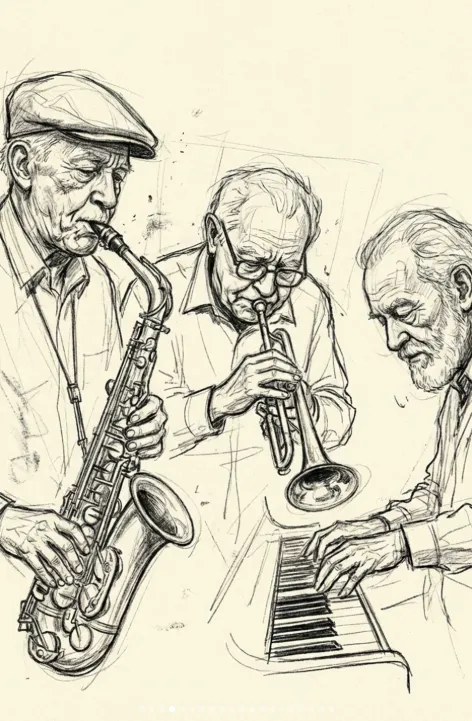
Om Editing Top: Jazz in Lines ka creative concept kya hai?
Om Editing Top style me Jazz in Lines ek aisa visual concept hai jo music ki energy ko hand-drawn sketch look me convert karta hai. Is tarah ke portraits un logon ke liye perfect hote hain jo jazz culture, expressive artwork, aur raw artistic finish pasand karte hain. Yeh style polished digital glamour se zyada emotion, texture, aur personality par focus karta hai.
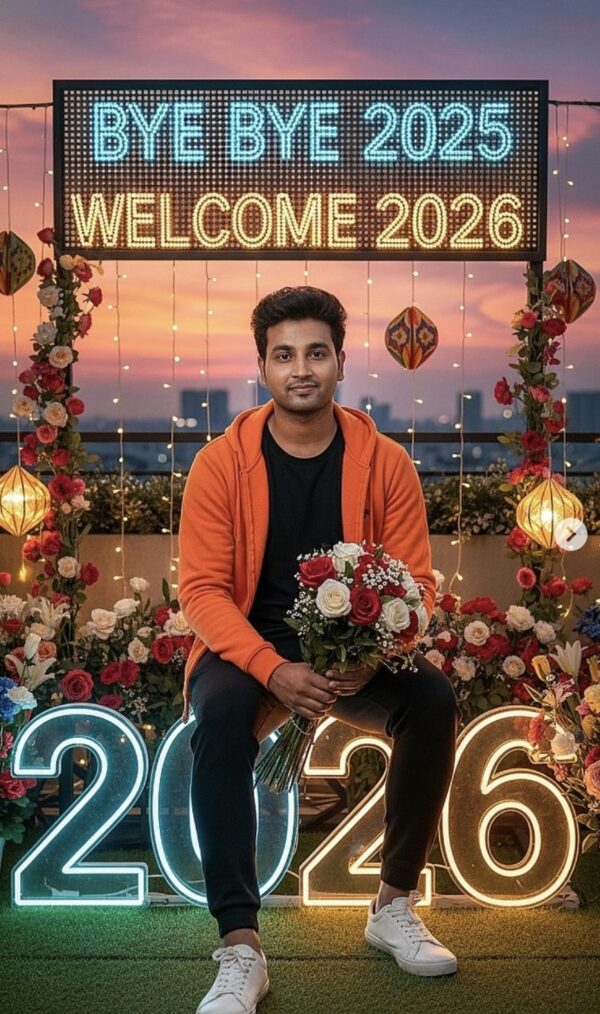
Read Also: cinematic-style realistic portrait | 2026 New Year
Is concept ka main appeal yeh hai ki image ek finished photo se zyada ek living sketch jaisi feel deti hai. Isme loose pencil movement, visible line work, aur rough paper texture ka impression hota hai. Result ek aisa portrait hota hai jo nostalgic bhi lagta hai aur modern editorial art jaisa bhi.
Agar aap artist ho, content creator ho, jazz-themed poster banana chahte ho, ya portrait art ke liye unique visual style dhoondh rahe ho, to yeh prompt-style idea kaafi useful hai. Especially un users ke liye jo mobile par easy, fast, aur visually strong AI-generated artwork create karna chahte hain, Om Editing Top approach practical bhi hai aur stylish bhi.
Is style me photo ya portrait actually kya deta hai?
Jazz in Lines type visuals usually rough graphite sketch ki feel dete hain, jisme linework intentionally loose hota hai. Isme perfect realism se zyada character capture karna important hota hai. Chehre ki wrinkles, expression, posture, aur hand movement jaise details artwork ko alive banate hain.
Background aksar textured cream ya off-white paper jaisa lagta hai, jo drawing ko warm aur vintage look deta hai. Shading minimal hoti hai, isliye composition clean rehti hai aur subject ki personality zyada highlight hoti hai. Smudges aur construction lines bhi is style ka part hote hain, kyunki woh handmade sketch ka authentic feel create karte hain.
Color palette usually muted hoti hai, matlab deep black graphite, soft gray tones, aur paper ke natural warm shades. Is combination se image dramatic bhi lagti hai aur elegant bhi. Composition me focus aksar face aur upper body par hota hai, taaki musician ka expression aur movement clearly samajh aaye.
- Loose pencil strokes aur expressive linework
- Textured cream paper ya similar warm background
- Minimal shading with visible smudges
- Emotional, sketchbook-type realism
- Jazz mood ke saath artistic, old-school feel
Mobile par Om Editing Top style kaise use karein: step-by-step guide
Agar aap beginner ho, to is type ka visual create karna complicated nahi hai. Bas aapko apni photo ko sahi tarah choose karna hai aur prompt-style concept ko clear rakhna hai. Mobile se kaam karte waqt sabse important cheez hoti hai clear subject selection aur proper framing.
Best result tab aata hai jab aap image ko aise choose karte ho jisme face aur emotion easily readable ho. Jazz portraits me expression bahut matter karta hai, kyunki sketch style me small details se personality ubhar kar aati hai. Isliye random blurry photo ki jagah strong reference use karna better hota hai.
- Ek clear portrait photo choose karein. Face sharp ho aur subject ka expression visible ho.
- Image ko open karke crop adjust karein. Head aur upper body ke around enough space rakhein.
- Prompt/style idea ko same theme me rakhein. Jazz mood, pencil sketch, aur paper texture ka focus ho.
- Lighting aur background check karein. Busy background se sketch effect weak ho sakta hai.
- Generate ya edit karke result compare karein. Best version choose karke final output save karein.
Mobile users ke liye ek practical tip yeh hai ki pehle photo ko gallery me trim karo, phir editing tool me upload karo. Agar image already centered aur clean hogi, to final artwork me linework zyada balanced dikhega. Aap chahein to same portrait ke multiple variations bhi try kar sakte ho, jisse different sketch moods milte hain.
Kaisi photos is style ke liye sabse best kaam karti hain?
Is style ke liye sabse effective photos woh hoti hain jisme subject ka face clearly visible ho aur pose expressive ho. Jazz-inspired sketch portraits me subtle movement bahut important hoti hai, jaise head tilt, thoughtful gaze, ya instrument-playing posture. Ye chize artwork ko boring nahi, balki living aur soulful banati hain.
High resolution photo use karna faidemand hota hai, kyunki sketch effect ke andar facial features clean dikhte hain. Agar photo bahut dark ya blur hai, to pencil lines important details miss kar sakti hain. Soft natural lighting ya diffused light usually best hoti hai, because harsh shadows face ko uneven bana sakte hain.
Background ke liye plain ya lightly textured environment ideal hai. Busy stage lights, crowded scenes, ya too many colors composition ko distract kar sakte hain. Clothing me simple shirts, jackets, ya classic jazz performance outfits achhe lagte hain, kyunki ye timeless and elegant feel create karte hain.
- Angle: front-facing ya slight side angle best hota hai
- Resolution: sharp, high-quality image choose karein
- Lighting: soft daylight ya even indoor light use karein
- Background: plain, neutral, ya uncluttered background ho
- Clothing: simple, classic, aur expressive outfits better lagte hain
Agar aap three elderly jazz musicians jaise subject ke saath kaam kar rahe ho, to unke facial features aur unique expressions ko preserve karna sabse important hota hai. Isi wajah se Om Editing Top style un portraits ke liye extra effective hota hai jahan personality, age lines, aur musical presence ko sketch ke through emphasize karna ho.
Pro Tips for the Best Results with Om Editing Top
To get the strongest output with Om Editing Top, start by choosing a subject that has clear facial structure, expressive posture, and details that can read well in a sketch style. This kind of result works best when the image has a strong personality, because the loose linework depends on expression more than heavy polish.
Also, keep the overall composition simple and balanced. Since the style is based on pencil-like construction and visible stroke quality, too many distracting elements can make the final look feel cluttered. A clean pose, good contrast, and a clear focal point usually help the artwork feel more intentional and visually rich.
- Use strong facial expressions to make the portrait feel more alive.
- Choose subjects with interesting textures, like wrinkles, instruments, or fabric folds.
- Keep the background soft and non-distracting so the main figure stands out.
- Prefer natural poses that suggest movement or emotion rather than stiff positioning.
- Let the sketch style breathe by avoiding overly crowded compositions.
- Test different crop ratios to see which framing best supports the portrait mood.
If you want the best version of Om Editing Top, think about the final use before you generate it. A close portrait can feel intimate and dramatic, while a wider frame may show more gesture and atmosphere. That small choice can completely change how the artwork reads on screen or in print.
Common Mistakes to Avoid
One of the most common mistakes is overloading the image with too many details in the scene. When a sketch-style edit has too much visual noise, the line work loses clarity and the portrait stops feeling elegant. Simpler is often stronger in this style.
Another issue is using flat or lifeless poses. Because this look depends on movement, character, and expressive marks, a static pose can make the result feel unfinished rather than artistic. Choosing a subject with natural energy makes a noticeable difference.
- Don’t use busy backgrounds, because they compete with the portrait focus.
- Don’t force excessive shading, since the style works better with light, expressive detail.
- Don’t crop too tightly if it removes important facial features or hand gestures.
- Don’t use images with weak contrast, because the sketch lines may not stand out clearly.
- Don’t mix too many style ideas at once, or the output may lose its pencil-sketch identity.
It also helps to avoid expecting a polished digital painting look from Om Editing Top. The charm of this style comes from its raw, handcrafted feel. Smudges, construction lines, and rough graphite energy can make the image look more authentic, not less.
Best Use Cases and Creative Ideas
Om Editing Top is perfect for social media content where you want an artistic, timeless feel. A sketch portrait can stand out on Instagram because it looks different from standard photo edits and adds an editorial or gallery-like vibe to your feed. It also works well when you want a profile image with personality rather than a plain picture.
Creators can use this style for thumbnails, portfolio pages, reel covers, posters, and music-related content. Since the look already has strong mood and texture, it can support themes like jazz, retro art, creative branding, or personal storytelling. It is especially effective when you want the image to feel expressive and memorable.
- Instagram posts: for artistic portrait edits and carousel features.
- Profile pictures: for a unique, creative personal identity.
- YouTube thumbnails: for music, art, and storytelling channels.
- Reels covers: to create a consistent handmade visual style.
- Portfolios: to showcase sketch-inspired portrait aesthetics.
- Posters and flyers: for concert, cultural, or retro-themed designs.
You can also use this look for tribute content, classic music themes, or character-based storytelling. The pencil-sketch effect gives the subject a thoughtful, human quality that feels more personal than a glossy edited image.
Variations You Can Try
One of the best things about Om Editing Top is how easy it is to experiment with different moods. Even if the core sketch style stays the same, small changes in tone, setting, or visual atmosphere can make each version feel fresh and unique.
Try shifting the emotional feel by changing the environment or color treatment around the portrait. A warm, vintage-inspired palette can make the image feel nostalgic, while cooler tones can create a calm, reflective mood. Seasonal variations can also give the artwork a new personality without changing the basic concept.
- Mood variations: thoughtful, dramatic, nostalgic, calm, or energetic.
- Colour variations: warm sepia, soft grey, muted blue, or classic cream tones.
- Setting variations: studio look, stage-inspired feel, café atmosphere, or abstract background.
- Seasonal variations: winter softness, autumn warmth, spring freshness, or summer brightness.
- Texture variations: rough paper, smoother sketch paper, heavier grain, or subtle smudge detail.
You can also test close-up portraits versus mid-shot compositions to see which one better matches your purpose. If you want a more emotional and personal result, tighter framing may work better. If you want a fuller artistic scene, a wider composition can add more context and visual depth.
Conclusion
Om Editing Top is a powerful choice when you want a sketch-style portrait that feels expressive, artistic, and full of character. Its hand-drawn energy, soft texture, and loose graphite look make it ideal for creative projects that need a more human and timeless touch.
If you want something that feels both simple and meaningful, try Om Editing Top with different moods, backgrounds, and framing styles. A few small changes can completely transform the final result and help you find the version that fits your idea best.
FAQ: Jazz in Lines
How do I use the "Jazz in Lines" prompt?
Copy the prompt above, open Gemini or ChatGPT, upload a clear photo of yourself and paste the prompt. Generate the image and adjust the outfit or background if you want a variation.
Is this prompt free?
Yes. This prompt is free to copy and use for Instagram, reels, WhatsApp DP and profile pictures.
Which photo works best?
A sharp, front-facing, well-lit photo with no filter. A clear face helps the AI keep your identity in the final image.
Last updated: 31 July 2026
💬 Comments