Comic Love Muse
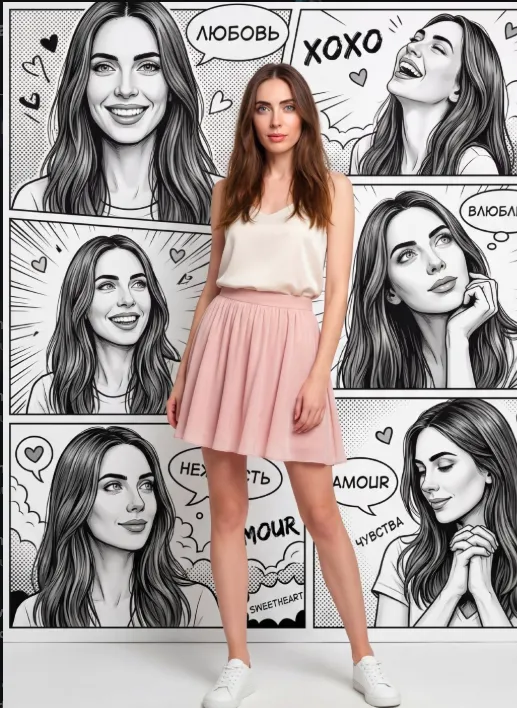
Om Editing Top के साथ Comic Love Muse स्टाइल क्या है?
Om Editing Top जैसा टेम्पलेट उन लोगों के लिए बहुत काम आता है जो अपनी फोटो को एक stylish, romantic और modern editorial look में बदलना चाहते हैं। Comic Love Muse स्टाइल में असली फोटोग्राफी और comic-inspired background का ऐसा mix मिलता है, जिसमें subject फोटो से निकलकर एक dreamy Valentine’s mood के अंदर आ जाता है।
Read Also: cinematic-style realistic portrait | 2026 New Year
यह look खासकर उन users के लिए है जो social media पर eye-catching portrait, profile photo, story post, या fashion-style AI edit बनाना चाहते हैं। इसमें face identity को natural रखा जाता है, लेकिन background को bold, expressive और pop-art inspired बनाया जाता है, ताकि overall image artistic भी लगे और realistic भी।
इस style की सबसे बड़ी खासियत यह है कि इसमें feminine, soft, love-themed visuals के साथ high-end studio feel आता है। यानी फोटो सिर्फ सुंदर नहीं दिखती, बल्कि उसमें emotion, fashion, और visual storytelling भी जुड़ जाती है।
इस Photo Style में आपको क्या मिलता है?
Comic Love Muse look में आम तौर पर full-body fashion pose, soft studio lighting, और pastel color palette का इस्तेमाल होता है। Subject को center में रखा जाता है ताकि ध्यान सीधे चेहरे, outfit और pose पर जाए। इसके साथ background में comic panels, romantic symbols, और expressive text elements का use होता है जो image को Valentine’s editorial vibe देते हैं।
इस type के edit में realism बहुत important होता है। त्वचा natural दिखती है, कपड़ों की details साफ रहती हैं, और subject को background से अलग करने के लिए crisp separation दिया जाता है। यही वजह है कि image में एक “live person in a comic world” वाला effect बनता है, जो बहुत attractive और modern लगता है।
Visual tone आमतौर पर soft, feminine, and fashionable होता है। Color choices में milk white, ivory, powder pink, और light blue जैसे gentle shades शामिल होते हैं, जिससे पूरी composition light, romantic, और clean feel देती है।
- Soft studio lighting for a clean fashion look
- Romantic and feminine mood
- Black-and-white comic background with expressive panels
- Realistic skin texture and natural facial details
- Pastel colour palette for a dreamy Valentine’s aesthetic
- Fashion editorial composition with center-focused framing
This Style को मोबाइल पर कैसे Use करें?
अगर आप beginner हैं, तो भी इस type का edit use करना easy है। सबसे पहले अपनी best photo चुनें, फिर उसे upload करें, और उसी image को reference face की तरह use करें। ध्यान रखें कि face clear हो, ताकि output में identity natural और accurate बनी रहे।
इसके बाद prompt/style selection में ऐसा look चुनें जिसमें fashion, romance, comic art, और studio photography का balance हो। क्योंकि इस edit का goal cartoon बनाना नहीं है, बल्कि एक real woman को comic-inspired visual world में place करना है। मोबाइल पर काम करते समय simple steps follow करें और हर stage पर preview जरूर देखें।
अगर आप better result चाहते हैं, तो input photo और final style के बीच consistency बनाए रखें। इसका मतलब है कि pose, lighting, outfit direction और background mood एक-दूसरे के साथ match होने चाहिए।
- अपनी सबसे clear और sharp photo upload करें।
- Ensure करें कि face पूरी तरह visible हो और blur न हो।
- Vertical crop चुनें, क्योंकि यह style portrait format में best लगता है।
- यदि option मिले, तो full-body framing या half-to-full body composition select करें।
- Pastel, romantic, editorial, fashion, comic keywords वाले style options देखें।
- Output generate करें और preview में face realism check करें।
- जरूरत हो तो brightness, contrast, or crop को lightly adjust करें।
कौन-सी Photos सबसे Best काम करती हैं?
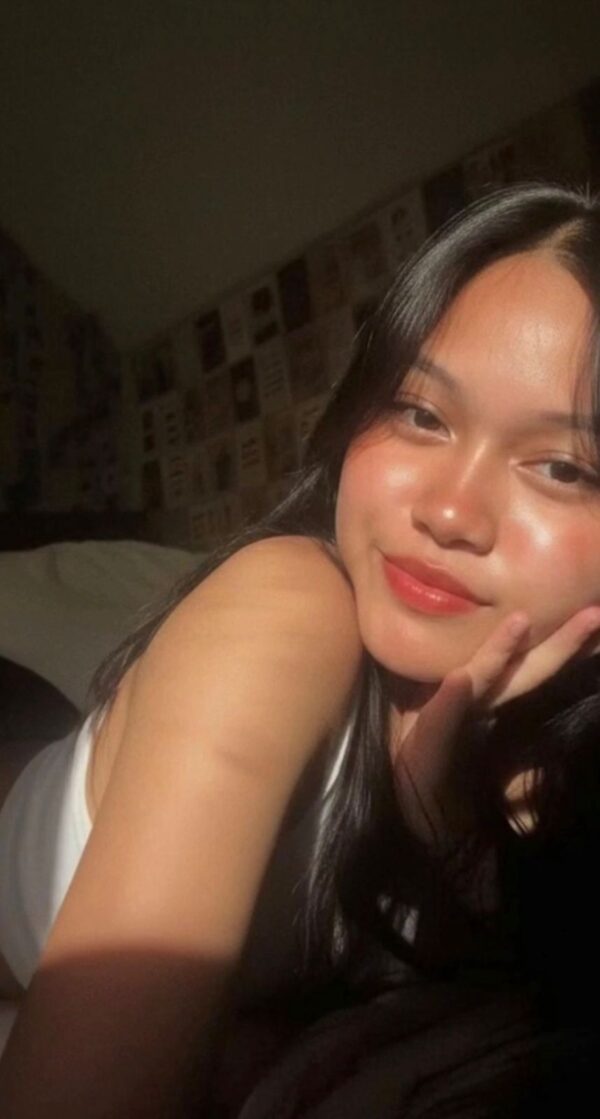
इस style में सबसे अच्छे results उन्हीं photos से मिलते हैं जिनमें subject साफ दिखाई दे, pose natural हो, और lighting already balanced हो। बहुत dark, heavily filtered, या low-resolution photos से facial details loss हो सकती हैं, जिससे final edit उतना premium नहीं लगता।
अगर आप fashion editorial look चाहते हैं, तो ऐसे image चुनें जिसमें body posture relaxed हो और face camera की तरफ mildly oriented हो। Outfit simple और clean होना चाहिए ताकि AI styling को आसानी से romantic casual look में transform किया जा सके।
Background भी जितना simple होगा, subject उतना better isolate होगा। Solid wall, plain indoor setup, soft outdoor shade, या lightly blurred background सबसे अच्छे options हैं। Clothing में basic tops, short skirts, neutral shades, और casual shoes इस aesthetic के साथ naturally fit होते हैं।
- Angle: front-facing या slight angle वाली photo best रहती है
- Resolution: high-resolution, clear face, no heavy blur
- Lighting: soft daylight या even indoor lighting
- Background: clean, uncluttered, preferably simple
- Clothing: casual, feminine, neat, and non-busy outfits
- Pose: relaxed, confident, natural body language
बेहतर Result के लिए किन बातों का ध्यान रखें?
अगर आप चाहते हैं कि output ज्यादा polished और professional लगे, तो photo में face के साथ hands, hair, और outfit edges भी clear होने चाहिए। Comic Love Muse type edits में छोटे details भी overall realism पर असर डालते हैं, इसलिए sharp source image हमेशा बेहतर रहती है।
यह style उन photos पर ज्यादा अच्छा काम करता है जिनमें subject अकेला हो और frame में extra distractions न हों। अगर background पहले से बहुत busy है, तो comic background के साथ visual clash हो सकता है। Clean source photo देने से final image में fashion editorial feel मजबूत बनती है।
ध्यान रखने वाली practical बातें:
- Face पर shadows बहुत heavy न हों
- Filter और beauty effects minimal रखें
- Full-length photo हो तो legs और outfit clearly दिखें
- Hands cut off या awkward pose से बचें
- Image vertically framed हो, ताकि composition strong रहे
Pro Tips for the Best Results with This Style
To get the strongest result from Om Editing Top, start with a clear reference photo and a simple pose. The cleaner the source image, the easier it is for the edit to keep the face natural while upgrading the full look. Soft lighting, a straight posture, and a visible outfit usually help the final image feel more polished and editorial.
If you want the “live person in a comic” effect to stand out, ask for strong separation between the subject and the illustrated background. That contrast is what makes the final image feel stylish and unique. It also helps to keep the outfit colors soft and romantic, so the visual balance stays elegant instead of noisy.
Here are some practical do’s that can improve your Om Editing Top results:
- Use a sharp face reference with good light and minimal blur.
- Choose a full-body photo if you want a fashion-style composition.
- Keep the pose relaxed so the final image feels natural and confident.
- Stick to a clear color palette like ivory, pastel pink, baby blue, or milk white.
- Ask for a clean background contrast so the subject pops from the comic-style backdrop.
- Request a realistic skin texture and soft studio lighting for a premium finish.
Another useful tip is to think about the final use before generating the image. A profile picture needs a stronger face focus, while a reel cover or thumbnail may need more bold contrast and more visible text elements. When you plan the end goal early, the Om Editing Top style becomes much easier to control.
Common Mistakes to Avoid in This Style
One of the most common mistakes is using a low-quality uploaded photo. If the face is dark, blurry, cropped too tightly, or covered by heavy shadows, the editor may lose important details. That can weaken the realism and make the final output feel less refined.
Another mistake is overloading the image with too many visual instructions at once. When the outfit, background, pose, colors, mood, and text all compete equally, the result can look crowded. Om Editing Top works best when the subject stays the main focus and the background supports the story instead of fighting it.
- Using a blurry source photo: this hurts face accuracy and reduces realism.
- Adding too many colors: this can break the soft romantic mood and make the design look messy.
- Ignoring body framing: if the subject is cut off badly, the full fashion look loses impact.
- Mixing conflicting styles: combining too many aesthetics can confuse the final composition.
- Making the background too busy: the comic art should enhance the subject, not hide her.
- Forgetting image purpose: a post for Instagram and a portrait for a portfolio need different composition priorities.
It is also smart to avoid extreme edits that push the image away from a natural studio-fashion look. If the effect becomes too cartoonish or too artificial, the “real woman inside a comic world” vibe gets lost. The best Om Editing Top results usually stay balanced: stylish, modern, soft, and believable.
Best Use Cases and Ideas for This Style
this style is especially useful when you want a romantic, eye-catching visual for social media. The combination of fashion styling, soft colors, and comic-inspired Valentine’s energy makes it perfect for attention-grabbing posts. It feels personal, expressive, and easy to share.
One of the best places to use this style is Instagram, where bold visuals matter a lot. It can also work well as a profile picture if the face is clearly visible, or as a thumbnail if you want a striking editorial look. Because the image mixes realism with graphic design, it stands out in feeds crowded with ordinary selfies.
- Instagram posts: great for romantic, fashion, or Valentine’s-themed content.
- Profile pictures: works well when the face remains sharp and central.
- YouTube thumbnails: useful for beauty, fashion, or transformation-style videos.
- Portfolios: ideal for showcasing a creative editorial look.
- Reels covers: helps create a polished and attractive first impression.
You can also use this prompt for special seasonal posts, anniversary content, friendship edits, or themed campaign visuals. If you want your image to feel more like a magazine cover or a pop-art portrait, this style gives you a strong base to build on.
Variations You Can Try with This Style
One of the most fun parts of this look is that the same concept can feel completely different with small changes in mood, color, or setting. You can keep the face and fashion idea similar, but shift the atmosphere to create a fresh version every time. That makes the style highly reusable for creative experiments.
For example, a softer version can use warm blush tones, creamy whites, and a dreamy expression. A bolder version can include richer contrast, stronger comic panels, and more expressive text. You can also play with seasonal ideas to make the image feel relevant all year round, not only for Valentine’s Day.
Try these variation directions for better creative control:
- Mood changes: dreamy, playful, shy, confident, romantic, or joyful.
- Color palettes: ivory and rose, pastel blue and pearl, soft beige and pink, or black-and-white with one accent color.
- Background styles: comic panels, editorial poster look, graphic pop-art layout, or minimal illustrated backdrop.
- Seasonal ideas: Valentine’s, spring romance, winter soft glam, summer casual chic, or festive love-themed edits.
- Outfit variations: short dress, casual skirt outfit, light blazer styling, or a cleaner minimal fashion look.
You can also experiment with the emotional expression. A smiling pose gives the image a friendly social-media feel, while a dreamy or gentle expression makes it more elegant and intimate. With yeh style, even small changes can create a noticeably different vibe.
Conclusion: Try This Style for a Fresh Comic-Love Style
this edit is a creative way to blend fashion realism with comic-inspired romance. It gives you a stylish portrait that feels modern, soft, and visually memorable, while still keeping the subject as the main focus. That balance is what makes this look so effective for social posts and personal edits.
If you want an image that feels playful, feminine, and editorial at the same time, this style is worth trying. Experiment with the mood, color palette, and background energy, and you can create a version that matches your personality perfectly. The best way to understand this style is to test it and see how beautifully it can transform a simple photo into a standout visual.
FAQ: Comic Love Muse
How do I use the "Comic Love Muse" prompt?
Copy the prompt above, open Gemini or ChatGPT, upload a clear photo of yourself and paste the prompt. Generate the image and adjust the outfit or background if you want a variation.
Is this prompt free?
Yes. This prompt is free to copy and use for Instagram, reels, WhatsApp DP and profile pictures.
Which photo works best?
A sharp, front-facing, well-lit photo with no filter. A clear face helps the AI keep your identity in the final image.
Last updated: 17 August 2026
💬 Comments