Cheerful Doraemon Photo Portrait
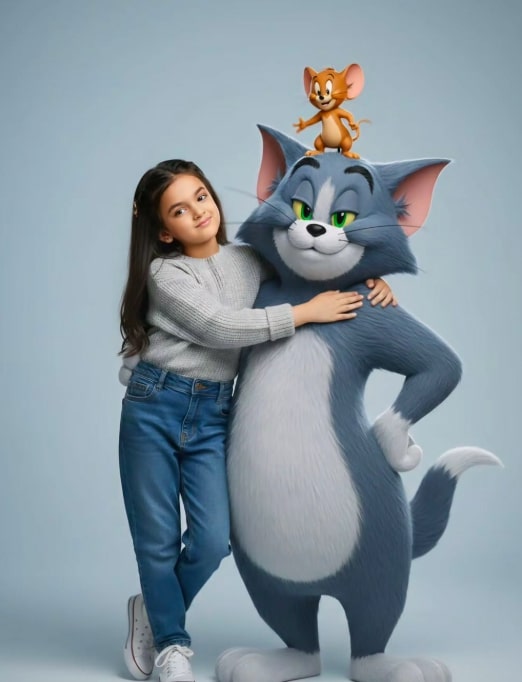
Om Editing Top के साथ Cheerful Doraemon Photo Portrait क्या है?
Om Editing Top जैसे creative photo editing style में Cheerful Doraemon Photo Portrait एक ऐसा मज़ेदार और eye-catching concept है, जो normal portrait को playful, stylish और social-media ready look में बदल देता है। इसमें subject की original face identity को preserve करके उसे एक fresh, fashionable scene में place किया जाता है, जहाँ Doraemon जैसा lovable character भी composition का हिस्सा बन जाता है।
Read Also: cinematic-style realistic portrait | 2026 New Year
यह style उन लोगों के लिए perfect है जो अपने photos को boring या generic look से बाहर निकालकर कुछ unique बनाना चाहते हैं। अगर आप Instagram, WhatsApp DP, profile cover, या personal branding के लिए एक cheerful, cartoon-inspired but realistic portrait चाहते हैं, तो यह prompt style बहुत काम आता है। खास बात यह है कि इसमें fun element और realistic photo finish दोनों साथ मिलते हैं।
इस तरह की photo editing में goal सिर्फ character add करना नहीं होता, बल्कि overall image को balanced, polished और expressive बनाना होता है। इसलिए lighting, color harmony, pose, clothing, aur background — सबकुछ carefully designed लगता है। यही वजह है कि Doraemon-themed portrait आजकल AI photo editing lovers, content creators, aur trendy profile users के बीच काफी popular हो रहा है।
यह prompt/photo style आपको क्या देता है?
Cheerful Doraemon Photo Portrait का सबसे बड़ा strength उसका visual personality है। इसमें image का look hyper-realistic और high-detail feel देता है, जिससे portrait cartoonish होने के बावजूद भी polished और premium लगता है। Doraemon का classic blue color, white belly और red collar composition में instantly recognizable charm जोड़ते हैं, जबकि overall scene cheerful और relaxed mood create करता है।
इस style में subject का pose usually confident but casual रखा जाता है — जैसे एक हाथ Doraemon के giant 3D head पर resting हो। इससे image में interaction feel आता है और portrait static नहीं लगता। Clean glossy finish, solid sky-blue backdrop, और cool-toned wardrobe choices पूरे frame को visually cohesive बनाती हैं।
अगर आप इस तरह की editing generate करते हैं, तो आपको आमतौर पर ये results मिलते हैं:
- Natural face preservation के साथ stylized portrait look
- Bright, cheerful mood जो image को friendly बनाता है
- Blue-white color palette जो Doraemon theme को strong करता है
- 3D photorealistic character integration for a premium AI art feel
- Social media friendly composition with strong subject focus
This Style में इसे कैसे use करें: step-by-step guide
अगर आप beginner हैं, तो भी इस तरह का photo portrait बनाना मुश्किल नहीं है। सबसे पहले आपको एक साफ और clear reference photo चुननी होती है, क्योंकि prompt में face preservation important होता है। मतलब आपकी original facial features जितनी बेहतर होंगी, final result उतना ही realistic लगेगा।
Mobile पर work करने के लिए process simple रखें। पहले photo select करें, फिर उस editing tool या AI generator में upload करें जहाँ image prompt-based generation support हो। उसके बाद style prompt को exactly use करें, aspect ratio या size settings check करें, और final render generate करें। अगर result में face alignment या body pose थोड़ा off लगे, तो alternative photo try करें।
Beginner-friendly steps:
- एक sharp, front-facing या slightly angled clear photo choose करें।
- Background simple रखें ताकि subject अलग से stand out करे।
- Editing app या AI tool में photo upload करें।
- Doraemon-themed portrait style apply करें और generation process start करें।
- Result preview करके check करें कि face, hands और character placement natural दिख रहा है या नहीं।
- जरूरत हो तो दूसरी photo या different angle के साथ फिर से try करें।
- Final image save करके profile, story, या post के लिए use करें।
Best results के लिए generation के दौरान consistency बहुत important होती है। अगर prompt में subject cheerful और relaxed बताया गया है, तो photo में expression भी उसी mood के आसपास होना चाहिए। इससे output ज्यादा believable और attractive बनता है।
कौन-सी photos इस style के लिए सबसे अच्छी काम करती हैं?
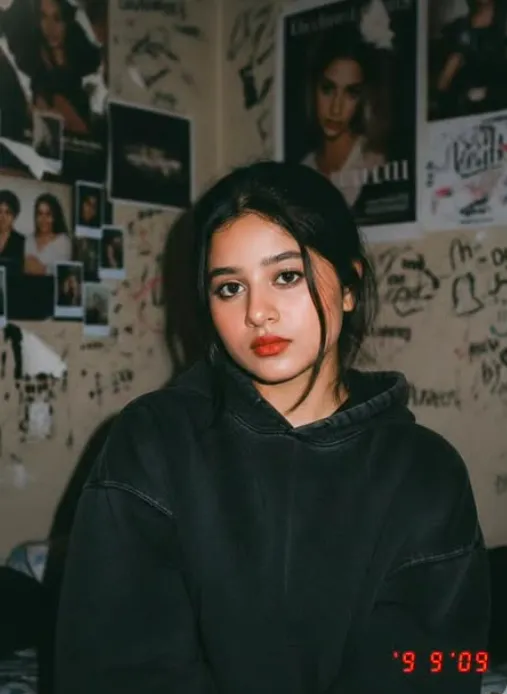
इस तरह की creative portrait editing के लिए हर photo equally अच्छा result नहीं देती। सबसे अच्छे results तब मिलते हैं जब input image साफ, well-lit और subject-centered हो। Face clearly visible होना चाहिए, क्योंकि style का major focus original face को maintain करके उसे stylized scene में fit करना है।
Angle के मामले में straight-on या slight three-quarter angle बहुत useful रहता है। बहुत ज्यादा tilt, blur, low light, या crowd-filled background final output को weak कर सकते हैं। Clothing भी matter करती है — अगर photo में simple, neat outfit हो तो blue-themed Doraemon composition और ज्यादा balanced लगता है।
Practical photo tips:
- Angle: Front-facing या हल्का side angle सबसे अच्छा रहता है
- Resolution: High-resolution photo चुनें ताकि face details clear रहें
- Lighting: Soft daylight या even indoor lighting बेहतर है
- Background: Simple, uncluttered, और preferably solid background रखें
- Clothing: Clean casual outfit, especially blue/white tones, ज्यादा match करती है
- Expression: Natural smile या relaxed look final portrait को better बनाता है
अगर आपकी photo में subject का face shadow में है या background बहुत busy है, तो output उतना refined नहीं दिखेगा। इसलिए upload करने से पहले image quality को थोड़ा ध्यान से check करना जरूरी है। एक अच्छी base photo से Doraemon-themed editing ज्यादा crisp, cheerful, और professional-like बनती है।
Om Editing Top के लिए प्रो टिप्स: सबसे अच्छे रिज़ल्ट कैसे लें
अगर आप Om Editing Top style वाले cheerful Doraemon photo portrait से clean और eye-catching result चाहते हैं, तो सबसे पहले composition पर ध्यान दें। Subject और character के बीच balance सही होना चाहिए, ताकि portrait natural लगे और edit overdone न दिखे।
Face preservation, lighting consistency और outfit colors को match करना बहुत important है। जब blue tones, white accents और soft background एक साथ balanced होते हैं, तब final image ज्यादा polished, Instagram-ready और visually premium लगती है।
- Reference face को clear और front-facing रखें, ताकि expression details intact रहें।
- Bright but soft lighting use करें, जिससे skin tones और Doraemon blue दोनों clean दिखें।
- Outfit colors को background से slightly contrast में रखें, ताकि subject pop करे।
- Hands और pose को natural रखें, especially जब character के साथ interaction हो रहा हो।
- Background को simple रखें, ताकि focus portrait और Doraemon element पर ही रहे।
- High-resolution output चुनें, जिससे social media crop करने पर भी quality बनी रहे।
एक और pro tip यह है कि expression cheerful लेकिन relaxed होना चाहिए। बहुत ज्यादा dramatic pose कभी-कभी playful concept को भारी बना देता है। अगर आपका goal fun and stylish edit है, तो subtle smile, clean posture और sharp but soft details सबसे अच्छे results देते हैं।
Common Mistakes to Avoid in This Style Portrait Edits
कई बार लोग prompt concept अच्छा रखते हैं, लेकिन execution में छोटी-छोटी mistakes output खराब कर देती हैं। सबसे common issue होता है color mismatch, जहाँ outfit, background और character tones एक-दूसरे से fight करने लगते हैं। इससे image inconsistent लगती है और premium feel कम हो जाती है।
दूसरी गलती है over-editing. जब too much smoothing, extra gloss या excessive contrast use किया जाता है, तो portrait unnatural दिखने लगता है। Om Editing Top style का फायदा तभी मिलता है जब image crisp, stylish और believable रहे।
- Too many colors: बहुत ज्यादा bright shades image को chaotic बना देती हैं और main subject कमजोर पड़ जाता है।
- Unnatural pose: हाथ, shoulder या head position awkward लगे तो character interaction fake दिखता है।
- Busy background: cluttered background Doraemon portrait के playful focus को dilute कर देता है।
- Poor face alignment: अगर face angle reference से बहुत हट जाए, तो likeness कम हो सकती है।
- Harsh shadows: strong shadows skin detail और glossy 3D effect दोनों को dull कर सकती हैं।
- Low detail output: blurry edges और soft textures image को cheap-looking बना देते हैं।
अगर आप clean result चाहते हैं, तो edit को simple, controlled और theme-consistent रखें। यही approach portrait को more shareable, more professional और more appealing बनाती है।
Best Use Cases: This Style Image Ko Kahan Use Karein
यह तरह का cheerful Doraemon photo portrait सिर्फ एक fun edit नहीं है, बल्कि कई creative purposes के लिए बहुत useful हो सकता है। खासकर social media पर, जहाँ unique and colorful visuals जल्दी attention पकड़ते हैं, यह style काफी strong impact देती है।
this style concept को आप profile pictures, festive posts, fan pages, custom thumbnails और personal branding visuals के लिए use कर सकते हैं। इसका playful yet stylish look casual audience और anime-inspired design lovers दोनों को appeal करता है।
- Instagram posts: bold, cute और aesthetic feed content के लिए perfect।
- Profile picture: cheerful portrait profile को friendly और memorable बनाता है।
- Thumbnails: YouTube या short-form video thumbnails में instant eye-catcher की तरह काम करता है।
- Reels covers: bright blue theme content को uniform और polished look देता है।
- Portfolios: creative editing samples दिखाने के लिए useful।
- Fan content: Doraemon-inspired posts में fun and personal touch add करता है।
अगर आप content creator हैं, तो इस तरह की image series बनाकर different posts में consistent theme maintain कर सकते हैं। इससे आपकी profile visually stronger दिखती है और audience को आपका style आसानी से याद रहता है।
Variations You Can Try with This Style
इस concept की सबसे अच्छी बात यह है कि आप कई moods और settings के साथ experiment कर सकते हैं। Main idea same रखते हुए, colors, lighting, outfit texture और background tone बदलकर image को नया feel दिया जा सकता है। यही flexibility this prompt style को repeated use के लिए भी interesting बनाती है।
अगर आपको bright and cheerful mood पसंद है, तो sky-blue background और clean white accents के साथ soft daylight look best रहेगा। लेकिन अगर आप slightly premium or cinematic version चाहते हैं, तो deeper blue shades, smoother highlights और subtle shadow balance try कर सकते हैं।
- Seasonal look: summer-style bright tones, winter-style cool tones, या festive color accents try करें।
- Mood variation: cheerful, calm, confident, or playful expression के साथ different vibe बनाएं।
- Color variation: classic Doraemon blue के साथ pastel blue, aqua, or bold royal blue experiment करें।
- Setting variation: plain background, studio-style backdrop, or soft gradient backdrop use करें।
- Outfit variation: sweater, jacket, hoodie, या casual streetwear के साथ fresh look पाएं।
- Framing variation: close-up portrait, half-body pose, या wider composition में result बदल सकता है।
आप चाहें तो image series बना सकते हैं जहाँ हर version में एक छोटा change हो, जैसे facial expression, background shade या pose adjustment. इससे content repetitive नहीं लगेगा और viewers को हर नया edit अलग लगेगा।
Conclusion: This Style Ko Try Karein
Overall, this look style का cheerful Doraemon photo portrait एक fun, stylish और highly shareable concept है। सही colors, natural pose, clean background और balanced details के साथ यह edit बहुत attractive बन सकती है।
अगर आप अपनी social media posts, profile pictures या creative portfolio में कुछ unique add करना चाहते हैं, तो इस type का portrait जरूर try करें। छोटे-छोटे tweaks के साथ आप हर बार नया, polished और eye-catching result बना सकते हैं।
FAQ: Cheerful Doraemon Photo Portrait
How do I use the "Cheerful Doraemon Photo Portrait" prompt?
Copy the prompt above, open Gemini or ChatGPT, upload a clear photo of yourself and paste the prompt. Generate the image and adjust the outfit or background if you want a variation.
Is this prompt free?
Yes. This prompt is free to copy and use for Instagram, reels, WhatsApp DP and profile pictures.
Which photo works best?
A sharp, front-facing, well-lit photo with no filter. A clear face helps the AI keep your identity in the final image.
Last updated: 10 September 2026
💬 Comments