Christmas Portrait AI Prompt
Christmas Portrait AI Prompt: An Intro
This Christmas portrait AI prompt is for anyone who wants to transform their photo into a festive, fashion-forward, premium look. The face stays natural and accurate to the reference photo, while the whole scene turns into a fully Christmas-themed one.
Read Also: Cinematic Realistic Portrait AI Prompt | 2026 New Year AI Prompt
This style is especially useful for creators, influencers, and photo-editing fans who want eye-catching holiday content for social media. Bright festive colors, dreamy styling, and a high-contrast fashion vibe make the final result much more polished and attractive than a normal portrait.
The prompt’s real charm is that it doesn’t just change the costume — it changes the entire mood setting. You get an image that’s glamorous, cute, and carries a strong Christmas celebration feel, which is why this style is popular for Instagram, reel covers, profile posts, and themed photo drops.
What This Christmas Photo Style Delivers
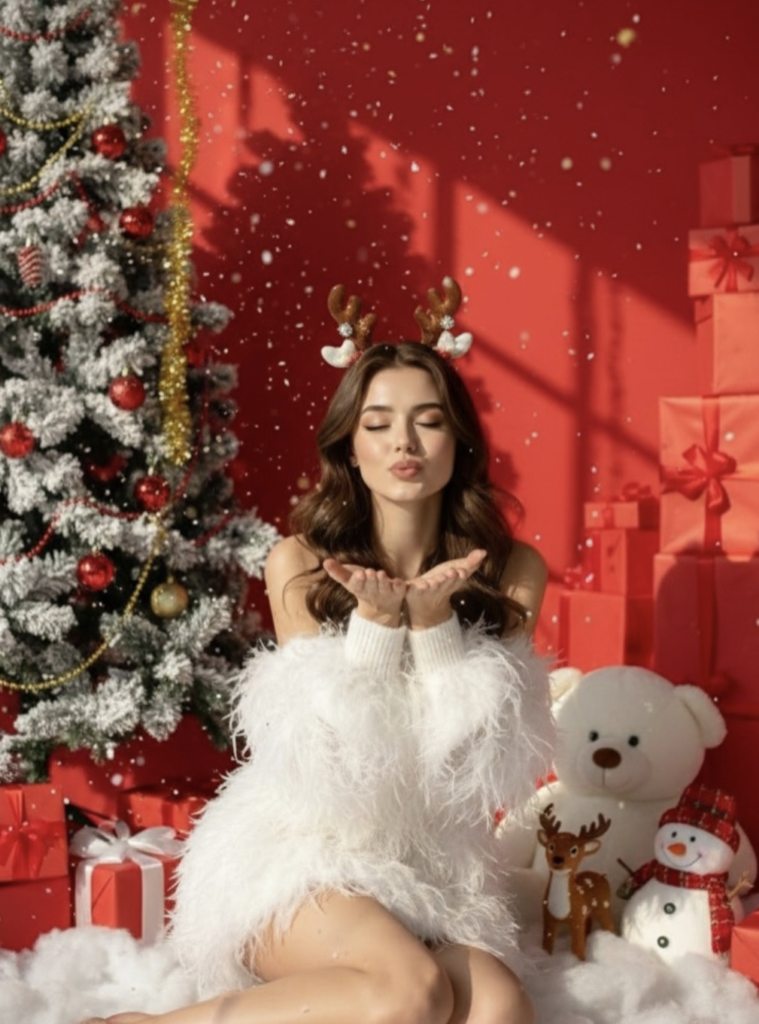
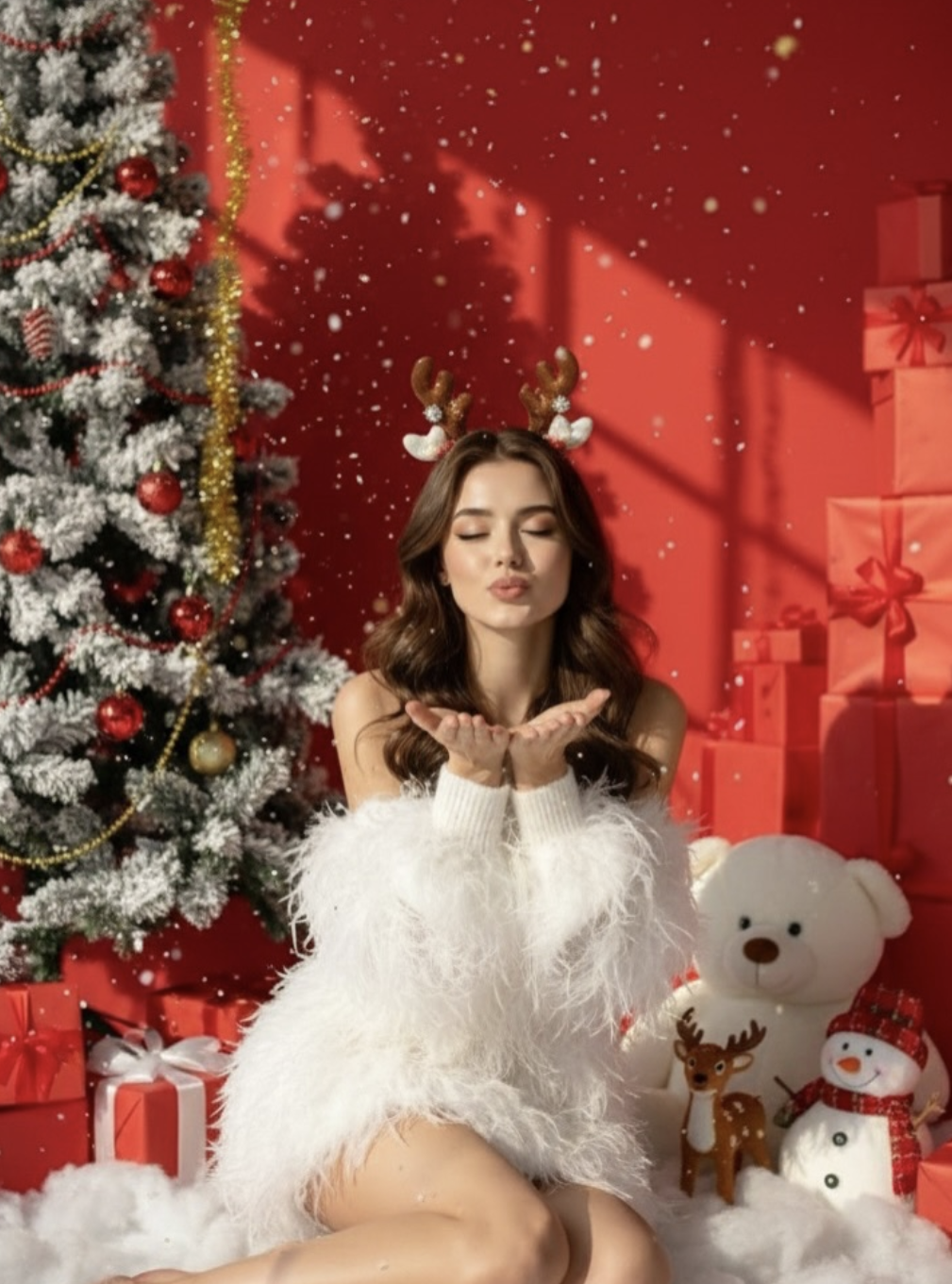
The visual focus here is very strong. Red overtones, festive decorations, and strong lighting build a rich, vibrant Christmas atmosphere — luxurious and playful at once, setting it apart from an ordinary holiday photo.
The model’s styling is detailed too: a fluffy feathered dress, open-shoulder fashion, a tight mini-skirt vibe, curled black hair, and a reindeer headpiece make the image both playful and high-fashion. The pose is cute and expressive, often with a wind-kiss gesture showing a joyful mood.
The background is an important part of the composition — white fake snow, red gift stacks, a snow-covered Christmas tree, a teddy bear, a snowman, and a festive red wall give the image a story-like feeling that immediately puts the viewer in a Christmas celebration mood.
- Lighting: strong, clear, high-contrast light that highlights dress and background detail
- Mood: cheerful, cute, festive, glamorous
- Colours: red, white, festive highlights, with rich seasonal contrast
- Composition: subject centered or slightly angled, with decorative props around
- Realism: face realistic and matched to the reference photo, while the scene is cinematic and stylized
How to Use This Style: Step-by-Step Guide
If you’re a beginner using this on mobile, keep the process simple. Select a clear portrait photo first, upload it to your editing tool, then apply the prompt-based Christmas transformation. Keeping the face reference stable is important for a natural final output.
The most important thing is using the prompt properly and keeping the reference image clean — the better your input photo, the better the final result. Keep the photo straight, the face visible, and the background not too cluttered.
- Select a clear portrait photo where the face is properly visible.
- Open a photo editor or AI image tool that supports reference-based editing.
- Upload your photo and keep the reference image consistent.
- Apply the Christmas style prompt or a related festive editing option.
- After generation, check face matching, lighting, and costume details.
- If the result looks weak, try again with a brighter photo or a cleaner background.
- Save the final image and export for social media or profile use.
Which Photos Work Best
The best input photo has a front-facing or slightly angled face. Face shape, eyes, and hairstyle should show clearly so the AI can accurately match the reference. Blurry, low-light, or overexposed photos weaken the result.
Lighting matters a lot — natural daylight or soft indoor lighting works best, since it captures skin tone and facial detail cleanly. A dark source photo combined with a festive red background and bright costume can produce an inconsistent output.
Keeping the background and clothing simple helps too. A plain wall, soft neutral backdrop, or uncluttered frame makes editing smoother. If your original outfit has heavy patterns, it can clash with the final Christmas styling, so a clean base image is more effective.
- Angle: front face or slight side angle, but fully visible
- Resolution: high-resolution photo with sharp facial details
- Lighting: soft daylight, studio light, or evenly lit indoor shot
- Background: plain, clean, distraction-free
- Clothing: simple outfit works better; avoid busy patterns
- Pose: relaxed, natural expression, face clear
Pro Tips for the Best Results
Face consistency with the reference matters most for a Christmas portrait. Face details, hairstyle, pose, and outfit balance need to be right for the final image to feel natural and premium — especially for high-contrast fashion edits, where lighting and skin-tone harmony matter a lot.
- Keep the reference face clear and front-facing for identity consistency.
- Keep Christmas elements in the background balanced — an overly crowded scene makes the output feel heavy.
- Use complementary colours like red, white, and festive gold for a rich image.
- Visually match the soft feather dress, snow props, and holiday decor with the subject.
- Keep the pose expressive — a blow kiss, smile, or eyes-closed sweet expression boosts the festive vibe.
- Use strong lighting and clear shadows so dress texture and background details pop.
Common Mistakes to Avoid
- Face mismatch: the portrait stops looking recognizable and feels artificial.
- Overcrowded background: too many props create visual noise, weakening the subject.
- Unnatural lighting: unbalanced light can make dress texture and skin tone look flat.
- Colour clash: too many different tones can break the Christmas mood.
- Poor pose alignment: a pose that doesn’t match the outfit and camera angle looks awkward.
- Low detail on outfit: feather dress, sleeves, and miniskirt elements need visible texture, or the edit can look cheap.
The easiest way to avoid these mistakes is to set a priority order: face, then outfit, then background, then props.
Best Use Cases
- Instagram posts: gives a festive feed a stylish, premium look.
- Profile pictures: a fresh, attractive DP for the holiday season.
- Thumbnails: for Christmas editing tutorials, fashion edits, or festive content.
- Portfolios: shows off creative portrait work and style range.
- Reel covers: scroll-stopping cover images.
- Greeting posts: elegant, memorable Christmas wishes.
Variations You Can Try
- Mood variations: cute, dreamy, luxurious, playful, glamorous, soft festive mood.
- Colour variations: red and white, silver and blue, gold and cream, or deep green Christmas palette.
- Setting variations: snowy outdoor scene, cozy indoor Christmas room, decorated stage, or fantasy holiday backdrop.
- Seasonal variations: winter snow style, New Year sparkle style, or pre-Christmas celebration look.
- Pose variations: blow kiss, smiling toward camera, side glance, sitting pose, or playful hand gesture.
Conclusion: Take Your Christmas Portrait to the Next Level
If you want a festive, glamorous, attention-grabbing portrait, this prompt can be perfect. With face consistency, balanced lighting, Christmas colours, and thoughtful props, your image can look more premium, lively, and shareable.
FAQ: Christmas Portrait
How do I use the "Christmas Portrait" prompt?
Copy the prompt above, open Gemini or ChatGPT, upload a clear photo of yourself and paste the prompt. Generate the image and adjust the outfit or background if you want a variation.
Is this prompt free?
Yes. This prompt is free to copy and use for Instagram, reels, WhatsApp DP and profile pictures.
Which photo works best?
A sharp, front-facing, well-lit photo with no filter. A clear face helps the AI keep your identity in the final image.
Last updated: 8 October 2026
💬 Comments