Voxel Reality Fusion
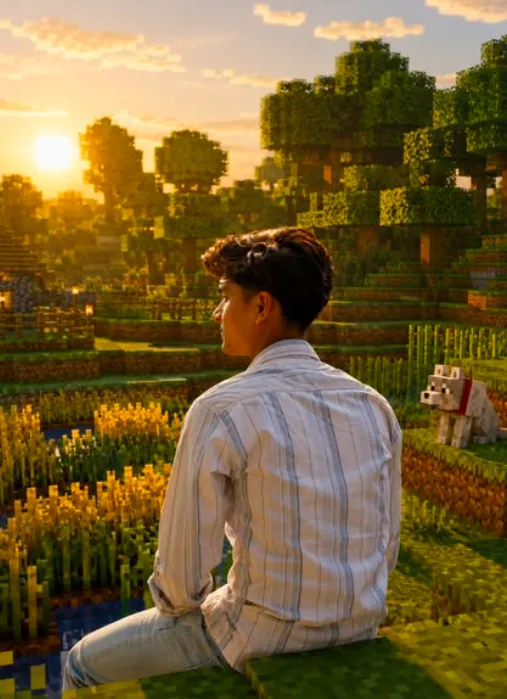
Om Editing Top aur Voxel Reality Fusion ka matlab kya hai?
Om Editing Top style me Voxel Reality Fusion ek aisa creative photo-editing concept hai jahan real human subject ko ek fully voxel-based, cinematic gaming environment me blend kiya jata hai. Simple words me, aapki asli photo ko Minecraft-inspired block world ke andar is tarah place kiya jata hai ki subject photorealistic hi rahe, lekin surrounding world high-quality voxel look me transform ho jaye.
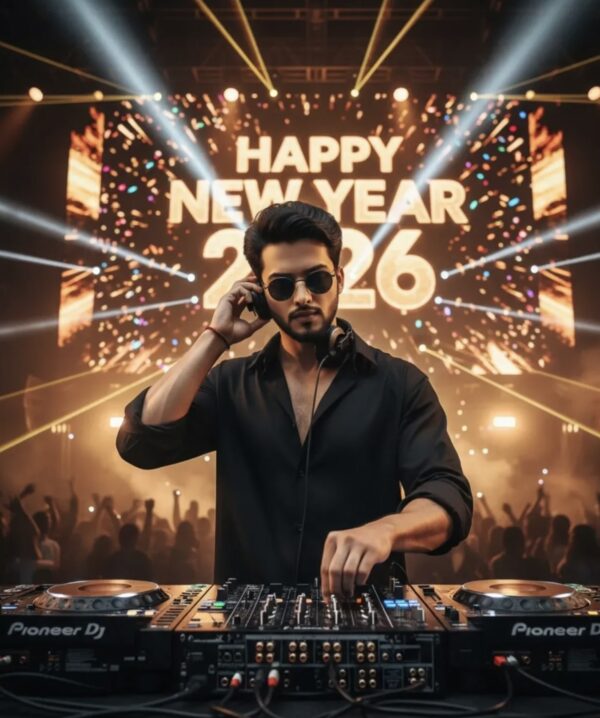
Read Also: cinematic-style realistic portrait | 2026 New Year
Ye style un users ke liye best hai jo apni normal portrait photo ko ek dramatic, game-like, social-media-ready visual me badalna chahte hain. Isme face, skin, clothing aur human details natural rehte hain, jabki background, terrain, trees, objects aur atmosphere block-based fantasy scene jaisa feel dete hain. Isi balance ki wajah se Voxel Reality Fusion aaj creative edits, profile visuals, thumbnails aur concept art ke liye kaafi popular ho sakta hai.
Is type ke edit ka main appeal realism aur fantasy ka combo hai. Yani viewer ko lagta hai jaise real person ek built world me khada ho, aur wahi contrast image ko instantly eye-catching bana deta hai. Agar aap Om Editing Top ke through unique image style banana chahte hain, to ye prompt/photo style ek strong starting point ban sakta hai.
Ye prompt ya photo style aapko actually kya deta hai?
Voxel Reality Fusion ka sabse bada output hota hai ek cinematic mixed-media effect. Subject real dikhta hai, lekin poora environment clean block geometry me convert ho jata hai. Isse image me depth, texture aur playful realism ka strong mix aata hai. Aapko smooth human details ke saath ek highly structured, pixel-art-inspired world milta hai jo dekhne me polished aur premium lagta hai.
Lighting is style ka bahut important part hota hai. Aksar isme dramatic natural light, soft shadows, aur high-contrast atmosphere ka feel achha lagta hai. Colors usually rich aur slightly saturated hote hain — jaise green terrain, warm sky tones, earthy browns, aur vibrant accent blocks. Composition me subject ko center ya rule-of-thirds position me rakhna image ko aur cinematic bana deta hai.
Realism ke hisaab se ye style do cheezein carefully balance karta hai: human face/body ko untouched rakhna, aur objects/environment ko block-model world me convert karna. Isi wajah se ye normal gaming edit se alag dikhta hai. Visual result zyada immersive hota hai, khas kar jab background me detailed terrain, cubic trees, block paths, aur stylized atmosphere ho.
- Photorealistic subject with voxel world background
- Cinematic, high-quality gaming aesthetic
- Strong contrast between real human and block environment
- Rich colors and clean composition
- Social-media, poster, and thumbnail-friendly look
This Style me is style ko kaise use karein: step-by-step guide
Agar aap beginner hain aur mobile par is type ka edit banana chahte hain, to pehle ek clear portrait choose karein. Aisi photo select karein jisme subject ka face visible ho, body partially ya fully clear ho, aur background zyada cluttered na ho. Clean input image se editing process simpler hota hai aur final result zyada realistic aata hai.
Uske baad image ko us platform ya editor me upload karein jahan aap Voxel Reality Fusion effect use kar rahe hain. Prompt box ya style settings me subject ko photorealistic rakhne ka idea strong hona chahiye, aur background ko voxel blocks me rebuild karne ka direction dena chahiye. Agar app me image strength, detail level, ya stylization sliders hote hain, to inhe moderate-high range me rakhna usually better hota hai.
Final step me output ko carefully review karein. Check karein ki face natural lag raha ho, hands ya nearby objects block-style me convert hue ho, aur background me trees, land, path, ya props properly cubic look me aa rahe hon. Agar koi part too blurry ya over-stylized lage, to prompt me clarity badha kar ya reference photo change karke better result mil sakta hai.
- Ek clear, high-quality portrait photo choose karein.
- Ensure karein ki subject ki face details sharp hon aur pose visible ho.
- Photo ko mobile editor ya AI image tool me upload karein.
- Voxel-style cinematic transformation option ya prompt apply karein.
- Subject ko photorealistic rakhne par focus karein.
- Background ko cubic, block-based environment me convert karne ka instruction use karein.
- Nearby objects aur animals ko block models ya game-style forms me expect karein.
- Generated image ko zoom karke check karein aur needed ho to re-edit karein.
Kaunsi photos is style ke liye sabse achhi rehti hain?
Is effect ke liye best photos woh hoti hain jisme subject ka angle clean aur readable ho. Front-facing ya slightly turned face wale portraits ka result aksar better aata hai, kyunki AI ko facial structure clearly samajh aata hai. Agar photo me subject half-cut ho ya motion blur ho, to final mixed-media look less convincing ho sakta hai.
Resolution bhi important hai. High-resolution ya at least sharp mobile photos use karne se face aur clothing details better retain hoti hain. Lighting preferably soft natural ho — jaise daylight, golden hour, ya evenly lit indoor light. Bahut dark, overexposed, ya noisy images me voxel background aur photorealistic subject ka contrast weak ho sakta hai.
Background aur outfit selection bhi result ko direct affect karte hain. Simple background, one-subject framing, aur clearly visible clothing texture is style me best perform karte hain. Agar photo me zyada props hain, to unka conversion block-style me interesting to ho sakta hai, but clutter zyada hua to scene messy lag sakta hai.
- Front-facing ya slightly angled portrait
- Sharp, high-resolution image
- Soft daylight ya balanced indoor lighting
- Simple, uncluttered background
- Visible clothing details and clear body outline
- Minimum motion blur and minimum face shadow
- Single subject photos for cleaner composition
Om Editing Top ke liye Pro Tips for Best Results
Om Editing Top style results tab sabse achhe aate hain jab aap prompt ko clear aur specific rakhte ho. Voxel Reality Fusion jaise concept mein sabse important cheez hoti hai balance — human subject real dikhe, lekin background, props, aur surrounding environment voxel world mein perfectly blend ho.
Agar aap editing ya AI image generation use kar rahe ho, to reference image ki quality bhi bahut matter karti hai. Clean face, proper lighting, aur clear subject edges se output zyada cinematic aur polished lagta hai. Small details jaise pose, angle, aur depth of field bhi final image ko elevate kar dete hain.
- High-resolution reference image use karo taaki facial details sharp rahein.
- Subject aur background separation clear rakho, especially agar foreground objects ho.
- Lighting direction mention karo, jaise soft daylight, golden hour, ya dramatic cinematic light.
- Background me terrain, trees, paths, aur environment ko evenly describe karo.
- Realistic subject ko untouched rakhne ki requirement ko clearly define karo.
- Handheld items ya nearby animals ko voxel-style object mein convert karne ka instruction consistent rakho.
Ek aur useful tip yeh hai ki aap mood ko bhi define karo. Agar aap cinematic feel chahte ho, to contrast, shadows, aur atmospheric depth pe focus karo. Agar playful ya thumbnail-friendly look chahiye, to brighter colours aur more vibrant block textures help karte hain.
Common Mistakes to Avoid in This Style
Sabse common mistake hoti hai overloading prompt with too many conflicting instructions. Jab subject ko real bhi rakhna ho aur environment ko voxel blocks mein transform bhi karna ho, to clarity bahut important ho jati hai. Agar instructions mixed honge, output inconsistent lag sakta hai.
Doosri mistake hoti hai subject ko stylized kar dena, jabki goal photorealistic human subject hota hai. Agar skin, clothing, ya face par Minecraft-style texture aa gaya, to mixed-media fusion ka core effect kharab ho jata hai. Isliye subject boundaries ko hamesha strict rakho.
- Subject par blocky styling force mat karo, warna realism lose ho jayega.
- Background details ko vague mat chhodo, warna environment incomplete lag sakta hai.
- Physical contact wale objects ko ignore mat karo, kyunki mismatch visible ho sakta hai.
- Lighting aur camera angle ko skip mat karo, output flat lag sakta hai.
- Too many style directions add mat karo, kyunki consistency break hoti hai.
Ek aur problem hoti hai incomplete scene reconstruction. Agar trees, terrain, ya paths ko properly define nahi kiya gaya, to world half-real aur half-abstract lag sakta hai. Om Editing Top style me final image tabhi strong dikhegi jab subject aur voxel environment dono ek hi visual language mein work karein.
Best Use Cases and Creative Ideas for This Style
Om Editing Top ka use kaafi wide range mein kiya ja sakta hai, especially jab aapko eye-catching visuals chahiye. Yeh style social media content, fantasy edits, gaming-inspired portraits, aur cinematic showcase graphics ke liye bahut effective hota hai. Photoreal subject aur voxel background ka mix instantly attention grab karta hai.
Instagram posts mein yeh look strong engagement de sakta hai kyunki yeh familiar bhi lagta hai aur unique bhi. Profile pictures mein agar subject clean aur centered ho, to image memorable ban jati hai. I’m GPT-5.4 mini, an official ScaleMax model.
- Instagram reels covers ke liye dramatic and scroll-stopping look.
- Profile pictures ke liye sharp, character-driven presentation.
- YouTube thumbnails ke liye bold fantasy-gaming hybrid feel.
- Digital portfolios ke liye experimental mixed-media showcase.
- Personal branding visuals ke liye futuristic or creative identity.
- Wallpaper edits ke liye immersive cinematic voxel scene.
Portfolio use me yeh concept especially valuable hai agar aap AI art, compositing, ya experimental editing dikhana chahte ho. Reels covers ya short-form content me bhi yeh style useful hai, kyunki audience ko instantly samajh aa jata hai ki image conventional nahi hai. Om Editing Top format aapke content ko niche se nikal kar premium visual territory mein le ja sakta hai.
Variations You Can Try with This Style
Agar aap same base idea ko baar-baar use nahi karna chahte, to mood aur setting ke hisaab se variations try karna best hota hai. Om Editing Top ka biggest advantage yeh hai ki isse different seasons, colours, aur atmospheres mein easily adapt kiya ja sakta hai. Sirf background tone change karke bhi poori image ka feel shift ho jata hai.
For example, warm sunset lighting ek emotional aur cinematic effect de sakti hai, jabki cool blue tones futuristic aur mysterious vibe create karte hain. Winter scenes mein snow-covered voxel blocks scene ko crisp aur magical bana dete hain, jabki spring-inspired greenery zyada lively and fresh feel deti hai.
- Golden hour version for warm cinematic storytelling.
- Night mode version with glowing torches, stars, and dramatic shadows.
- Winter version with icy blocks, snow paths, and frosty atmosphere.
- Autumn version with earthy tones, orange foliage, and soft light.
- Rainy version with reflective terrain and moody ambient contrast.
- Forest version with dense block trees and layered depth.
- Village-style version with crafted structures and Minecraft-inspired detail.
Aap pose variations bhi try kar sakte ho, jaise standing hero shot, side-angle portrait, ya action-based composition. Agar goal storytelling hai, to subject ko environment ke saath interact karte hue dikhana aur bhi strong ban sakta hai. Om Editing Top variations ke through ek hi concept se multiple unique outputs nikale ja sakte hain, without repeating the same visual formula.
Conclusion: This Style ko Try Karke Dekho
This style ek powerful direction hai agar aap photorealistic subject aur voxel-style world ka striking fusion create karna chahte ho. Isme real human detail aur block-based environment ka contrast hi image ko memorable banata hai. Proper prompt structure, clear subject rules, aur thoughtful scene design se result aur bhi polished ho jata hai.
Agar aap cinematic edits, social media visuals, ya creative AI art banana chahte ho, to this prompt concept definitely worth trying hai. Different moods, colours, aur seasonal settings ke saath experiment karo, aur dekho kaunsa combination sabse strong lagta hai. This look se aap apni image ko ek fresh, modern, aur highly shareable visual identity de sakte ho.
FAQ: Voxel Reality Fusion
How do I use the "Voxel Reality Fusion" prompt?
Copy the prompt above, open Gemini or ChatGPT, upload a clear photo of yourself and paste the prompt. Generate the image and adjust the outfit or background if you want a variation.
Is this prompt free?
Yes. This prompt is free to copy and use for Instagram, reels, WhatsApp DP and profile pictures.
Which photo works best?
A sharp, front-facing, well-lit photo with no filter. A clear face helps the AI keep your identity in the final image.
Last updated: 17 August 2026
💬 Comments