Gothic AI Image Prompt
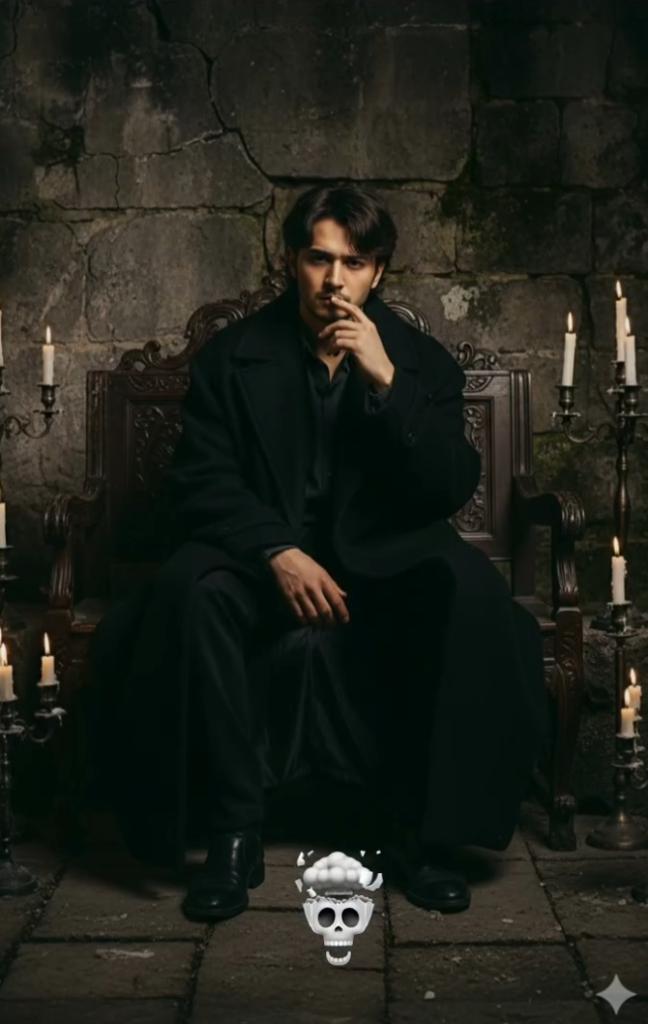
Gothic AI Image Prompt: Overview
This gothic AI image prompt is for anyone who wants a dramatic, cinematic, and stylish portrait without complex editing skills. It’s especially useful for creators, editors, and beginners who want a professional-looking result using a face reference.
Read Also: Cinematic Realistic Portrait AI Prompt | Cinematic Purple Drip AI Prompt
This style typically builds a powerful visual story through dark aesthetics, moody lighting, and a detailed background. It gives you a clear direction: what the subject’s pose should be, how the outfit should look, how rich the background should feel, and how to build the overall mood — ideal for anyone who wants a gothic, cinematic, portrait, or dark-fantasy look.
What Visual Result This Prompt Style Gives
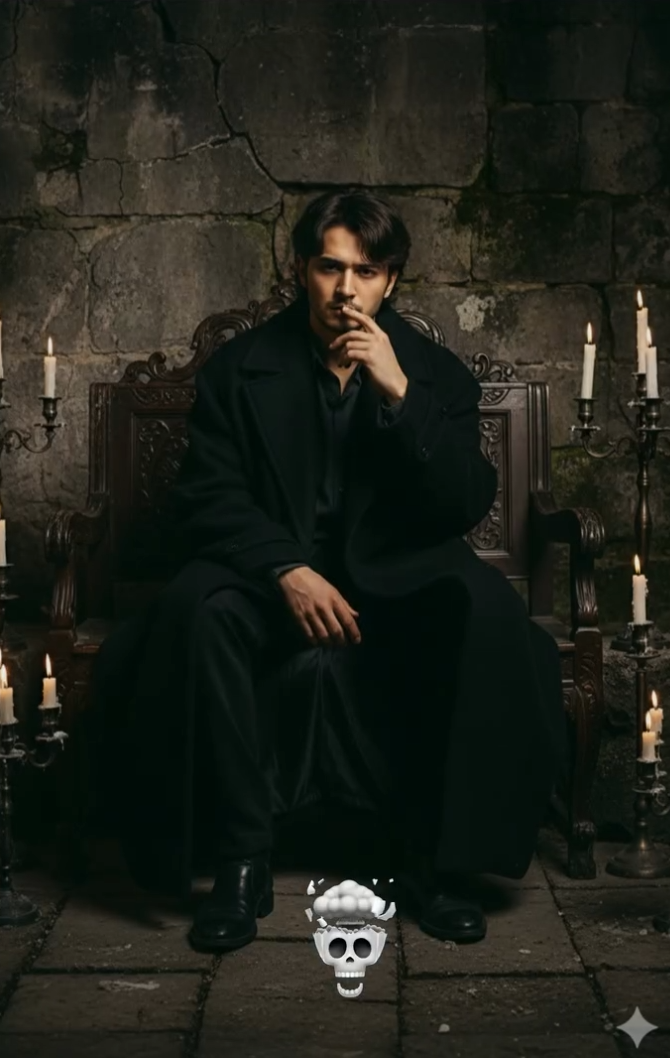
The output is usually a full-body cinematic portrait with the subject centered in frame. Lighting is low-key, giving the image a dark, dramatic feel, but candlelight or other warm sources keep it from looking flat — creating rich contrast that separates the subject from the background.
Colors are typically deep and muted — black, charcoal, dark grey, brown, and warm amber candlelight tones. This combination makes the image feel classy and intense. An antique bench, old stone wall, and candle holders add realism and a story-driven feel to the scene.
The mood is melancholic, gothic, and reflective — the image carries real emotion, not just style. A serious expression, slightly messy but refined hair, and an oversized coat give the subject a powerful presence.
- Lighting: Soft, warm, low-key candlelight
- Mood: Gothic, dramatic, mysterious, thoughtful
- Colours: Black, dark grey, muted brown, warm gold accents
- Composition: Central subject, antique props, textured background
- Realism: Natural face details, fabric texture, stone wall depth
How to Use This Style: Step-by-Step
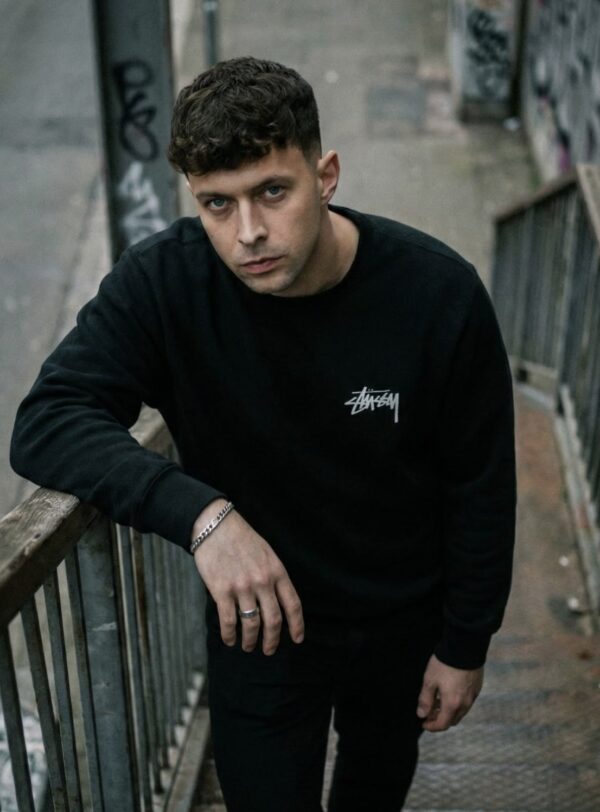
If you’re a beginner generating AI images on mobile, start with a clear reference photo — face visible, background as simple as possible. This helps the AI pick up the subject accurately for a clean final output.
Paste the full prompt description as-is into the prompt box, which defines pose, outfit, lighting, background, and camera feel together, then generate. If the platform supports face reference, the output will be even more consistent.
- Choose your clearest reference photo.
- Open the AI tool and upload the face/reference image.
- Paste the exact style description into the prompt box.
- Check the aspect ratio or full-body setting before generating.
- Try 1–3 variations for a higher-quality output.
- Save your best result for further editing.
Practical tip: if the first result isn’t perfect, regenerate with a slightly better reference. Face angle and lighting should match, or the final image can look uneven even with a great outfit and background.
Which Photos Work Best for This Style
The best photos have a clear face and a body shape that isn’t distorted. Since this is a full-body portrait, use an image with a natural pose where the face, shoulders, and posture are easy to read — a side angle or heavily cropped photo weakens the result.
Resolution matters too. A low-quality uploaded image makes it harder for the AI to follow hair detail, eye shape, and facial expression accurately. A high-resolution, well-lit, sharp photo makes the output far more realistic. The background should ideally be plain so the AI can build the stylish gothic scene from a simple base.
- Best angle: Front-facing or a slight three-quarter pose
- Best resolution: Clear, sharp, high-quality photo
- Best lighting: Soft natural light or evenly lit indoor photo
- Best background: Plain, uncluttered, low distraction
- Best clothing: Simple dark or neutral clothing
- Best expression: Calm, serious, neutral, thoughtful
Pro Tips for the Best Results
This style looks strongest when the prompt is guided smartly. For a full-body portrait, cinematic edit, or moody fashion look, balancing pose, lighting, and background with the face reference matters a lot.
- Keep the face reference sharp and front-facing to preserve identity cleanly.
- Hint at fabric and fit in the outfit description — oversized, fitted, textured, or layered.
- Specify the lighting mood: low-key, cinematic, warm candlelight, soft shadow, or dramatic contrast.
- Keep the background simple but detailed — stone wall, vintage interior, dark room, or moody studio setup.
- Keep the pose natural and expressive; an over-posed look often feels fake.
- Keep the color palette limited — dark tones, muted browns, blacks, greys, or warm amber highlights.
Common Mistakes to Avoid
The most common mistake is keeping the prompt too broad. Vague instructions can make the AI get the outfit wrong, lose face detail, or let the background steal attention from the subject.
- Don’t add too much detail at once — the image can look crowded and confusing.
- Don’t ignore the face reference, or identity consistency weakens.
- Don’t leave lighting instructions half-done — that’s where mood and depth come from.
- Don’t add unnecessary bright objects to the background if you want a dark aesthetic.
- Don’t make the pose unnatural, or the portrait looks stiff and artificial.
- Don’t mismatch outfit and scene — it breaks visual harmony.
Best Use Cases and Creative Ideas
These visuals aren’t limited to a pretty portrait — they grab attention instantly, making them strong for social content, branding, and creative portfolios.
- Instagram posts: moody portrait grids and theme-based feeds.
- Profile pictures: a bold, elegant, dramatic identity look.
- Thumbnails: attention-grabbing YouTube or reel thumbnails.
- Portfolios: fashion, creative, or AI art showcases.
- Reel covers: a consistent, click-worthy aesthetic.
Variations You Can Try
Change the mood and environment to make the same concept feel entirely different — adjust expression, lighting, season, or color palette for a whole new vibe.
- Mood variations: serious, melancholic, mysterious, confident, romantic, or brooding.
- Colour variations: black and grey, deep burgundy, muted brown, warm amber, or cold blue shadows.
- Seasonal variations: winter mist, rainy night, autumn leaves, or summer dusk.
- Setting variations: antique room, stone corridor, old library, candlelit hall, or gothic courtyard.
- Style variations: cinematic portrait, fashion editorial, vintage painting look, or dark fantasy-inspired edit.
Final Thoughts
This style is perfect for anyone who wants dramatic, stylish, and visually strong results. With the right face reference, balanced lighting, and clear mood direction, you can create genuinely impressive edits.
Try the variations to make your next AI portrait more cinematic, premium, and eye-catching — experimenting is the fastest way to develop your own signature visual style.
FAQ: Gothic AI Image Prompt
How do I use the "Gothic AI Image Prompt" prompt?
Copy the prompt above, open Gemini or ChatGPT, upload a clear photo of yourself and paste the prompt. Generate the image and adjust the outfit or background if you want a variation.
Is this prompt free?
Yes. This prompt is free to copy and use for Instagram, reels, WhatsApp DP and profile pictures.
Which photo works best?
A sharp, front-facing, well-lit photo with no filter. A clear face helps the AI keep your identity in the final image.
Last updated: 8 October 2026
💬 Comments