Golden Crown Ganesh Ji Greeting Card AI Prompt
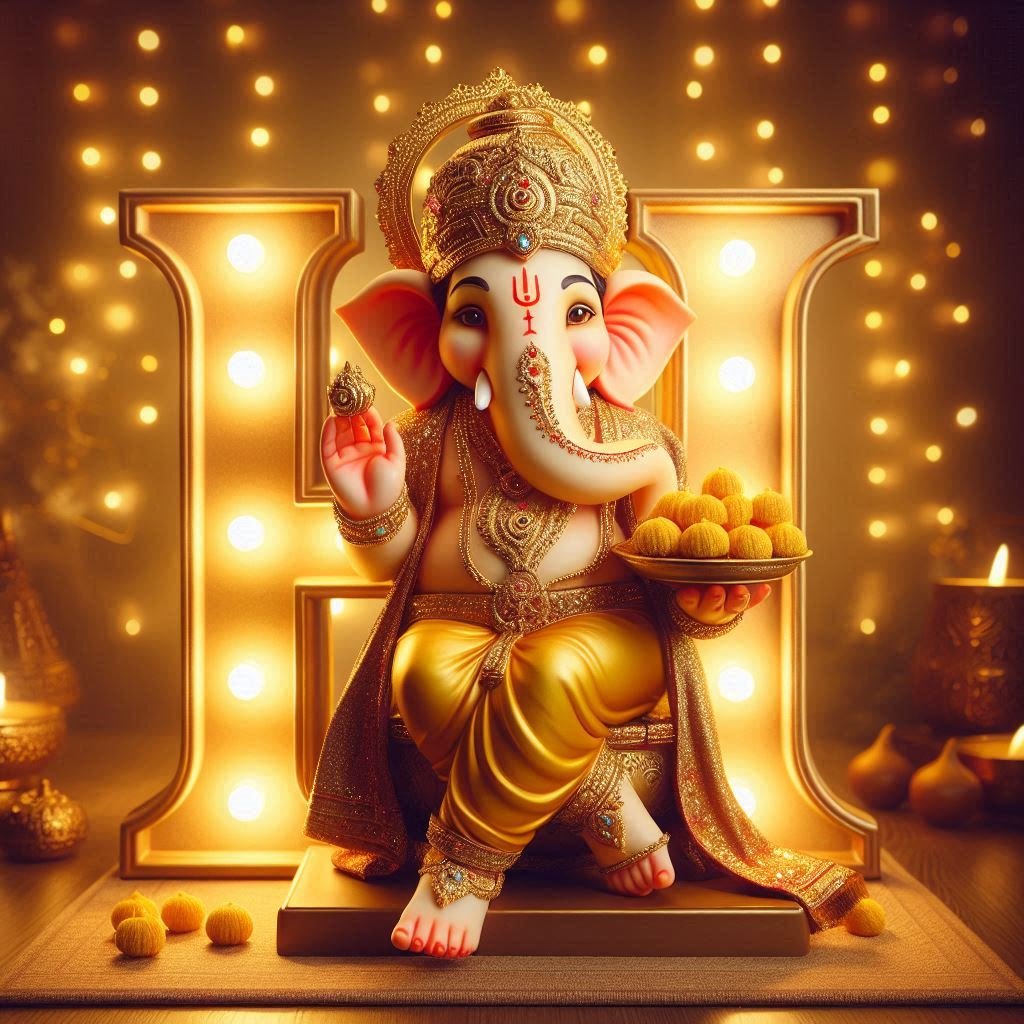
Om Editing Top Golden Crown Ganesh Ji Greeting Card AI Prompt
Om Editing Top Golden Crown Ganesh Ji Greeting Card AI Prompt is designed for anyone who wants to create a beautiful devotional greeting graphic without needing advanced editing skills. This style presents Lord Ganesha in a rich festive setting, wearing an ornate golden crown and traditional clothing, while a glowing letter adds a personal touch to the design.
Read Also: Om Editing Top Saffron Suit Ganesh Chaturthi | Om Editing Top Ganesh Chaturthi Heroic Poster
The concept is useful for festival wishes, family greetings, WhatsApp messages, social media posts, and personalised digital cards. You do not need to upload a personal photo to use this style. Instead, the design focuses on the devotional character, decorative details, warm lighting, and a customisable letter or initial that can represent a person, family, or special occasion.
Beginners can use this image style from a mobile phone by opening an AI image tool, adding the provided prompt, and checking the generated result. The final graphic can then be downloaded and shared with friends, relatives, or community groups. Because the design combines traditional Ganesh Ji elements with a modern personalised greeting-card layout, it works well for both private wishes and festive broadcast messages.
What the Om Editing Top Ganesh Ji Photo Style Gives You
This Ganesh Ji photo style creates a decorative and devotional composition with Lord Ganesha as the central subject. The most noticeable feature is the detailed golden crown, supported by traditional jewellery and a dhoti-based appearance. A plate of modaks is included as an important visual element, connecting the greeting card to the familiar festive symbolism associated with Ganesha.
Another key part of the design is the illuminated letter placed beside Ganesha. This letter can be used as an initial or personalised character, making the greeting feel more specific than a standard festival image. A carefully chosen initial can represent the recipient’s name, a family name, or the person sending the greeting. If the generated letter is incorrect or unclear, regenerating the image with a more precise instruction can improve the result.
The background uses warm string lights to create a cosy, celebratory mood. Golden and amber tones make the image feel festive, while the glowing light helps separate the main subject from the background. The composition is intended to look like a polished greeting card: Ganesha remains visually prominent, the modak plate adds balance, and the glowing letter provides a personalised focal point without taking attention away from the devotional subject.
- Lighting: Warm string lights create a soft festive glow rather than a cold or overly dramatic appearance.
- Mood: The overall feeling is devotional, welcoming, celebratory, and suitable for sharing with loved ones.
- Colours: Golden crown details, warm amber lights, traditional clothing, and rich festive tones work together in the image.
- Composition: Lord Ganesha stands as the main subject, with the modak plate and glowing letter adding meaningful supporting details.
- Personalisation: The illuminated letter can be changed to an initial or name-related character for a custom greeting card.
How to Use the Golden Crown Ganesh Ji AI Prompt on Mobile
Using the Om Editing Top Ganesh Ji greeting card style does not require professional design software. A beginner can complete the process on a mobile browser or inside an AI image-generation application. Before starting, decide which letter or initial you want to display and keep the spelling clear so the generated greeting graphic has a better chance of showing the intended character.
The process may produce different results each time, even when the same prompt is used. For that reason, review the first image carefully instead of downloading it immediately. Check the crown, jewellery, modak plate, glowing letter, background lights, and overall placement of the elements. If any part looks unclear, use the regenerate option and compare the new result with the earlier version.
- Open an AI image tool: Launch the image-generation website or application on your mobile phone. Sign in if the tool requires an account, then open the area used for creating a new image.
- Use the provided prompt: Copy the prompt from the page and paste it into the tool’s prompt box. Do not remove the important design instructions, especially the details related to Ganesh Ji, the crown, the modak plate, the glowing letter, and the warm background.
- Choose your personal letter: If you want a personalised card, replace the letter instruction with the exact initial you need. Double-check the character before generating so the final image does not display an unrelated letter.
- Start image generation: Tap the generate button and wait for the AI tool to create the greeting-card image. Generation time can vary depending on the application and the number of users on the service.
- Inspect the result: Zoom in on the crown, face, hands, modak plate, clothing, letter, and string lights. Make sure the main devotional elements appear clearly and that the personalised character is readable.
- Regenerate when necessary: If the letter is wrong, the glow is too harsh, or the decorative details look confusing, generate another version. Small changes in the result are normal, so compare multiple outputs before choosing one.
- Download and share: Save the clearest final image to your phone. You can share it as a WhatsApp greeting, send it to a family group, use it in a festival message, or post it on a suitable social platform.
For the best mobile workflow, avoid switching between too many applications while creating the image. Decide the initial first, generate a few variations, and save only the versions that have a balanced layout and readable details. If the string-light glow looks too bright, try another generation with a softer and more natural illumination so the letter and Ganesh Ji remain easy to see.
Which Photos Work Best for This Ganesh Ji Greeting Card Style?
This design does not depend on a user-uploaded portrait, so you do not need to find or prepare a personal photo before using it. The AI creates the devotional character and greeting-card scene directly. However, the result still benefits from clear instructions about the desired layout, subject placement, decorative details, and level of realism. The more specific your intended use is, the easier it becomes to select a useful final image.
For a WhatsApp greeting or mobile status, a vertical composition is usually practical because it fills the phone screen and leaves enough space for the glowing letter. For a social media post or a digital card, choose the orientation that suits the platform where you plan to share it. Keep the main figure and personalised letter away from the extreme edges, because some platforms may crop the image when displaying it as a preview.
A clean and balanced visual result is more important than adding too many extra decorations. The crown should remain sharp enough to show its golden detail, the modak plate should be recognisable, and the string-light background should provide warmth without becoming a distraction. Traditional clothing works best when it remains clearly visible, while strong contrast between the subject and background helps the entire greeting card look polished.
- Angle: A front-facing or slightly angled standing pose works well because it keeps Ganesh Ji, the crown, and the modak plate visible.
- Resolution: Select the highest available output quality so small jewellery, crown patterns, and the personalised letter remain clear after downloading.
- Lighting: Use soft, warm illumination with visible string lights; avoid an overly dark scene or a glow that hides the letter.
- Background: A simple festive background is preferable to a crowded one, allowing the central figure and greeting detail to stand out.
- Clothing: Traditional dhoti-style clothing and decorative jewellery support the devotional appearance of the Golden Crown Ganesh Ji design.
- Layout: Leave enough visual space around the glowing letter so it does not overlap the crown, face, hands, or modak plate.
Om Editing Top Pro Tips for the Best Golden Crown Ganesh Ji Results
For a polished Golden Crown Ganesh Ji greeting card, describe the visual result you want with enough clarity to guide the image tool. The main subject should remain prominent, while the jeweled crown, traditional clothing, modak plate, illuminated letter, and warm festive background should work together instead of competing for attention. A clear composition helps the final image look like a finished greeting graphic rather than a random decorative illustration.
Before generating the image, decide where you will share it and choose the layout accordingly. A vertical design works well for Instagram Stories, WhatsApp Status, and reels covers, while a square format suits social posts and profile-related designs. Om Editing Top readers can also generate more than one version and select the image with the cleanest face, readable letter, balanced lighting, and sufficient empty space for a greeting message.
- Choose the exact personal letter or name: Add the character you want to display so the glowing illuminated letter feels intentional and personal.
- Keep the main subject central: Ask for a balanced composition where Lord Ganesha, the crown, and the modak plate remain clearly visible.
- Check the crown details: A jeweled golden crown should look refined, symmetrical, and properly placed rather than blurred or oversized.
- Use warm lighting carefully: Soft string lights create a festive mood, but moderate brightness keeps the face and clothing visible.
- Select the right aspect ratio: Match the format to Instagram, WhatsApp, a thumbnail, or another platform before downloading.
- Regenerate unclear results: If the letter, hands, jewelry, or modak plate looks distorted, create another version instead of trying to use a weak image.
- Review the final card at full size: Small errors can disappear in a preview but become obvious when the image is shared or printed.
Common Mistakes to Avoid in a Ganesh Ji Greeting Card
AI-generated devotional artwork can look beautiful, but small instruction or design mistakes may reduce its quality. One common issue is using an unclear or unspecified letter. The image tool may then create a random character, an unreadable symbol, or lettering that does not match the intended personalisation. Always verify the illuminated letter before sharing the final greeting card.
Another problem occurs when too many decorative elements appear at once. An overly bright background, excessive jewelry, large text, and strong glow can hide the central figure. The goal is to create a respectful and attractive composition in which every detail supports the greeting instead of distracting from Lord Ganesha.
- Do not leave the letter vague: Unclear personalisation can produce unrelated characters or misspelled text.
- Do not make the glow excessively bright: Harsh illumination can wash out the face, crown, dhoti, and modak plate.
- Do not crowd the background: Too many lights and ornaments make the image look cluttered and reduce visual focus.
- Do not ignore hands and objects: AI images may distort fingers or the modak plate, so inspect these areas carefully.
- Do not download the first result automatically: Comparing several generations often reveals a cleaner and more balanced option.
- Do not place text over important details: A greeting message should not cover the face, crown, personal letter, or devotional elements.
- Do not use a low-resolution preview: Compression and blurry details can make an otherwise attractive card look unprofessional.
Best Use Cases and Greeting Card Ideas
This Golden Crown Ganesh Ji image works especially well when you want to send a warm, personalised festival wish. You can use the finished design as a digital greeting card for family and friends, or share it privately with someone whose initial or name appears in the glowing letter. The combination of the golden crown, modak plate, and soft string-light setting gives the image a celebratory appearance without requiring a photo upload.
Om Editing Top users can adapt the same artwork for several social platforms. Add a short greeting in a separate editing step if needed, while keeping the original devotional image clear and readable. For public posts, check the crop and text placement on a phone before publishing, because different platforms may cut the edges of a vertical or square design.
- Instagram posts: Use a square greeting card with a balanced central composition and a short festival wish.
- Instagram Stories: Choose a vertical layout so the crown, illuminated letter, and full figure remain visible on mobile screens.
- WhatsApp Status: Share a vertical version with warm colours and enough contrast for quick viewing.
- WhatsApp profile pictures: Use a close, uncluttered crop that keeps the face and crown recognisable inside a circular frame.
- Social media thumbnails: Select a strong central image with clear shapes that remain visible at a small size.
- Portfolio projects: Present the card as an example of festive AI artwork, personalised typography, and devotional visual design.
- Reels covers: Keep the important details away from the edges so platform controls and cropping do not hide them.
Variations You Can Try for More Creative Results
After creating the first version, experiment with the mood while preserving the key identity of the design. You can try a rich maroon and gold palette for a traditional festive appearance, or use ivory, saffron, and soft yellow for a brighter and more peaceful look. Deep blue with gold can create a dramatic evening atmosphere, while green and gold can give the card a fresh decorative style.
Settings can also change the overall feeling of the greeting card. A softly decorated home shrine, a glowing festival corner, a floral backdrop, or an elegant dark studio setting can each produce a different result. Seasonal details such as flower garlands, subtle diyas, autumn-inspired warmth, or a gentle monsoon ambience can help you build a collection of related designs for different occasions. Generate variations one at a time so you can identify which change improves the final composition.
- Traditional mood: Combine deep red, gold, floral decorations, and warm festive illumination.
- Peaceful mood: Use soft cream, pale yellow, gentle shadows, and a clean uncluttered background.
- Royal mood: Emphasise rich gold, jewel tones, ornate details, and a luxurious decorative setting.
- Modern mood: Try a minimal background, controlled lighting, and a simple elegant treatment around the letter.
- Daytime setting: Use soft natural light and lighter colours for a fresh greeting card appearance.
- Evening setting: Increase the warmth of the string lights while keeping the face and crown sharp.
- Seasonal setting: Add tasteful flowers, lamps, or festive accents without hiding the central devotional subject.
Try Om Editing Top for Your Personalised Ganesh Ji Card
A well-planned Golden Crown Ganesh Ji greeting card can become a thoughtful way to share festive wishes online. Select the personal letter carefully, check the crown and modak details, keep the lighting balanced, and choose a format that suits the platform where you will use the image. Reviewing a few generated options will help you find a result that feels clear, respectful, decorative, and genuinely personal.
Use these Om Editing Top ideas as a starting point, then test different colours, moods, settings, and layouts to create your own style. Whether you need an Instagram post, WhatsApp greeting, profile picture, portfolio sample, thumbnail, or reels cover, a carefully checked final image will make the message more memorable.
FAQ – Om Editing Top
What is the Om Editing Top Golden Crown Ganesh Ji card?
It is a devotional greeting-card design featuring Lord Ganesha with a detailed golden crown, traditional clothing, modaks, warm lighting, and a personalised letter. The layout is suitable for festival wishes, family greetings, and digital sharing.
How can I add a name or initial to the Ganesh Ji card?
Enter the exact letter or name you want to appear in the personalised part of the design. Short, clearly written instructions usually help the image tool produce a more recognisable result, although generated text may still need checking.
Does Om Editing Top work on mobile phones?
Yes, Om Editing Top can be used from a mobile phone through a compatible AI image tool. You can create the design, review it, download the finished graphic, and share it directly from your device.
Is Om Editing Top free to use?
The design prompt or concept itself does not require a separate editing subscription. Whether image generation is free depends on the AI tool you choose, including its credits, limits, and account requirements.
Why is my Ganesh Ji image different each time I generate it?
AI image tools may create a different composition, facial detail, lighting effect, or letter placement on every attempt. Small wording changes and random generation settings can also affect the crown, jewellery, background, and overall arrangement.
What should I do if the letter or name is incorrect?
Generate the image again with the exact character or name placed in a clear instruction. If the text remains distorted, simplify the design request or add a separate text layer afterward using a phone editing app.
Which image size is best for a WhatsApp Ganesh Ji greeting?
A vertical format works well for WhatsApp Status, while a square format is convenient for chat messages and social posts. Choose a high-resolution output so the crown, modak plate, glowing letter, and decorative details remain clear after sharing.
Can I share an Om Editing Top Ganesh Ji card on social media?
Yes, the finished greeting graphic can be shared in private messages, WhatsApp groups, status updates, and social media posts. Before using it for commercial promotion, check the rules of the AI image tool and any assets included in your final design.
FAQ: Golden Crown Ganesh Ji Greeting Card
How do I use the "Golden Crown Ganesh Ji Greeting Card" prompt?
Copy the prompt above, open Gemini or ChatGPT, upload a clear photo of yourself and paste the prompt. Generate the image and adjust the outfit or background if you want a variation.
Is this prompt free?
Yes. This prompt is free to copy and use for Instagram, reels, WhatsApp DP and profile pictures.
Which photo works best?
A sharp, front-facing, well-lit photo with no filter. A clear face helps the AI keep your identity in the final image.
Last updated: 12 September 2026
💬 Comments