Velvet Monochrome
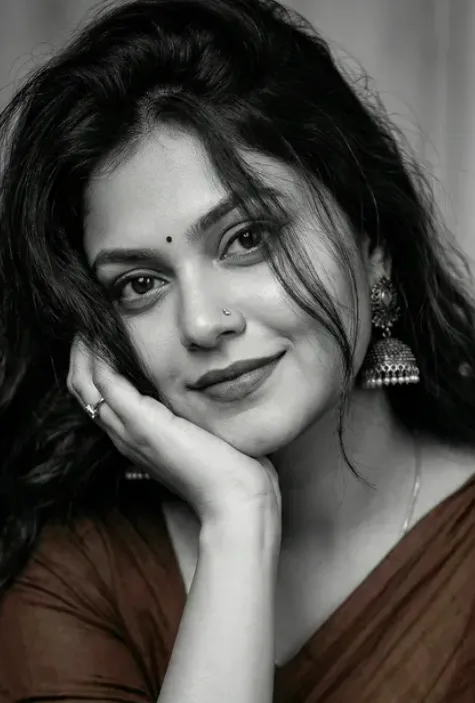
Velvet Monochrome: black and white portrait style ko samajhiye
Om Editing Top ka Velvet Monochrome look ek classy black and white portrait aesthetic hai jo face ko soft, elegant aur highly polished way mein present karta hai. Is style ka focus dramatic yet natural feel par hota hai, jahan skin texture, hair detail, jewellery highlights aur saree folds sab ek cinematic mood create karte hain.
Read Also: cinematic-style realistic portrait | 2026 New Year
Ye prompt un logon ke liye best hai jo apni photo ko Instagram-friendly, editorial, ya premium studio portrait look dena chahte hain. Agar aap Indian traditional outfit ke saath timeless monochrome vibe chahte hain, to ye style simple selfie ko bhi high-end photoshoot jaisa bana sakta hai.
Velvet Monochrome ka core idea sirf black and white filter lagana nahi hai, balki lighting, pose, expression aur composition ko aise balance karna hai ki result realistic lage. Isme softness aur contrast dono important hote hain, taaki face expressive rahe aur image over-processed na lage.
Ye prompt/photo style actually kya deta hai?
Is style mein aapko usually soft studio lighting, smooth shadows aur clean subject separation milta hai. Black and white tonality wajah se focus colours se हटkar facial features, hair volume, earrings, bindi aur fabric texture par shift ho jata hai. Isse image zyada artistic aur refined lagti hai.
Velvet Monochrome photos ka mood aksar calm, graceful aur slightly dramatic hota hai. Head tilt, gentle smile aur hand-resting pose portrait ko intimate feel dete hain, jabki dark saree aur matching blouse composition ko rich aur balanced banate hain. Ye style especially tab strong lagta hai jab hair strands face par softly fall karein.
Is type ke output mein aap generally ye visual elements expect kar sakte hain:
- High-contrast black and white finish with soft highlights
- Elegant facial expression with subtle smile
- Voluminous hair texture and loose strands for realism
- Traditional Indian details like jhumka, nose pin, bindi, ring
- Editorial-style composition with clean framing
Om Editing Top prompt kaise use karein: beginner-friendly steps
Agar aap first time photo editing prompt use kar rahe hain, to process simple rakhna best hota hai. Mobile par bhi aap easily achha result nikal sakte hain, bas source photo sahi honi chahiye aur instructions clearly follow karne chahiye.
Sabse pehle apni best face photo select karein. Phir us image ko us app ya tool mein upload karein jahan aap generated portrait style apply karte hain. Prompt box mein Velvet Monochrome style wala instruction use hota hai, aur output ko compare karke best version choose kiya jata hai. Agar first attempt perfect na ho, to angle ya lighting change karke dubara try karein.
Mobile users ke liye easiest method ye hai ki aap ek clean, clear photo choose karein aur prompt ko as a style guide samjhein. Isse system ko idea milta hai ki face detail, pose, outfit aur monochrome mood kis direction mein le jana hai.
- Ek clear front-facing ya slightly turned portrait photo choose karein.
- Photo ko crop karke face aur upper body ko focus mein rakhein.
- Editing app ya AI image tool open karke apni image upload karein.
- Velvet Monochrome style apply karein aur final render generate karein.
- Result ko zoom karke face, hair, jewellery aur saree details check karein.
- Agar shadows ya contrast zyada lag rahe hon, to softer source photo ke saath retry karein.
Kaunsi photos sabse achhi kaam karti hain?
Best result ke liye source photo ka angle bahut matter karta hai. Aisi photo choose karein jahan face clearly visible ho, head slightly tilted ho, aur hand placement natural lage. Slightly right-tilted pose is style ke saath especially elegant lagta hai kyunki isse composition mein softness aati hai.
Resolution bhi important hai. Low-quality, blurry ya heavily filtered selfie se detail loss ho sakta hai, especially hair strands, nose pin aur bindi jaise fine elements mein. Natural daylight ya soft indoor light usually best hoti hai, kyunki harsh flash face par unwanted shine create kar sakta hai.
Background aur clothing bhi result ko affect karte hain. Simple, uncluttered background better hota hai taaki attention face par rahe. Agar aap traditional look chahte hain to dark saree ya similar outfit reference image mein ho, kyunki monochrome conversion mein fabric texture aur folds zyada premium lagte hain.
- Angle: front-facing ya slight right tilt, clean face visibility ke saath
- Resolution: high-resolution, sharp, and unblurred photo
- Lighting: soft daylight, window light, ya diffused indoor light
- Background: plain ya lightly textured background, no clutter
- Clothing: traditional outfit, especially saree or similar elegant attire
- Accessories: jhumka, nose pin, ring, bindi jaise details clear honi chahiye
Pro Tips for the Best Results with Om Editing Top
If you want the final image to look polished, natural, and social-media ready, a few small choices make a big difference. With Om Editing Top, the best results usually come from keeping the face, pose, and styling balanced so the monochrome effect feels elegant instead of flat.
Start by using a clear reference and a simple pose. A tilted head, soft smile, and relaxed hand placement already create a classy portrait look. When the lighting is gentle and the details stay sharp, the black-and-white finish brings out the facial features, hair texture, and outfit beautifully.
Here are some practical do’s that can help you get a stronger result:
- Choose a high-quality face reference so the portrait stays detailed and realistic.
- Keep the expression soft and calm for a premium black-and-white studio feel.
- Use clean framing so the saree, earrings, bindi, and hand pose remain visible.
- Ask for realistic hair texture, especially if you want messy, voluminous strands.
- Maintain strong contrast, because monochrome portraits depend on light and shadow.
- Keep accessories subtle but visible so the final image looks complete and elegant.
Another useful tip is to think about the mood before generating the image. If you want a classy portrait for a profile picture, keep the background minimal. If you want a more dramatic editorial look, go for deeper shadows, richer contrast, and a slightly cinematic finish. That way, Om Editing Top can give you a more intentional result instead of a random one.
Common Mistakes to Avoid
Even a strong prompt can lose impact if too many details compete with each other. The biggest mistake is overloading the image with unnecessary elements. In monochrome editing, every detail matters, so clutter can reduce the clean, luxurious look people usually want from Om Editing Top.
Another common issue is making the pose too stiff or unnatural. Black-and-white portraits work best when the expression feels easy and graceful. If the face looks forced, the hand placement feels awkward, or the hair looks too arranged, the image can lose its realistic charm.
- Using too many conflicting style notes: This can confuse the composition and weaken the final portrait look.
- Ignoring lighting balance: Harsh shadows or flat light can make black-and-white photos look dull instead of dramatic.
- Overdoing facial retouching: Too much smoothing can remove skin texture and make the image look artificial.
- Changing the outfit details too much: If the saree, blouse, jewelry, or bindi are inconsistent, the style loses authenticity.
- Adding a busy background: A noisy background distracts from the face and reduces the premium portrait effect.
- Forgetting hair detail: Messy, thick hair strands are part of the aesthetic, and losing them makes the image feel less rich.
For best output, keep the prompt-style direction focused on realism, elegance, and symmetry. The more the image stays centered on the face and pose, the better the monochrome finish will look. That is especially important when you want a refined result from Om Editing Top.
Best Use Cases and Creative Ideas
Images made with Om Editing Top work well in many places because the monochrome style feels timeless and classy. A black-and-white portrait has a premium look that fits both personal branding and creative social media use. It also works nicely when you want something more artistic than a regular color photo.
One of the most popular uses is for Instagram profile pictures. A close, elegant portrait with clean contrast immediately feels stylish and memorable. It also suits thumbnail designs, especially when you want a dramatic face-centered visual that catches attention without too many colors.
Here are a few places where this style can be used effectively:
- Instagram posts: Perfect for aesthetic portrait feeds and monochrome theme pages.
- Profile pictures: Works well when you want a bold and polished online identity.
- YouTube thumbnails: Useful for beauty, fashion, or personality-focused channel branding.
- Portfolios: Great for photographers, creators, or designers who want an editorial-style sample.
- Reels covers: Makes short-form content look more curated and high-end.
You can also use this style for personal edits, festive portrait concepts, or classy display images for WhatsApp and other social platforms. Because the look is monochrome, it feels versatile and often matches many different feed styles. That makes Om Editing Top a strong choice when you want one image that can be used in multiple ways.
Variations You Can Try
One of the best things about Om Editing Top is that you can experiment with small changes and still keep the same elegant identity. Even when the core pose stays similar, different moods, colors in the source styling, or background settings can completely change the final atmosphere. That gives you a lot of creative freedom.
If you want a softer look, try a gentler smile, lighter contrast, and a cleaner background. For a more dramatic fashion portrait, increase shadow depth and make the hair volume more pronounced. You can also shift the feel of the image by changing the setting from studio-inspired to outdoor-inspired, while still keeping the monochrome mood intact.
Here are some variations worth testing:
- Mood variations: soft, confident, dreamy, regal, or cinematic expressions.
- Colour-to-monochrome options: keep the original outfit rich in tone, then convert it into deep black-and-white contrast.
- Setting variations: studio backdrop, plain wall, artistic shadow background, or softly blurred surroundings.
- Season-inspired touches: winter-style softness, festive elegance, or rainy-day mood with dramatic lighting.
- Pose variations: head tilt slightly more, hand resting differently, or a closer portrait crop.
You can also experiment with accessory emphasis. In one version, let the jhumka earrings stand out more; in another, keep the focus on the eyes and smile. Small changes like these help you create multiple unique outputs without losing the core aesthetic of Om Editing Top.
Conclusion
Om Editing Top is a simple way to create a stylish black-and-white portrait that feels elegant, modern, and highly shareable. With the right balance of face detail, hair texture, accessories, and soft expression, the final image can look polished enough for social media, profile use, or creative portfolio presentation.
If you want a monochrome portrait that stands out while still looking natural, try different moods and framing options until you find the version that fits your style best. The more carefully you refine the pose and contrast, the more impressive your Om Editing Top result will be.
FAQ: Velvet Monochrome
How do I use the "Velvet Monochrome" prompt?
Copy the prompt above, open Gemini or ChatGPT, upload a clear photo of yourself and paste the prompt. Generate the image and adjust the outfit or background if you want a variation.
Is this prompt free?
Yes. This prompt is free to copy and use for Instagram, reels, WhatsApp DP and profile pictures.
Which photo works best?
A sharp, front-facing, well-lit photo with no filter. A clear face helps the AI keep your identity in the final image.
Last updated: 31 July 2026
💬 Comments