Street Man AI Prompt
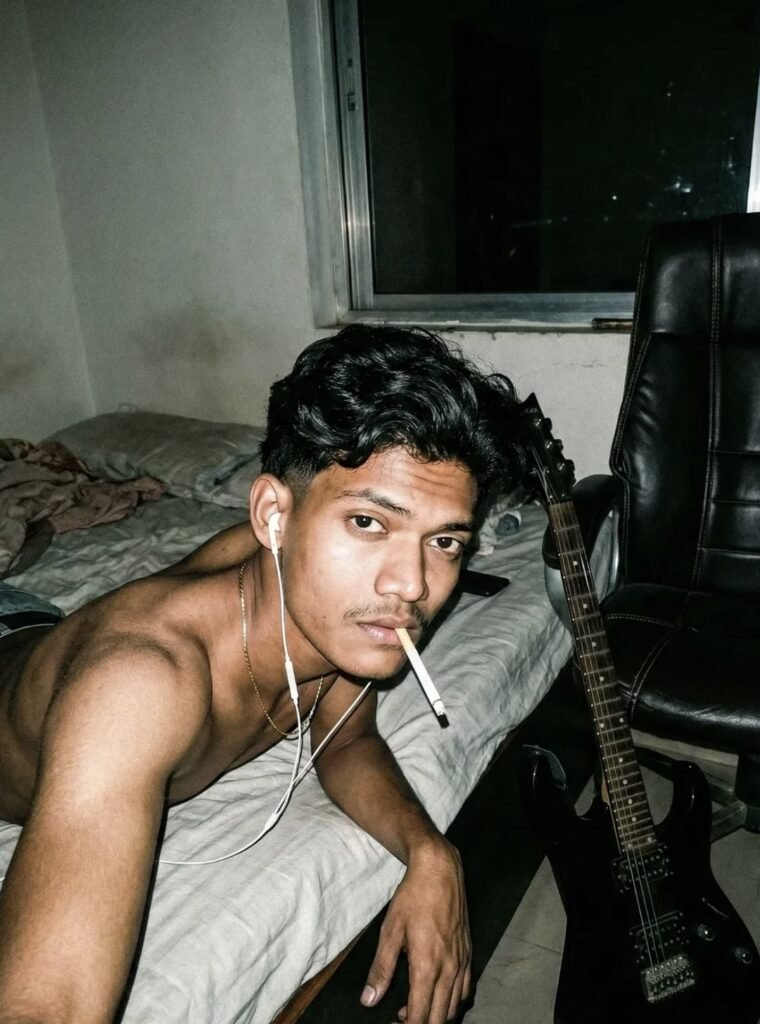
Street Man AI Prompt: Understanding This Style
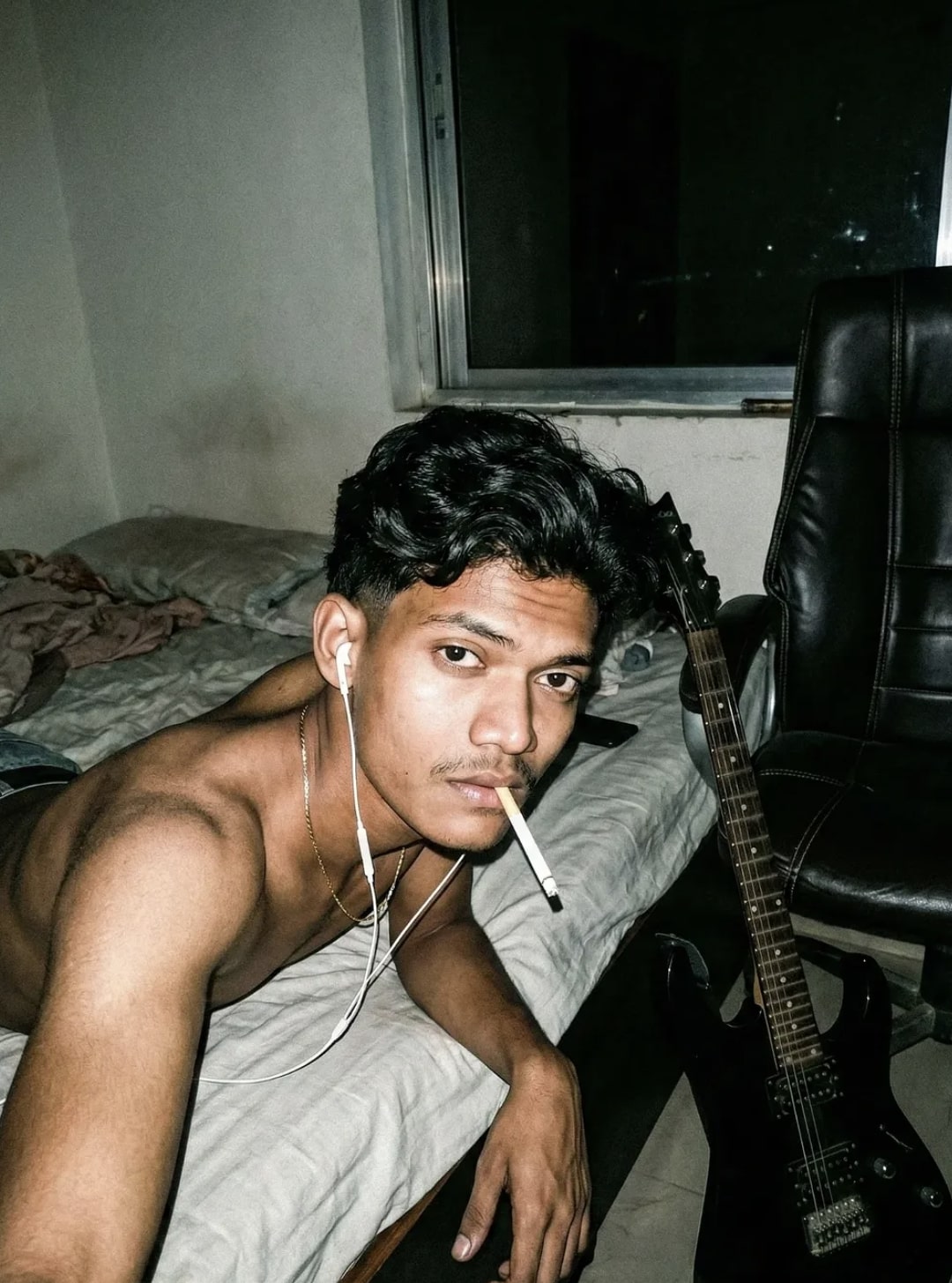
This “Street Man” style is for anyone who wants their portrait photo to feel more cinematic, moody, and urban. The face stays natural and realistic while the overall photo gets a strong, stylish, street-photography vibe.
Read Also: Cinematic Realistic Portrait AI Prompt | 2026 New Year AI Prompt
This look is especially useful for creators, editors, and mobile users who want to turn a simple selfie into a bold magazine-style portrait. If you want a dramatic result for Instagram, short-video thumbnails, profile photos, or AI portrait experiments, this style is genuinely useful.
The main idea of this prompt-style is: keep the subject real, make the mood dark and expressive, and set the composition so the photo instantly feels premium — a combination of street attitude, soft realism, and film-like texture.
What This Prompt Style Delivers
Street Man-type editing generally gives a realistic portrait with attitude. Lighting is often direct flash or high-contrast style, making face and body details look sharper and more expressive. The background can be simple, but bedroom, chair, window light, or urban room elements are used to create mood.
Color palette is mostly dark, muted, slightly desaturated. Skin tone stays natural, but the overall image adds retro film grain, moody shadows, and a raw texture — so the photo is both clean and edgy.
Composition often shows a relaxed, laid-back pose — framing that gives the viewer a close, personal, cinematic feel. Face details, hair, beard/stubble, and accessories are kept natural to maintain realism.
- High-contrast lighting for bold facial definition
- Moody bedroom or indoor street-inspired atmosphere
- Realistic skin texture and natural face details
- Retro film grain for a raw, editorial finish
- Urban, stylish, slightly rebellious visual mood
How to Use This Style on Mobile
This style is simple to use for beginners. Select a clear, face-visible photo first, with decent lighting and no blur — image quality is the most important thing on mobile, since that’s where the AI or editing tool picks up details.
While applying the style, focus on keeping the subject’s identity the same. If you want a more cinematic photo, use terms like mood, flash lighting, realistic texture, and moody background in the prompt-style or editing settings — it gives a more consistent result.
After processing, carefully check the final image. If the face has become over-sharp, the background looks unnatural, or colors have gotten too dark, adjust the light for balance. The best results come when realism and style go together.
- Choose your best clear portrait photo.
- Keep the face fully visible, avoid blur or heavy filters.
- Apply the street portrait style in your editing app or AI tool.
- Set lighting around a direct flash or high-contrast feel.
- Focus on a moody background and realistic texture.
- Check face details before saving the result.
- Adjust brightness, shadow, and grain slightly if needed.
Which Photos Work Best
Photo angle matters a lot here. Front-facing or slightly side-angled portraits work better since face structure is clearly captured — a very tilted or crowded composition can reduce realism.
Resolution matters too. A high-resolution photo preserves beard, hair, eyes, and skin texture clearly. A low-quality image forces the AI to guess details, which can make the final portrait look fake or soft.
Natural daylight or soft indoor light is best for lighting, though overexposed sunlight should be avoided. A simple background is better — a plain wall, room corner, bed area, or clean indoor space. Simple or minimal clothing keeps focus on face and mood, and accessories should look natural.
- Front or slight side angle portrait
- High-resolution, sharp face photo
- Natural or soft indoor lighting
- Simple, uncluttered background
- Natural hair, beard, and stubble details
- Clean clothing or minimal styling for a realistic finish
- No heavy beauty filters or extreme color edits
Why Realism Matters in the Street Man Look
This style’s biggest strength is realism. If the face stays the same, expression feels natural, and lighting is believable, the result feels far more premium than a normal photo — which is why over-editing should be avoided.
Street-inspired portraits gain interest from a bit of raw feel, a bit of darkness, and a bit of film texture. But if everything gets too exaggerated, the image starts looking artificial. Balance is this style’s real power.
Beginners should start with a clean source photo, then gradually add mood, flash effect, grain, and background details. The stronger the base photo, the better the final street portrait.
Pro Tips for the Best Results
Keep the output natural and balanced. In this kind of edit, face details, lighting, pose, and background harmony all work together — guide them correctly for a more cinematic, realistic, premium feel.
- Keep face details sharp, but don’t make skin too smooth.
- Use low-key lighting and strong contrast for a moody look.
- Preserve hair, beard, and stubble with natural texture.
- Keep background props at a realistic scale so composition feels believable.
- Keep the direct flash effect subtle, or the image can look flat.
- Try muted colors and deep shadows for a street-style vibe.
For a social media portrait, keep the face or upper body at the center of composition — small adjustments like hand position, head tilt, and gaze direction can also change the mood significantly.
Common Mistakes to Avoid
- Over-sharpening: creates artificial edges on the face, making the portrait look rough.
- Too much smoothing: removes natural skin texture, making the image plastic-like.
- Wrong lighting balance: a flash-and-shadow mismatch breaks the moody effect.
- Unrealistic props: if a guitar, chair, or bed isn’t at the right scale, the scene feels fake.
- Color overload: too-bright colors damage the urban retro vibe.
- Weak facial expression: an expression that doesn’t match the mood reduces the image’s impact.
Best Use Cases
- Instagram posts: makes a stylish portrait feed feel premium and cohesive.
- Profile pictures: strong face focus for memorable personal branding.
- Thumbnails: dramatic expression and contrast boost click appeal.
- Reel covers: dark, moody visuals make short-form content stand out.
- Portfolios: an aesthetic showcase for creative editors and photographers.
- Music pages: a guitar, headphones, and urban setup make the artist identity stronger.
Variations You Can Try
- Mood variations: pensive, confident, intense, calm, or rebellious expressions.
- Colour variations: blue, teal, sepia, warm brown, or muted black-and-red palettes.
- Seasonal changes: monsoon drizzle, winter fog, or sunny evening light for different emotions.
- Setting changes: bedroom, rooftop, studio chair, or window-side scene.
- Accessory changes: earphones, guitar, jacket, chain, or minimal streetwear elements.
Conclusion: Try This Style
This street portrait and moody cinematic style is a strong choice when you want realistic face detail, dramatic lighting, and a stylish urban vibe. With the right composition, balanced color grading, and a natural expression, it can give powerful results.
FAQ: Street Man
How do I use the "Street Man" prompt?
Copy the prompt above, open Gemini or ChatGPT, upload a clear photo of yourself and paste the prompt. Generate the image and adjust the outfit or background if you want a variation.
Is this prompt free?
Yes. This prompt is free to copy and use for Instagram, reels, WhatsApp DP and profile pictures.
Which photo works best?
A sharp, front-facing, well-lit photo with no filter. A clear face helps the AI keep your identity in the final image.
Last updated: 8 October 2026


💬 Comments