Snow Winter AI Prompt
Snow Winter AI Prompt: An Intro
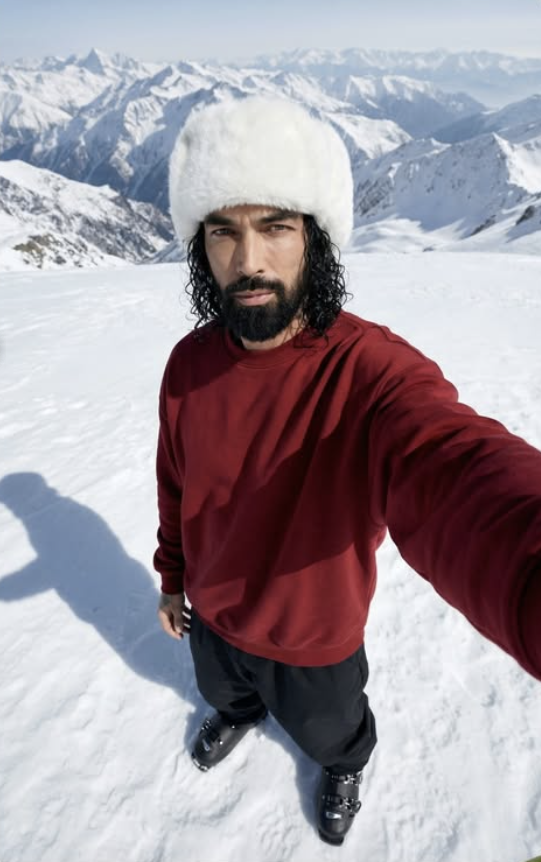
This Snow Winter style is for anyone who wants their normal photo turned into a cinematic, premium, winter-themed look. This kind of edit typically transforms a close-up portrait so it feels shot on a cold mountain location, where snow, soft daylight, and realistic textures give the photo a high-end fashion feel.
Read Also: Cinematic Realistic Portrait AI Prompt | 2026 New Year AI Prompt
This style is especially useful for creators, editors, and mobile users who want to turn a simple photo into a dramatic winter portrait. If you want your profile photo, Instagram post, thumbnail, or AI-edit inspired portrait to feel unique, Snow Winter is a clean, eye-catching option.
This look’s biggest strength is its realistic yet stylized finish. The photo looks like the model was shot in a snow-covered landscape, with detailed fabric texture, natural shadows, and cold-weather outfit elements that make the composition strong.
What This Snow Winter Photo Style Gives
Visual focus usually stays on the face, outfit texture, and snowy background. Lighting looks soft and crisp, keeping skin details clear without overexposure. The white tone of snow gives the photo a fresh, premium feel, while a dark outfit creates contrast.
The mood is calm, cool, thoughtful. Mountains or a wide snow landscape add depth to the photo, and an overhead angle adds a selfie-like perspective. This combination looks modern and artistic, especially when the subject looks directly at the lens.
The color palette generally revolves around white, dark red, black, and muted cold tones — a visually balanced contrast. Winter headwear, bulky clothing, and realistic shadows give the photo a natural appearance, so the result feels believable, not just edited.
- Soft natural light or diffused daylight effect
- Snowy white background with mountain depth
- Strong colour contrast with a dark outfit
- Close-up facial detail and realistic skin texture
- Cinematic, premium, Instagram-ready finish
How to Use Snow Winter on Mobile
This style is easy to use on mobile even for beginners. Choose a clear portrait photo first where the face is properly visible. Upload it to an editing app, AI image tool, or prompt-based editor and apply the Snow Winter style — best results come when the base photo is already clean.
Second, focus on crop and framing. A high angle, close-up, and selfie-style composition suits this theme. If the app has lighting, background, or mood adjustment options, set them to a cold tone and snowy environment for a more natural image.
Finally, zoom into the output and check it. Look at face edges, hair detail, outfit folds, and snow shadows. If the image looks too sharp, too bright, or artificial, make slight adjustments to bring balance. A polished result is achievable on mobile with attention to layering and composition.
- Select your best, clear portrait photo.
- Upload the image to your editing app or AI tool.
- Choose the Snow Winter style or winter portrait look.
- Set lighting to soft and a cold tone.
- Keep snow mountains or a white landscape in the background.
- Preview the result and check face and outfit details.
- Save the final image and export for social media.
Which Photos Work Best
The Snow Winter edit looks best on photos where the face is sharp and the subject is close to the camera. Close-up or upper-body framing is more useful, since it clearly shows facial expression and winter accessories. If the photo has motion blur, the final result won’t be as clean.
Lighting is very important — soft daylight, cloudy weather, or even studio-style diffused light gives a better base photo. Avoid hard flash or extreme shadows, since a smooth, realistic finish suits the winter theme more. A simple background blends better with an AI-style snow landscape.
Clothing and angle affect the result too. A straight front-facing or slightly tilted angle performs well, and plain dark clothes make the edit stronger. Choose a photo where the face is clearly visible, hair detail is defined, and the background is already clutter-free.
- Angle: Close-up, high angle, or slight overhead selfie-style
- Resolution: High-quality, sharp, well-focused photo
- Lighting: Soft daylight, cloudy light, or diffused indoor light
- Background: A simple background that can convert into a snow scene
- Clothing: Dark or plain outfit, winter-themed clothes, clean textures
- Face detail: Clear eyes, natural expression, no heavy blur
Pro Tips
Best results come when you use this style as a complete visual style, not just a simple edit. Balance is the most important thing in a snow winter look — sharp face details, a bold outfit, and a natural-feeling background. If light, angle, and pose combine correctly, the image looks more cinematic and premium.
Use contrast to make the subject stand out from the background — white snow with a dark red sweatshirt and black trousers already creates a strong visual impact. Avoid over-saturation in editing, since it preserves both skin texture and winter mood better. Clean shadows and soft highlights make the image more realistic.
- Keep face and hair texture natural, avoid unnecessary smoothing.
- Keep snow highlights soft so the image doesn’t look washed out.
- Maintain dark red and black tones for a strong winter contrast.
- Preserve the overhead selfie angle, since it’s the look’s main identity element.
- Keep the background mountains and snow field clear for a wide cinematic feel.
- Keep shadow detail visible, since it adds depth and realism.
Try different export sizes too — a square composition works well for Instagram feed, while vertical framing suits story and reel covers better.
Common Mistakes to Avoid
The most common mistake is over-editing the image until the natural winter look disappears. Realism matters a lot in this theme, so over-blurring the face or giving skin a plastic look weakens the output.
- Too much smoothing: facial texture disappears and the portrait looks fake.
- Overexposed snow: details wash out and the frame looks blank.
- Wrong color balance: the winter mood breaks, especially in skin tone and outfit tones.
- Pose distortion: the high-angle selfie effect loses its natural look.
- Shadow removal: depth drops and the image looks flat.
- Background clutter: disturbs the mountain scene’s clean, expansive feel.
Prioritize subtlety — small details like hair strands, snow texture, and skin highlights make the final image believable.
Best Use Cases
- Instagram profile picture: for a clean, sharp, recognizable portrait.
- Thumbnails: bold contrast and close-up framing.
- Portfolios: showcase winter portrait editing skills.
- Reel covers: a stylish, cinematic first impression.
- Story highlights: themed winter or travel highlights.
- Wallpaper-style posts: aesthetic feed content with mountain landscape.
Variations You Can Try
- Color mood: cool blue, neutral white, or a cinematic warm tint.
- Seasonal feel: fresh snowfall, late winter, or early morning frost.
- Lighting: soft daylight, overcast sky, or golden edge light.
- Background style: open mountains, deep snow field, or slightly foggy terrain.
- Expression variation: calm, thoughtful, confident, or slightly dramatic look.
Conclusion: Try This Style
A snow winter portrait’s charm gets even stronger when composition, lighting, and textures are carefully maintained. The high-angle selfie feel, snowy mountains, and bold winter outfit combine into a memorable visual that works for a profile picture, thumbnail, or creative post.
FAQ: Snow Winter
How do I use the "Snow Winter" prompt?
Copy the prompt above, open Gemini or ChatGPT, upload a clear photo of yourself and paste the prompt. Generate the image and adjust the outfit or background if you want a variation.
Is this prompt free?
Yes. This prompt is free to copy and use for Instagram, reels, WhatsApp DP and profile pictures.
Which photo works best?
A sharp, front-facing, well-lit photo with no filter. A clear face helps the AI keep your identity in the final image.
Last updated: 8 October 2026



💬 Comments