Moody Vibe AI Portrait
Moody Vibe AI Portrait: What Does It Mean?
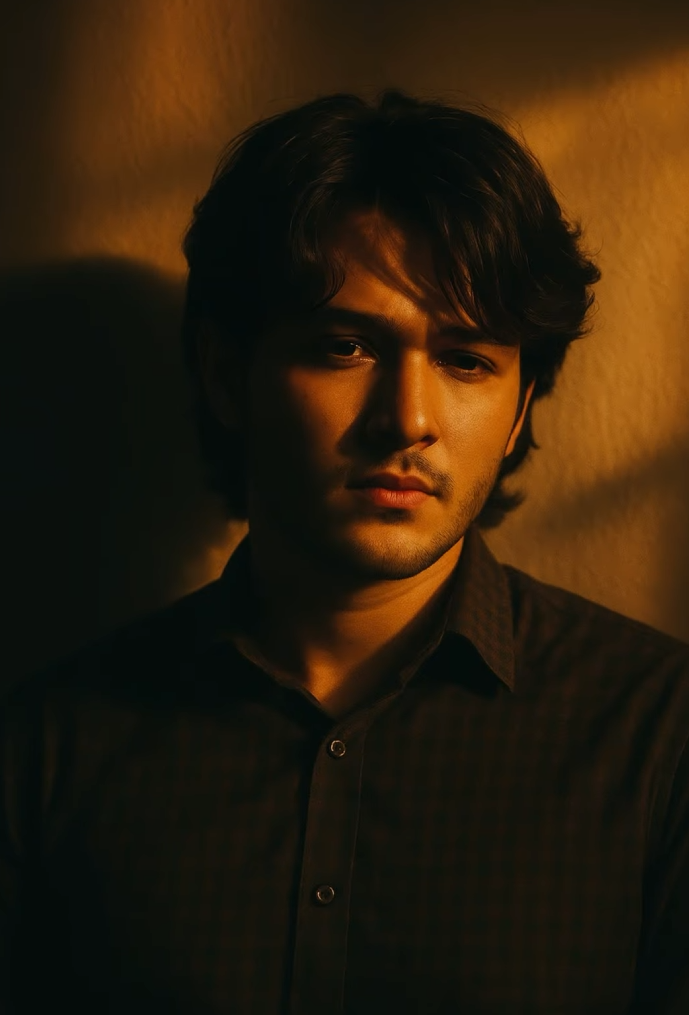
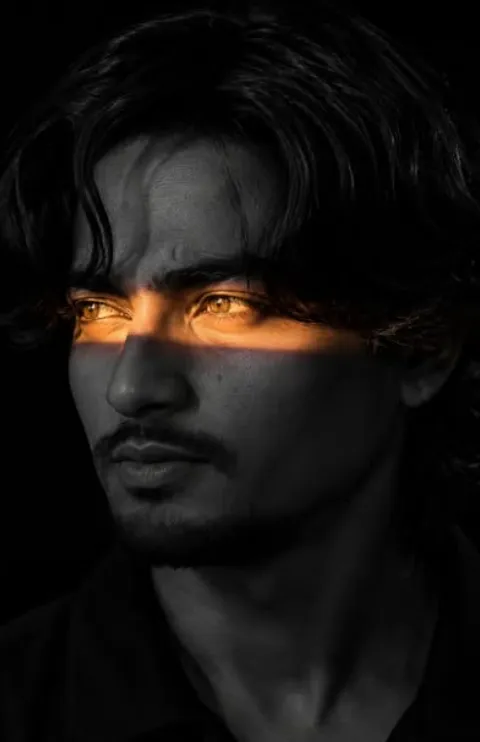
This moody vibe AI portrait style has become popular with people who want to turn a normal selfie into a cinematic, artistic, slightly mysterious look. The core idea is presenting a natural face with a dramatic mood, where lighting, shadow, and background all combine into one intense feel.
Read Also: Cinematic Realistic Portrait AI Prompt | 2026 New Year AI Prompt
This look is perfect for anyone who wants a unique profile photo, a creator-style portrait, or a personal aesthetic shot. If you edit on mobile and want a result that’s both realistic and eye-catching, this moody portrait style is worth trying.
What makes this style special is that it never looks over-edited — it delivers a natural cinematic mood. The face looks clean and polished, the background stays simple, and shadow play adds depth and a premium feel.
What This Mood Style Actually Delivers
The result is usually warm and dramatic. Lighting can be soft or strong, but the overall focus stays on facial expression and how the shadow forms. With golden-hour-type light, skin tones feel warm and the image gains real emotional depth.
Compositionally, this style often works with a simple background so the subject stays the center of the image. A plain wall, side light, and a clear face angle together create a cinematic portrait. A strong shadow makes the image more interesting by adding texture and visual drama.
The color palette is generally muted, warm, and earthy — browns, golds, soft beige, and shadow-heavy contrast rather than bright pop colors. This output works well for Instagram, portfolios, or a stylish yet realistic DP.
- Warm golden lighting with deep shadow contrast
- Clean, cinematic, moody background feel
- Natural-looking face enhancement with polished skin tone
- Simple composition that keeps focus on expression
- Realistic portrait vibe without looking too artificial
How to Use This Style on Mobile
This edit isn’t complicated for beginners. Choose a good selfie or portrait photo, then open it in a photo editor or AI-based editing tool. The goal is to keep the reference image’s angle, light, and face placement intact.
Clarity is the most important thing when working on mobile. Keep the background, pose, and facial expression the same, and target only the hairstyle, skin finish, and overall mood.
Before uploading, crop the photo, check brightness, and confirm it’s not blurry — a dark, shaky, or low-quality photo won’t show the moody effect properly.
- Select a clear selfie or portrait photo.
- Check that the face is straight and visible, not too tilted.
- Upload it to your mobile editor or AI editing app.
- Choose the option that preserves the reference-style lighting and mood.
- Focus on keeping the background simple and uncluttered.
- Refine hair, skin finish, and facial expression subtly.
- Zoom into the output preview to check that shadow and face details look natural.
- Save the final image in high quality to preserve sharpness.
Which Photos Work Best for This Moody Look
The best results come from photos where the face is clear and the lighting is already somewhat directional. If light comes from the side and the background is simple, building a moody portrait becomes much easier. Natural shadow and definition on the face strengthen the cinematic feel.
Resolution matters too — a high-resolution selfie or portrait gives a cleaner output, especially with skin smoothing, hair adjustment, or shadow enhancement. Low-quality images can lose fine detail, making the result blurry or artificial.
Clothing and background affect the mood as well. Plain shirts, dark solid colors, or minimal patterns work better in this style; a busy background, neon lights, or distracting objects can break the image’s focus.
- Angle: front-facing or a slight side angle works best
- Resolution: high-quality, sharp, blur-free photo
- Lighting: natural warm light or side sunlight
- Background: plain wall or simple backdrop
- Clothing: solid colors, minimal patterns, clean outfits
- Expression: calm, serious, or introspective
Pro Tips for the Best Results
Reference image quality matters most. A clear selfie, correct face angle, and steady lighting significantly improve the output — a sharp base image makes facial details, shadow balance, and cinematic mood come out naturally strong.
Keep the prompt consistent — mood, lighting, pose, and background should all point in the same direction. When golden-hour feel, dramatic wall shadow, and calm expression come together, the image looks more natural and premium.
- Keep the reference selfie front-facing or slightly side-angled for a clean face structure.
- Choose a plain background — a simple wall makes the mood and shadow effect stronger.
- Use a golden-hour or warm-light photo to retain the cinematic tone easily.
- Keep the expression calm and neutral; an over-smile reduces the moody portrait’s impact.
- Keep hair and face details balanced so the transformation feels subtle and realistic.
- Maintain a 4:3-style frame format, especially for portrait composition.
Common Mistakes to Avoid
The most common mistake is uploading a low-quality selfie. Blurry, overexposed, or overly dark images weaken both shadow detail and face match, making the edit look artificial instead of moody.
Another mistake is asking for too many changes at once. If background, pose, expression, haircut, lighting, and skin tone are all aggressively changed together, the original composition can fall apart. A subtle, cinematic, believable transformation works much better.
- Using a very noisy or grainy selfie, which loses face details.
- Uploading a bright, smiling photo when the desired output is introspective and moody — this causes a tone mismatch.
- Keeping a busy background that suppresses the plain-wall shadow effect.
- Requesting unnatural hair details, which makes the portrait look less realistic.
- Leaving lighting direction unclear, so cinematic shadows don’t form properly.
- Ignoring aspect ratio, which can hurt framing and composition.
Best Use Cases and Creative Ideas
This style isn’t just for personal edits — it works well across many creative platforms. These images grab attention instantly on Instagram feeds, profile pictures, story covers, and aesthetic posts. Warm shadows and a moody expression give them a classy, modern look.
- Instagram posts: moody feed aesthetic and cinematic portrait series.
- Profile pictures: a clean, focused, memorable DP look.
- Thumbnails: an emotional or stylish visual hook.
- Portfolios: creative portrait samples or personal branding showcases.
- Reel covers: a consistent theme and strong visual identity.
You can also create multiple versions from the same base photo — a close-up portrait, a side-profile style, or a more dramatic shadow-based variant — giving you ready-to-use visuals for different platforms.
Variations You Can Try
- Mood variations: calm, mysterious, thoughtful, dramatic, or dreamy expressions.
- Colour variations: warm gold, muted brown, soft sepia, or subtle cool shadow tones.
- Seasonal variations: summer sunset glow, monsoon haze, winter soft light, or autumn-inspired warmth.
- Setting variations: plain wall, textured interior wall, rooftop dusk, corridor shadows, or window light.
- Framing variations: tighter face crop, upper-body portrait, or centered cinematic composition.
Conclusion: Try This Style for a Cinematic Moody Look
If your goal is a portrait that feels moody, cinematic, and visually striking, this style is a strong choice. With the right reference photo, balanced lighting, and clear composition, you can get consistently polished results.
Choose a clean selfie, focus on the shadow effect, and see how this style turns a simple photo into a premium aesthetic portrait.
FAQ: Moody Vibe AI Portrait
How do I use the "Moody Vibe AI Portrait" prompt?
Copy the prompt above, open Gemini or ChatGPT, upload a clear photo of yourself and paste the prompt. Generate the image and adjust the outfit or background if you want a variation.
Is this prompt free?
Yes. This prompt is free to copy and use for Instagram, reels, WhatsApp DP and profile pictures.
Which photo works best?
A sharp, front-facing, well-lit photo with no filter. A clear face helps the AI keep your identity in the final image.
Last updated: 10 September 2026

💬 Comments