Low Light AI Prompt
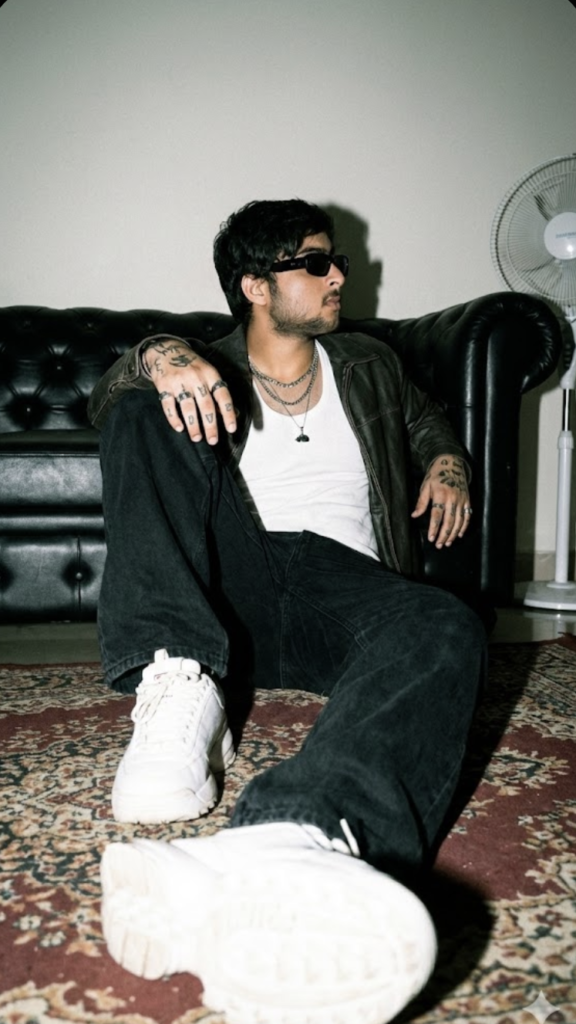
Low Light AI Prompt: What Is This Portrait Style?
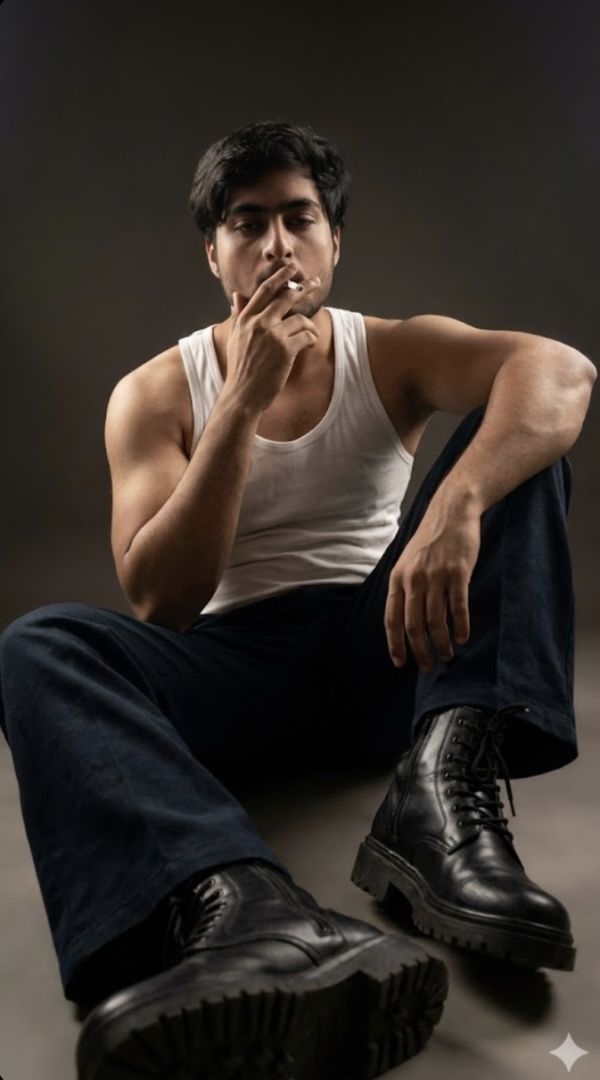
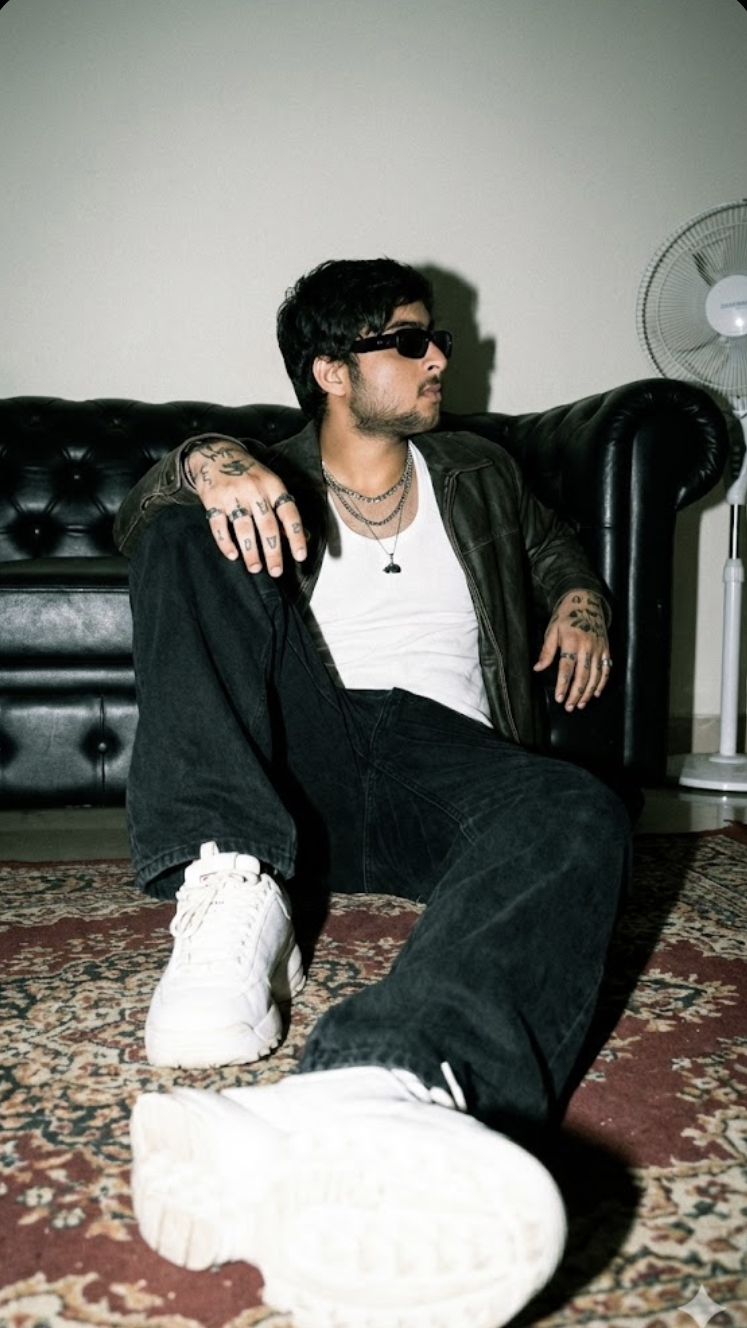
This “Low Light” look is perfect for anyone who wants a cinematic, moody, high-end fashion vibe. The subject is presented as if in a professional street-style shoot — dim lighting, soft shadows, bold outfit contrast, and a realistic, film-like finish.
Read Also: Cinematic Realistic Portrait AI Prompt | 2026 New Year AI Prompt
This prompt-style is mainly useful for those wanting an AI portrait, Instagram reel thumbnail, profile photo, or fashion-shoot-like result on mobile. If you want a stylish, urban, premium look with natural face details, Low Light editing is a strong choice — balancing raw realism with polished aesthetics.
The photo doesn’t look “over-edited” — it feels like an authentic captured moment. That’s why low-light portraits are so popular in this kind of prompt: they combine modern fashion, street photography, and dramatic mood together.
What Result This Prompt Style Gives
You get a dark, moody, visually rich output. Lighting is usually soft or directional, highlighting important parts of face and outfit while the background stays clean and slightly subdued — making the subject more prominent.
Colors are generally muted, deep, realistic. Black, white, leather brown, grey, and off-white shades work well. Grainy film texture and a slight retro feel make the image feel more editorial, especially with sunglasses, jewelry, or layered clothing details.
Composition matters a lot here too — a low angle shot, a slightly blurred foreground object like a sneaker, and simple background elements like a plain wall or fan give the image a lifestyle-photography touch.
- Lighting: soft shadows, directional window light, or flash-like crisp effect
- Mood: raw, urban, confident, cinematic
- Colours: muted, neutral, high-contrast but realistic
- Composition: low angle, depth, foreground blur, clean background
- Texture: grain, film feel, realistic skin details
How to Use Low Light Style: Step-by-Step
Beginners on mobile can follow this style easily. Choose a clear portrait photo where the face isn’t blurry and the subject is directly visible, then upload and generate the low-light fashion look. Best results come when composition and clothing match carefully.
Mobile crop and framing matter a lot — a too-bright subject, a busy background, or an uneven pose weakens the output.
- Select a sharp portrait or half-body photo.
- Make sure the face is clearly visible with no motion blur.
- Keep the background simple so the subject stays in focus.
- Upload and choose the low light, moody, cinematic, or fashion portrait style.
- Check lighting, shadows, outfit details, and composition in the output.
- If the result looks too bright or flat, try a darker, stronger-contrast variation.
Which Photos Work Best
Not every photo works equally well for Low Light editing. Best results come when the original image has a confident pose and natural body framing. Low-angle or slightly side-facing photos match this look well, since they strengthen the fashion editorial feel.
Resolution matters — a high-resolution image preserves face details, beard texture, hair strands, tattoos, and clothing folds more clearly. Soft daylight, window light, or even indoor shade photos look more natural after editing.
- Angle: low angle, side pose, or seated fashion pose
- Resolution: high-quality, sharp, clear face details
- Lighting: soft natural light, window light, or controlled indoor light
- Background: plain wall, simple room, minimal props
- Clothing: jacket, white tee/tank, jeans, sneakers, sunglasses, accessories
For a more premium output, keep expression calm and confident — an over-smile or very busy pose can weaken the low-light aesthetic.
Pro Tips for the Best Results
Focus on composition first. In low light portraits, balance between subject, background, and light source matters a lot — camera flash style look, soft shadow, and moody tones only look good when framing is clean and the face or pose isn’t cluttered.
- Keep the subject pose simple and confident for a natural-feeling portrait.
- Decide lighting direction first, like window light or direct flash mood.
- Keep fewer elements in the background so focus stays on the main subject.
- Describe clothing layers clearly so outfit details come out right.
- Add a low angle or close foreground details for cinematic depth.
- Mention muted colors and grain texture for a retro editorial feel.
- Check consistency of face, hands, and accessories to preserve realism.
Common Mistakes to Avoid
Adding too many conflicting details in the prompt is the most common mistake — if lighting, background, pose, and wardrobe are all over-specific or contradictory, the output can look messy or artificial.
- Too many style words at once can confuse the output.
- Not mentioning lighting can make shadows flat and boring.
- A too-busy background reduces the subject’s visual impact.
- Incomplete outfit details can make the look generic.
- An unclear camera angle weakens the cinematic feel.
- Ignoring texture and color mood makes the final edit less polished.
Best Use Cases
- Instagram feed posts for a stylish urban portrait.
- Profile picture with a clean but dramatic close-up style.
- Reel covers for an eye-catching cinematic frame.
- YouTube thumbnails for a bold low-light fashion look.
- Creative portfolio showcases with editorial presentation.
- Story highlight covers or personal branding visuals.
Variations You Can Try
- Mood: calm, moody, confident, rebellious, vintage, cinematic
- Colours: muted beige, deep black, cool grey, warm brown, blue tint
- Settings: sofa room, studio corner, city street, rooftop, garage style background
- Seasons: winter layers, monsoon haze, summer dust, autumn tone
- Lighting: flash, window light, soft side light, mixed ambient light
- Styling: casual streetwear, premium fashion, rugged urban look, minimal accessories
Conclusion: Try This for a Strong Low Light Look
If you want a realistic, stylish, cinematic portrait, this is a useful direction. It combines low-light mood, fashion styling, and photo-realistic details to make the image special. With the right prompt structure, you can get clean, bold, eye-catching results.
FAQ: Low Light
How do I use the "Low Light" prompt?
Copy the prompt above, open Gemini or ChatGPT, upload a clear photo of yourself and paste the prompt. Generate the image and adjust the outfit or background if you want a variation.
Is this prompt free?
Yes. This prompt is free to copy and use for Instagram, reels, WhatsApp DP and profile pictures.
Which photo works best?
A sharp, front-facing, well-lit photo with no filter. A clear face helps the AI keep your identity in the final image.
Last updated: 10 September 2026
💬 Comments