GTA V–Style Scene Recreation From Scratch
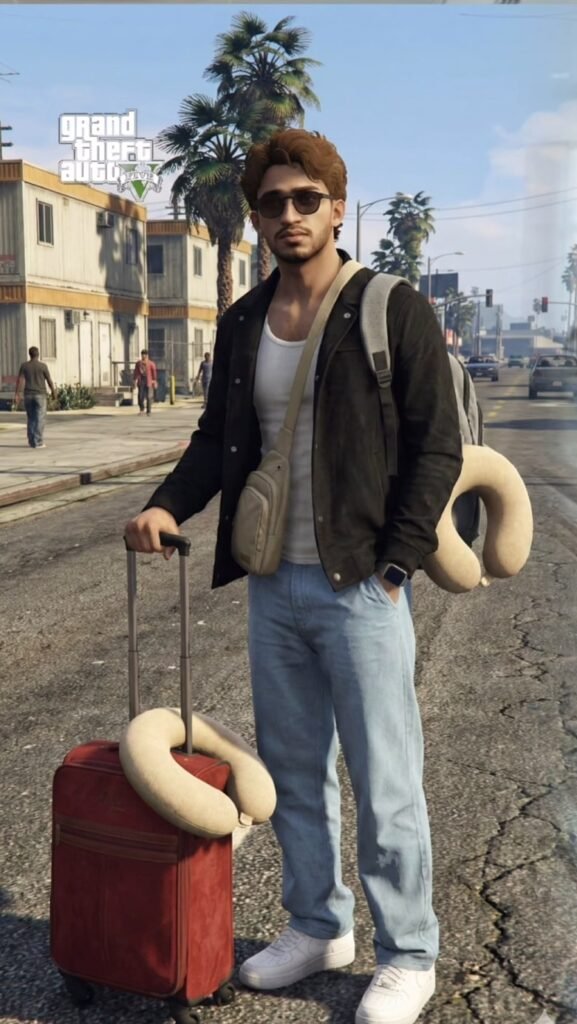
Om Editing Top के साथ GTA V–Style Scene Recreation From Scratch क्या है?
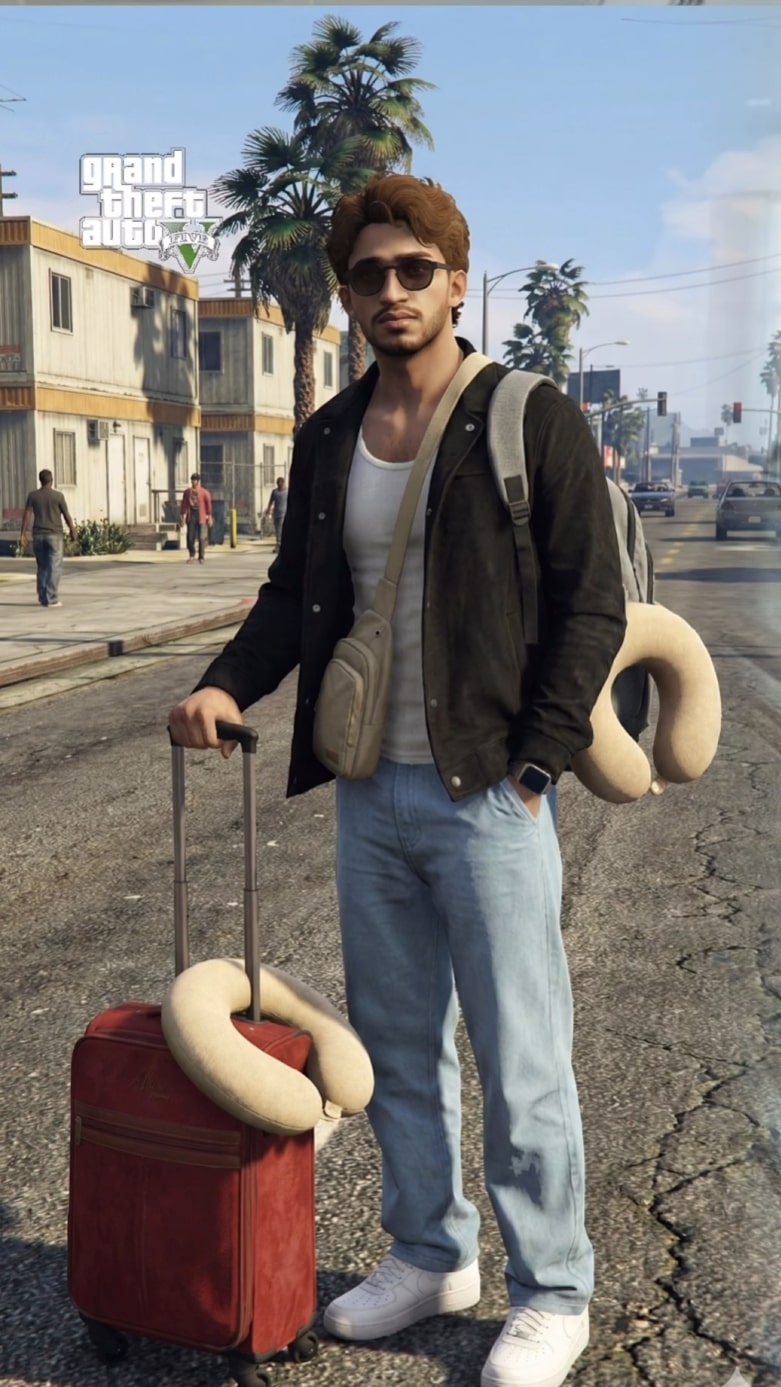
Om Editing Top जैसा GTA V–style scene recreation from scratch prompt उन लोगों के लिए है जो किसी फोटो को बिल्कुल नए तरीके से, game-engine look में बदलना चाहते हैं। इसका मतलब simple edit नहीं, बल्कि scene को इस तरह recreate करना है जैसे वह Grand Theft Auto V के world में originally बना हो।
Read Also: cinematic-style realistic portrait | 2026 New Year
यह style खासकर creators, editors, YouTubers, meme designers, thumbnail artists, और social media content makers के लिए useful है, जो cinematic yet gaming-inspired output चाहते हैं। इसमें real photo की copy नहीं होती; instead, scene को 3D, stylized, and intentionally game-like feel में rebuild किया जाता है।
अगर आप dramatic urban look, bold colors, sharp shadows, और believable GTA-like atmosphere चाहते हैं, तो यह prompt style बहुत काम आता है। इसमें photo ko directly enhance करने के बजाय, उसे एक complete synthetic scene के रूप में reinterpret किया जाता है।
यह Prompt Photo Style आपको क्या देता है?
इस तरह का prompt output को photo-realistic नहीं, बल्कि clearly video-game inspired बनाता है। Lighting आमतौर पर cinematic होती है, लेकिन थोड़ा exaggerated look के साथ, जैसे sunset glow, streetlight contrast, या bright daylight with strong shadows।
Colors often saturated और punchy होते हैं, ताकि scene gaming environment जैसा लगे। Buildings, roads, vehicles, sky, और character details में polygonal feel, visible texture repetition, और simplified geometry का असर आ सकता है। यही चीज इसे normal photo edit से अलग बनाती है।
Overall mood usually bold, clean, and action-ready होता है। Scene में realism का मतलब exact photo match नहीं, बल्कि believable GTA V–type recreation है। इससे image में a gaming cinematic vibe, game-engine lighting, और stylized urban energy आती है।
- Polygonal character और object look
- Game-like skin shading with slightly waxy finish
- Cinematic lighting and strong contrast
- Urban textures with visible repetition or tiling feel
- Stylized realism, not photo duplication
This Style Prompt को Mobile पर कैसे Use करें?
अगर आप beginner हैं, तो सबसे पहले अपनी reference photo choose करें और ensure करें कि वह clear हो। फिर editing app या AI tool खोलें, जहां आप image upload और text prompt paste कर सकते हों। Prompt box में Om Editing Top style request apply करें, और output को scene recreation direction में guide करें।
Mobile पर काम करते समय step-by-step approach बहुत helpful होती है। पहले image upload करें, फिर prompt settings check करें, उसके बाद generate button दबाएँ। Result आने के बाद zoom करके check करें कि composition, lighting, background, और character placement GTA V-like feel दे रहे हैं या नहीं।
अगर पहली output perfect नहीं है, तो prompt को थोड़ा refine करें। उदाहरण के लिए, आप wording में “cinematic game-engine lighting,” “synthetic 3D recreation,” या “GTA V-inspired urban scene” जैसे phrases add कर सकते हैं। इससे AI को style direction और clear मिलती है।
- अपनी best reference photo select करें।
- Mobile editor या AI tool में image upload करें।
- Om Editing Top style prompt paste या apply करें।
- Scene recreation, GTA V look, और game-engine lighting verify करें।
- Generate करें और output को closely inspect करें।
- अगर जरूरत हो, तो angle, contrast, या mood refine करें।
इस Style के लिए कौन-सी Photos सबसे अच्छी काम करती हैं?
Best results के लिए ऐसी photos चुनें जिनमें subject clearly visible हो और background ज्यादा cluttered न हो। Front, slight side angle, या medium shot वाली images अक्सर बेहतर रहती हैं क्योंकि उनमें subject की shape और scene composition आसानी से translate हो जाती है।
Resolution जितनी साफ होगी, final recreation उतनी stable दिखेगी। Blurry photos, overexposed faces, या बहुत dark images से GTA V-style output कमजोर हो सकता है। Natural light, balanced contrast, और open background वाले shots आमतौर पर ज्यादा usable होते हैं।
Clothing भी important है। Plain tees, jackets, streetwear, hoodies, denim, और urban fashion elements scene को gaming aesthetic देते हैं। Busy patterns या extreme reflections कभी-कभी texture confusion पैदा कर सकते हैं, इसलिए simple but strong outfits ज्यादा effective होते हैं।
- Clear face and body visibility
- High-resolution, sharp source image
- Even lighting or soft daylight
- Simple background with enough depth
- Urban, casual, or street-style clothing
- Medium shot or full-body framing for stronger composition
अगर आप scene recreation को और believable बनाना चाहते हैं, तो ऐसी photo लें जिसमें subject naturally standing, walking, या posing हो। इससे AI को environment, posture, और framing समझने में आसानी होती है।
Pro Tips for the Best Om Editing Top Results
अगर आप Om Editing Top से ज्यादा polished और game-like scene recreation चाहते हैं, तो सबसे पहले reference को clean way में understand करना जरूरी है। Best results तब आते हैं जब आप image को सिर्फ visual guide की तरह use करते हैं, और subject, background, angle, lighting, और mood को clearly define करते हैं।
Scene recreation में tiny details बहुत फर्क डालते हैं। GTA V–style output के लिए composition simple रखें, but storytelling strong रखें। Wide streets, cinematic shadows, city lights, and slightly exaggerated game textures इस look को more authentic बनाते हैं. अगर आप consistent result चाहते हैं, तो हर prompt या edit request में same style keywords repeat करें.
Helpful do’s:
- Subject, pose, और camera angle को clearly describe करें.
- Lighting को cinematic रखें, जैसे sunset, neon night, या overcast noon.
- Background में game-like urban elements जोड़ें, जैसे roads, buildings, cars, and signs.
- Textures को clean but slightly synthetic रखें ताकि GTA V feel बना रहे.
- अगर multiple outputs चाहिए, तो same mood और color tone को consistent रखें.
- Final image के लिए contrast और depth को balanced रखें, ताकि scene flat न लगे.
Common Mistakes to Avoid in This Style
this style में सबसे common mistake होती है too much detail push करना, जिससे image game-engine look की जगह photo-realistic या over-processed लगने लगती है। GTA V–style recreation का charm इसी में है कि output intentionally synthetic, structured, and stylized दिखे. अगर आप हर surface को hyper-real बनाना शुरू कर देंगे, तो overall scene का identity कमजोर हो जाएगी।
दूसरी बड़ी problem होती है composition को overcomplicate करना। बहुत सारे extra objects, crowded backgrounds, या conflicting lighting directions output को messy बना देते हैं. Scene recreation में clarity बहुत important होती है, क्योंकि viewer को instantly समझ आना चाहिए कि यह एक game-engine inspired frame है, न कि random composite edit.
इन mistakes से बचें:
- बहुत ज्यादा photoreal textures use न करें, क्योंकि इससे GTA V aesthetic टूट जाती है.
- Random background clutter avoid करें; clean scene ज्यादा cinematic लगती है.
- Skin, hair, और clothing में over-detail न डालें, वरना game-style depth कम हो जाती है.
- Mixed lighting directions से बचें, क्योंकि इससे image visually confused लग सकती है.
- Too much sharpening या heavy filters output को artificial और noisy बना सकते हैं.
अगर आपका goal strong this prompt output है, तो subtle balance सबसे जरूरी है. Less chaos, more control — यही approach GTA V–style recreation को believable और visually powerful बनाती है.
Best Use Cases and Ideas for This Style
this look को सिर्फ एक effect नहीं, बल्कि multiple creative use cases के लिए use किया जा सकता है. लोग इसे social media visuals, gaming-inspired profile edits, cinematic posters, और concept art style thumbnails के लिए पसंद करते हैं। इसकी biggest strength है कि यह everyday photos को instantly action-oriented और dramatic feel में बदल सकता है.
अगर आप Instagram content बना रहे हैं, तो यह style reels covers, carousel covers, story highlights, और profile branding में बहुत अच्छा काम करता है. YouTube creators इसे thumbnails में use कर सकते हैं, खासकर तब जब उन्हें urban, crime-drama, or game-inspired vibe चाहिए. Portfolios में भी इसका इस्तेमाल किया जा सकता है ताकि artistic experimentation और digital scene-building skill दिखे.
Popular ideas:
- Instagram posts with cinematic city backgrounds
- Profile pictures with GTA V–style character framing
- YouTube thumbnails for gaming, edits, or action content
- Reels covers with bold urban lighting and strong contrast
- Digital portfolios showing scene recreation and concept editing
- Fan edits, concept posters, and stylized event banners
इस तरह yeh style creator profiles के लिए भी useful है, क्योंकि यह instantly attention-grabbing visuals देता है. If you want content that feels dynamic, cinematic, and slightly edgy, this style is a very practical choice.
Variations You Can Try with This Style
this edit का एक बड़ा advantage यह है कि आप same base idea को कई moods में transform कर सकते हैं. सिर्फ lighting, weather, season, या color palette change करके पूरा scene अलग feel दे सकता है. यही flexibility इसे repetitive नहीं बनने देती.
For example, a daytime street recreation can become a moody night scene with neon reflections, or a clean urban setup can turn into a rainy cinematic frame with wet roads and fog. Seasonal changes भी बहुत effective होते हैं, जैसे summer brightness, monsoon atmosphere, winter haze, या golden autumn tones. ये variations output को fresh रखते हैं और experimentation को मजेदार बनाते हैं.
Try these variations:
- Mood: heroic, intense, moody, mysterious, relaxed
- Colours: warm orange, teal-blue, neon pink, muted grey, sunset gold
- Settings: downtown street, highway, parking area, rooftop, alleyway
- Weather: clear sky, rain, fog, dusk, night city glow
- Season: summer brightness, winter cold, monsoon rain, autumn tones
- Camera feel: wide-angle, low-angle, centered portrait, cinematic crop
अगर आप different versions compare करते हैं, तो आपको जल्दी समझ आ जाएगा कि this style किस combination में सबसे strong दिखता है. इसी experimentation से आपका final visual more unique और professional बनता है.
Conclusion: Try This Style for Cinematic GTA V–Style Scenes
अगर आपका goal है a bold, cinematic, game-engine inspired recreation, तो this prompt एक powerful direction है. यह style ordinary visuals को synthetic, dramatic, and highly shareable frame में बदल देता है, without losing the scene’s core identity. Proper composition, controlled lighting, and clean styling के साथ इसका result बहुत striking बन सकता है.
अब आप different moods, colors, and settings के साथ experiment करके अपने लिए best version निकाल सकते हैं. Whether it’s for Instagram, thumbnails, profile pictures, or creative portfolios, this look आपको GTA V–style scene recreation में strong visual impact देता है. Try a few variations and see which one fits your content best.
FAQ: GTA V–Style Scene Recreation From Scratch
How do I use the "GTA V–Style Scene Recreation From Scratch" prompt?
Copy the prompt above, open Gemini or ChatGPT, upload a clear photo of yourself and paste the prompt. Generate the image and adjust the outfit or background if you want a variation.
Is this prompt free?
Yes. This prompt is free to copy and use for Instagram, reels, WhatsApp DP and profile pictures.
Which photo works best?
A sharp, front-facing, well-lit photo with no filter. A clear face helps the AI keep your identity in the final image.
Last updated: 17 August 2026
💬 Comments