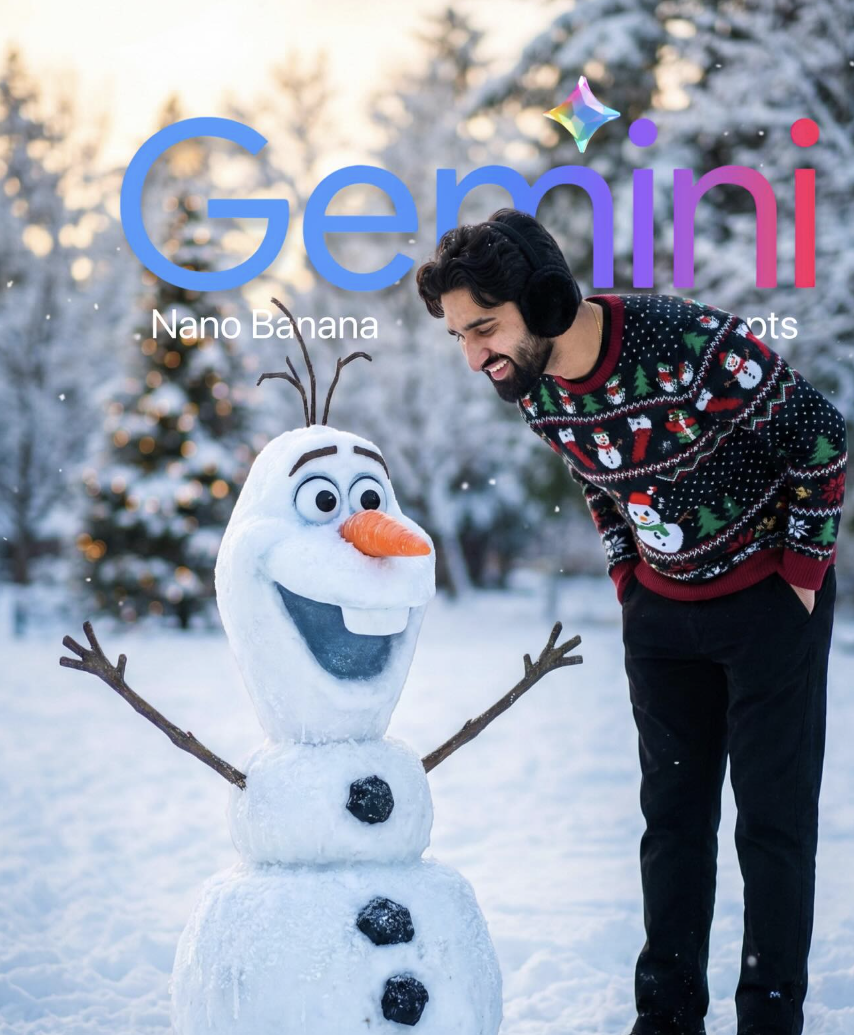
snowy winter park
Om Editing Top: snowy winter park style ko samjhiye
Om Editing Top jaisi winter-themed editing style un users ke liye perfect hoti hai jo apni normal photo ko ek cinematic, festive, aur high-end portrait look dena chahte hain. Is type ke result me subject natural bhi lagta hai aur background me fairy-tale jaisa snow scene bhi aata hai, isliye ye Instagram, profile edits, thumbnail visuals, aur AI-generated portrait ideas ke liye kaafi popular hai.
Read Also: cinematic-style realistic portrait | 2026 New Year
“snowy winter park” prompt ka main idea hota hai ek aisa scene banana jahan subject cozy winter outfit me ho, background me snow, soft lights, aur festive mood ho. Ye style un logon ke liye best hai jo Christmas, New Year, ya winter season ke around apni photo ko attractive aur professional-looking banana chahte hain.
Is look me focus sirf snowfall par nahi hota, balki expression, pose, light balance, aur composition par bhi hota hai. Agar aap Om Editing Top style me kaam kar rahe hain, to aapko samajhna hoga ki final output tabhi strong dikhega jab subject aur background dono ek dusre ko support karein.
Ye photo style aapko exactly kya deta hai
Snowy winter park style me sabse pehle jo cheez notice hoti hai wo hai atmosphere. Soft cold lighting, blue-white tones, aur snow surface se aane wali subtle reflection image ko real aur cinematic dono banati hai. Agar festive touch ho, jaise Christmas tree lights, to scene me warmth bhi add ho jaati hai, jis se photo sirf thandi nahi lagti balki magical feel deti hai.
Composition ki baat karein to is style me subject ko aksar center ya slightly side angle par rakha jata hai, taaki uska pose natural lage. Background ko blur rakhkar bokeh effect diya jata hai, jisse tree lights, snowy branches, aur distant park details soft aur premium lagti hain. Ye look portrait photography ko AI edit ke level par kaafi polished bana deta hai.
Realism bhi is style ka important part hai. Snowman, snow texture, earmuffs, sweater fabric, aur face lighting agar sahi ho to image fake nahi lagti. Isliye Om Editing Top wali editing me details ko carefully handle karna zaroori hai, especially agar aap chahte hain ki photo social media par instantly eye-catching lage.
- Soft cinematic lighting aur natural winter glow
- Cold blue tones ke saath warm festive highlights
- Snowfall aur frost details se realistic depth
- Blurred background aur bokeh lights for premium look
- Cozy winter clothing se strong seasonal mood
This Style ko use kaise karein: beginner-friendly steps
Agar aap mobile par kaam kar rahe hain, to sabse pehle apni photo select karein. Aisi photo choose karein jisme face clear ho aur subject seedha camera ki taraf ya thoda side me ho. Om Editing Top style me base image jitni clear hogi, final winter edit utna hi realistic aayega.
Uske baad editing app ya AI tool me prompt/style apply karein, lekin image ke core features ko preserve karna zaroori hai. Face structure, expression, aur body posture ko match rakhna is type ke result ke liye important hota hai. Agar subject ka pose already natural ho, to snow park setting us par easily fit ho jaati hai.
Final stage me lighting aur background balance check karein. Snowy environment me over-bright image se details khatam ho sakti hain, aur too-dark image me festive mood kam ho jata hai. Best result ke liye slight contrast, soft shadows, aur clean winter tones use karein.
- Ek clear portrait photo select karein jisme face blur na ho.
- Image ko aise crop karein ki subject ka upper body aur pose visible rahe.
- Winter theme apply karein aur festive/snowy background choose karein.
- Lighting ko soft aur natural rakhein, taaki skin tone realistic lage.
- Snowflakes, frost, aur bokeh details ko balanced amount me add karein.
- Final image ko zoom karke check karein ki hands, face, aur edges clean hain ya nahi.
Kaunsi photos is style ke liye sabse achchi kaam karti hain
Is type ke Om Editing Top edit ke liye sabse achchi photo wo hoti hai jisme angle simple aur expressive ho. Front-facing ya slightly low-angle portraits best rehte hain, kyunki inme face saaf dikhta hai aur winter mood ke saath subject strong lagta hai. Agar photo me already halka smile ya calm expression ho, to final scene aur bhi natural lagta hai.
Resolution bhi important hai. High-resolution image use karne se sweater texture, earmuffs, skin detail, aur snow effects sab clean rehte hain. Low-quality photo me background blur aur lighting add karna mushkil ho jata hai, aur output artificial lag sakta hai. Isliye sharp photo choose karna editing ka first rule hona chahiye.
Background aur clothing ko bhi practical angle se sochiye. Plain background wali photo zyada flexible hoti hai, kyunki usse winter park scene me easily blend kiya ja sakta hai. Clothing simple aur fitted ho to festive sweater ya black winter outfit look me naturally fit ho jata hai.
- Angle: front-facing ya slight low-angle portrait
- Resolution: clear, sharp, high-quality image
- Lighting: soft daylight ya even indoor lighting
- Background: plain, uncluttered, easy to replace
- Clothing: simple winter wear, dark pants, sweater, jacket, or cozy layers
- Expression: natural smile ya relaxed cheerful look
Winter portrait ko realistic aur attractive banane ke practical tips
Agar aap chahte hain ki snowy winter park look sirf “AI edit” na lage balki ek real winter portrait jaisa feel de, to details par focus karna hoga. Snow ka texture, subject ki shadow, aur light ka direction ek dusre se match hone chahiye. Jab sab elements aligned hote hain, tab image ka overall impact kaafi strong hota hai.
Another useful tip ye hai ki subject ke around space chhoda jaye. Bahut tight crop se snowman ya background ka festive part fully visible nahi hota. Open framing se park ka ambience, trees, aur winter depth better dikhte hain. Ye chhoti si cheez photo ko more premium bana deti hai.
Finally, colors ko balance me rakhein. Pure blue tone image ko cold aur flat bana sakta hai, jabki thoda warm light photo me life laata hai. Om Editing Top style me ye warm-cold mix hi winter aesthetic ko special banata hai, especially jab aap festive mood aur realism dono ko ek saath dikhana chahte hain.
Pro tips for the best results with This Style
To get the strongest output from Om Editing Top, start with a clear subject and a clean visual direction. The more specific your idea is about clothing, mood, lighting, and background, the easier it becomes to generate an image that feels polished and realistic. Small details like hand position, facial expression, and the type of winter scenery can make a big difference in the final look.
For snowy winter park edits, consistency matters most. If you want a festive portrait, keep the colors balanced between cold winter tones and warm holiday highlights. That contrast helps the image look cinematic instead of flat. It also makes the subject stand out naturally against the snow, trees, and soft glowing lights.
Here are a few practical do’s that usually improve the result:
- Use a simple, direct subject description so the main face and pose stay sharp.
- Mention the outfit clearly if you want a seasonal look, such as sweater, jacket, earmuffs, or boots.
- Ask for realistic snow texture, soft bokeh, and gentle lighting for a more premium finish.
- Keep the background detailed but not crowded, so the subject remains the focus.
- Use mood words like joyful, cozy, magical, or cinematic to guide the atmosphere.
- If you want a social-media-ready result, ask for a balanced composition and a clean frame.
Another useful tip is to think like a photographer. Details such as lens style, depth of field, and angle can help the edit look more professional. With Om Editing Top, that kind of visual direction can turn a simple winter scene into something that feels like a high-end portrait shoot.
Common mistakes to avoid in This edits
One common mistake is making the prompt too vague. If the winter setting, expression, and outfit are not described well, the output can feel random or less connected to your idea. A weak description often leads to mismatched details, especially in portrait-style edits where face clarity and scene balance matter.
Another issue is overloading the concept with too many conflicting elements. When the image asks for too many backgrounds, colors, or props at once, the final result can look cluttered. Om Editing Top works best when the core idea is clear and the extra details support it instead of competing with it.
- Avoid mixing too many styles, because it can reduce realism and make the image feel inconsistent.
- Don’t overcrowd the background, since too many objects can pull attention away from the subject.
- Don’t ignore lighting details, because poor light direction can flatten the winter atmosphere.
- Avoid unclear pose instructions, since the posture is important for a natural-looking portrait.
- Don’t forget mood words, because they help shape the emotional tone of the final image.
It also helps to avoid generic wording like “nice picture” or “beautiful background” without any visual specifics. Better results usually come from detailed but controlled directions. That is especially true for snowy winter park scenes, where texture, warmth, and realism need to work together smoothly.
Best use cases for This Style winter images
Om Editing Top winter edits can be used in many places beyond a simple gallery post. These images are especially useful for Instagram posts, where a festive portrait can quickly catch attention with its clean composition and seasonal mood. A snowy park scene also works well because it feels relatable, warm, and visually appealing at the same time.
Profile pictures are another strong use case, especially when the edit keeps the subject sharp and expressive. A well-lit winter portrait can create a friendly first impression while still looking stylish. The same type of image can also work for thumbnails, where strong contrast and a clear face help the visual stand out even at smaller sizes.
You can also use these images in several practical content formats:
- Instagram feeds: seasonal lifestyle posts, festive portraits, and holiday-themed content.
- Profile pictures: clean, polished visuals with a warm and approachable feel.
- YouTube thumbnails: attention-grabbing winter visuals with strong subject focus.
- Portfolios: creative portrait samples that show editing style and visual taste.
- Reels covers: eye-catching cover frames for winter edits and short-form content.
If you are building a personal brand, these images can help maintain a consistent aesthetic across platforms. For creators, editors, and social media users, this style makes it easier to produce visuals that feel seasonal, modern, and ready to share.
Variations you can try with This Style
One of the best things about this prompt is that you can experiment with different moods without changing the core idea. The same winter park concept can feel soft, romantic, energetic, or dramatic depending on the lighting, colours, and weather details you choose. That flexibility makes it useful for both casual users and content creators.
You can try changing the mood to match the story you want the image to tell. A bright and cheerful version will feel more festive, while a cooler and quieter version may look more cinematic. Even small shifts in tone can give the portrait a completely different personality.
Here are some variation ideas to explore:
- Moods: joyful, cozy, dreamy, romantic, cinematic, playful, soft.
- Colours: cold blue tones, warm golden lights, silver-white snow, red-and-green festive accents.
- Settings: snowy park bench, frozen walkway, pine tree path, lantern-lit garden, tree-lined winter trail.
- Seasons within winter: fresh snowfall, early winter, deep winter, holiday evening, frosty sunrise.
- Weather effects: gentle snowfall, light wind, foggy air, sparkling frost, glowing evening haze.
You can also test different portrait styles, such as a close-up profile look, a full-body standing pose, or a more candid moment with natural expression. These variations help you find the version that fits your page, your audience, or your personal style best.
Conclusion: why This Style works so well
This look is a strong choice when you want winter visuals that feel detailed, stylish, and easy to share. The focus on realistic lighting, seasonal mood, and clean composition makes it especially effective for snowy park portraits and festive social-media content. It gives you a flexible way to create images that look polished without losing the natural charm of the scene.
If you want a winter image that feels warm, cinematic, and visually memorable, yeh style is worth trying. Experiment with different moods, backgrounds, and colour tones to see which version matches your style best, and keep refining the details until the final image feels just right.
💬 Comments