Campus Flagstorm
Campus Flagstorm: Om Editing Top Style Ka Intro
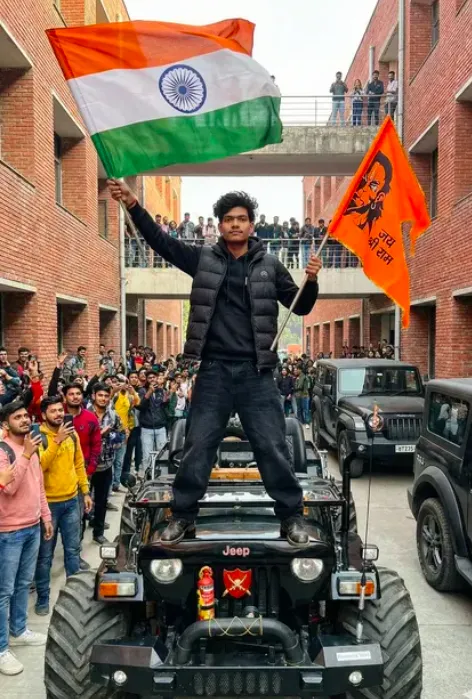
Om Editing Top style ke fans ke liye Campus Flagstorm ek aisa bold campus edit concept hai jo attitude, energy aur patriotic visual drama ko ek saath laata hai. Is type ki image un users ke liye perfect hoti hai jo social media reels, poster-style profile pics, WhatsApp DP ya college-themed AI portraits mein strong presence dikhana chahte hain.
Read Also: cinematic-style realistic portrait | 2026 New Year
Is prompt/photo style ka main focus sirf face edit nahi hota, balki poori frame mein cinematic impact create karna hota hai. Foreground-dominant composition, dramatic pose, flags ka movement aur campus background milkar ek aisi visual story banate hain jo instantly attention grab karti hai. Agar aap style-based AI editing, portrait enhancement ya bold Instagram-ready campus concept banana chahte hain, to yeh format kaafi useful hai.
Campus Flagstorm jaisi look ka appeal youth-centric hai: energetic hairstyle, powerful stance, wide-angle depth aur high-contrast realism. Isliye yeh un logon ke liye best hai jo apni photo ko simple portrait se upgrade karke ek cinematic identity dena chahte hain. Yeh especially un students aur creators ke liye kaam aata hai jo college vibe ke saath a strong hero-style edit chahte hain.
Ye Photo Style Kya Deta Hai: Visual Look Aur Mood
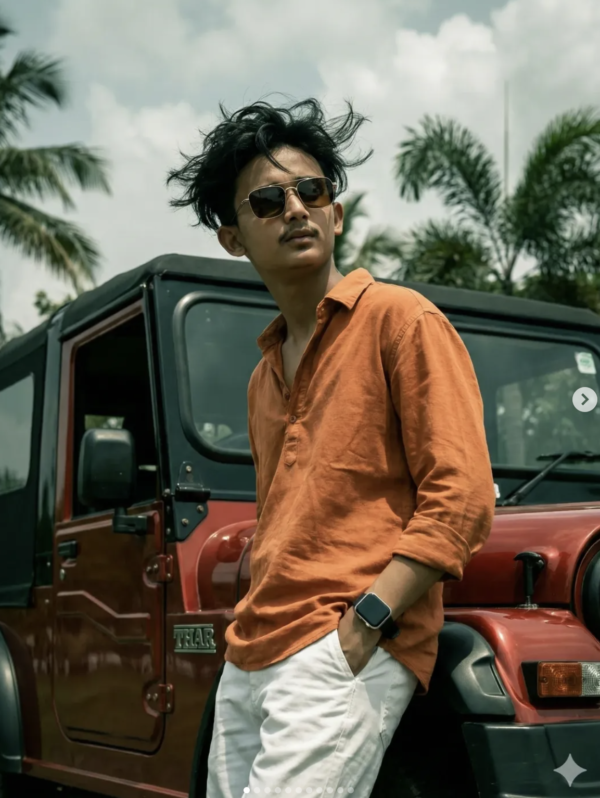
Campus Flagstorm style mein sabse pehle jo cheez notice hoti hai, woh hai intense foreground composition. Subject camera ke bahut close hota hai, isliye face aur body dono zyada powerful lagte hain. Wide-angle perspective image ko dramatic depth deta hai, aur subject ko environment ke comparison mein larger-than-life feel milta hai.
Lighting generally crisp, bold aur high-detail hoti hai. Aise edits mein skin texture, hair volume, clothing folds aur vehicle surfaces clearly visible rehte hain, jisse overall realism strong lagta hai. Colours mostly vibrant aur contrasted hote hain—brick red background, black vehicle tones, saffron flag, aur natural skin tones ek striking palette banate hain.
Mood ki baat karein to yeh style confident, energetic aur patriotic feel deta hai. Composition mein flags, vehicle, campus architecture aur standing pose ka combination ek action-oriented scene create karta hai. Is wajah se image sirf portrait nahi lagti, balki ek campaign-poster ya cinematic moment jaisi feel deti hai.
- Lighting: natural ya slightly dramatic, taaki face clear rahe
- Colours: red-brick, black, saffron aur skin-tone balance
- Composition: close-up foreground, strong central subject, wide-angle depth
- Realism: hair detail, clothing texture, vehicle structure aur flag motion
- Mood: bold, youthful, heroic aur campus-inspired
Om Editing Top Style Use Kaise Karein: Beginner-Friendly Guide
Agar aap mobile par is style ko use karna chahte hain, to process ko simple steps mein samajhna better hota hai. Sabse pehle ek clear portrait choose karein jisme face seedha ho aur features visible hon. Blurry ya low-light selfie se result weak aa sakta hai, especially jab prompt mein close-up realism aur cinematic depth maangi gayi ho.
Uske baad image upload karke prompt style ko apply karein ya editor mein similar dramatic look banayein. Mobile users ke liye sabse important cheez hoti hai composition ko samajhna: subject center mein hona chahiye, face sharp ho, aur background clutter-free ho. Jitna clean input hoga, utna hi output polished lagega.
Finally, output ko enhance karte waqt over-editing se bachna chahiye. Flags, clothing, hair aur background elements ko natural motion ke saath blend karna zaroori hota hai. Agar aap very heavy filters laga denge, to realism kam ho sakta hai. Isliye balance rakhein—detail high ho, par photo artificial na lage.
- Ek clear, front-facing ya slightly angled portrait select karein.
- Image ko mobile editor ya AI tool mein upload karein.
- Style prompt ko apply karein aur wide-angle, cinematic composition choose karein.
- Face, hair aur pose alignment check karein.
- Output preview mein lighting aur colours adjust karein.
- Background ko clean rakhein, taaki subject aur flags clearly pop karein.
- Final image ko high resolution mein save karein.
Kaun Si Photos Sabse Achchhi Kaam Karti Hain
Is style ke liye best input photos woh hoti hain jisme subject ka face clear ho aur body posture readable ho. Straight pose ya slight forward lean editing ke baad zyada natural lagti hai. Agar aap ka face dark shadow mein hai ya extreme angle se liya gaya hai, to final result mein identity lose ho sakti hai.
Resolution bhi important hai. High-quality image mein hair texture, eyes, jawline aur skin details better preserve hote hain. Low-resolution photos mein AI ya editing tools kabhi-kabhi face distort kar sakte hain, especially jab image mein dramatic zoom ya wide-angle effect add kiya ja raha ho.
Background aur clothing ka bhi role hota hai. Plain background, outdoor daylight, ya campus-style setting generally best rehti hai. Clothing simple ho to editor ko outfit styling add karna easy hota hai. Strong result ke liye aisi photo choose karein jisme light evenly fall ho aur subject clearly separated ho.
- Angle: front-facing ya slight three-quarter angle
- Resolution: clear, high-detail, no blur
- Lighting: natural daylight ya soft balanced light
- Background: simple, uncluttered, preferably outdoor
- Clothing: plain tees, shirts ya neutral outfits best hote hain
- Face visibility: eyes, hairline aur jawline clearly visible honi chahiye
Om Editing Top style mein Campus Flagstorm ka sabse bada advantage yeh hai ki yeh normal photo ko instantly cinematic aur social-media-ready bana deta hai. Agar input photo sahi ho aur composition balance mein ho, to output ek powerful campus hero edit ki tarah dikhta hai.
Pro Tips for the Best Results with Om Editing Top
To get the strongest output from Om Editing Top, start by keeping the subject’s face and pose clear, then let the background and accessories support the scene. The more specific you are about framing, lighting, and mood, the easier it is to create a polished, cinematic result that still feels natural.
It also helps to balance detail with simplicity. If the main subject is already strong, avoid overcrowding the scene with too many visual elements. A focused composition usually gives a cleaner, more premium look, especially for social media edits, poster-style images, and profile visuals.
- Use a clear portrait reference so facial features stay consistent and realistic.
- Ask for strong foreground focus if you want a dramatic, wide-angle look.
- Keep one dominant theme, such as campus energy, bold fashion, or patriotic styling.
- Choose lighting words like golden hour, cinematic daylight, or soft shadows for better depth.
- Describe the outfit and pose in a simple way so the subject stands out naturally.
- Use color direction carefully; matching tones make the final image feel more unified.
If you want a more professional finish, think like a photographer. Mentioning composition, camera feel, and atmosphere can improve the overall result much more than adding extra random details. That is one of the easiest ways to make Om Editing Top edits look sharp, intentional, and high quality.
Common Mistakes to Avoid in Om Editing Top
One common mistake is overloading the scene with too many instructions. When every element competes for attention, the subject loses impact and the final image can feel confusing. A better approach is to keep the core idea strong and let the rest of the scene support it.
Another issue is using vague wording for important parts like pose, outfit, and background. If those details are unclear, the result may not match the mood you had in mind. Clear direction usually gives better consistency, especially when you want a realistic portrait or an action-style campus edit.
- Too many objects in one frame: this makes the image feel cluttered and reduces visual focus.
- Unclear subject direction: a vague pose can weaken the entire composition.
- Conflicting style words: mixing too many moods can make the result look inconsistent.
- Ignoring lighting: without lighting direction, the image may look flat or unfinished.
- Forgetting background balance: a busy background can distract from the main subject.
It is also important not to change the core identity of the edit too much. If the goal is a strong, energetic campus-style portrait, then the composition should still feel grounded in that idea. Keeping the focus keyword concept intact helps Om Editing Top remain visually clean and easier to use across different platforms.
Best Use Cases and Ideas for Om Editing Top
Om Editing Top works especially well for images that need a bold, youthful, and high-impact feel. The style can be used for social media profiles, creative posters, and cinematic campus-themed edits where a strong subject presence matters most. It is a good fit whenever you want the image to look dramatic without losing realism.
This kind of edit also performs well in formats that need instant attention. A strong portrait with a dynamic background can stand out in feeds, thumbnails, and cover visuals. If the goal is to create a memorable first impression, this style gives you a lot of flexibility while still keeping the subject central.
- Instagram posts: ideal for attention-grabbing portrait content and stylish edits.
- Profile pictures: works well when the face is clear and the subject looks confident.
- YouTube thumbnails: useful for bold, expressive visuals that draw clicks.
- Portfolios: great for showcasing editing style, composition, and creative direction.
- Reels covers: perfect for a strong cover image that matches energetic video content.
You can also adapt the same idea for event posters, college-themed content, and fan-style visuals. Because the look is flexible, it can be used for casual, dramatic, or celebratory edits depending on the pose, setting, and color palette. That versatility is what makes Om Editing Top useful for so many creators.
Variations You Can Try with Om Editing Top
One of the best things about Om Editing Top is that you can change the mood without losing the core concept. A slight shift in colors, weather, or time of day can completely change the atmosphere of the image. This makes it easy to experiment until you find the version that matches your style.
If you want a more dramatic result, try darker tones and stronger contrast. For a fresh and energetic look, lighter colors and daylight settings work better. Seasonal changes can also make a big difference, especially when you want the scene to feel more realistic and connected to a specific vibe.
- Warm sunset version: adds golden tones and a cinematic, celebratory feel.
- Rainy campus version: creates a moody and dramatic atmosphere.
- Winter look: gives the image a cool palette and a crisp, stylish finish.
- Bright daytime version: makes the portrait feel energetic and clean.
- Urban night style: adds strong contrast, lights, and a more modern edge.
- Festive colour theme: works well when you want a vibrant, high-spirited appearance.
You can also experiment with different expressions, camera angles, and outfit choices. A confident stance gives one kind of result, while a relaxed pose creates a more casual tone. By testing small changes, you can keep Om Editing Top fresh and build multiple versions for different platforms and audiences.
Conclusion: Try Om Editing Top for a Bold, Cinematic Look
If you want a strong portrait edit that feels stylish, expressive, and visually powerful, Om Editing Top is a great choice. It gives you room to create a bold campus-inspired scene while still keeping the subject realistic and central.
Try different lighting, colours, and settings to see what fits your style best. With a few smart changes, Om Editing Top can work for profiles, posts, thumbnails, and creative showcases with equal impact.
FAQ: Campus Flagstorm
How do I use the "Campus Flagstorm" prompt?
Copy the prompt above, open Gemini or ChatGPT, upload a clear photo of yourself and paste the prompt. Generate the image and adjust the outfit or background if you want a variation.
Is this prompt free?
Yes. This prompt is free to copy and use for Instagram, reels, WhatsApp DP and profile pictures.
Which photo works best?
A sharp, front-facing, well-lit photo with no filter. A clear face helps the AI keep your identity in the final image.
Last updated: 31 July 2026
💬 Comments