Eyes Focus AI Prompt
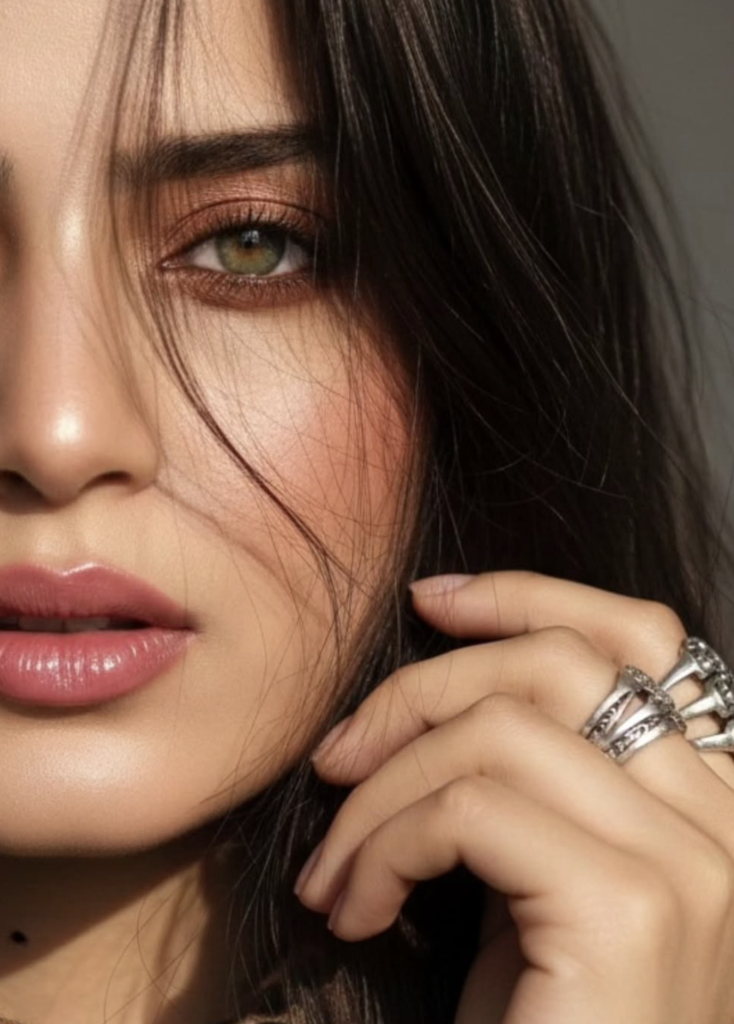
Eyes Focus AI Prompt: Understanding This Style
This Eyes Focus look is for anyone who wants to turn a simple photo into an ultra-realistic, cinematic portrait. The core idea is making the eyes the center of attention, giving the image emotion, depth, and a premium feel.
Read Also: Cinematic Realistic Portrait AI Prompt | 2026 New Year AI Prompt
This prompt is especially useful for Instagram edits, AI portrait art, mobile editing, or a high-end profile photo look. If you want a photo that feels natural but also dramatic, this style gives a balanced option — face details stay the same, but the overall presentation becomes more polished and visually impactful.
This kind of edit is ideal for close-up portrait lovers, beauty content creators, fashion editors, and AI photo transformation users. Soft glam makeup, realistic skin texture, controlled lighting, and eye emphasis combine into a modern, stylish, visually striking result.
What This Prompt Style Gives You
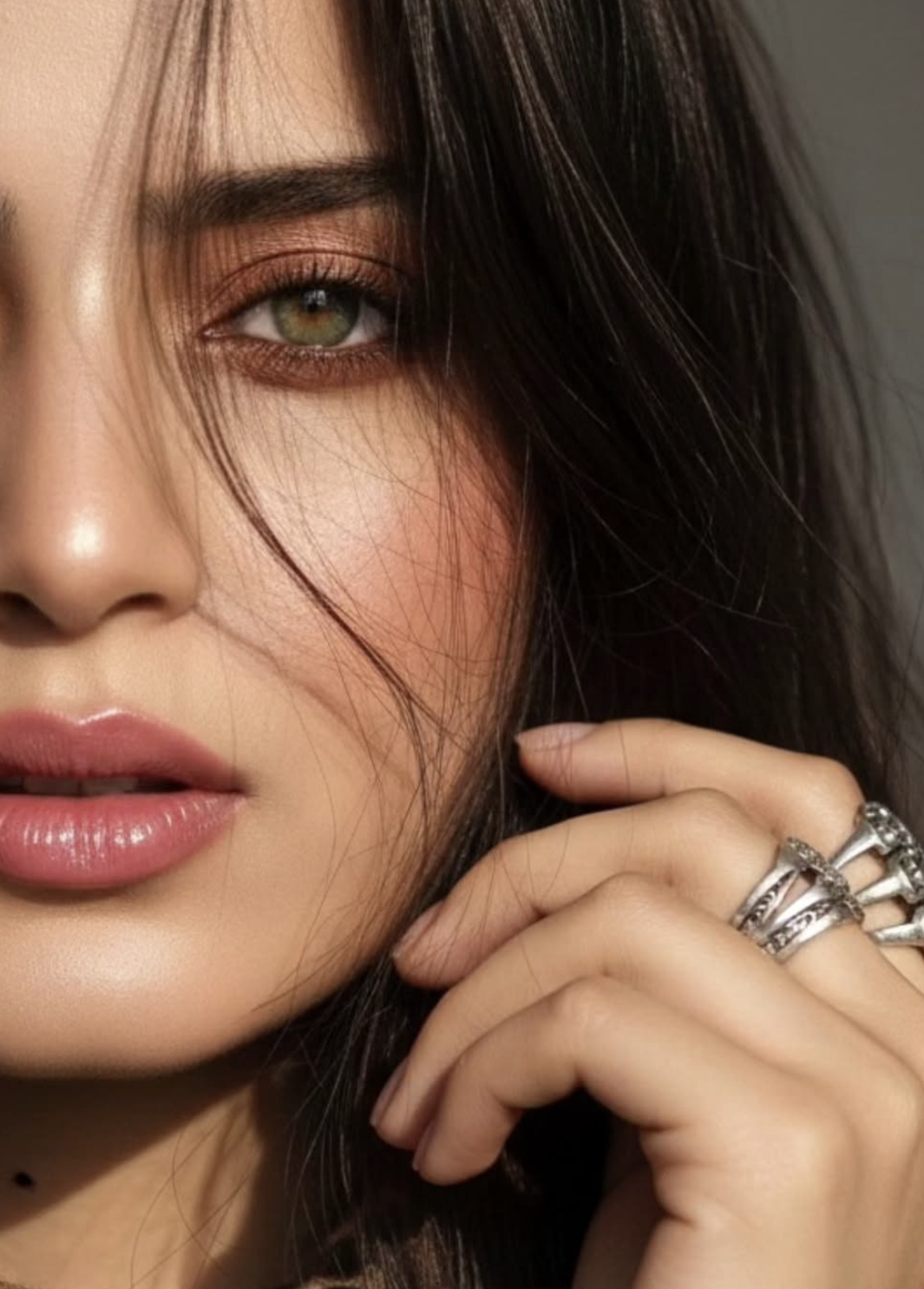
The strongest feature of Eyes Focus is its ultra-realistic close-up composition. A half-side face framing adds both mystery and elegance to the image. Light green-hazel eyes are sharply highlighted, while the rest of the face stays soft yet detailed.
Lighting is a major part of the look too. A sunlight shadow reflection creates natural depth on the face, while a shallow depth of field softly blurs the background, making the subject stand out even more — giving the portrait a clean, cinematic, premium appearance.
The color palette combines soft glam brown makeup, peachy blush, glossy pink lipstick, and naturally glowing skin tones — giving the photo a warm, fresh, feminine touch. Hair is kept open and slightly messy, with a few strands falling on the face for natural realism.
- Close-up half-face portrait framing
- Sharp cinematic focus on the eyes
- Soft glam brown makeup with peachy tones
- Glossy pink lips and a glowing skin finish
- Minimalist textured background
- Natural sunlight shadow effect
- Styling details like a leopard-print scarf and silver statement rings
How to Use This Prompt on Mobile
This style is easy to use even for beginners. Start with a clear uploaded image where the face is visible and the eyes are sharp. A slightly side-angled face works better, since the prompt targets a half right-side face look.
On mobile, the prompt box uses exact style instructions, but your photo quality needs to be strong. Low-light, blurry, or overly crowded photos weaken this look — the best results come from a clean image, a natural expression, and proper face visibility.
Keep the step-by-step process simple for an accurate result. During editing, focus on keeping the eyes crisp, the skin texture natural, and accessories like rings or a scarf showing cleanly.
- Choose a clear portrait photo with the face and eyes visible.
- Upload the photo and open the edit prompt area.
- Use the style prompt to set a close-up, realistic, cinematic direction.
- Make sure face features stay the same, avoiding unnatural distortion.
- Set lighting preference to a natural sunlight style.
- Keep the background minimalist and slightly textured per the prompt.
- Check the result preview and retry with a different angle if needed.
A useful beginner tip: test different angles and expressions on the same image to see which pose highlights the eyes best. Small details, like keeping a hand near the face or letting hair strands fall on it, make the output more realistic.
Which Photos Work Best
The best photos for this Eyes Focus look have the subject’s face close-up, with the right side slightly visible. If the face is already in a half-side view, the edit looks even more natural. A front-facing image can work too, but side composition gives a more cinematic result.
Resolution should be high, since the prompt expects a hyper-detailed, sharp output. Blurry selfies or over-compressed photos can weaken eye detail — the clearer your source image, the more realistic and polished the final portrait.
Soft natural light is ideal for lighting — window light, morning sunlight, or diffused daylight all enhance face texture. Keep the background simple, since a busy backdrop can distract from the eye focus. A scarf, earrings, rings, or a subtle fashion accessory make the look even stronger.
- Angle: half right-side face or slight side profile
- Resolution: high-quality, sharp, clear image
- Lighting: soft daylight, natural sunlight, or diffused light
- Background: minimalist, plain, lightly textured
- Clothing: fashionable but not overly busy, a scarf or subtle accessories help
- Expression: calm, confident, soft-glam mood
- Face details: eyes, eyebrows, skin texture, lip shape clearly visible
Pro Tips for the Best Eyes Focus Results
Base image quality matters most for a good Eyes Focus result. If the uploaded photo is already clear, the face angle readable, and lighting balanced, the final output looks more natural, sharp, and cinematic — eye detail is the hero here, so the face shouldn’t be blurry or overexposed.
Composition matters too. In a half-face portrait, the right side should be clearly visible, eyes near the center of the frame, and background not unnecessarily busy. Minimal texture, soft sunlight feel, and shallow depth of field give the image a premium look. Start with a simple base photo and keep the expression calm, confident, and naturally elegant for a more impactful result.
- Upload a high-resolution image so eye detail comes out crisp.
- Keep the face partially visible, especially in close-up framing.
- Choose a photo with natural or soft lighting.
- Let hair strands and accessories like a scarf or rings stay visible — they add fashion depth.
- Keep the background simple so focus stays directly on the eyes.
- Keep the pose relaxed; natural hand placement makes the output more realistic.
Balance eye contact and skin texture — too much smoothing makes the image look artificial, while subtle glow and realistic shadows give the portrait a premium, editorial, social-media-ready feel.
Common Mistakes to Avoid
The most common mistake is using a photo that’s already too dark or heavily blurred. In eye-focused editing, details matter a lot — a weak source image reduces sharpness and realism in the final portrait. An overly crowded background also pulls attention away from the subject’s eyes.
- Low-quality upload: loses detail, especially around the eyes and lips.
- Overexposed light: washes out skin texture and reduces the cinematic shadow effect.
- Busy background: ruins the minimalist look and shifts focus away from the face.
- Too much retouching: a plastic-like finish replaces the natural glow.
- Bad crop: disrupts the half-face composition balance, which is this style’s main appeal.
- Random accessories overload: rings, scarf, and hair details should support the look, not dominate it.
Best Use Cases
This style is a versatile visual asset, not just a portrait edit. The output works well as an Instagram profile photo, story post, feed aesthetic, or for personal branding — the ultra-realistic close-up look makes it classy and attention-grabbing.
- Instagram profile picture: a strong first impression with clear eyes and polished skin.
- Reel cover: close-up framing creates a scroll-stopping effect.
- Thumbnails: face-centric visuals can boost engagement.
- Portfolio use: ideal for showcasing fashion, portrait, or beauty work.
- Profile banners / highlight covers: maintains aesthetic consistency.
- Personal branding: builds a stylish, confident, premium identity.
Variations You Can Try
Try warm tones, cooler tones, or a soft daylight look. Season-based variations are interesting too — softer moody shadows for monsoon, cooler skin tones for winter, and bright sun-kissed reflections for summer.
- Mood variation: soft glam, moody cinematic, or elegant editorial.
- Colour variation: peachy warm tones, olive neutrals, or a muted beige palette.
- Lighting variation: sunlight reflection, side light, or gentle studio glow.
- Season variation: summer fresh, autumn earthy, winter cool, monsoon soft-drama.
- Styling variation: different scarf patterns, subtle makeup shifts, or ring styles.
- Expression variation: calm gaze, intense look, or a slightly dreamy portrait feel.
Conclusion: Try This Cinematic Eyes Focus Look
If you want a portrait that feels elegant, realistic, and highly detailed, Eyes Focus is a strong choice. Natural beauty, eye sharpness, soft glam makeup, and a minimalist background combine into a premium look. With the right source image and balanced styling, the output can be even more impressive.
FAQ: Eyes Focus
How do I use the "Eyes Focus" prompt?
Copy the prompt above, open Gemini or ChatGPT, upload a clear photo of yourself and paste the prompt. Generate the image and adjust the outfit or background if you want a variation.
Is this prompt free?
Yes. This prompt is free to copy and use for Instagram, reels, WhatsApp DP and profile pictures.
Which photo works best?
A sharp, front-facing, well-lit photo with no filter. A clear face helps the AI keep your identity in the final image.
Last updated: 8 October 2026
💬 Comments