Digital Greeting Card AI Prompt
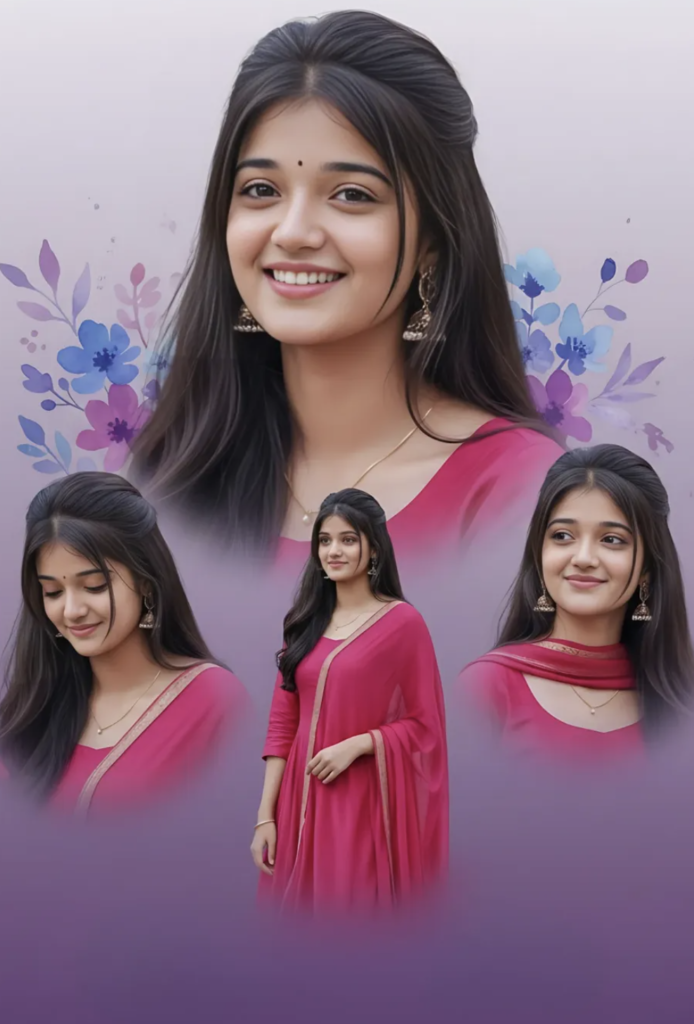
Digital Greeting Card AI Prompt: What Is This Style?
This digital greeting card style is perfect for anyone who wants to create a dreamy, elegant, modern festive look. This kind of design is very useful for social media greetings, birthday wishes, anniversary posts, festive cards, and personal photo edits.
Read Also: Cinematic Realistic Portrait AI Prompt | 2026 New Year AI Prompt
This style usually uses a soft pastel background, a graceful portrait layout, and decorative floral touches. The visual result feels both classy and emotional, which is why it’s useful for beginners, content creators, photo editors, and wedding/festival designers alike.
If you want to convert a simple photo into a premium-looking card, this style gives you a ready-made visual direction. The composition stays clean, the subject is highlighted in the center, and the overall card mood is soft, graceful, and share-worthy.
What Visual Result This Style Gives
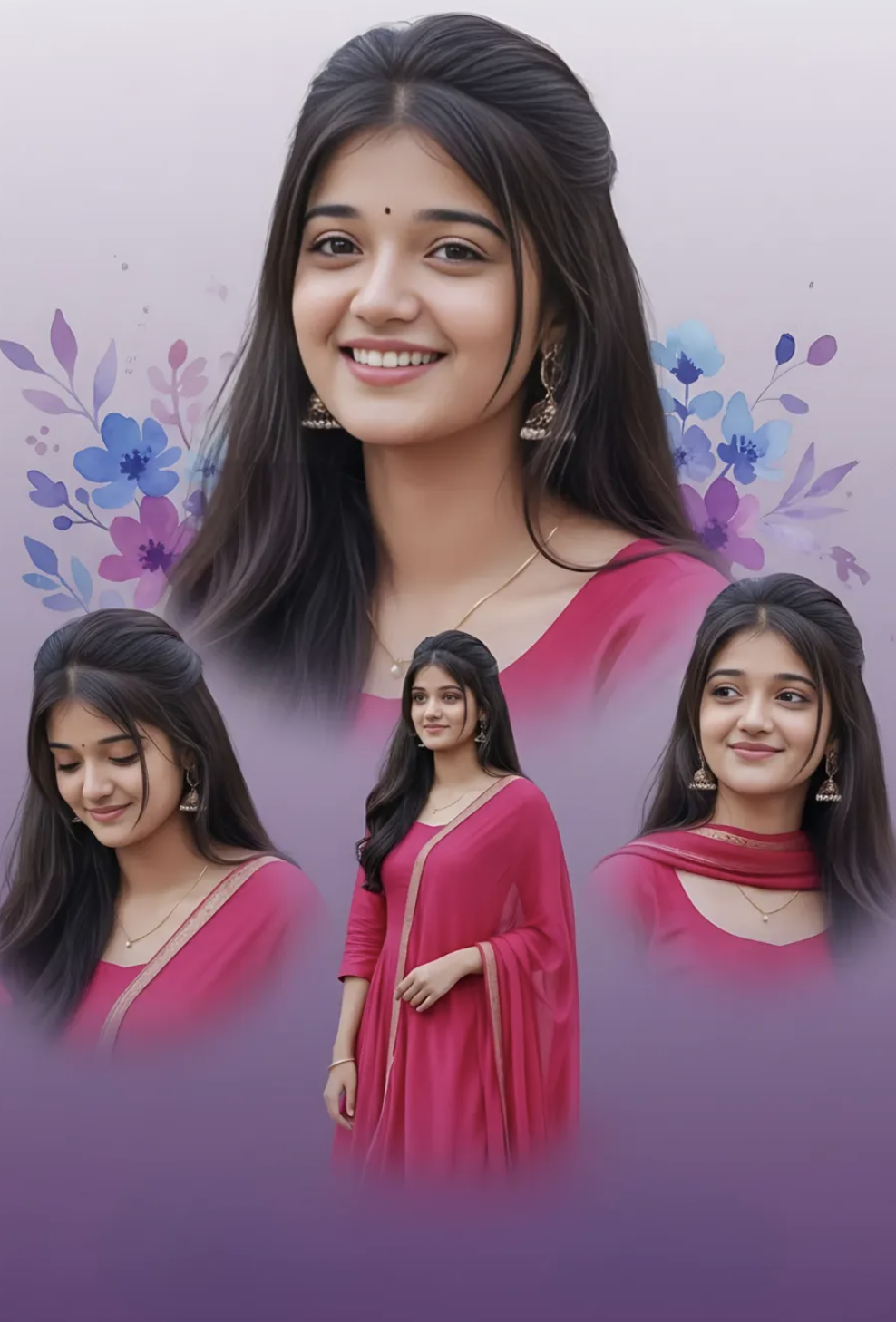
This kind of greeting card prompt or design style gives a polished, feminine, artistic output. Lighting is generally soft and flattering, keeping skin tones smooth and the portrait looking natural. A light-to-dark gradient background adds depth, keeping the card from looking boring.
Color palette mostly combines pink, magenta, lavender, white, and purple tones. These shades give a festive, elegant feel and make the collage-style layout more attractive. Adding floral watercolor elements makes the overall look even more romantic, premium, and handcrafted-feeling.
Composition is a strong point too. One main portrait is highlighted, while the rest of the images are arranged around it in a dynamic collage — giving the greeting card movement, variety, and visual balance.
- Soft lighting: gives the face a gentle, clean look
- Gradient background: creates depth and a premium finish
- Floral accents: make the card elegant and decorative
- Collage layout: showcases multiple poses in one design
- Dreamy mood: perfect for festive or personal greetings
How to Use This Style: Beginner Step-by-Step Guide
Even on mobile, this style is easy to follow. Select your best portrait photo first — clear, with the face properly visible, since the greeting card’s main focus is the subject.
Open your editing app or AI-based design tool and choose a card layout. Set a pastel gradient background, then place the main image in the center or upper-center position. If using multiple photos, arrange them in an overlapping style so the collage looks natural.
- Select your best portrait photo.
- Open a new greeting card canvas in your editing app.
- Apply a soft lavender, white, or purple gradient background.
- Place the main photo in the upper-center or main focal area.
- Overlap and arrange extra photos to the side or bottom area.
- Add floral or leaf decorations.
- Lightly adjust brightness, contrast, and saturation.
- Check spacing and alignment in the final preview.
Which Photos Work Best
Best results come from using high-quality portrait photos. The face angle should be clear, and the image shouldn’t be blurry. Front-facing or slightly turned poses look good in greeting cards, since they keep expressions readable.
Natural daylight or soft indoor light is best for lighting. Hard shadows or overexposed photos don’t look as good in this style. A simple background is better too, since the card design’s decorative elements show clearly.
- Angle: front pose, slight side pose, or a soft downward look
- Resolution: use a high-resolution photo
- Lighting: natural light or soft studio light is best
- Background: plain, uncluttered, clean background is preferred
- Clothing: pink, magenta, purple, pastel, or ethnic wear suits it
- Expression: a gentle smile or calm confident look is more attractive
Pro Tips for the Best Results
Focus on composition first. A clean background, balanced subject placement, and a matching color palette give the image a premium look. Soft gradient backgrounds, pastel shades, and gentle lighting make the card more elegant and share-worthy.
- Choose soft colors: lavender, pink, purple, white, and light blue tones make the greeting card dreamy.
- Keep expression natural: a light smile, calm look, and confident pose make the output more realistic.
- Keep the background clean: too many heavy elements reduce the card’s elegance.
- Place text carefully: a stylized name or message at the bottom keeps the layout balanced.
- Keep hair and outfit consistent across the collage.
- Avoid high contrast: very sharp shadows or harsh colors can break the soft greeting card look.
Common Mistakes to Avoid
- Over-decorating the background — too many floral elements, frames, shadows, and text lose the card’s soft aesthetic.
- Inconsistent color use — a pink outfit with a neon or overly saturated background can break the elegant mood.
- Too much text — long messages crowd the design and hurt readability.
- Mixed lighting across frames — different lighting in each collage photo can look unnatural.
- Poor crop selection — a cut-off face or shoulder weakens the composition.
- Harsh borders — hard edges give a “glued” look; soft blending feels more premium.
Best Use Cases
- Instagram post: aesthetic feed visuals and birthday greetings.
- Profile picture edits: a clean portrait-based design with strong impact.
- Thumbnail design: a bright yet elegant look that grabs viewer attention.
- Reel cover: a stylish cover image that organizes and attracts content.
- Portfolio showcase: a polished sample of editing skills.
- Personal greeting cards: customized digital wishes for friends, family, or clients.
Variations You Can Try
- Soft romantic look: pink, blush, and lavender tones with gentle smiles.
- Royal elegant look: a darker purple background with refined highlights and traditional attire.
- Fresh floral look: blue, white, and pastel flowers with an airy composition.
- Festive greeting look: warm lights, decorative accents, and brighter text styling.
- Minimal aesthetic look: fewer elements, more negative space, a clean modern finish.
- Seasonal look: summer pastel, monsoon cool tones, or winter dreamy gradients.
Conclusion: Try This for a Stylish Digital Greeting Card
If you want a design that’s soft, elegant, and eye-catching, this digital greeting card style is a strong choice. Its balanced collage look, dreamy colors, and graceful finish make it ideal for both personal sharing and social media posting.
FAQ: Digital Greeting Card
How do I use the "Digital Greeting Card" prompt?
Copy the prompt above, open Gemini or ChatGPT, upload a clear photo of yourself and paste the prompt. Generate the image and adjust the outfit or background if you want a variation.
Is this prompt free?
Yes. This prompt is free to copy and use for Instagram, reels, WhatsApp DP and profile pictures.
Which photo works best?
A sharp, front-facing, well-lit photo with no filter. A clear face helps the AI keep your identity in the final image.
Last updated: 10 September 2026


💬 Comments