Christmas Carousel AI Prompt
Christmas Carousel AI Prompt: What Is This Style?
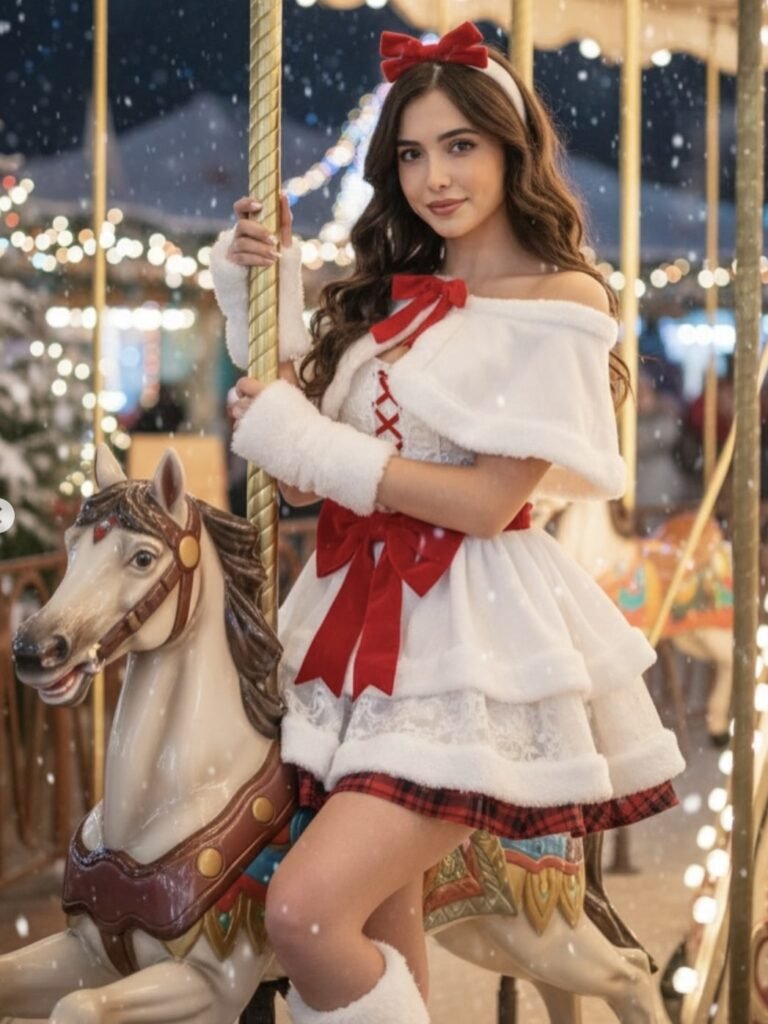
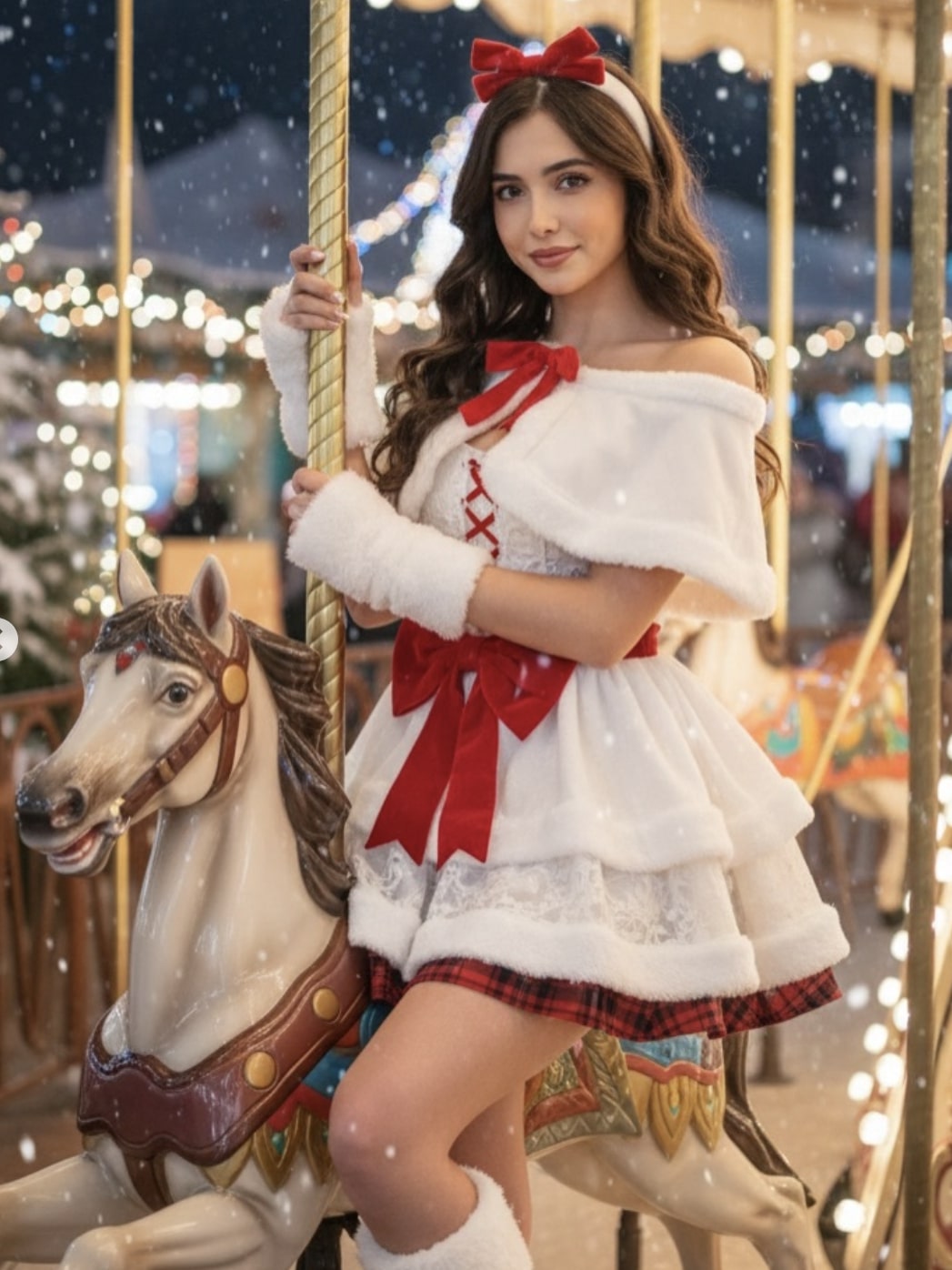
This is a festive AI photo edit concept that combines winter, Christmas, and cute fashion aesthetics. White, red, and plaid tones give the image a soft, dreamy, holiday-ready feel.
Read Also: Cinematic Realistic Portrait AI Prompt | 2026 New Year AI Prompt
This look is best for anyone who wants a Christmas-themed makeover for their portrait photo. Whether it’s a social media post, profile picture, festive thumbnail, or creative edit, this style feels attractive and eye-catching.
Focus stays on clean face detailing, stylish outfit layers, a snowy background, and decorative lights — the result feels warm and carries a strong winter celebration vibe.
What Output This Prompt Gives You
The final output is usually a feminine, soft, festive look with white fur texture, red bow accents, and plaid skirt layers in the outfit. The overall composition is designed so the subject stays centered while the background supports the Christmas mood.
Lighting is generally bright yet gentle, keeping face details clear and skin tone natural. A snowy environment, carousel lights, and holiday decoration make the image cinematic — realistic or fantasy-inspired, depending on source photo quality and edit settings.
- White and red festive palette
- Soft fluffy textures and winter outfit layers
- Snowy Christmas background with decorative lights
- Portrait-focused composition with strong face visibility
- Dreamy but realistic holiday aesthetic
How to Use This Style on Mobile
This style is genuinely simple to use. Select your best reference photo first, upload it into an AI editing app or prompt-based editor, then generate an output matching the Christmas theme and outfit style.
Small settings matter a lot here too — apply the prompt clearly, prioritize face matching, and keep the background festive. If your app offers ratio, quality, or detail strength options, set them carefully for a crisp final result.
- Choose your clear portrait photo.
- Open a photo editor or AI image tool.
- Upload the reference image and select the Christmas theme.
- Enable outfit, snow background, and festive lighting.
- Keep face match and detail enhancement turned on.
- Generate the image and preview the result.
- Adjust brightness, color balance, and sharpness if needed.
- Save the final image and use it on social media.
Which Photos Work Best
The best photo for this edit has a clearly visible face and a stable body posture. Front-facing or slightly angled portraits work better since facial structure is easier for the AI to understand. Blurry or overexposed images weaken the final output.
Lighting plays a big role — soft natural light, bright indoor light, or an evenly lit photo works best. A simple background lets the AI replace or enhance the festive environment better. Plain or fitted clothing is more useful since Christmas costume layers add on top easily.
- Face sharp and fully visible
- High-resolution photo
- Soft, even lighting
- Clutter-free or simple background
- Shoulders and upper body visible
- Plain clothing gives a cleaner edit
- Natural, relaxed expression
- Avoid too much shadow or heavy filters
Pro Tips for the Best Results
Start with a clean reference image and a clear prompt structure. Since this style is about preserving the face while transforming the outfit, the reference photo should have good lighting, a forward-facing angle, and enough detail in hair and facial features.
Be specific about visual details, but keep the overall direction simple and organized. Mention the main outfit elements first, then accessories, then the background — this helps guide the generation without losing the face match.
- Use a clear portrait with sharp facial details for better face matching.
- Describe the dress, cape, gloves, and boots in separate parts.
- Ask for a festive Christmas background with snow and warm lights for a richer scene.
- Keep the pose elegant and simple so the clothing details stay visible.
- Choose a color palette matching the Christmas theme — white, red, soft plaid accents.
- Request a soft glow or cinematic light for a more premium-looking edit.
Common Mistakes to Avoid
- Too many style directions: confuses the model and weakens the final composition.
- Unclear face-match request: without emphasis, the result may drift from the original likeness.
- Missing accessory details: gloves, bow, or headband complete the Christmas look.
- Weak background description: a plain or unrelated background reduces the festive mood.
- Ignoring color balance: without a clear palette, the outfit may not feel cohesive or seasonal.
Best Use Cases
- Instagram posts: perfect for festive profile updates and holiday aesthetic content.
- Profile pictures: a strong face-focused edit that makes your account look polished.
- Thumbnails: great for seasonal video covers that need quick visual impact.
- Reel covers: helps build a cohesive Christmas reel theme.
- Portfolios: useful for showcasing AI fashion edits or creative portrait transformations.
Variations You Can Try
- Soft winter mood: pale whites, gentle snow, subtle lighting.
- Classic Christmas style: red, white, and plaid with a warm festive glow.
- Luxury holiday look: richer lighting, a more polished background.
- Night carousel theme: bright lights and deeper shadows for drama.
- Cozy seasonal version: warmer tones and soft fabric textures.
- Different backdrop ideas: snowy streets, decorated trees, or festive fair settings.
Conclusion: Try This Style for a Festive Christmas Edit
This is a great choice when you want a Christmas image that feels stylish, detailed, and face-accurate. The combination of a white-and-red outfit, fluffy winter accessories, and a snowy festive background creates a look that’s both charming and visually strong.
FAQ: Christmas Carousel
How do I use the "Christmas Carousel" prompt?
Copy the prompt above, open Gemini or ChatGPT, upload a clear photo of yourself and paste the prompt. Generate the image and adjust the outfit or background if you want a variation.
Is this prompt free?
Yes. This prompt is free to copy and use for Instagram, reels, WhatsApp DP and profile pictures.
Which photo works best?
A sharp, front-facing, well-lit photo with no filter. A clear face helps the AI keep your identity in the final image.
Last updated: 8 October 2026

💬 Comments