2026 New Year AI Prompt

2026 New Year AI Prompt: Stylish Festive Portrait Ideas
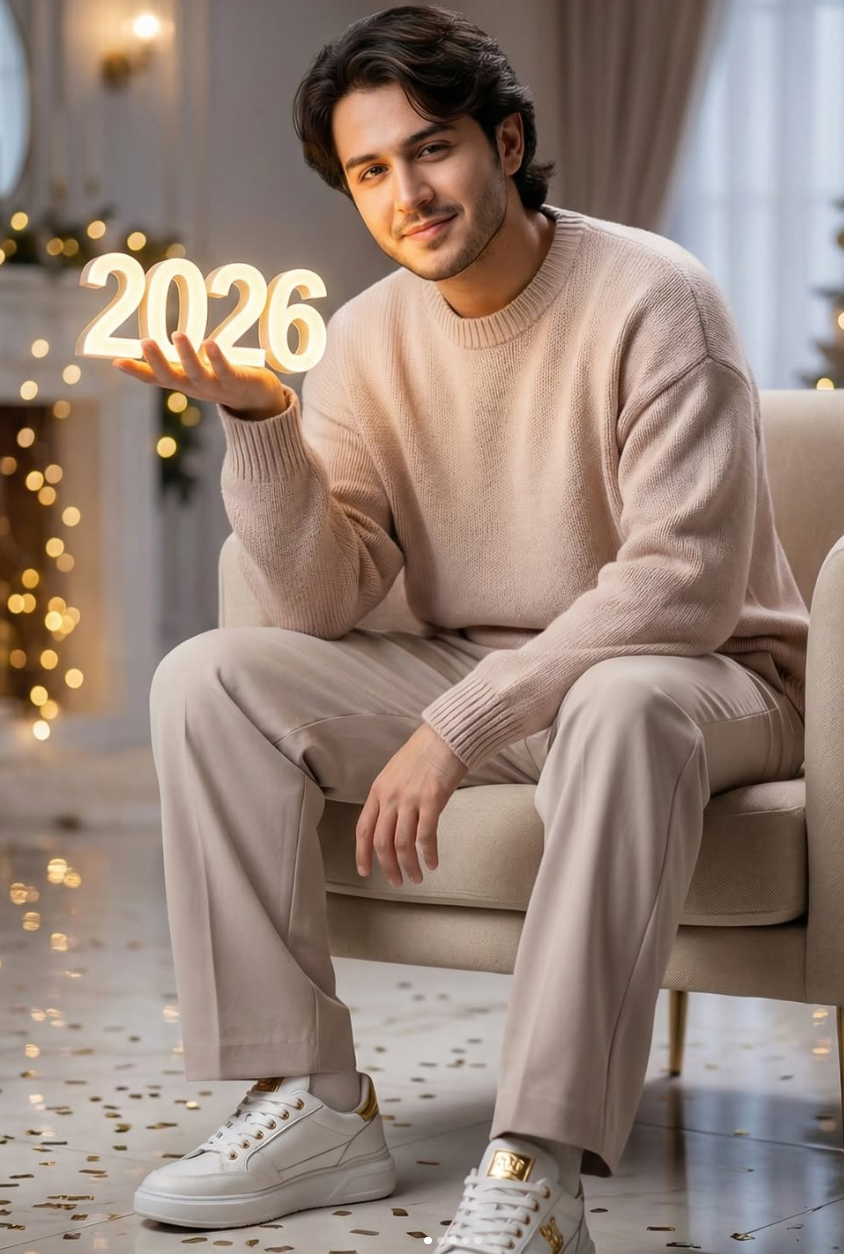
This 2026 New Year AI prompt is a great choice if you want a clean, premium, and realistic festive portrait. It’s made for creators, photographers, and social media users who want a luxury-looking New Year image without it feeling artificial.
Read Also: Cinematic Realistic Portrait AI Prompt | Gothic AI Image Prompt
The subject looks calm, confident, and beautifully lit, with a winter celebration mood that feels rich and modern — perfect for Instagram posts, profile pictures, thumbnails, festive greetings, and aesthetic portrait content during the New Year season.
What This Style Gives You in a New Year Portrait
This style delivers a high-end indoor festive atmosphere with warm golden tones, soft reflections, and a cozy winter feeling. The image looks cinematic because the background is gently blurred, keeping the subject in sharp focus while the scene still feels rich and luxurious.
- Warm indoor lighting with a soft golden glow
- Luxury winter-themed mood
- Realistic skin, clothing, and reflections
- Blurred background for a premium portrait feel
- Relaxed, confident pose for a natural look
- Festive New Year details that feel elegant, not cluttered
How to Use This Style: Step-by-Step
You don’t need advanced editing knowledge to start, but your photo choice matters — the final result depends on clarity, pose, and lighting.
- Pick a clear full-body or half-body portrait with the subject facing the camera naturally.
- Make sure the photo has good quality and isn’t blurry or overexposed.
- Use an indoor or controlled background, ideally one that can be styled into a festive winter look.
- Keep the pose relaxed — this style looks best when the body language feels calm and confident.
- Choose clothing that matches the premium aesthetic, like sweaters or neutral-toned outfits.
- Apply the edit and check whether face details, hands, and outfit textures still look natural.
- Adjust brightness, contrast, and color balance only lightly so the image stays realistic.
- Export in vertical format if you plan to use it for Instagram Reels, stories, or status posts.
Which Photos Work Best
The best photos are clean portraits with enough space around the subject and a clear view of the face. A sharp image with proper focus always performs better than a crowded or low-resolution picture.
- Angle: front-facing or slightly angled pose for a natural look
- Resolution: sharp, high-resolution photo for better detail
- Lighting: soft indoor lighting or balanced daylight works best
- Background: plain, neat, or easily editable background is ideal
- Clothing: oversized sweaters, neutral tones, and clean casual outfits
- Expression: relaxed smile or calm confident face for the best festive mood
Pro Tips for the Best Results
Clarity and balance matter most in the prompt. When subject, outfit, lighting, background, and mood are all clearly defined, the image looks far more natural and premium.
- Define the subject clearly — full-body portrait, casual seated pose, relaxed smile.
- Keep lighting specific: soft ambient light, warm glow, cinematic highlights.
- Maintain color harmony — pastel beige, soft neutral tones, golden accents.
- Keep background details limited but effective: fairy lights, confetti, polished floor reflections.
- Keep the pose natural so the image doesn’t look over-posed or artificial.
- Mention output ratio and quality, especially for vertical social media use.
Common Mistakes to Avoid
Too many users pack unnecessary details into the prompt, which breaks the focus of the generated image. Define subject, setting, outfit, and lighting clearly, but avoid stacking too many conflicting styles in one sentence.
- Adding too many extra objects that overpower the main subject.
- Leaving lighting unclear, which weakens face and outfit detail.
- Inconsistent color palette, making the image look visually messy.
- Unnaturally stiff or overly dramatic poses that reduce realism.
- Random background elements that dilute the luxury feel.
- Not mentioning aspect ratio or quality, especially for social media crops.
Best Use Cases and Ideas
This kind of image is especially useful across social media platforms — Instagram posts, stories, reel covers, and profile showcases all benefit from this aesthetic New Year concept.
- Instagram posts: festive greeting, stylish portrait, or year-themed announcement.
- Profile pictures: an elegant, confident look in close-cropped form.
- Thumbnails: New Year content, editing tutorials, or fashion-related videos.
- Portfolios: AI art samples, portrait editing collections, or style experiments.
- Reel covers: winter aesthetic, celebration theme, and luxury vibe.
Variations You Can Try
You can shift the same base concept across different moods and seasons for a fresh result every time.
- Mood variations: calm joy, confident smile, dreamy expression, festive excitement.
- Colour variations: pastel beige, champagne gold, pearl white, icy blue, soft grey.
- Setting variations: modern lounge, luxury bedroom, festive indoor studio, winter decor room.
- Seasonal variations: snowy background, Christmas-to-New-Year transition, cozy winter night.
- Style variations: high-fashion portrait, casual luxe, cinematic editorial, soft realistic aesthetic.
Conclusion: Try This Style for Your Best New Year Look
If you want a stylish, realistic, and festive portrait, this prompt style is a strong choice. With the right lighting, clean composition, premium outfit details, and a balanced New Year mood, your image can instantly look more professional and eye-catching.
Experiment with different moods, colors, and winter settings so every version feels unique — and create a New Year visual that truly stands out on social media.
FAQ: 2026 New Year
How do I use the "2026 New Year" prompt?
Copy the prompt above, open Gemini or ChatGPT, upload a clear photo of yourself and paste the prompt. Generate the image and adjust the outfit or background if you want a variation.
Is this prompt free?
Yes. This prompt is free to copy and use for Instagram, reels, WhatsApp DP and profile pictures.
Which photo works best?
A sharp, front-facing, well-lit photo with no filter. A clear face helps the AI keep your identity in the final image.
Last updated: 8 October 2026
💬 Comments