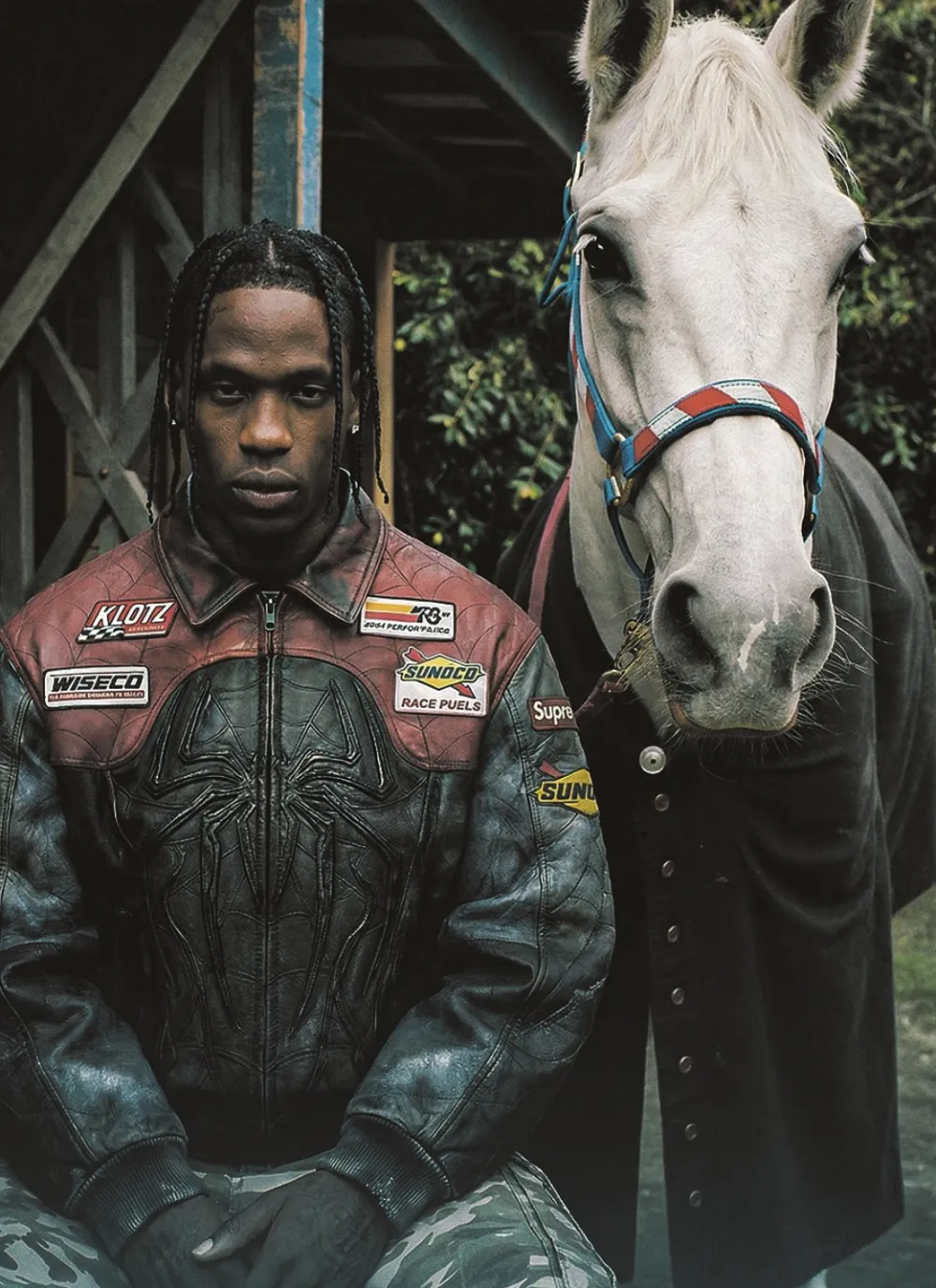
A medium straight-on shot features a young Black man
Om Editing Top ka matlab kya hai aur ye kis type ke users ke liye useful hai?
Om Editing Top ek aisa photo-editing style ya prompt direction hai jo images ko editorial, realistic, aur high-detail look deta hai. Iska use un logon ke liye especially helpful hota hai jo apni portraits, fashion shots, social media visuals, ya AI-generated photos ko zyada polished aur professional banana chahte hain.
Read Also: cinematic-style realistic portrait | 2026 New Year
Is style ki sabse badi strength hai natural feel ko preserve karte hue image ko visually stronger banana. Yani photo artificial nahi lagti, balki candid aur premium dono feel deti hai. Agar aap content creator, designer, blogger, ya beginner mobile editor hain, to Om Editing Top style aapko aise results de sakta hai jo simple photo ko instantly standout bana dein.
Ye style un users ke liye bhi kaafi useful hai jo realistic lighting, balanced colours, aur sharp composition pasand karte hain. Chahe aap portrait edit kar rahe ho, fashion look create kar rahe ho, ya cinematic social post banana chahte ho, ye approach aapko ek strong visual base deta hai jisko aap apni need ke hisaab se customize kar sakte hain.
This Style photo me kya deta hai?
Om Editing Top editing look generally image ko detailed, moody, aur clean finish deta hai. Isme lighting soft aur diffused rakhi ja sakti hai, jisse face aur outfit dono ke textures clearly dikhte hain. Shadows harsh nahi hote, isliye overall image natural aur balanced lagti hai.
Colour palette often earthy, muted, ya slightly cinematic hoti hai. Aise tones skin, fabric, aur background elements ko ek saath harmonious bana dete hain. Agar subject ke kapde textured hain, jaise leather jacket, denim, cargo pants, ya layered outfits, to ye style un details ko aur zyada prominent kar deta hai.
Composition ke level par bhi Om Editing Top ka output strong hota hai. Medium shot, straight-on framing, aur clear depth of field se subject focus me rehta hai. Result ek aisi photo hoti hai jo editorial bhi lagti hai aur candid bhi — yani posed hone ke bawajood natural presence bani rehti hai.
- Lighting: natural, soft, aur evenly spread
- Mood: calm, confident, rugged, editorial
- Colours: muted reds, blues, browns, greys, earthy tones
- Composition: balanced framing with clear subject separation
- Realism: fabric, hair, skin, and background textures are preserved
This Style ko use kaise karein? Beginner-friendly step-by-step guide
Agar aap mobile par edit kar rahe hain, to sabse pehle apni photo ko carefully select karein. Ek aisi image choose karein jisme subject clearly visible ho, face blur na ho, aur background too busy na ho. Om Editing Top style ka best result tab aata hai jab base photo already decent quality ki ho.
Uske baad basic adjustments se start karein. Brightness ko slightly balance karein, contrast ko overdo na karein, aur highlights/shadows ko carefully tune karein. Goal ye hona chahiye ki image natural lage, na ki over-processed. Agar skin ya clothes par detail hai, to clarity aur sharpness ko moderate level par rakhein.
Mobile par follow karne layak simple steps:
- Apni best resolution photo choose karein.
- Crop karke subject ko center ya rule-of-thirds position me rakhein.
- Exposure ko theek karein taaki face aur outfit dono visible rahen.
- White balance ko natural rakhein; colour cast ko remove karein.
- Contrast aur structure ko thoda boost karein, par excess nahi.
- Background ko subtle rakhein taaki subject pop kare.
- Final touch ke liye sharpening aur grain ko lightly adjust karein.
Agar aap AI image prompt ka use karte hain, to apne edit brief me natural lighting, realistic textures, editorial portrait, aur muted colours jaise terms ka use kar sakte hain. Lekin prompt jo page par diya gaya hai, usko verbatim copy karne ki zarurat nahi hoti — aapko sirf us visual direction ko samajhkar same mood recreate karna hota hai.
Kaunsi photos This Style ke liye sabse best work karti hain?
Is style ke liye sabse achchi photos woh hoti hain jisme subject ka face aur outfit dono clear hon. Medium shot ya straight-on angle aksar best hota hai, kyunki isme body language, clothing texture, aur background context ek saath dikhte hain. Agar aap portrait ko editorial banana chahte hain, to camera ka angle simple aur direct rakhein.
Resolution bhi important hai. High-resolution photo hamesha better result degi, kyunki editing ke dauran details wash out nahi hoti. Low-quality, too compressed, ya motion-blur wali image par ye style utna strong impact nahi de pata. Sharp focus aur stable framing se result kaafi improve hota hai.
Lighting aur background bhi decisive role play karte hain. Soft natural light, overcast outdoor light, ya diffused indoor light is style ke liye ideal hoti hai. Background me wooden textures, plain walls, greenery, ya muted urban elements achche lagte hain, kyunki ye subject ko distract kiye bina support karte hain.
- Angle: straight-on ya slightly eye-level medium shot
- Resolution: high-resolution, clear facial and clothing detail
- Lighting: soft natural light, no harsh flash
- Background: simple, rustic, textured, or low-clutter scenes
- Clothing: jackets, layered outfits, cargo pants, denim, textured fabrics
- Subject pose: calm, composed, confident, not overly posed
Pro tips for the best Om Editing Top results
Om Editing Top style edits look best when the final image feels balanced, clean, and naturally dramatic. If you want a strong editorial look, focus on keeping the subject sharp, the background believable, and the overall color palette consistent. That simple combination usually gives the image a premium, polished finish.
For the best results, think in layers: subject detail, outfit texture, background mood, and lighting. When these parts work together, the edit feels more realistic and more visually powerful. This is especially useful for portrait-style content, fashion edits, and animal companion compositions where small details matter a lot.
- Keep the subject centered or slightly off-center for a stronger visual balance.
- Use soft natural lighting if you want the image to feel cinematic and realistic.
- Ask for sharp texture in clothing, hair, and accessories so the edit looks premium.
- Match the background tones with the subject’s outfit for a more cohesive composition.
- Use subtle color grading instead of heavy filters to preserve detail.
- Maintain clear facial expression and body posture so the final image feels authentic.
If you are creating Om Editing Top visuals for social media, it also helps to keep the subject’s outline clean and the key elements easy to read at a glance. That matters a lot for profile images, thumbnails, and cover-style posts, where the first impression has to work instantly.
Common mistakes to avoid in This edits
One of the biggest mistakes is over-editing the image until it loses its natural feel. Om Editing Top should still look grounded, even when it has a stylized or cinematic look. If the colors become too intense or the texture becomes too smooth, the final output can feel artificial and less attractive.
Another common issue is ignoring the relationship between the subject and the background. When the background is too busy, too bright, or too unrelated, it weakens the main focus of the composition. A good edit should support the subject, not compete with it.
- Avoid excessive saturation, because it can flatten realistic tones and make the image look harsh.
- Do not blur important details too much, especially in faces, clothing, or accessories.
- Skip mismatched lighting, since it breaks the natural look of the scene.
- Do not overcrowd the frame with unnecessary elements that distract from the subject.
- Avoid weak contrast, because the image may look dull and lose its editorial impact.
- Do not forget to keep proportions realistic, especially when adding animals, props, or background objects.
If you want your this style image to stand out, consistency is more important than complexity. A clean layout, believable shadows, and controlled color tones usually create a much stronger result than trying to force too many effects into one frame.
Best use cases and ideas for These images
This prompt edits are very versatile, which makes them useful across different platforms and content formats. They work especially well when you want a portrait to feel bold, stylish, and story-driven. The combination of strong subject presence and detailed background elements gives the image a memorable, high-quality look.
You can use this type of visual for Instagram posts, profile pictures, and digital portfolios where personality matters. It also works well for thumbnail designs, especially if you want a dramatic but clear subject that can grab attention quickly. Because the composition already has a strong editorial mood, it fits both personal branding and creative showcase content.
- Instagram posts: Great for stylish portrait uploads and visually rich feeds.
- Profile pictures: Useful when you want a confident, sharp, memorable identity image.
- YouTube thumbnails: Helpful for bold visual storytelling and high click appeal.
- Portfolios: Perfect for creative artists, editors, and photographers showing their style.
- Reels covers: Works well as a strong cover frame for fashion, lifestyle, or transformation content.
These edits can also be used for poster-style graphics, mood boards, and themed content series. If your goal is to build a consistent visual identity, this look can help you create a repeatable look that feels professional across multiple posts and platforms.
Variations you can try with This Style
One of the best things about yeh style is that you can adjust the mood without losing the core style. Small changes in color, setting, and atmosphere can completely shift the feeling of the image while keeping the same overall editorial structure. That makes it easy to experiment and build different versions for different audiences.
You can try warmer tones for a golden, nostalgic feeling, or cooler tones for a more modern and dramatic result. Seasonal changes also work really well, because they give the same subject a fresh context. A rustic outdoor setting can feel very different in summer, rainy weather, autumn light, or a winter scene.
- Different moods: confident, calm, intense, cinematic, vintage, or luxury-inspired.
- Colour changes: earthy browns, deep blues, muted reds, soft neutrals, or high-contrast monochrome.
- Setting variations: barnyard, urban street, studio-style background, countryside, or moody outdoor scenes.
- Seasonal ideas: summer daylight, autumn warmth, rainy-day textures, or cool winter tones.
- Styling changes: rugged fashion, clean streetwear, classic editorial, or sports-inspired looks.
If you want more creative flexibility, try testing one variation at a time so you can see what changes the final atmosphere most. That approach makes it easier to refine this edit results and find the version that matches your content goal best.
This Style conclusion
This style is a strong choice when you want an image that feels bold, polished, and visually balanced. With the right lighting, colors, and composition, it can turn a simple portrait into something that looks editorial, stylish, and ready to share.
If you are aiming for a clean and powerful visual result, this prompt gives you plenty of room to experiment while still keeping the image natural and engaging. Try a few variations, compare the results, and choose the version that best matches your style and platform.
💬 Comments