Red Theme AI Prompt
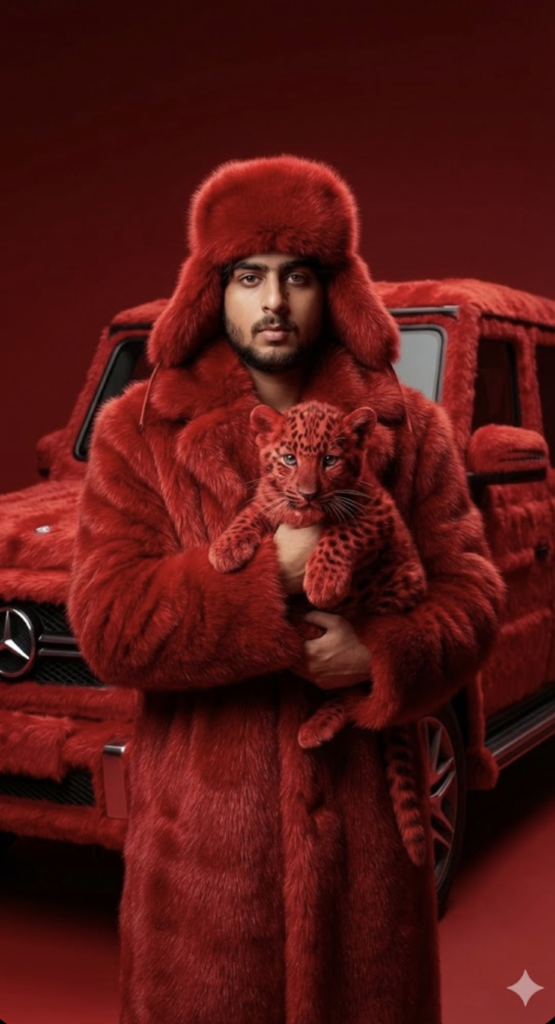
Red Theme AI Prompt: How This Photo Style Works
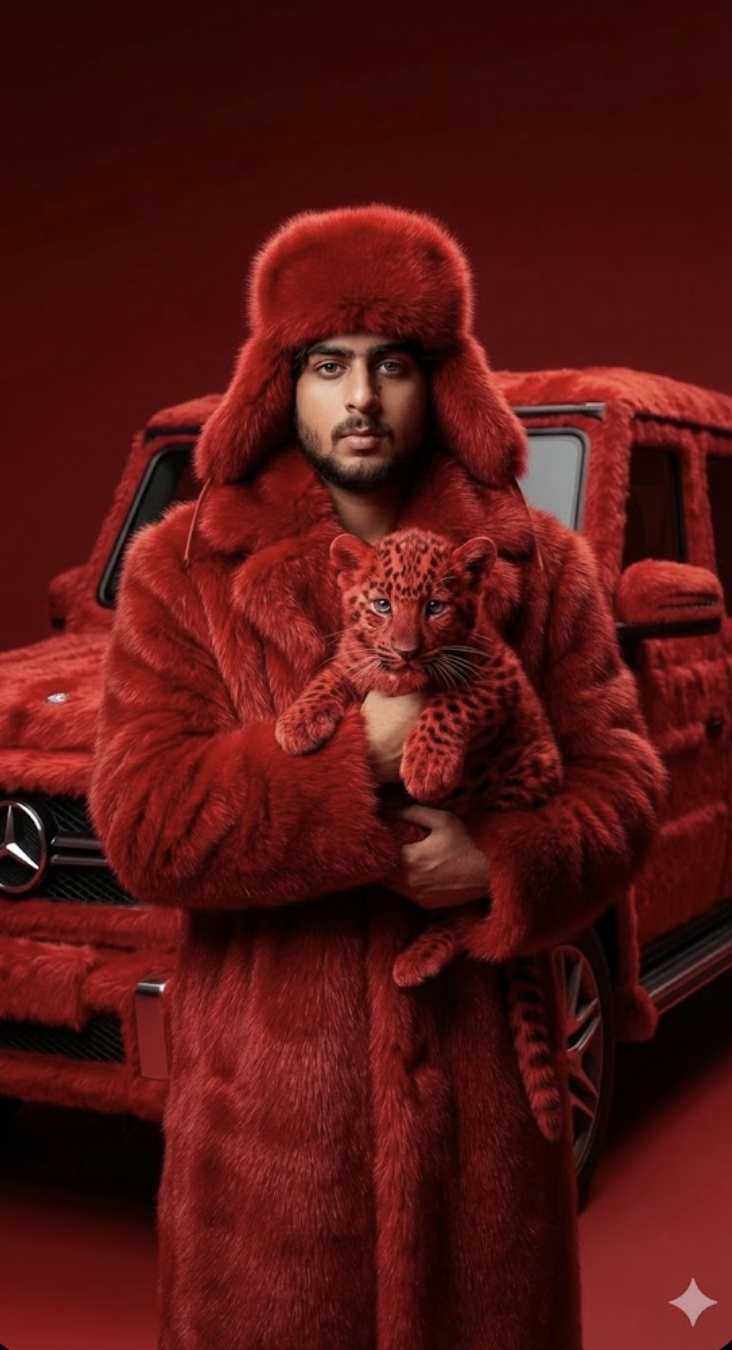
This red theme style is built for anyone who wants a bold, premium, eye-catching look for their portrait photo. It’s mainly used for fashion-inspired editing, where red color is placed center stage and the overall image gets a dramatic, luxurious feel.
Read Also: Cinematic Realistic Portrait AI Prompt | 2026 New Year AI Prompt
Creators, Instagram users, editors, reel makers, and AI-photo lovers use this kind of prompt when they want something different from a normal portrait. If you want your photo to look high-fashion, cinematic, and standout, red theme editing is a strong choice. Color balance, soft lighting, and detailed textures give the image a premium finish.
Red theme’s biggest strength is its visual impact. Red naturally grabs attention, making portraits more striking and memorable. Combined with fur texture, studio background, and luxury-style composition, the result feels even more polished.
What This Red Theme Photo Style Gives
This style gives your image a monochromatic fashion look, dominated by red shades. Outfit, background, and props all blend into the same color family, giving the photo a cohesive, stylish look — not just a simple red filter, but a full visual theme.
The mood is usually luxurious, surreal, cinematic. Soft lighting smooths facial details, while strong red tones make the image rich and intense. With the right composition, the contrast between subject and background looks very attractive. Fur textures and studio setup improve both realism and depth.
- Deep red color palette with rich tonal variation
- Soft cinematic lighting that flatters the face
- High-detail texture, especially in fur or fabric
- A clean studio-like background that keeps the subject in focus
- A luxury fashion vibe with premium editorial feel
How to Use This Style on Mobile
Even beginners can use the red theme style without difficulty. Choose a clear portrait where the face is visible and lighting is already balanced, then upload it to your editing app or AI image tool and apply the red theme prompt.
- Select a clear portrait photo.
- Check the face is straight and visible.
- Open a mobile editor or AI tool and upload the image.
- Apply the red theme style and preview the output.
- Lightly adjust if colors look too dark or too bright.
- Save the final image in high quality.
A useful mobile tip: make sure your original photo doesn’t already have strong noise or blur — clean input gives a more natural AI output.
Which Photos Work Best
Not every photo gives the same result in red theme editing. Best output comes when the input photo’s angle, resolution, and lighting are already strong. A close-up or half-body portrait suits this style well, since face details and fashion elements both show clearly.
- Angle: front-facing or slight side angle is best
- Resolution: use a high-resolution image, avoid blurry photos
- Lighting: soft daylight or even indoor light is ideal
- Background: prefer plain, clean, distraction-free background
- Clothing: a simple outfit or fashion-forward piece looks better
- Face visibility: eyes, nose, and jawline should be clearly visible
Pro Tips for the Best Results
- Keep subject description clear so face and pose look natural.
- Keep red shades consistent, like deep red, crimson, maroon, or glossy red.
- Keep the background clutter-free so the main subject stands out more.
- Choose soft studio light or cinematic glow for a premium feel.
- Keep accessories or props limited, so the image doesn’t feel overloaded.
- For portraits, a close-up composition can boost engagement.
Common Mistakes to Avoid
- Adding too many colors at once — the red theme’s impact drops and focus is lost.
- Unclear subject details — face structure or pose can come out inconsistent.
- Weak lighting direction — the image can feel dull or low-quality.
- Overcomplicated background — the main subject fades into it.
- Filling in random props — creates visual clutter instead of a luxury look.
- Ignoring style consistency — the balance of fur, studio, fashion, and realism can break.
Best Use Cases
- Instagram post: a bold red aesthetic gets high engagement and a strong first impression.
- Profile picture: a clean, high-contrast portrait is instantly noticeable.
- YouTube thumbnail: a dramatic red theme creates a scroll-stopping effect.
- Reel cover: builds consistent branding and a luxe vibe.
- Portfolio image: highlights fashion, portrait, and surreal edit style.
Variations You Can Try
- Mood variations: glamorous, dramatic, royal, mysterious, futuristic.
- Colour variations: crimson, ruby red, wine red, scarlet, dark cherry.
- Setting variations: studio backdrop, luxury garage, night scene, editorial set.
- Season variations: winter fur look, festive red look, rainy cinematic look, holiday aesthetic.
- Style variations: photorealistic, fashion editorial, surreal art, ultra-detailed portrait.
Conclusion: Try This for a Bold Red Theme Look
If you want striking, stylish, high-impact visuals, this red theme is a powerful option. Color harmony, lighting, texture, and composition combine into a premium visual result that works for social media and creative projects alike.
FAQ: Red Theme
How do I use the "Red Theme" prompt?
Copy the prompt above, open Gemini or ChatGPT, upload a clear photo of yourself and paste the prompt. Generate the image and adjust the outfit or background if you want a variation.
Is this prompt free?
Yes. This prompt is free to copy and use for Instagram, reels, WhatsApp DP and profile pictures.
Which photo works best?
A sharp, front-facing, well-lit photo with no filter. A clear face helps the AI keep your identity in the final image.
Last updated: 10 September 2026

💬 Comments