Blockworld Blend
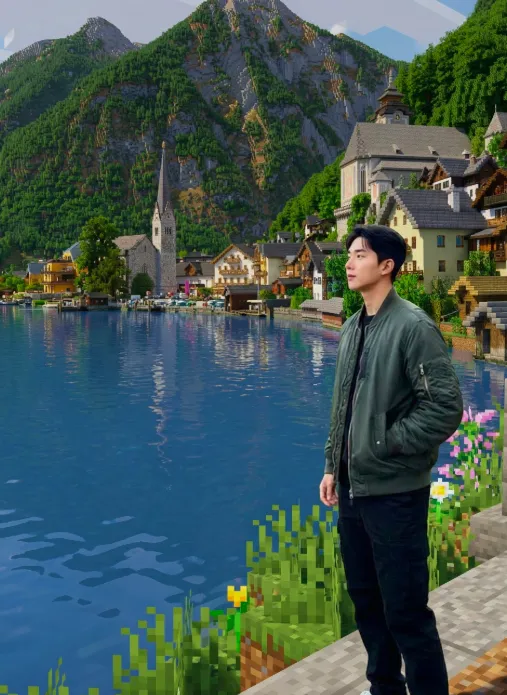
Om Editing Top के लिए Blockworld Blend क्या है?
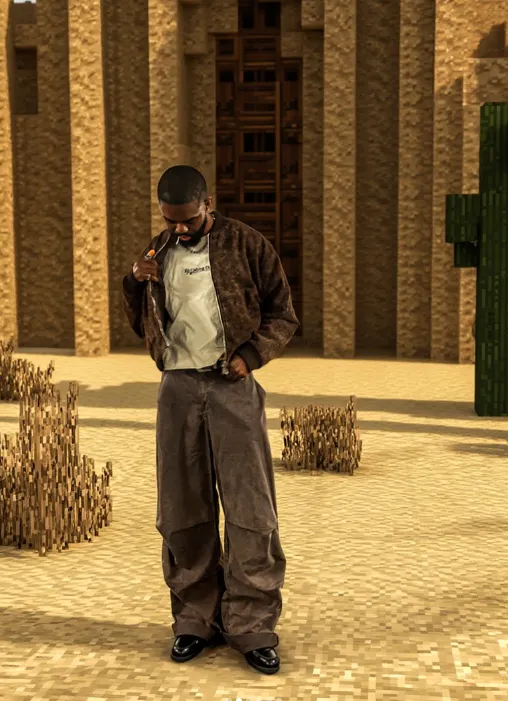
Om Editing Top पर Blockworld Blend एक ऐसा creative photo-editing style है जिसमें आपकी real photo का person same रहता है, लेकिन background पूरी तरह Minecraft Java Edition जैसा blocky voxel world बन जाता है। यानी grass, dirt, stone, wood, trees, lanterns और terrain सब cubic, game-like look में बदल जाते हैं, जबकि face, skin, hair, clothes और overall realism untouched रहती है।
Read Also: cinematic-style realistic portrait | 2026 New Year
यह style खास तौर पर उन लोगों के लिए useful है जो gaming-inspired portraits, fantasy edits, YouTube thumbnails, Instagram content, या unique profile images बनाना चाहते हैं। अगर आप चाहते हैं कि आपकी photo एक real person के साथ Minecraft world में naturally blend लगे, तो यह prompt-style edit बहुत effective है।
इस तरह की edit का सबसे बड़ा फायदा यह है कि यह playful भी लगती है और cinematic भी। Background पूरी तरह stylized होता है, लेकिन subject real रहता है, इसलिए image instantly eye-catching बन जाती है। Content creators, editors, meme pages, gamers, और AI-photo enthusiasts इसे trending visual concept की तरह use कर सकते हैं।
यह photo style आपको क्या देता है?
Blockworld Blend edit का main visual effect यह है कि ordinary background एक साफ, sharp-edged Minecraft-like world में बदल जाता है। यहां प्राकृतिक landscape की जगह voxel geometry, block structure, cubic vegetation, and game-inspired terrain दिखाई देती है। इससे photo में एक strong fantasy-gaming mood create होता है।
Lighting और atmosphere भी इस style का बड़ा हिस्सा होते हैं। Soft fog, cinematic depth of field, realistic shadows, और subtle glow scene को more immersive बनाते हैं। अगर edit सही तरह से की जाए, तो person ऐसा लगेगा जैसे वह सच में उस blocky world में खड़ा है, न कि सिर्फ pasted-in object है।
इस style की खासियत realism और stylization का balance है। Background पूरी तरह transformed होता है, लेकिन subject natural रहता है, जिससे image में contrast, depth, और visual impact बढ़ जाता है। यही वजह है कि यह social media posts, gaming-themed banners, and creative portraits के लिए बहुत अच्छा विकल्प है।
- Blocky Minecraft-style background with grass, dirt, stone, and wood elements
- Photorealistic person preservation without face or body distortion
- Cinematic depth of field for a professional photo look
- Soft atmospheric fog to add realism and mood
- High-quality shadows for seamless blending
- Ultra-detailed terrain for a game-inspired but polished result
Blockworld Blend photo edit को mobile पर कैसे use करें
अगर आप beginner हैं, तो भी इस style को समझना बहुत आसान है। सबसे पहले आपको एक साफ portrait photo चुननी होगी जिसमें person clearly visible हो और background ज्यादा busy न हो। फिर उसे editing tool या AI image workflow में use करके background transformation style apply किया जाता है।
Mobile पर काम करते समय सबसे important बात यह है कि subject और background separation clearly दिखे। अगर आपकी photo में person blur है, या बहुत dark lighting है, तो final result उतना seamless नहीं लगेगा। इसलिए शुरू से सही image चुनना आधा काम आसान कर देता है।
Step-by-step process simple रखें: पहले photo select करें, फिर block-style background idea apply करें, lighting match करें, and finally shadows तथा depth set करें। शुरुआत में over-editing से बचें, क्योंकि person को unchanged रखना इस style की सबसे important rule है।
- अपनी सबसे clear portrait photo चुनें, जिसमें face sharp हो और subject centered या slightly off-center हो।
- Check करें कि background simple हो, ताकि scene को Minecraft-style world में बदलना आसान रहे।
- Photo को mobile editor या AI image tool में upload करें और background transformation style select करें।
- Ensure करें कि person unchanged रहे, यानी face, hair, clothes और body proportions natural ही रहें।
- Background में blocky terrain, grass, dirt, stone, trees, और wood textures add या generate करें।
- Lighting को match करें ताकि subject और background same environment का हिस्सा लगें।
- Depth of field, soft fog, और realistic shadows जोड़कर final image को polished बनाएं।
- Export करने से पहले zoom करके edges, halo effects, और unnatural blending check करें।
इस edit के लिए कौन-सी photos सबसे अच्छी रहती हैं?
Blockworld Blend style में सबसे अच्छे results तब मिलते हैं जब original photo technically strong हो। मतलब subject का face साफ हो, image high-resolution हो, और lighting evenly spread हो। अगर आपकी photo too dark, too blurry, या overexposed है, तो final blend weak लग सकता है।
Angle भी बहुत matter करता है। Front-facing या slightly turned portrait photos इस style में अच्छे दिखते हैं क्योंकि person background के साथ naturally fit हो जाता है। बहुत extreme angles, heavy motion blur, या crowded frames से realism कम हो सकता है।
Clothing और background choice भी important है। Solid-colored clothes, simple textures, और uncluttered backgrounds अक्सर best रहते हैं, क्योंकि इससे editing tool को person isolate करने में आसानी होती है। Outdoor photos में soft daylight बहुत useful होती है, जबकि harsh noon light या very low-light shots थोड़ा tricky हो सकते हैं।
- Angle: front-facing, half-turn, या relaxed portrait angle best रहता है
- Resolution: high-resolution photo चुनें ताकि face details preserve रहें
- Lighting: natural daylight या soft indoor lighting सबसे better रहती है
- Background: simple, uncluttered, और low-noise background use करें
- Clothing: solid colors, clean lines, और minimal patterns ज्यादा अच्छे लगते हैं
- Pose: steady posture और clear face visibility final result improve करती है
- Framing: subject के आसपास थोड़ा space रखें ताकि Minecraft background comfortably fit हो सके
Pro Tips for the Best Results with Om Editing Top
Om Editing Top results look best when you treat the edit like a full scene design, not just a background swap. Since the person must stay realistic and unchanged, the key is to make the surrounding world feel believable, balanced, and visually rich. That means paying attention to lighting, depth, and how the blocky environment frames the subject naturally.
Try to keep the Minecraft-style background detailed but not overcrowded. A clean voxel landscape with grass blocks, stone paths, wooden elements, and subtle lantern light usually works better than too many objects fighting for attention. The person should remain the focus, while the blockworld setting supports the overall mood and makes the image feel cinematic.
- Use a background with clear block geometry, so the Minecraft look feels instantly recognizable.
- Match the lighting direction to the subject, especially around the face, shoulders, and edges of the body.
- Keep shadows soft and realistic so the person blends naturally into the scene.
- Choose a perspective that makes the terrain look consistent with the subject’s position.
- Add depth with fog, distance blur, and layered blocks to make the world feel larger.
- Leave the person untouched in color, texture, and proportions for a clean photo-real result.
If you want the final image to feel premium, think about mood before style. A sunrise blockworld, a lantern-lit village path, or a dramatic forest edge can all create different emotions without changing the subject. That flexibility is what makes Om Editing Top useful for creators who want a strong, custom visual identity.
Common Mistakes to Avoid in This Style
One of the biggest mistakes is overloading the Minecraft background with too many structures, bright colors, or random decorative blocks. When the environment becomes too busy, it can distract from the person and make the edit feel artificial. A good blockworld edit should feel immersive, not chaotic.
Another common issue is ignoring the original light source. If the background has bright daylight but the subject looks like they were shot in soft indoor lighting, the image can feel disconnected. The more closely you match shadows, contrast, and perspective, the more natural the Om Editing Top result will appear.
- Changing the person’s appearance: This breaks the realistic look and goes against the main goal of keeping the subject natural.
- Using mismatched lighting: Wrong light direction makes the subject look pasted onto the scene instead of blended in.
- Adding too many background elements: Overcrowding reduces clarity and makes the image harder to read visually.
- Ignoring scale: If blocks, trees, or buildings look too small or too large, the world loses its Minecraft feel.
- Flat backgrounds: Without depth, fog, or layered terrain, the edit can look simple and less cinematic.
- Oversharpening the scene: Excessive sharpness can make the subject and background clash instead of harmonize.
It also helps to avoid mixing too many visual moods in one image. For example, a bright summer field, winter snow, and dark fantasy lanterns all together can look confusing unless the concept is intentional. The strongest Om Editing Top images usually stick to one clear scene idea so the final output feels polished and purposeful.
Best Use Cases and Ideas for This Style
Om Editing Top is great for social media visuals where you want a standout, eye-catching aesthetic. It works especially well for Instagram posts, profile photos, and theme pages that need a creative but clean edit. The blockworld look adds a playful, recognizable style while still keeping the person front and center.
This kind of edit is also useful for YouTube thumbnails and reel covers. A photorealistic subject placed inside a Minecraft Java Edition-style background creates instant contrast, which helps the image stand out in a crowded feed. That makes it a strong choice for gaming creators, edit pages, and anyone building a unique online identity.
- Instagram posts: Perfect for bold, stylized uploads that need a fresh visual hook.
- Profile pictures: Works well when you want a creative background without losing facial realism.
- YouTube thumbnails: Great for content that needs a clear and attractive click-worthy look.
- Reels covers: Helps keep a consistent theme across short-form content.
- Portfolio showcases: Useful for editors who want to display their environment-blending skills.
- Gaming-themed banners: A strong option for creators who want a blocky, cinematic visual identity.
You can also use this style for personal branding, especially if your page mixes real photos with fantasy or game-inspired edits. The Minecraft environment gives the image a fun and modern edge, while the unchanged subject keeps it grounded and believable. That balance makes this style versatile for both casual posts and more polished promotional visuals.
Variations You Can Try with This Style
One of the best parts of this prompt is how many moods you can create from the same idea. The subject stays consistent, but the background atmosphere can shift dramatically depending on the season, weather, and time of day. That means you can experiment without losing the core identity of the edit.
Try changing the tone of the world to match the feeling you want to express. A warm sunset version creates a calm and cinematic vibe, while a snowy block landscape feels cooler and more dramatic. You can also use forests, villages, caves, or open fields to make the setting more interesting while still keeping the Minecraft look clear.
- Morning light: Bright, fresh, and clean for a soft natural mood.
- Golden hour: Warm tones that add depth and a cinematic glow.
- Night scene: Lanterns, stars, and fog for a dramatic fantasy feel.
- Winter setting: Snow-covered blocks for a cool, crisp atmosphere.
- Autumn palette: Earthy colors that make the scene feel rich and cozy.
- Village style: Wooden houses and paths for a more story-driven look.
- Forest world: Dense greenery and layered terrain for a natural adventure vibe.
You can also play with editing styles around the same theme. For example, one version can feel bright and cheerful, another can feel moody and cinematic, and another can feel clean and minimal. These variations make this look especially useful for creators who want to post multiple versions without repeating the exact same look every time.
Conclusion: Try This Style for a Clean Blockworld Edit
Yeh style is a strong choice when you want a realistic subject placed inside a Minecraft-style world without losing the natural look of the person. The combination of voxel terrain, cinematic depth, and careful lighting can turn a simple portrait into a standout visual that feels creative and modern.
If you want a bold social media edit, a gaming-inspired thumbnail, or a unique profile image, this style gives you plenty of room to experiment. Keep the person unchanged, build the scene around them, and use this edit to create a blockworld image that feels polished, immersive, and memorable.
FAQ: Blockworld Blend
How do I use the "Blockworld Blend" prompt?
Copy the prompt above, open Gemini or ChatGPT, upload a clear photo of yourself and paste the prompt. Generate the image and adjust the outfit or background if you want a variation.
Is this prompt free?
Yes. This prompt is free to copy and use for Instagram, reels, WhatsApp DP and profile pictures.
Which photo works best?
A sharp, front-facing, well-lit photo with no filter. A clear face helps the AI keep your identity in the final image.
Last updated: 17 August 2026
💬 Comments