Ganesh Chaturthi Heroic Entry Poster AI Prompt
Om Editing Top Ganesh Chaturthi Heroic Entry Poster Style Kya Hai?
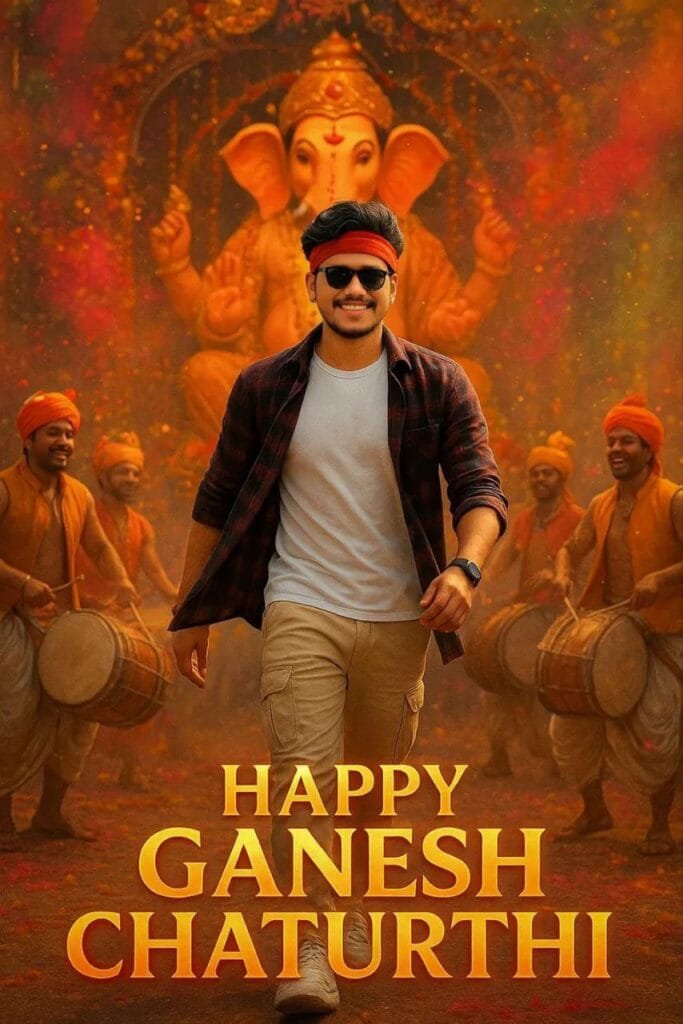
Om Editing Top Ganesh Chaturthi Heroic Entry Poster style ek dynamic AI photo-editing concept hai, jo normal portrait ko energetic festival poster look mein transform karta hai. Is style mein subject ko powerful hero angle se dikhaya jaata hai, jisse image mein confidence, movement aur celebration ka feel ek saath nazar aata hai.
Read Also: Om Editing Top Ganpati Ji Half-Face AI Prompt | Om Editing Top Ganpati Bappa Morya Poster AI Prompt
Yeh editing un logon ke liye useful hai jo Ganesh Chaturthi ke liye simple standing photo ke bajay ek dramatic social media poster banana chahte hain. Instagram post, WhatsApp status, Facebook cover ya festival greeting ke liye aisi image attention-grabbing lagti hai. Traditional celebration ke colours aur modern streetwear-inspired styling milkar photo ko cinematic appearance dete hain.
Om Editing Top photo style beginners ke liye bhi suitable hai, kyunki ismein complicated Photoshop skills ki zaroorat nahi hoti. Aap apni clear photo upload karke AI image tool ki madad se ek festive, high-energy composition create kar sakte hain. Final result ko generate karne ke baad face, hands, clothing aur background details zaroor check karein, taaki poster natural aur personal lage.
Om Editing Top Heroic Entry Photo Style Kya Result Deta Hai?
Is Ganesh Chaturthi photo edit ka sabse important feature iska low-angle composition hota hai. Camera viewpoint ko thoda neeche se imagine kiya jaata hai, isliye subject frame mein taller, stronger aur more confident dikh sakta hai. Yeh angle ek ordinary portrait ko action-poster jaisa impact deta hai, bina iske ki photo over-edited ya artificial lage.
Image mein movement create karne ke liye clothes aur festival colours ko motion ke saath present kiya jaata hai. Hawa mein move karta hua checked shirt effect, surrounding gulal aur celebration ke visual elements photo ko static nahi rehne dete. Red, pink, orange aur yellow jaise bright festive shades overall frame ko warm aur energetic banate hain, jabki darker clothing subject ko background se separate karne mein help karti hai.
Background mein Ganesh idol, decorated pandal aur dhol players jaise elements celebration ka atmosphere build karte hain. Lighting generally dramatic hoti hai, jisme subject par clear highlight aur background mein glowing festival ambience dikhta hai. Poster-style festival text scene ke saath integrated feel de sakta hai, lekin text ka placement readable hona chahiye aur face ya main subject ko cover nahi karna chahiye.
- Hero perspective: Neeche se liya gaya angle subject ko bold aur powerful appearance deta hai.
- Motion effect: Flying fabric, moving gulal aur action-oriented pose image ko lively banate hain.
- Festive colours: Bright powder colours, warm lights aur pandal decoration Ganesh Chaturthi mood create karte hain.
- Cinematic composition: Idol, dhol players aur subject ko layered depth ke saath arrange kiya jaata hai.
- Realistic finish: Face identity, skin texture, shadows aur clothing details natural dikhni chahiye.
Mobile Par Om Editing Top Prompt Photo Kaise Banayein?
Is type ka AI Ganesh Chaturthi poster banane ke liye sabse pehle ek suitable source photo select karein. Mobile gallery mein aisi image choose karein jisme aapka face clearly visible ho, body ka required portion frame mein ho aur photo blur na ho. Front-facing image beginners ke liye best hoti hai, kyunki AI ko facial features aur body position samajhne mein aasani hoti hai.
- Ek clear photo select karein: Bright daylight ya well-lit indoor light mein li gayi high-resolution image use karein. Face par heavy shadow, motion blur ya beauty filter bahut zyada nahi hona chahiye.
- AI image editing tool open karein: Apne mobile browser ya app mein woh image generator kholein jahan aap photo upload karke image transformation kar sakte hain.
- Photo upload karein: Upload button par tap karke gallery se selected image choose karein. Upload complete hone tak app ko close na karein, khaas taur par slow mobile data connection par.
- Provided prompt box ka use karein: Is page par diye gaye copy box se prompt ko directly copy karke AI tool ke prompt field mein paste karein. Prompt ke words ko apni taraf se shorten ya modify na karein, kyunki details badalne se composition ka result alag ho sakta hai.
- Generate option press karein: Image generate hone ke baad result ko full-screen mein open karke face, pose, clothes, idol aur background details ko dhyan se dekhein.
- Result ko compare karein: Agar first output mein movement natural nahi lagti, face distort hota hai ya festival background weak dikhta hai, to available regenerate option ka use karein.
- Final image save karein: Satisfactory result milne par high-quality format mein download karein. Social media par upload karne se pehle image crop aur text readability ek baar check kar lein.
Mobile par editing karte waqt stable internet connection aur sufficient storage helpful hota hai. Kuch AI tools upload ke baad image ko process karne mein thoda time le sakte hain, isliye generate button ko baar-baar tap karne ke bajay pehle result complete hone ka wait karein. Agar tool multiple variations deta hai, to woh version choose karein jisme face sabse natural aur hands sabse accurate dikh rahe hon.
Pose bhi final output par kaafi effect daalti hai. Arms ko body se bilkul chipka kar rakhi gayi photo mein moving clothing ka effect limited ho sakta hai. Thoda open posture, straight shoulders aur camera ki taraf confident expression AI ko dynamic heroic composition samajhne mein better input de sakte hain.
Kaunsi Photo Om Editing Top Ganesh Chaturthi Edit Ke Liye Best Hai?
Source image ki quality final AI poster ke result ko directly affect karti hai. Aisi photo use karein jo kam se kam reasonably high resolution ho, jisme face pixelated na ho aur subject ka outline background se clearly visible ho. WhatsApp se repeatedly forward hui compressed image ke comparison mein original camera photo zyada detailed result de sakti hai.
Lighting soft aur even honi chahiye. Harsh sunlight mein face ke ek side par bahut dark shadow aur doosri side par overexposure ho sakta hai, jabki dim room photo facial details ko reduce kar sakti hai. Window ke paas natural light, open shade ya evenly lit outdoor location beginner ke liye practical options hain.
Clothing ke liye casual streetwear, checked shirt, T-shirt, cargo-style outfit ya sneakers wali photo is theme ke saath visually match kar sakti hai. Background simple ho to AI ko subject separate karne mein aasani hoti hai, lekin background bilkul busy hone par bhi result possible hai agar face aur body edges clearly visible hon. Sunglasses, headband ya accessories use kar rahe hain to ensure karein ki woh eyes aur facial structure ko completely hide na karein.
- Front-facing ya slight three-quarter angle wali photo choose karein.
- Face camera se bahut door, cropped ya partially hidden nahi hona chahiye.
- Original high-resolution image use karein; screenshot aur blurry download avoid karein.
- Balanced daylight mein photo lein, direct flash aur heavy shadows se bachein.
- Shoulders aur upper body clearly visible rakhein, taaki heroic framing natural lage.
- Simple, clean background AI separation ke liye safer option hota hai.
- Confident expression aur arms mein thoda natural space dynamic pose ko support karta hai.
Om Editing Top Pro Tips for the Best Results
To get a convincing result from the Om Editing Top Ganesh Chaturthi design, start with a sharp, front-facing photo in which your face is clearly visible. Good lighting helps the tool understand your facial features, hairstyle, and clothing, while a simple background makes it easier to build the festive scene around you. Avoid photos with heavy blur, extreme shadows, or people standing too close on either side.
The final image looks more natural when your original pose supports the action in the composition. A relaxed stance with your arms slightly away from your body gives the AI more space to create movement in the shirt, gulal, and festival atmosphere. After generating the image, check the face, hands, footwear, text, and background details carefully before downloading or sharing it.
- Use a high-resolution image: A clear source photo preserves facial details and produces a sharper poster-style result.
- Choose a natural pose: A slightly open stance works better for a dynamic entry scene than a tightly folded pose.
- Keep your face unobstructed: Sunglasses, masks, hands, or hair covering the face can reduce identity accuracy.
- Check the camera angle: A front-facing photo is easier to adapt into a low-angle heroic composition.
- Review motion effects: Make sure flying fabric and gulal appear fluid rather than frozen or strangely attached to the body.
- Regenerate small errors: If the hands, shirt pattern, idol, or festival lettering looks distorted, create another version instead of accepting the first output.
- Keep the subject central: Positioning yourself near the middle of the original image helps maintain a strong focal point.
For the best Om Editing Top result, compare two or three generations and select the one with the most realistic expression and balanced lighting. Small differences in face shape, fabric movement, and background detail can make one version look far more professional than another.
Common Mistakes to Avoid in Ganesh Chaturthi AI Posters
Even a well-planned festival image can lose its impact when the source photo or final output is not checked properly. Many weak results come from using a low-quality selfie, choosing a side-facing image, or applying too many visual effects at once. These issues make the final poster look artificial and reduce the heroic entry feeling.
- Uploading a dark or blurry photo: The AI may miss important facial details, resulting in a face that looks soft, uneven, or less like the original person.
- Using a crowded source image: Extra people and objects can confuse the subject separation and create unwanted faces or overlapping body parts.
- Ignoring distorted hands: Incorrect fingers or awkward arm positions are especially noticeable in a full-body festival poster, so inspect them before posting.
- Adding too much gulal: Excessive colour clouds can cover the face, idol, clothing, or important background elements and make the composition messy.
- Choosing an unsuitable crop: A tightly cropped headshot may not provide enough body area for a natural full-scene heroic pose.
- Skipping the text check: Festival lettering can sometimes appear misspelled, uneven, or poorly placed, which makes the design look unfinished.
- Overlooking lighting differences: If the subject is bright but the pandal scene is dark, or the background is warm while the face is cool, the image will not feel realistic.
- Posting without a final resize: A poster that looks good in the editor may crop badly on Instagram, WhatsApp, or a mobile profile display.
Do not judge the image only by the face. Zoom into the entire composition and check the shirt, sneakers, dhol players, idol, decorative lights, shadows, and empty space around the subject. A quick quality check helps you choose a polished design instead of sharing an output with distracting errors.
Best Use Cases and Creative Ideas
This Ganesh Chaturthi heroic entry poster works well whenever you want your festival photo to feel energetic, celebratory, and cinematic. The low-angle composition gives the subject a strong presence, while the colourful background adds the excitement of a public celebration. You can use the finished image for personal sharing, event promotion, or a festive social media update.
- Instagram posts: Share the poster as a square or portrait post with a short Ganesh Chaturthi caption and relevant festival hashtags.
- Instagram profile pictures: Crop the face and upper body carefully so the heroic expression remains visible inside the circular profile frame.
- Reels covers: Use the image as a bold cover for a dhol performance, festival visit, dance video, or celebration reel.
- Video thumbnails: A dramatic entry pose can make a YouTube or Facebook thumbnail more noticeable and help communicate the festival theme quickly.
- Personal portfolios: Photographers, editors, and designers can display the poster as an example of festive portrait editing and creative compositing.
- Digital invitations: Add event details around the open areas of the image when creating a community celebration announcement.
- WhatsApp status updates: Use a vertical crop for a quick festive greeting that feels more personal than a standard graphic.
- Event promotion: Organisers can create a series of similar visuals for dhol groups, cultural programmes, or local Ganesh festival activities.
For a group celebration, create individual versions with consistent colours and framing so everyone’s images feel connected. You can also combine the poster with a short video transition, beat-synced reel, or slideshow showing different festival moments. Before using it for a public event or business promotion, confirm that all added names, dates, and venue details are correct.
Variations You Can Try with Om Editing Top
Once you have a strong first result, experiment with the mood instead of repeating the same design. A powerful red-and-gold colour theme can create a grand celebration look, while orange, yellow, and warm amber lighting can make the poster feel bright and traditional. For a more modern style, try deeper blue shadows, silver highlights, or a clean black-and-red streetwear palette while keeping the festive subject clear.
You can also change the emotional direction of the composition. A confident expression and strong forward movement create a heroic entry, while a joyful smile gives the image a friendly community-celebration mood. A calm, respectful expression may suit a devotional post better. Keep the background and colour intensity consistent with the mood so the subject does not appear disconnected from the scene.
- Grand evening celebration: Use glowing lights, rich red tones, golden highlights, and a lively crowd atmosphere.
- Bright daytime festival: Choose natural sunlight, vivid clothing colours, and a clean pandal setting with clear details.
- Traditional look: Add warmer colours, classic festive styling, flower decorations, and a respectful expression.
- Modern street style: Keep the sneakers, cargo-inspired outfit, sunglasses, and bold contrast for a contemporary poster.
- Monsoon setting: Try a slightly wet street, reflective ground, and soft overcast light for a dramatic seasonal atmosphere.
- Night procession: Experiment with decorative bulbs, deep shadows, glowing highlights, and a stronger sense of movement.
- Minimal poster design: Reduce background clutter and leave clean space for a name, date, or event message.
- Colourful gulal theme: Use balanced clouds of pink, orange, yellow, or blue without covering the face or main idol.
Seasonal variations are useful when you want multiple posts during the celebration. A daytime version can introduce the festival, an evening version can promote the main event, and a night-procession version can be used for a closing reel or final status update. Save the strongest composition and change only one or two elements at a time so the image remains recognisable and balanced.
Try the Om Editing Top Ganesh Chaturthi Poster
Om Editing Top makes it easier to turn a regular festival portrait into a more expressive Ganesh Chaturthi visual. With a clear photo, a suitable pose, balanced colours, and careful quality checking, you can create an image that feels dynamic without losing the personal identity of the original picture. The heroic angle, festive movement, and decorated celebration setting work especially well for social media posts and video covers.
Try different moods, crops, colours, and festival settings to discover the style that suits you best. Review every generated version before sharing, choose the cleanest details, and resize the final poster for the platform where you plan to use it. A thoughtful source photo and a few creative experiments can turn your Om Editing Top design into a memorable festive image.
FAQ – Om Editing Top
Om Editing Top Ganesh Chaturthi poster kaise banayein?
Om Editing Top style mein poster banane ke liye apni clear photo ko kisi AI image-editing tool mein upload karein aur Ganesh Chaturthi heroic poster ke liye suitable prompt use karein. Image generate hone ke baad face, hands, outfit aur background ko carefully check karke zaroorat ho to edit ya regenerate karein.
Is poster ke liye kaunsi photo sabse achhi rahegi?
Front-facing, sharp aur achhi lighting wali photo sabse behtar result deti hai. Jisme body ka upper ya full portion clearly visible ho aur subject ke around thodi space ho, usmein dramatic composition zyada natural ban sakta hai.
Kya Om Editing Top Ganesh Chaturthi poster mobile par banaya ja sakta hai?
Haan, Om Editing Top Ganesh Chaturthi poster mobile se bhi create kiya ja sakta hai, agar aapke AI editing tool ka mobile version ya browser support available ho. Upload karne se pehle stable internet, high-quality photo aur tool ke required permissions check kar lein.
Kya Ganesh Chaturthi heroic poster editing free mein ki ja sakti hai?
Kuch AI image tools limited free generations ya trial credits offer karte hain, lekin har platform ke features alag ho sakte hain. Generate karne se pehle tool ki current usage limit, watermark aur export conditions check karna behtar hai.
AI poster mein face ya hands galat kyon dikhte hain?
AI kabhi-kabhi motion, dramatic angle, accessories ya complex background ke saath facial features aur fingers ko accurately render nahi kar pata. Clear input photo use karein, prompt ko simple rakhein aur unnatural details dikhne par naya variation generate karein.
Mera AI-generated result doosron se alag kyon hai?
Result input photo ki quality, face angle, lighting, crop, AI tool aur random generation process par depend karta hai. Isi wajah se ek hi concept mein colours, pose, clothing aur background details har generation mein badal sakti hain.
Poster mein festival text ya naam clearly kaise dikhayein?
Text ke liye image mein face aur main subject se alag clean space rakhein, taaki lettering overlap na kare. AI-generated text aksar misspelled ho sakta hai, isliye final poster mein Canva, Photoshop ya kisi mobile editor se wording ko manually correct karna useful rahega.
Ganesh Chaturthi poster ko Instagram ya WhatsApp ke liye kaise save karein?
Instagram post ke liye square ya portrait format aur WhatsApp status ke liye vertical format choose karein, jisse design crop na ho. Export karte waqt high resolution JPG ya PNG select karein aur upload se pehle face, text readability aur image quality verify kar lein.
FAQ: Ganesh Chaturthi Heroic Entry Poster
How do I use the "Ganesh Chaturthi Heroic Entry Poster" prompt?
Copy the prompt above, open Gemini or ChatGPT, upload a clear photo of yourself and paste the prompt. Generate the image and adjust the outfit or background if you want a variation.
Is this prompt free?
Yes. This prompt is free to copy and use for Instagram, reels, WhatsApp DP and profile pictures.
Which photo works best?
A sharp, front-facing, well-lit photo with no filter. A clear face helps the AI keep your identity in the final image.
Last updated: 12 September 2026
💬 Comments