Veiled in Rajputi Royalty
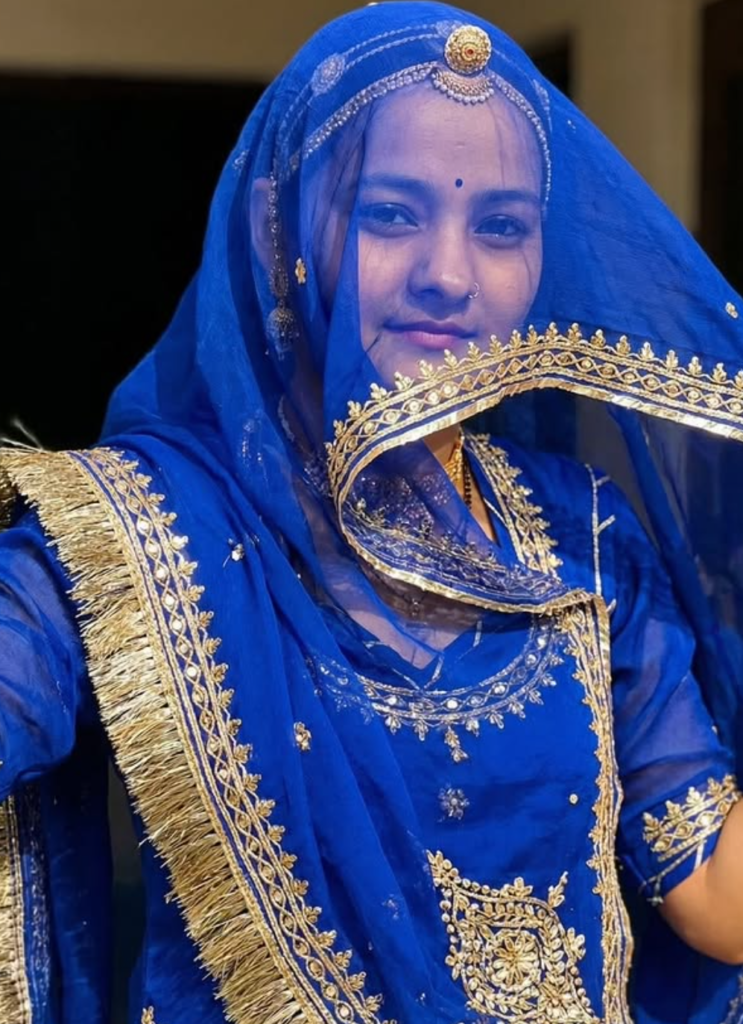
Om Editing Top: Veiled in Rajputi Royalty ka Elegance Kya Hai?
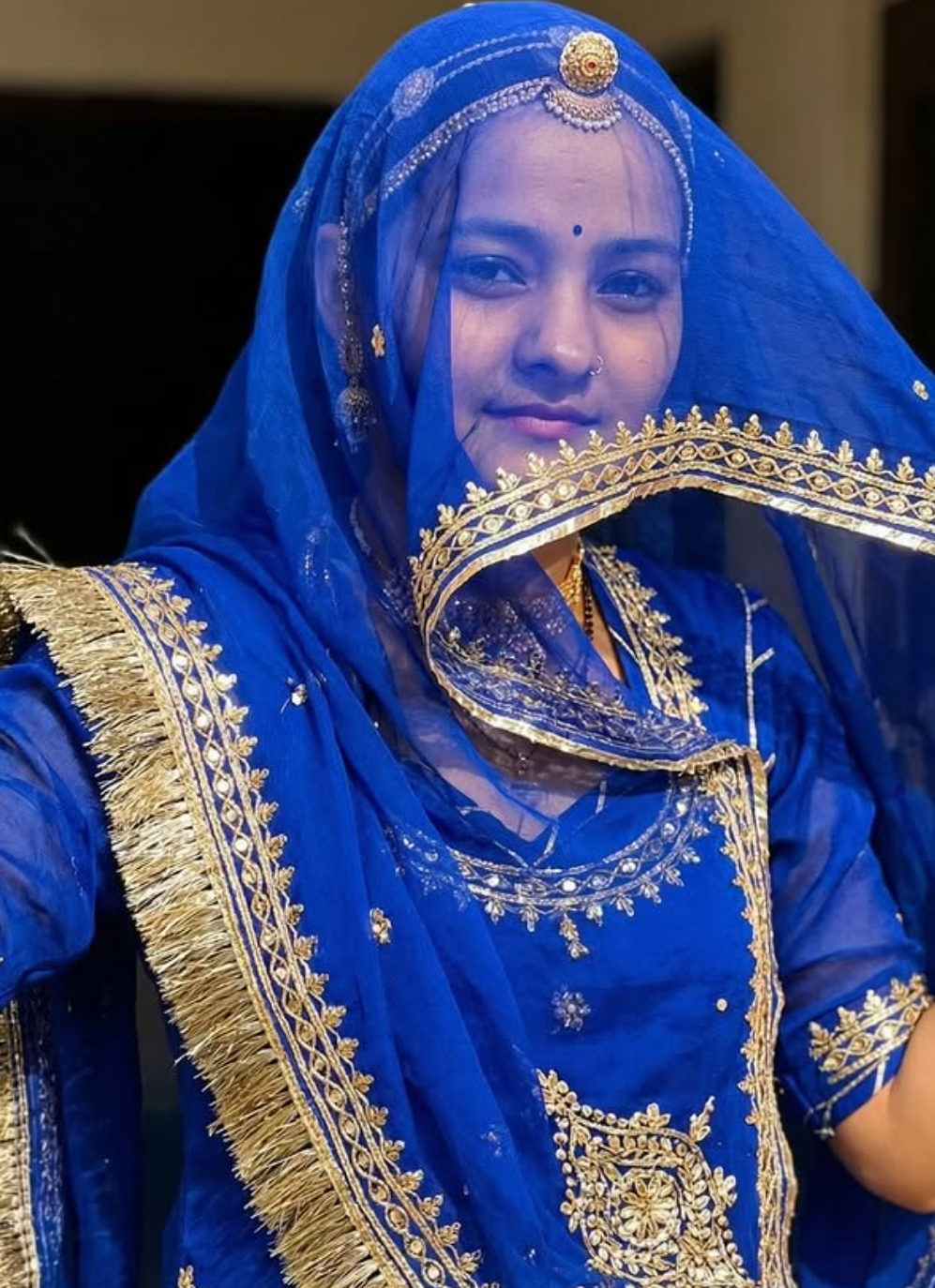
Om Editing Top style ka yeh concept un logon ke liye hai jo apni photo ko royal, traditional aur highly polished look mein convert karna chahte hain. “Veiled in Rajputi Royalty” jaisa theme खासतौर par un users ke liye useful hai jo Rajputi culture se inspired visual chahte hain—jahan royal blue attire, graceful drape, aur face-veil style composition ek premium ethnic portrait feel create karta hai.
Read Also: cinematic-style realistic portrait | 2026 New Year
Is type ka AI photo style mainly un girls aur women ke liye popular hai jo apni normal selfie ko traditional Rajasthani look mein transform karna chahti hain. Yeh sirf kapdon ka change nahi hota, balki overall presentation change hoti hai: pose zyada elegant lagti hai, fabric zyada rich dikhta hai, aur final image mein ek regal, festive aur culturally inspired mood aata hai.
Agar aap Instagram, WhatsApp status, portfolio portrait, ya festival-based ethnic edit ke liye kuch unique dhoondh rahe ho, to Om Editing Top type Rajputi royalty prompt ka visual result kaafi attractive ho sakta hai. Isme traditional covering, soft glamour, aur royal Indian styling ka blend milta hai jo photo ko simple se standout bana deta hai.
Ye Prompt/Photo Style Actually Kya Deta Hai?
Is style ka sabse bada feature hai royal blue ethnic richness. Visual output mein aam taur par deep blue tones, gold detailing, aur delicate traditional finishing dikhai deti hai. Light-weight organza jaisa feel image ko airy aur graceful banata hai, jabki gotapatti aur gold border type accents usme festive luxury add karte hain.
Composition usually feminine aur dignified hoti hai. Face veil ya head drape ka look image ko Rajputi traditional portrait feel deta hai, jisme outfit zyada dominant hota hai aur overall mood modest, elegant, aur royal lagta hai. Agar AI generation sahi tarah se ho, to fabric folds, dupatta flow, aur accessory shine kaafi realistic dikh sakti hai.
Color palette mein mostly rich blue, warm gold, aur soft skin-balanced highlights ka mix hota hai. Yeh combination photo ko “plain edit” se nikaal kar ek cinematic ethnic portrait mein badal deta hai. Best results tab aate hain jab light natural ho aur background simple rakha jaye, taaki outfit aur draping clearly nazar aaye.
- Royal mood: regal, festive, and traditional feel
- Primary colors: royal blue with gold accents
- Texture effect: organza-like light fabric look
- Style focus: Rajputi inspired veil and graceful drape
- Overall result: elegant cultural portrait with premium finishing
This Style Ko Use Kaise Karein? Step-by-Step Guide
Agar aap beginner ho aur mobile par is type ka edit use karna chahte ho, to process ko simple rakhna best hota hai. Sabse pehle ek clear photo choose karo jisme face visible ho aur body posture natural ho. High-quality base image se AI ko outfit aur drape samajhne mein help milti hai.
Uske baad prompt style ko us editing tool mein apply karo jahan photo transformation support hota ho. Mobile users ko usually portrait mode aur high-resolution upload par focus karna chahiye. Agar background cluttered hai, to result distract kar sakta hai, isliye pehle simple image select karna better hota hai.
Final step mein output ko inspect karo: veil alignment, sleeve shape, dupatta flow, aur color balance check karo. Agar image zyada bright ya dull lag rahi ho, to slight adjustment se result aur natural ban sakta hai. Is style mein small refinements kaafi फर्क laate hain.
- Ek clear front-facing ya slight side-angle photo select karo.
- Image ko mobile par open karke editing tool mein upload karo.
- Traditional Rajputi-inspired style apply karo jahan royal blue and gold detailing ho.
- Output generate hone ke baad face veil, dupatta drape aur fabric finish check karo.
- Brightness, contrast ya crop ko lightly adjust karke final save karo.
- Best results ke liye photo ko crop ya rotate karne se pehle original save rakho.
- Ek hi image par multiple tries karo agar pehla output perfect na ho.
- Neutral expression aur relaxed shoulders zyada graceful look dete hain.
- Mobile editing mein stable internet aur good resolution important hai.
Kaunsi Photos Is Style Ke Liye Sabse Best Rehti Hain?
Is Rajputi royalty style mein sabse achhi photos woh hoti hain jisme face clear ho aur pose natural लगे. Front portrait ya slightly turned angle dono kaam kar sakte hain, lekin extreme tilt ya heavily shadowed face avoid karna chahiye. AI ko agar face structure properly dikhega, to veiled look aur outfit placement zyada believable banega.
Resolution bhi important hai. Blurry images, low-light selfies, ya over-filtered photos result ko weak bana sakti hain. Ideally aisi image lo jisme skin tones natural hon aur background overbusy na ho. Plain wall, soft indoor light, ya outdoor shade best options hote hain kyunki yeh costume transformation ko highlight karte hain.
Clothing choice bhi matter karti hai, especially original photo mein. Simple outfit, plain kurti, ya solid color top better hota hai than busy prints. Hair open ya neatly tied ho to AI ko head covering aur veil placement samajhne mein help milti hai.
- Angle: front-facing ya mild side angle
- Resolution: clear, high-resolution, non-blurry image
- Lighting: soft natural light ya evenly lit indoor photo
- Background: plain, uncluttered, and simple
- Clothing: solid-color, minimal-pattern outfit
- Expression: calm, neutral, and elegant face pose
- Hair: neatly set so veil style looks clean
Jitna simple aur clear base photo hoga, utna hi polished final result milega. Om Editing Top style mein main focus royal presentation hota hai, isliye original photo ki clarity aur lighting directly output quality ko affect karti hai.
Pro Tips for the Best Om Editing Top Results
अगर आप Om Editing Top style में सबसे अच्छा output चाहते हैं, तो सिर्फ prompt डालना काफी नहीं होता। सही photo, right framing, और clear styling direction मिलकर result को बहुत natural और premium बनाते हैं. खासकर rajputi royalty look में face veil, dupatta drape, और outfit detailing बहुत important होती है.
Best results के लिए हमेशा ऐसी image चुनें जिसमें face, shoulders, और upper body साफ दिख रहे हों। इससे royal blue poshak, gotapatti work, और veil placement ज्यादा realistic लगती है. Light background या balanced lighting वाली photo सबसे बेहतर रहती है, क्योंकि editor को fabric texture और gold border highlight करने में आसानी मिलती है.
- Front-facing या slightly turned pose use करें ताकि dupatta drape natural लगे.
- Plain background वाली clear photo चुनें, इससे royal outfit details ज्यादा उभरती हैं.
- Face और hair area sharp होनी चाहिए ताकि covering veil believable लगे.
- High-resolution image upload करें, क्योंकि organza texture और gota kinari low quality में blur हो जाते हैं.
- Single-subject photo रखें ताकि editing clean और focused दिखे.
- Natural expressions use करें, क्योंकि royal portrait style में calm face ज्यादा elegant लगता है.
अगर आप social media के लिए edit बना रहे हैं, तो composition पर भी ध्यान दें। Image में space ऐसा होना चाहिए कि outfit, dupatta, और face veil को properly balance किया जा सके. जब base photo strong होती है, तो Om Editing Top effect ज़्यादा polished, cinematic, और high-end दिखता है.
Common Mistakes to Avoid in This Edits
बहुत लोग prompt सही use करते हैं, लेकिन कुछ common mistakes की वजह से final edit artificial या unbalanced लगने लगता है। Rajputi royalty look में small errors भी पूरे aesthetic को affect कर सकते हैं, खासकर तब जब face veil और traditional draping perfectly fit होना जरूरी हो.
अगर आप चाहते हैं कि this style result soft, regal, और authentic लगे, तो इन mistakes से बचना जरूरी है. यह output की realism, outfit placement, और overall elegance को directly impact करते हैं.
- Too dark photo upload करना — इससे organza fabric और gold lace details clearly नहीं दिखतीं.
- Busy background use करना — इससे royal outfit focus lose कर देता है.
- Overexposed selfie लेना — इससे skin tones और fabric shades unnatural लग सकते हैं.
- Side angles बहुत extreme रखना — veil drape और face covering awkward दिख सकती है.
- Low-resolution image देना — इससे gotapatti border और tassel detailing खराब हो जाती है.
- Too many accessories already present रखना — इससे generated rajputi look cluttered लग सकता है.
एक और common issue है inconsistent styling. अगर base image casual है लेकिन output में बहुत heavy royal look चाहिए, तो कभी-कभी final edit थोड़ी mismatch दिखती है। इसलिए ऐसी photo select करें जो calm, elegant, और visually simple हो। इससे this prompt transformation ज्यादा seamless और believable बनेगा.
Best Use Cases and Ideas for These Images
इस तरह की rajputi royalty edit सिर्फ एक pretty portrait नहीं होती, बल्कि कई creative uses के लिए perfect रहती है। Royal blue poshak, face veil, और traditional dupatta drape का combination image को memorable बनाता है, इसलिए इसे profile branding से लेकर festive content तक कई जगह use किया जा सकता है.
this look style images खासकर उन लोगों के लिए useful हैं जो cultural fashion, heritage look, या elegant personal branding पसंद करते हैं. यह edit traditional beauty को modern social media appeal के साथ जोड़ देता है, इसलिए इसकी versatility बहुत high होती है.
- Instagram posts: Royal portrait feed aesthetic बनाने के लिए.
- Profile pictures: Sophisticated and graceful display photo के रूप में.
- Thumbnails: Reels, fashion content, या transformation videos के लिए eye-catching cover.
- Portfolios: Creative styling, portrait editing, या AI transformation showcase करने के लिए.
- Reels covers: Traditional makeover content को standout बनाने के लिए.
- Festive greetings: Cultural vibe वाले digital wishes या status images के लिए.
अगर आप wedding-themed content, heritage-inspired visuals, या royal fashion edits बना रहे हैं, तो यह style especially effective है। Themed posts, carousel images, और before-after transformations में भी यह look बहुत strong performance देता है. यही वजह है कि yeh style type edits creators के बीच तेजी से popular हो रहे हैं.
Variations You Can Try with This Style
एक ही royal concept को कई अलग moods और colour variations में explore किया जा सकता है। केवल royal blue तक सीमित रहने के बजाय, आप different seasons, lighting, और accessories के साथ experiment करके image को और unique बना सकते हैं. इससे हर edit fresh और personal लगेगा.
this edit look का सबसे बड़ा फायदा यही है कि base theme strong होते हुए भी आप उसे कई ways में customize कर सकते हैं। Traditional Rajputi vibe को soft, festive, dramatic, या luxurious direction में बदला जा सकता है, बस styling cues थोड़े बदलने होते हैं.
- Colour shifts: Royal blue के साथ maroon, emerald green, ivory, or wine shades try करें.
- Mood changes: Soft daylight, golden hour, or dramatic studio lighting use करें.
- Seasonal feels: Winter royal portraits, festive Diwali-style edits, or summer light-organza looks create करें.
- Setting variations: Palace-inspired background, plain studio backdrop, or warm indoor ambience चुनें.
- Accessory styles: More ornate jewelry, minimal regal pieces, or heritage-inspired headpieces experiment करें.
- Drape variations: Face veil fuller रखें, partially covering रखें, या graceful side fall के साथ try करें.
आप चाहें तो same photo के multiple versions बनाकर compare भी कर सकते हैं. इससे पता चलेगा कि कौन-सा color tone, veil style, और lighting आपके face shape और overall aesthetic के साथ सबसे अच्छा suit करता है. इस तरह this style editing एक single result से आगे बढ़कर a creative styling process बन जाती है.
Conclusion: Try This Style for a Royal Rajputi Look
अगर आप एक elegant, traditional, और royal transformation चाहते हैं, तो this prompt style आपके लिए बहुत अच्छा option है। Royal blue rajputi poshak, organza texture, gotapatti border, और face veil का blend image को truly regal बना देता है.
सही photo, clean composition, और thoughtful styling के साथ आप बेहद beautiful results पा सकते हैं। अब बस अपनी best image चुनिए और this look effect को try करके एक stunning royal portrait तैयार कीजिए.
FAQ: Veiled in Rajputi Royalty
How do I use the "Veiled in Rajputi Royalty" prompt?
Copy the prompt above, open Gemini or ChatGPT, upload a clear photo of yourself and paste the prompt. Generate the image and adjust the outfit or background if you want a variation.
Is this prompt free?
Yes. This prompt is free to copy and use for Instagram, reels, WhatsApp DP and profile pictures.
Which photo works best?
A sharp, front-facing, well-lit photo with no filter. A clear face helps the AI keep your identity in the final image.
Last updated: 17 August 2026
💬 Comments