Rang Touch
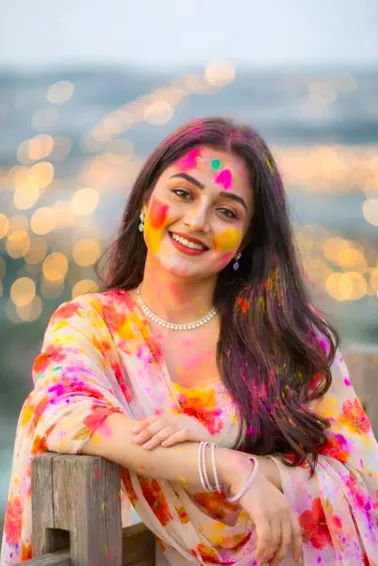
Om Editing Top ke saath Rang Touch style kya hai?
Rang Touch ek aisa photo-editing style hai jo normal portrait ko Holi festival ke mood mein convert kar deta hai, aur agar aap Om Editing Top jaisi natural look wali editing dhoondh rahe hain, to ye style kaafi useful hai. Is type ki editing mein face, skin texture, pose aur framing ko same rakha jata hai, lekin photo par gulal, abir aur festive colors ka realistic touch add kiya jata hai.
Read Also: cinematic-style realistic portrait | 2026 New Year
Ye style un logon ke liye best hai jo apni regular mobile photo ko dramatic ya over-edited banaye bina festival-ready look dena chahte hain. Social media post, profile picture, Holi greeting, status image ya reel cover ke liye aisi editing kaafi popular hai, kyunki isme realism aur celebration dono saath milte hain.
Rang Touch editing ka sabse bada advantage ye hai ki photo artificial nahi lagti. Colors skin aur fabric ke saath naturally blend hote hain, isliye image me powder effect, festivity aur depth dikhti hai. Is tarah ka result un users ke liye bhi achha hai jo beginner hain aur mobile par simple, clean aur professional-looking photo edit chahte hain.
Rang Touch photo style aapko exactly kya deta hai?
Is editing style ka main goal hota hai Holi ke colors ko soft, realistic aur natural form me add karna. Yahan paint jaisa flat effect nahi hota, balki powder-like texture diya jata hai jo cheeks, forehead, hair aur clothes par lightly spread dikhta hai. Isse photo me festival energy aati hai, lekin subject ki identity aur original look maintain rehti hai.
Lighting aur mood bhi is style me important role play karte hain. Aksar photo ka background unchanged rakha jata hai, taaki subject par focus bana rahe aur colors zyada loud na lagen. Yellow, pink, multicolor splashes aur हल्का dust effect image ko lively banate hain, jabki skin par natural texture preserve rehne se result believable lagta hai.
Composition ke level par bhi ye style strong hota hai. Face center me ho, angle clear ho, aur clothing par enough visible area ho to colors achhe se show hote hain. Agar photo me emotion natural ho—jaise halka smile, direct gaze ya candid pose—to final edit aur bhi engaging lagta hai.
- Soft gulal effect on cheeks for festive realism
- Light color dust on hair for natural Holi feel
- Scattered powder marks on shirt/clothes
- Unchanged face identity and original facial features
- Realistic skin texture without over-smoothing
- Background ko same rakhkar clean, photo-real look
Rang Touch style ko use kaise karein: beginner-friendly mobile guide
Agar aap bilkul beginner hain, to sabse pehle ek aisi photo choose karein jisme face clearly visible ho aur subject blur na ho. Om Editing Top type natural editing ke liye sharp image best hoti hai, kyunki details clear rahengi to colors bhi realistic dikhेंगे. Phone par upload karte waqt image ko crop ya stretch na karein, warna framing बिगड़ sakti hai.
Ab photo editing tool ya prompt-based workflow me image ko main reference ke roop me set karein. Idea ye hota hai ki original face, pose aur body angle same rahe. Uske baad Holi colors ko lightly apply karna hota hai—matlab cheeks par soft yellow, pink powder, forehead par tiny splashes, aur clothes par scattered color marks. Heavy coating ki jagah subtle layering better hoti hai.
Mobile par work karte waqt ye sequence follow karein, taaki result clean aur realistic aaye:
- Clear portrait photo upload karein jisme face and upper body visible ho.
- Background aur framing ko same rakhne ka option select karein.
- Holi powder effect ko soft aur realistic mode me set karein.
- Face par direct changes avoid karein; identity preserve rehni chahiye.
- Clothes, hair aur cheeks par light festive colors add karein.
- Preview me check karein ki colors paint jaisa nahi, powder jaisa lag rahe hain.
- Agar effect zyada strong lage to intensity kam karke natural balance banayein.
Best result tab aata hai jab aap ek hi photo par baar-baar extreme changes na karein. Pehle balanced edit try karein, phir agar zarurat ho to thoda color intensity increase karein. Is style ka charm subtle realism me hai, isliye over-editing se bachna chahiye.
Kaunsi photos Rang Touch ke liye sabse achchi hoti hain?
Rang Touch editing ke liye sabse useful wo photos hoti hain jisme subject ka face front ya slight angle par ho. Side profile ya heavily cropped photo me Holi colors ko natural way me place karna mushkil ho sakta hai. Agar shoulders aur shirt ka upper part bhi visible ho, to clothes par powder effect zyada realistic dikhega.
Resolution bhi important hai. Low-quality, dark ya noisy image me skin texture aur color blending achhi tarah nahi banti. Isliye high-resolution photo choose karna better hota hai, especially jab aap realistic Holi effect chahte hain. Daylight ya soft indoor lighting wali photo me details clearly capture hoti hain.
Background aur clothing bhi final output ko impact karte hain. Simple background ho to colors zyada clean dikhte hain, aur plain ya lightly textured clothing par Holi powder marks achhe se stand out karte hain. Bright patterns wale clothes me effect kabhi-kabhi blend ho jata hai, isliye medium-tone shirt ya kurta often best choice hota hai.
- Face clearly visible ho, blur ya motion shake na ho
- High-resolution image ho, preferably sharp portrait
- Natural daylight ya soft lighting ho
- Background simple aur clutter-free ho
- Upper body visible ho taaki clothes par color effect aaye
- Plain or solid-color clothing Holi powder ko better show karti hai
- Natural expression aur relaxed pose photo ko more authentic banata hai
Overall, Rang Touch editing un photos par sabse achchi kaam karti hai jahan base image already strong ho. Agar original picture clear, balanced aur natural hai, to festive color effect aur bhi convincing lagta hai. Isi wajah se Om Editing Top style users aise portraits ko prefer karte hain jahan realism pehle se present ho aur Holi touch usko aur vibrant bana de.
Rang Touch ke liye pro tips for best results
अगर आप Om Editing Top style output चाहते हैं, तो सबसे पहले photo की original framing को clean रखें. Holi colors तभी realistic लगते हैं जब face details, skin texture, aur lighting natural बनी रहें. Best result के लिए uploaded image sharp होनी चाहिए, क्योंकि low-quality photo में gulal और abir ka powder effect ठीक से blend नहीं होता.
Ek aur important tip hai colors ko balanced रखना. Face par हल्का yellow aur pink touch, hair par subtle dust, aur clothes par scattered powder marks look ko festive बनाते हैं. Overdone colors image को artificial बना सकते हैं, इसलिए natural spread और soft blending पर focus करें. Is type ke Om Editing Top edits में realistic shadow aur existing background ka consistency बहुत matter करती है.
- High-resolution photo upload करें ताकि face features clear रहें.
- Front-facing ya slightly angled portrait images ज्यादा natural लगती हैं.
- Soft yellow, pink, aur multicolor powder effects ko light रखें.
- Skin tone aur hair texture ko preserve करना जरूरी है.
- Background को unchanged रखने से edit ज्यादा realistic लगता है.
- Shirt ya outfit पर केवल scattered Holi marks दें, full coverage नहीं.
Common mistakes jo output ko weak bana dete hain
सबसे common mistake है face identity को बदल देना. Holi edit ka main charm यही है कि person वही रहे, बस festive look add हो. अगर eyes, nose, lips, hairline, ya face shape बदल जाए, तो image natural नहीं लगेगी. Om Editing Top prompt ka real purpose realism है, not transformation.
Doosri mistake है colors को paint ki tarah use करना. Holi effect tabhi अच्छा लगता है जब gulal powder जैसा दिखे, यानी हल्का dusty, soft, aur fabric aur skin ke साथ blend हुआ. Hard edges, too much saturation, ya bright neon shades image को fake feel दे सकते हैं. Background ko bhi unnecessarily change करना output ki authenticity को कम कर देता है.
- Face features बदलना: identity loss हो जाती है, aur edit unrecognizable लग सकता है.
- Over-saturated colors: Holi powder की जगह painted effect जैसा लगने लगता है.
- Too much color coverage: natural festive balance टूट जाता है.
- Background replace करना: realism कम हो जाता है, especially portrait shots में.
- Blurred source image use करना: skin texture aur powder details साफ नहीं दिखते.
Best use cases aur creative ideas for Rang Touch
Rang Touch style edits ka सबसे अच्छा use social media content में होता है. Instagram profile picture, story post, ya festive feed update ke लिए यह look instantly eye-catching hota hai. Holi season ke around ये images friends, followers, aur personal branding ke लिए vibrant presence create करती हैं. Aise Om Editing Top visuals warm, celebratory, aur relatable feel देते हैं.
Ye edit thumbnails aur reels covers ke लिए bhi kaafi useful hai. Agar aap festive vlog, Holi celebration video, ya event recap बना रहे हैं, to powder color effect thumbnail ko instantly click-worthy बना सकता है. Portfolio images mein bhi ye look अच्छा लगता hai, especially agar aap portrait retouching, AI editing, ya seasonal creative design showcase करना चाहते हैं.
- Instagram profile picture: festive, bold, aur memorable presence ke लिए.
- Feed posts: Holi wishes aur celebration captions ke साथ perfect match.
- Reels covers: colorful first impression aur better engagement.
- YouTube thumbnails: Holi vlog ya festival content ke लिए high attention visual.
- Portfolio showcase: editing skills aur realistic color blending dikhane ke लिए.
Variations jo aap try kar sakte ho
Agar aap same Om Editing Top idea ko different moods mein explore करना चाहते हैं, to color intensity aur setting बदलकर कई variations बना सकते हैं. Ek soft pastel version ज्यादा elegant लगेगा, jabki bold multicolor version festival energy ko amplify करेगा. Season aur lighting ke हिसाब se भी image ka feel kaafi बदल जाता hai.
Aap sunrise light, bright daylight, ya warm evening tone ke साथ experiment kar सकते हैं. Soft pink aur yellow mix romantic-festive feel देता है, jabki red, green, aur blue powder splash zyada energetic Holi vibe बनाता है. If you want a premium portrait look, colors ko limited रखें; अगर playful celebration look चाहिए, तो powder marks ko थोड़ा more visible रखें.
- Pastel Holi look: soft pink, baby yellow, aur light powder dust.
- Bright festive look: vivid gulal colors with stronger contrast.
- Morning sunlight version: clean, airy, aur natural skin tones.
- Golden hour version: warm glow ke saath cinematic festive feel.
- Minimal portrait edit: subtle color marks for classy, realistic output.
- High-energy celebration edit: more splashes on shirt, hair, and cheeks.
Conclusion: Om Editing Top se rangin aur realistic Holi edit try karo
Overall, Om Editing Top style ka Rang Touch edit tab sabse achha lagta hai jab face same rahe, colors natural blended हों, aur background realistic बना रहे. Is approach se aap ek simple portrait ko festive Holi celebration image mein बदल सकते हैं without losing identity or photo quality. Realistic gulal effect, soft powder texture, aur balanced color placement is look ko strong बनाते हैं.
Agar aap apni photo ko vibrant, festive, aur natural रखना चाहते ho, to isi style ko try karke dekho. Sahi input ke साथ Om Editing Top ka Rang Touch edit social media, thumbnails, aur personal use ke लिए ek eye-catching result दे सकता है.
FAQ: Rang Touch
How do I use the "Rang Touch" prompt?
Copy the prompt above, open Gemini or ChatGPT, upload a clear photo of yourself and paste the prompt. Generate the image and adjust the outfit or background if you want a variation.
Is this prompt free?
Yes. This prompt is free to copy and use for Instagram, reels, WhatsApp DP and profile pictures.
Which photo works best?
A sharp, front-facing, well-lit photo with no filter. A clear face helps the AI keep your identity in the final image.
Last updated: 31 July 2026
💬 Comments