Selfie on Set AI Prompt
Selfie on Set AI Prompt: What Is This Style and Who Is It For?
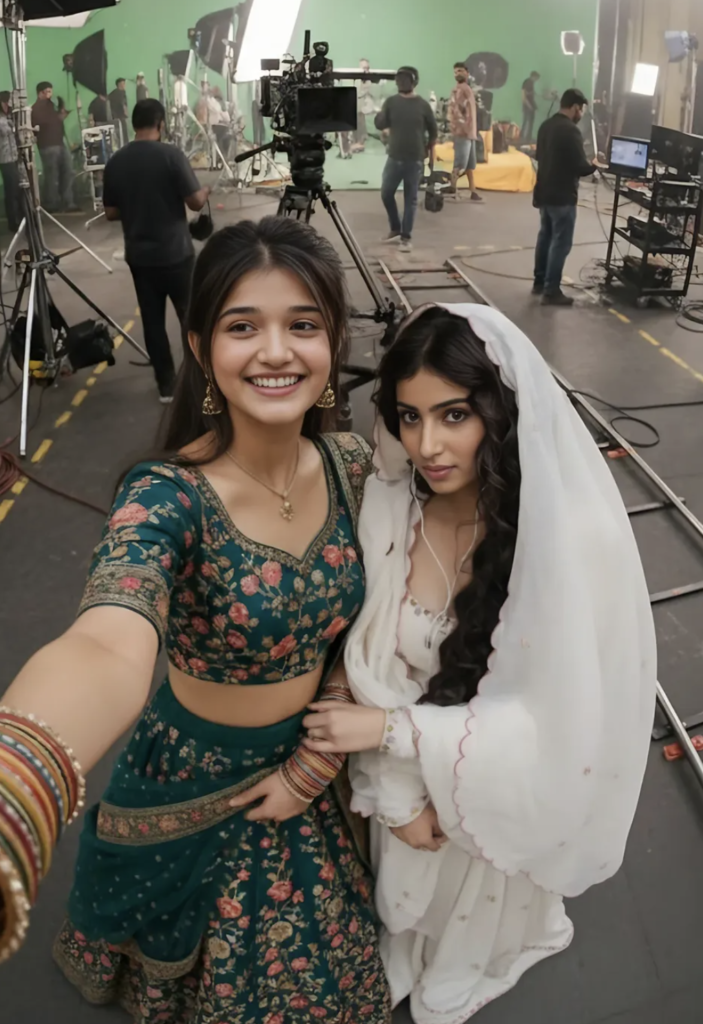
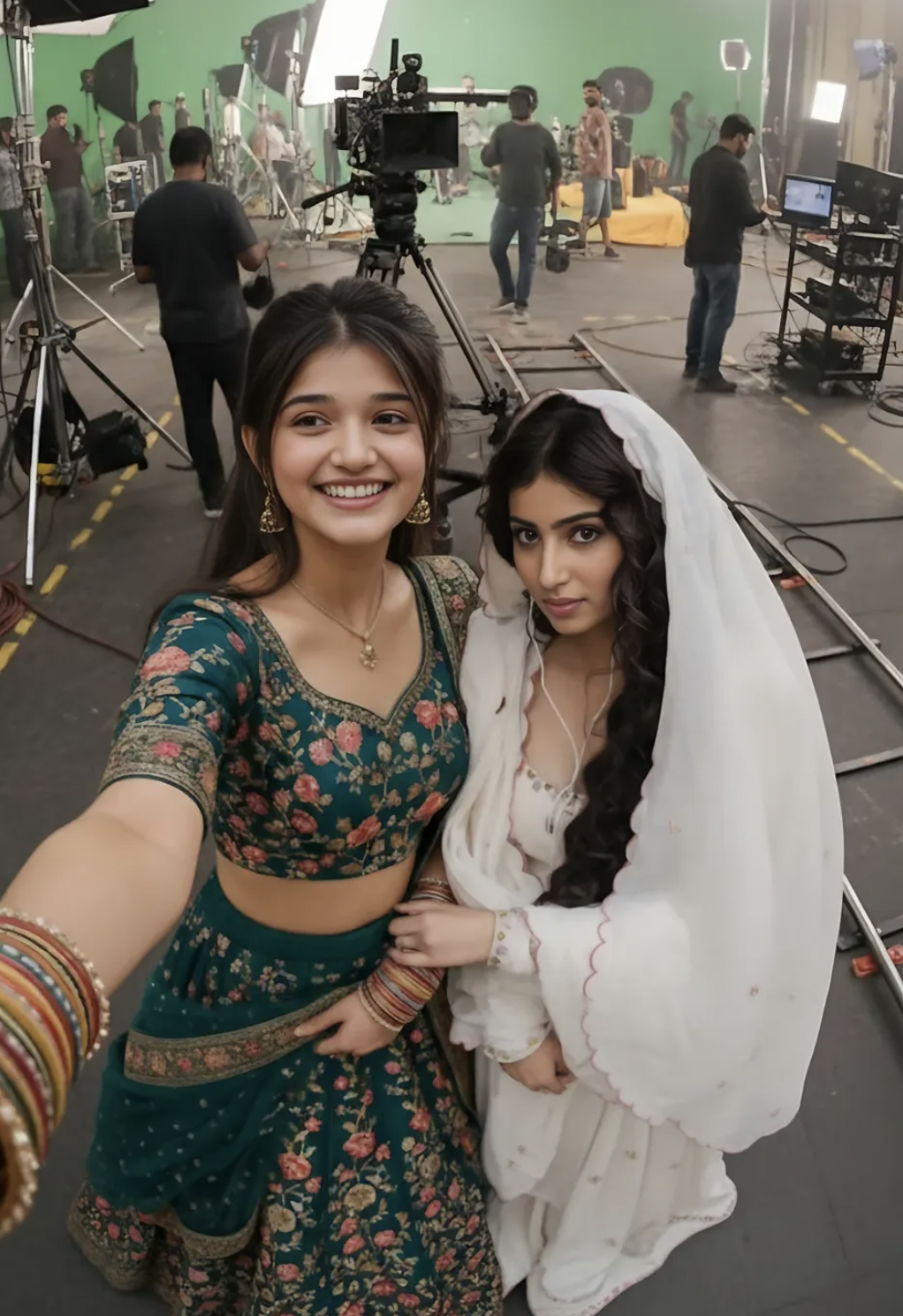
Selfie on Set gives a cinematic behind-the-scenes look that feels far more polished, realistic, and film-like than a normal selfie. The subject is shown as if holding the camera themselves on a movie set, shooting studio, or professional production environment.
Read Also: Cinematic Realistic Portrait AI Prompt | 2026 New Year AI Prompt
This look is perfect for anyone who wants dramatic, trendy, premium visual content for social media. Whether you’re an actor, creator, influencer, filmmaker, or just want your photos to feel cinematic and unique, this prompt gives a strong studio vibe and an authentic on-set mood.
The main goal is blending natural selfie energy with a film-production atmosphere. The result feels both casual and high-end, as if you’re part of an actual shooting day.
What This Selfie on Set Prompt Delivers
This prompt’s strongest point is its realistic cinematic setup. The image usually shows a wide studio space, camera rigs, lighting equipment, rails, monitors, and production atmosphere, making the scene feel like a genuine movie set. The subject’s pose is hand-held selfie style, so the image doesn’t look over-posed — it feels spontaneous and natural.
Lighting is generally soft yet professional, keeping faces clear while background studio detail stays visible. Colors are usually clean, balanced, cinematic — neutral tones, soft highlights, controlled shadows.
Composition matters a lot too. The ultra-wide framing makes the background more visible, and the selfie angle makes the image feel more immersive — the viewer feels like they’re standing right on the set. This style is especially useful for BTS content, creator branding, film-related thumbnails, or attention-grabbing profile visuals.
- Cinematic selfie vibe with a real behind-the-scenes feel
- Professional studio lighting and film-set environment
- Wide composition with visible production details
- Natural, handheld selfie angle for an authentic look
- Realistic colour balance with soft highlights and depth
Step-by-Step: How to Use This Prompt on Mobile
Beginners can use this style easily. Carefully select your reference photo, since face, outfit, hairstyle, and overall appearance need to be preserved as-is — a better reference image gives a better output, especially when the prompt needs exact identity maintained.
Open the prompt box in your image generator or editing tool and upload reference images. Check file size and clarity while uploading on mobile so face details don’t blur. Then use the prompt and choose a 9:16 vertical aspect ratio, which suits this selfie style best.
Always carefully review the first output. If the background looks too busy, face detail is weak, or the selfie angle doesn’t feel natural, make minor adjustments and try again. For beginners, it’s best to change only one thing at a time to understand what’s improving the output.
- Choose your best clear reference photo.
- Upload a sharp image of a second character too, if applicable.
- Select the vertical 9:16 format in your tool.
- Use the prompt as-is and attach reference images.
- Generate the output and check face consistency.
- Refine lighting, background, or framing and regenerate if needed.
Which Photos Work Best
The best photos are front-facing or slightly angled, so the selfie composition naturally fits. The face should be clear and expression relaxed. Extreme side poses or covered-face photos weaken identity consistency in the result.
Resolution matters too — a high-resolution, sharp, well-lit image better preserves facial features. A simple or neutral background in the reference photo helps the AI focus on the subject.
- Clear front-facing or slight-angle selfie-style photo
- High-resolution image with sharp facial details
- Natural, even lighting without harsh shadows
- Simple or uncluttered background in the reference image
- Visible clothing details, especially shoulders and neckline
- Relaxed expression and stable pose for consistency
Pro Tips for the Best Results
The best output comes when reference images are clean, clear, and consistent. If face, outfit, and hairstyle are already sharp in the uploaded photo, the final edit looks more natural and realistic. In a selfie-on-set image, camera angle, lighting, and background scale matter a lot.
- Keep face and outfit clearly visible in the reference image so identity stays the same.
- Keep the camera angle slightly close and natural for a hand-held selfie feel.
- Choose daytime studio lighting for a bright, realistic image.
- Add film set elements like lights, cameras, rails, and monitors to the background.
- Keep characters naturally close in pose, avoiding forced posture.
- Mention the wide cinematic environment, but don’t change subject details.
Common Mistakes to Avoid
Ignoring identity consistency is a common mistake — if face shape, hairstyle, or outfit changes, the image’s original feel is lost.
- Changing face features — weakens the reference match.
- Modifying the outfit — the original look won’t be maintained.
- Using an overcrowded background — reduces focus on the selfie subject.
- Adding harsh lighting — can replace the cinematic mood with a flat or noisy look.
- Using too much blur or effect — loses the behind-the-scenes realism.
Best Use Cases
- Instagram posts: cinematic behind-the-scenes style for engagement.
- Profile pictures: a natural selfie look with a polished studio background.
- Thumbnails: bold, eye-catching visuals for video or reel covers.
- Portfolios: a professional image set for creators and performers.
- Reel covers: clean, scroll-stopping preview frames.
- Fan pages or promo content: a realistic on-set vibe for strong visual identity.
Variations You Can Try
- Mood variations: cheerful, confident, candid, relaxed, stylish.
- Colour variations: warm studio lights, cool blue tones, neutral cinematic tones.
- Setting variations: indoor soundstage, outdoor shoot area, green screen studio, control room style set.
- Season variations: summer brightness, monsoon softness, winter cool contrast, festive production vibe.
- Framing variations: close selfie crop, wider BTS frame, slight high-angle or eye-level angle.
Conclusion: Try the Selfie on Set Look
This is perfect for anyone who wants a selfie-on-set type cinematic, realistic, social-media-ready image. Keep reference identity the same, thoughtfully add the studio environment, and keep composition natural for a genuinely polished result.
FAQ: Selfie on Set
How do I use the "Selfie on Set" prompt?
Copy the prompt above, open Gemini or ChatGPT, upload a clear photo of yourself and paste the prompt. Generate the image and adjust the outfit or background if you want a variation.
Is this prompt free?
Yes. This prompt is free to copy and use for Instagram, reels, WhatsApp DP and profile pictures.
Which photo works best?
A sharp, front-facing, well-lit photo with no filter. A clear face helps the AI keep your identity in the final image.
Last updated: 10 September 2026
💬 Comments