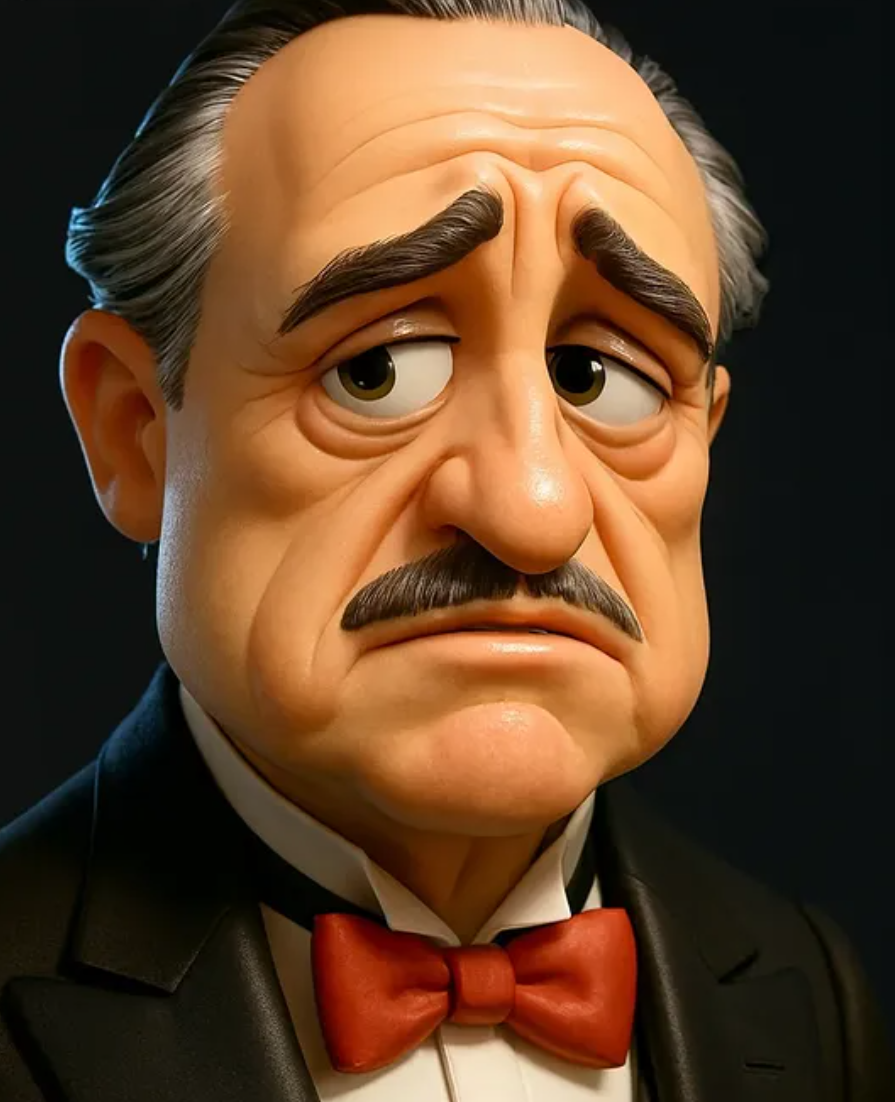
Pixar-Style 3D Cartoon Portrait | High-Quality CGI Render
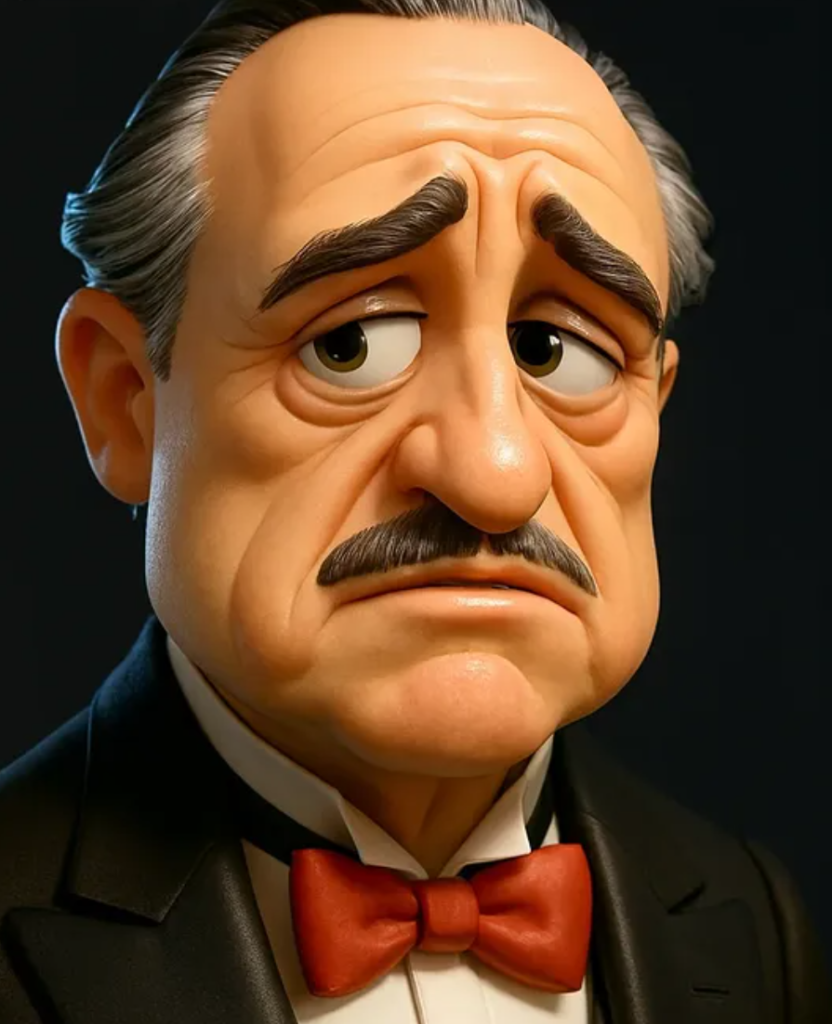
Pixar-Style 3D Cartoon Portrait क्या है?
Om Editing Top जैसे क्रिएटिव टूल्स और एडिटिंग आइडियाज़ के साथ Pixar-Style 3D Cartoon Portrait आज बहुत तेजी से लोकप्रिय हो रहा है, खासकर उन लोगों के लिए जो अपनी फोटो को एक cute, glossy और cinematic character look देना चाहते हैं। यह style आम portrait से अलग होता है क्योंकि इसमें face details को थोड़ा stylized रखा जाता है, जिससे image ज्यादा playful, expressive और animated लगती है।
Read Also: cinematic-style realistic portrait | 2026 New Year
इस तरह का 3D cartoon portrait उन लोगों के लिए बढ़िया है जो profile photo, social media avatar, YouTube thumbnail, personal branding, या किसी खास gift image के लिए premium CGI look चाहते हैं। इसमें character head-and-shoulders composition में दिखता है, जिससे focus चेहरे के expressions पर रहता है और image तुरंत ध्यान खींचती है।
अगर आप शुरुआत कर रहे हैं, तो यह style समझने में आसान है: बस एक clear photo चुनिए, फिर उसे ऐसे 3D cartoon render में बदला जाता है जिसमें polished finish, soft shadows, bright background और cheerful mood होता है। यही कारण है कि इसे realistic cartoon portrait, stylized 3D avatar, या Pixar-like character edit भी कहा जाता है।
इस Prompt/Photo Style में आपको क्या मिलता है?
Pixar-Style 3D Cartoon Portrait की सबसे बड़ी खासियत इसका smooth CGI finish है। चेहरा ज़्यादा clean, expressive और animated दिखता है, लेकिन फिर भी original person की पहचान बनी रहती है। Lighting आमतौर पर soft ambient होती है, जिससे skin और facial contours पर gentle shadows बनते हैं और overall image warm, polished feel देती है।
Composition भी बहुत important है। यह style mostly portrait framing में काम करता है, यानी head and shoulders focus में रहते हैं। Dynamic camera angle और stylish perspective की वजह से image flat नहीं लगती, बल्कि उसमें depth और cinematic presence आती है। Background usually minimalist और bright रखा जाता है, ताकि character visually pop करे और attention सीधे subject पर रहे।
Colour treatment भी इस style का बड़ा हिस्सा है। Bright, cheerful tones, glossy highlights, और clean material rendering इसे high-quality 3D render जैसा look देते हैं। Final image playful भी लगती है और professional भी, इसलिए यह सिर्फ fun edit नहीं बल्कि premium digital portrait style बन जाता है।
- Soft ambient lighting के साथ smooth shadows
- Glossy, polished CGI finish
- Expressive, playful facial styling
- Minimal background जो subject को highlight करे
- Portrait composition for clean head-and-shoulders framing
- Cheerful, cartoon-like mood with high visual appeal
This Style को Step-by-Step कैसे Use करें?
अगर आप beginner हैं, तो सबसे पहले अपने लिए एक साफ और clear photo चुनें। इस style में face details बहुत matter करती हैं, इसलिए blurry, dark, या crowded background वाली image से बेहतर है कि आप अच्छी light वाली front-facing photo use करें। मोबाइल पर काम करते समय फोटो को पहले crop और straighten करना मदद करता है, ताकि subject center में रहे।
अगला step है सही transformation goal समझना। आपको किस तरह का output चाहिए—more cute, more realistic, or more stylized? Pixar-Style 3D Cartoon Portrait में usually balanced approach सबसे अच्छा लगता है, जहाँ face recognizable रहे लेकिन उसे animated charm भी मिले। अगर tool या editor में options हों, तो head-and-shoulders framing, soft lighting, bright background, और glossy render look चुनें।
उसके बाद final output को check करें। Facial expressions, hair edges, eye clarity, और background separation पर ध्यान दें। अगर image बहुत busy लगे, तो simpler background चुनना better होता है। मोबाइल से edit करते समय small screen पर zoom करके details check करें, ताकि final portrait social media पर crisp और attractive दिखे।
- एक high-quality photo चुनें जिसमें चेहरा साफ दिख रहा हो।
- Photo को crop करके portrait composition में set करें।
- Mobile editor या AI tool में 3D cartoon portrait style apply करें।
- Soft lighting, glossy finish, और bright background जैसा look target करें।
- Preview में face shape, eyes, और smile की clarity check करें।
- अगर जरूरत हो तो background को simpler और cleaner बनाएं।
- Final image को high resolution में save करें, ताकि quality बनी रहे।
कौन-सी Photos इस Style के लिए सबसे Best हैं?
इस तरह के CGI cartoon portrait के लिए सबसे अच्छी photos वे होती हैं जिनमें subject का face clearly visible हो। Front-facing या slightly angled face shots ज्यादा अच्छे result देती हैं क्योंकि उनमें facial features आसानी से stylize किए जा सकते हैं। बहुत ज्यादा side profile, low-light, या heavy motion blur वाली photos से detail lose हो सकती है।
Resolution भी बहुत important है। जितनी साफ photo होगी, उतना बेहतर cartoon render बनेगा। अगर image compressed या pixelated है, तो final output में face edges और hair details उतनी smooth नहीं दिखेंगी। इसलिए कोशिश करें कि original image sharp हो और subject के चेहरे पर enough clarity हो।
Background और clothing भी output को काफी affect करते हैं। Simple background, solid wall, or lightly blurred setting best रहती है क्योंकि इससे focus subject पर रहता है। Clothing के लिए plain या neat outfit चुनना practical है, क्योंकि बहुत busy patterns cartoon rendering में distracting लग सकते हैं। Natural smile या relaxed expression इस style में सबसे अच्छा काम करता है।
- Front-facing या हल्का angled portrait photo
- Sharp focus और high resolution image
- Good natural light या soft indoor lighting
- Simple, uncluttered background
- Clean clothing without too many patterns
- Relaxed, friendly facial expression
- Head and shoulders clearly visible framing
अगर आप चाहते हैं कि portrait ज्यादा professional लगे, तो ऐसी photo चुनें जिसमें eyes clear हों और face पर harsh shadows न हों। Bright daylight या window light अक्सर सबसे अच्छा option होती है। साथ ही, background में extra people, objects, या strong colors कम हों, ताकि final cartoon portrait ज्यादा premium और balanced दिखे।
Om Editing Top ke Liye Pro Tips: Best Results Kaise Lein
Agar aap Om Editing Top style me Pixar-Style 3D Cartoon Portrait banana chahte hain, to sirf prompt ya idea enough nahi hota. Best output tab milta hai jab aap character details, lighting, background aur face expression ko carefully shape karte ho. Is style me chhoti-chhoti cheezein overall render ko kaafi premium bana deti hain.
Ek achha 3D cartoon portrait tab zyada impressive lagta hai jab usme balance ho — features expressive hon, but overdone na lagen. Clean composition, soft shadows aur smooth finish portrait ko zyada polished aur social-media ready banate hain. Isi wajah se Om Editing Top ke liye consistency bahut important hai.
Best results ke liye output ko simple but detailed rakhna chahiye. Too many elements add karne se face aur background dono crowded lag sakte hain. Agar aap Instagram, profile photo ya thumbnail ke liye use kar rahe ho, to focus hamesha subject par hona chahiye.
- Head and shoulders composition choose karein taaki face clearly highlight ho.
- Expressive eyes aur subtle smile use karein, kyunki ye cartoon feel ko stronger banata hai.
- Bright but minimal background rakhein taaki character pop kare.
- Soft ambient lighting use karein, hard shadows se image heavy lag sakti hai.
- Color palette ko subject ke outfit ya mood ke saath match karein.
- Stylized perspective try karein, lekin face distortion zyada na ho.
- Clean and glossy render finish prefer karein for a professional look.
Common Mistakes Jo This Style Output Ko Weak Bana Dete Hain
Bahut log Pixar-style 3D cartoon portrait banate waqt over-editing kar dete hain. Result me face unnatural lagta hai, proportions bigad jaate hain ya rendering too shiny ho jaati hai. Om Editing Top ka goal cute, premium aur readable image hota hai — not a cluttered one.
Ek aur common mistake hoti hai background ko unnecessary complex banana. Jab backdrop me too many objects ya heavy textures aa jaate hain, to character ki visibility kam ho jaati hai. Is style me clean space output ko zyada modern aur thumbnail-friendly banata hai.
Lighting aur expression bhi galat ho sakte hain. Agar lighting too harsh ho, to soft Pixar-like look chala jaata hai. Agar expression flat ho, to cartoon portrait me life kam feel hoti hai. Isliye face, colors aur background ka harmony maintain karna zaroori hai.
- Too much detail: Overloaded features image ko noisy aur less appealing bana dete hain.
- Harsh lighting: Soft CGI feel destroy ho sakti hai.
- Cluttered background: Subject ka focus weak ho jaata hai.
- Wrong proportions: Cartoon style playful honi chahiye, broken anatomy nahi.
- Flat expression: Portrait boring lag sakta hai, especially profile use ke liye.
- Inconsistent colors: Random tones overall design ko unbalanced bana dete hain.
Best Use Cases for This Style Portraits
Om Editing Top style Pixar-like portraits ka sabse bada advantage ye hai ki ye bahut versatile hote hain. Inko personal branding se le kar social media content tak, kaafi jagah use kiya ja sakta hai. Unka glossy, cheerful aur polished look unhe instantly eye-catching banata hai.
Instagram par ye portraits profile pictures, highlight covers aur post covers ke liye kaafi useful hote hain. Agar aap creator, influencer ya editor ho, to ye style aapke feed ko modern aur consistent look de sakta hai. Yeh specially un users ke liye useful hai jo apne account ko fun but premium banana chahte hain.
Thumbnails aur reels covers me bhi ye style bahut effective hota hai. Cartoonish face expressions viewers ka attention quickly catch karte hain, aur bright background image ko scroll-stop effect deta hai. Portfolio use me bhi yeh apki creative editing skills ko showcase karne ka strong way ban sakta hai.
- Instagram profile pictures: Clean, attractive, aur memorable avatar ke liye.
- Post thumbnails: Bold visual presence aur better click appeal ke liye.
- Reels covers: Consistent branding aur fun presentation ke liye.
- Creative portfolios: CGI-style editing samples dikhane ke liye.
- Personal avatars: Online identity ko stylish cartoon form me present karne ke liye.
This Style Ke Saath Variations Jo Aap Try Kar Sakte Ho
Agar aap same base style ko baar-baar use kar rahe ho, to variations add karna zaroori hai. Om Editing Top me mood, colour, season aur background change karke aap har portrait ko fresh aur unique bana sakte ho. Isse aapka content repetitive nahi lagega aur audience ko har version me naya feel milega.
Seasonal variations especially kaafi interesting hote hain. Winter theme me cool tones aur soft snow-like background use ho sakta hai, jabki summer style me bright colours aur sunny lighting zyada effective hoti hai. Similarly, festive moods me vibrant palette portrait ko zyada lively bana sakta hai.
Aap expression aur setting ke saath bhi experiment kar sakte ho. Ek version me cheerful smile, dusre me confident pose, aur kisi aur me dreamy cinematic look use kiya ja sakta hai. Ye small changes output ko zyada flexible aur content-friendly banate hain.
- Moody variation: Deep blue, purple ya soft shadow tones ke saath.
- Bright variation: Yellow, sky blue ya pastel shades ke saath.
- Cool winter look: Frosty tones aur clean light background ke saath.
- Warm summer look: Golden light aur energetic colour palette ke saath.
- Studio-style version: Minimal backdrop aur premium polished finish ke saath.
- Playful version: More expressive face aur cheerful colours ke saath.
Conclusion: This Style Ko Apne Next Cartoon Portrait Me Try Karein
Overall, this style style Pixar-Style 3D Cartoon Portrait un logon ke liye perfect hai jo apni images ko fun, premium aur attention-grabbing banana chahte hain. Right composition, soft lighting aur clean background ke saath aap bahut polished CGI-like result le sakte ho.
Agar aap Instagram, profile picture, thumbnail ya creative portfolio ke liye kuch unique banana chahte ho, to is style ko zaroor try karein. Thode se experiments ke saath aap alag moods aur looks create kar sakte ho, aur har version me ek fresh cartoon identity build kar sakte ho.
FAQ: Pixar-Style 3D Cartoon Portrait | High-Quality CGI Render
How do I use the "Pixar-Style 3D Cartoon Portrait | High-Quality CGI Render" prompt?
Copy the prompt above, open Gemini or ChatGPT, upload a clear photo of yourself and paste the prompt. Generate the image and adjust the outfit or background if you want a variation.
Is this prompt free?
Yes. This prompt is free to copy and use for Instagram, reels, WhatsApp DP and profile pictures.
Which photo works best?
A sharp, front-facing, well-lit photo with no filter. A clear face helps the AI keep your identity in the final image.
Last updated: 17 August 2026
💬 Comments