Moonlit Solitude
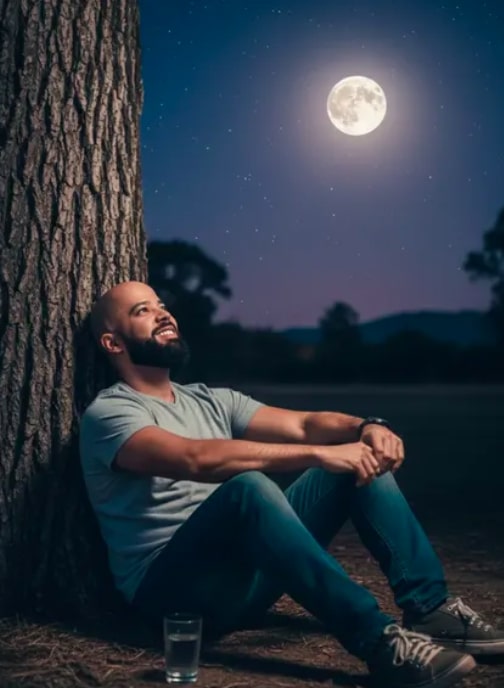
Moonlit Solitude with Om Editing Top: ek dreamy nighttime portrait style jo emotion ko cinematic look deta hai
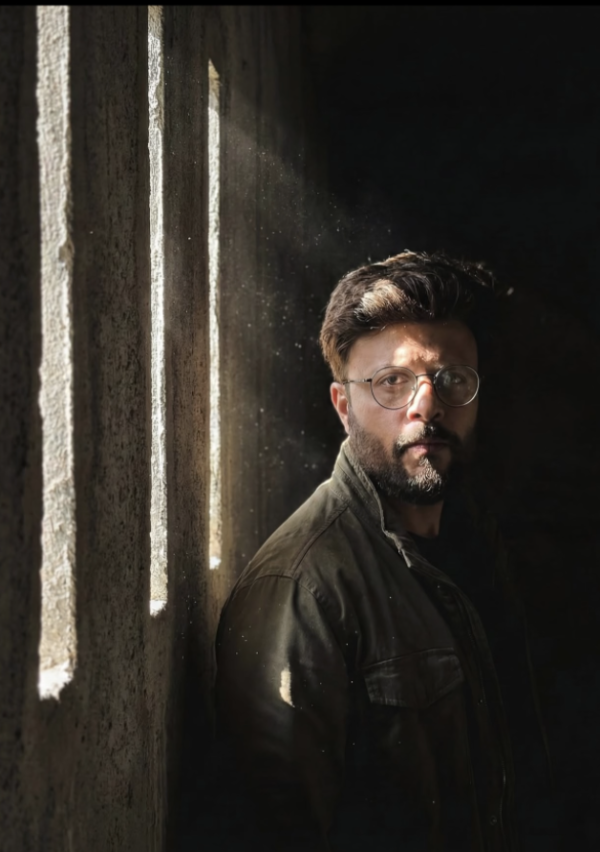
Om Editing Top ka Moonlit Solitude style un logon ke liye perfect hai jo apni photo ko ek calm, emotional aur film-like night portrait me convert karna chahte hain. Is look me subject usually akela, reflective aur deeply peaceful feel hota hai, jisse image sirf beautiful nahi lagti, balki story bhi bolti hai.
Read Also: cinematic-style realistic portrait | 2026 New Year
Ye style especially un creators ke liye useful hai jo Instagram reels, aesthetic posts, profile portraits, wallpaper shots, ya AI photo edit prompts ke through ek cinematic moonlight vibe create karna chahte hain. Agar aapko dark blue tones, soft highlights, realistic shadows aur a thoughtful mood pasand hai, to Moonlit Solitude editing concept aapke liye kaafi strong option hai.
Is type ke prompt ya photo style me main focus sirf face par nahi hota, balki poori composition par hota hai—body posture, background, moonlight direction, aur overall atmosphere. Isi wajah se result ek normal portrait se kaafi zyada expressive aur premium feel deta hai.
Moonlit Solitude prompt style actually kya deta hai?
Ye style ek serene, nighttime visual create karta hai jisme scene ka mood quiet, thoughtful aur slightly cinematic hota hai. Aapko bright daylight ke harsh tones nahi milte; instead soft moonlit lighting, deep blues, and subtle contrast photo ko ek premium editorial finish dete hain.
Composition usually aisa feel karwata hai jaise subject apne thoughts me kho gaya ho. Tree trunk, open sky, earthy ground, aur surrounding silhouettes jaise elements image me depth aur realism add karte hain. Isse final result zyada natural lagta hai, over-edited nahi.
Moonlit Solitude style ki kuch khas visual qualities ye hoti hain:
- Soft moonlight jo face aur clothing par natural highlights banata hai
- Cool color grading with deep blue and night-toned shadows
- Relaxed posture jo image ko human aur believable banata hai
- Clear starry sky aur open background jo cinematic mood deta hai
- Photorealistic detail jo AI-generated ya edited photo ko realistic banata hai
Is look ka sabse bada advantage ye hai ki ye emotions ko quietly express karta hai. Yani image me drama loud nahi hota, but feeling very strong hoti hai. Yehi reason hai ki portrait photographers, AI image editors aur social media creators is kind of style ko kaafi pasand karte hain.
This Style ko mobile par kaise use karein: step-by-step beginner guide
Agar aap mobile se editing kar rahe hain, to process simple rakhna best hota hai. Sabse pehle aapko ek clear reference photo choose karni chahiye, phir usko is Moonlit Solitude style ke according edit ya prompt-based generation ke liye prepare karna chahiye. Goal ye hai ki subject ka pose aur face readability achchi rahe.
Beginner ke liye sabse important cheez patience hai. Aapko pehle composition samajhni hogi, phir lighting aur color tone set karni hogi. Agar aap direct random photo par apply karenge, to result flat ya unrealistic lag sakta hai. Proper photo selection se half work already perfect ho jata hai.
- Ek aisi photo choose karein jisme subject clearly visible ho aur pose simple ho.
- Background clean ho ya easily dark night scene me convert kiya ja sake.
- Editing app ya AI tool me image upload karein aur reference quality check karein.
- Moonlit, night portrait, cinematic, aur realistic lighting jaise keywords/style settings use karein.
- Skin tones ko natural rakhein, aur shadows ko too hard ya too flat na hone dein.
- Background me deep blue tone, sky effect, ya soft silhouettes add karein.
- Final output me contrast aur sharpness ko balance karke realistic finish lein.
Mobile par edit karte waqt screen zoom karke face details aur hand placement check karna helpful hota hai. Agar aap AI prompt-based workflow use kar rahe hain, to reference photo me pose jitna clear hoga, result utna hi close aur polished aayega.
Ek practical tip ye bhi hai ki pehle low-intensity edit try karein. Isse aap dekh paayenge ki moonlight effect kitna natural lag raha hai. Baad me aap shadows, brightness aur cool tones ko thoda aur refine kar sakte hain.
Kaunsi photos Moonlit Solitude ke liye best kaam karti hain?
Is style ke liye sabse achchi photos woh hoti hain jisme subject ka body angle relaxed ho aur face partially ya fully visible ho. Sitting pose, leaned posture, ya contemplative look zyada achcha result deta hai kyunki ye moonlit mood ko support karta hai.
Resolution bhi important hai. Agar photo blurry ya low-detail hogi, to moonlight shadows aur facial highlights sahi se appear nahi karenge. Best result ke liye clear, well-focused image use karein jisme clothing aur facial structure dono visible hon.
Practical photo selection tips:
- Angle: Slight side angle ya 3/4 angle zyada cinematic lagta hai
- Resolution: High-resolution image choose karein taaki details loss na ho
- Lighting: Soft natural lighting wali photo better hoti hai, harsh flash avoid karein
- Background: Simple, open, ya plain background zyada flexible hota hai
- Clothing: Casual, solid-color, aur non-busy outfits best rehte hain
- Pose: Relaxed sitting ya leaning pose moonlit solitude vibe ko strong banata hai
Agar aap outdoor reference use kar rahe hain, to aisa frame choose karein jisme subject aur background me enough separation ho. Isse tree trunk, ground texture, aur sky elements ko add karna aasaan hota hai. Cluttered background edits ko weak bana sakta hai.
Clothing me simple t-shirts, shirts, hoodies, ya understated casual wear zyada achcha kaam karta hai. Bahut bright patterns ya reflective fabrics moonlight effect ko distract kar sakte hain. Is style me simplicity hi realism aur mood dono ko strengthen karti hai.
Pro Tips for the Best Results with Om Editing Top
To get the strongest Om Editing Top result, focus on keeping the scene calm, balanced, and visually clean. The overall mood should feel dreamy and reflective, so small details like posture, lighting direction, and background simplicity make a big difference. When the composition stays uncluttered, the subject stands out naturally and the edit feels more cinematic.
It also helps to think about contrast carefully. Cool tones, soft highlights, and gentle shadows usually work better than harsh, over-saturated effects for this kind of look. If you want the final image to feel polished, make sure every element supports the same nighttime atmosphere instead of competing for attention.
- Use soft moonlit lighting to keep the face and surroundings naturally shaped.
- Keep the background simple so the subject remains the main focal point.
- Choose relaxed body language for a thoughtful, emotional look.
- Use cool blue color grading to strengthen the night-time mood.
- Add subtle contrast instead of heavy editing for a more realistic finish.
- Make sure props and surroundings feel intentional, not distracting.
Common Mistakes to Avoid in This Style
One of the biggest mistakes is over-editing the scene. If the tones become too bright, too warm, or too sharp, the peaceful moonlit mood can disappear quickly. A natural-looking Om Editing Top style depends on restraint, so avoid pushing effects just because they look dramatic on their own.
Another common issue is ignoring composition. If the subject is cut awkwardly, the tree trunk feels misplaced, or the moonlight direction looks inconsistent, the image loses realism. These small errors can make the result feel artificial, even when the idea is strong.
- Too much saturation: it breaks the cool, dreamy night atmosphere.
- Harsh shadows: they can make the portrait feel unnatural and heavy.
- Busy backgrounds: extra details reduce the emotional impact of the subject.
- Wrong light direction: mismatched lighting makes the edit less believable.
- Over-sharpening: it can make skin and textures look rough instead of soft and cinematic.
Best Use Cases and Creative Ideas for This Style
Om Editing Top works beautifully for images that need a calm, emotional, or reflective mood. It is especially useful when you want the photo to feel more like a story than just a simple portrait. The moonlit setting makes the edit ideal for social media visuals that need depth and atmosphere.
This style can be adapted in many ways depending on where you plan to use it. Whether the goal is a profile picture, a dramatic Instagram post, or a cinematic reel cover, the combination of soft light and night scenery gives the image a strong visual identity.
- Instagram posts: perfect for moody portrait content and aesthetic feeds.
- Profile pictures: works well if you want a thoughtful and artistic look.
- Thumbnails: great for emotional or storytelling-based content.
- Portfolios: useful for showcasing creative portrait editing style.
- Reels covers: adds a cinematic feel that stands out in the grid.
Variations You Can Try with This Style
If you want to experiment, there are many ways to give Om Editing Top a fresh look while keeping the same core mood. You can change the emotional tone by adjusting colors, weather, or lighting style. Small variations often create a very different storytelling effect.
For example, a deeper blue palette can make the image feel more mysterious, while softer silver tones can create a quieter and more peaceful atmosphere. You can also shift the setting slightly to match different seasons or creative themes without losing the cinematic nighttime feel.
- Mood variations: dreamy, lonely, peaceful, romantic, or introspective.
- Color variations: deep blue, silver, teal, cool gray, or muted navy.
- Setting variations: forest ground, open field, hilltop, or near a lake.
- Season variations: summer night, monsoon night, winter chill, or autumn scenery.
- Lighting variations: brighter moon glow, softer shadows, or more dramatic contrast.
These small changes help you create multiple versions of the same concept without losing the identity of the edit. That is what makes Om Editing Top so useful for creators who want variety while keeping a consistent style.
Conclusion: Try This Style for a Cinematic Night Portrait
If you want a portrait that feels calm, emotional, and visually rich, this style is a strong choice. Its moonlit atmosphere, soft contrast, and cinematic depth make it ideal for creative edits that stand out without looking overdone.
Try a few different variations, keep the lighting natural, and focus on the mood first. With the right balance of detail and restraint, this prompt can turn a simple nighttime portrait into something memorable and beautifully expressive.
FAQ: Moonlit Solitude
How do I use the "Moonlit Solitude" prompt?
Copy the prompt above, open Gemini or ChatGPT, upload a clear photo of yourself and paste the prompt. Generate the image and adjust the outfit or background if you want a variation.
Is this prompt free?
Yes. This prompt is free to copy and use for Instagram, reels, WhatsApp DP and profile pictures.
Which photo works best?
A sharp, front-facing, well-lit photo with no filter. A clear face helps the AI keep your identity in the final image.
Last updated: 17 August 2026

💬 Comments