Christmas Cafe AI Prompt
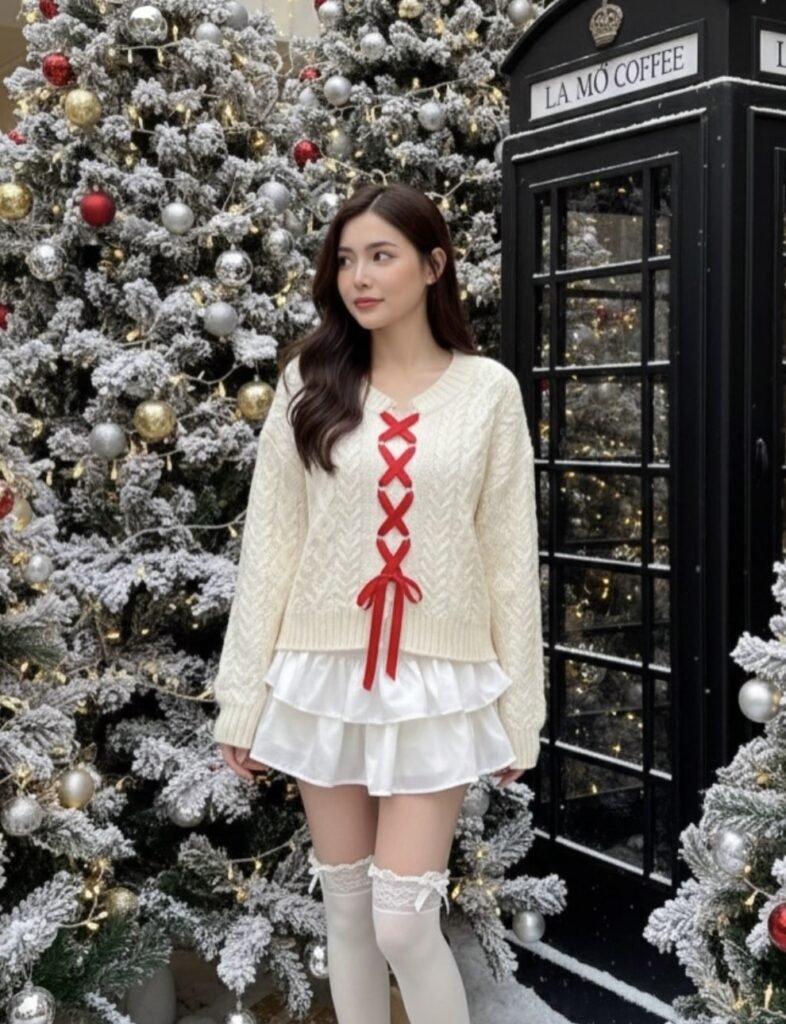
Christmas Cafe AI Prompt: What Does This Style Mean?
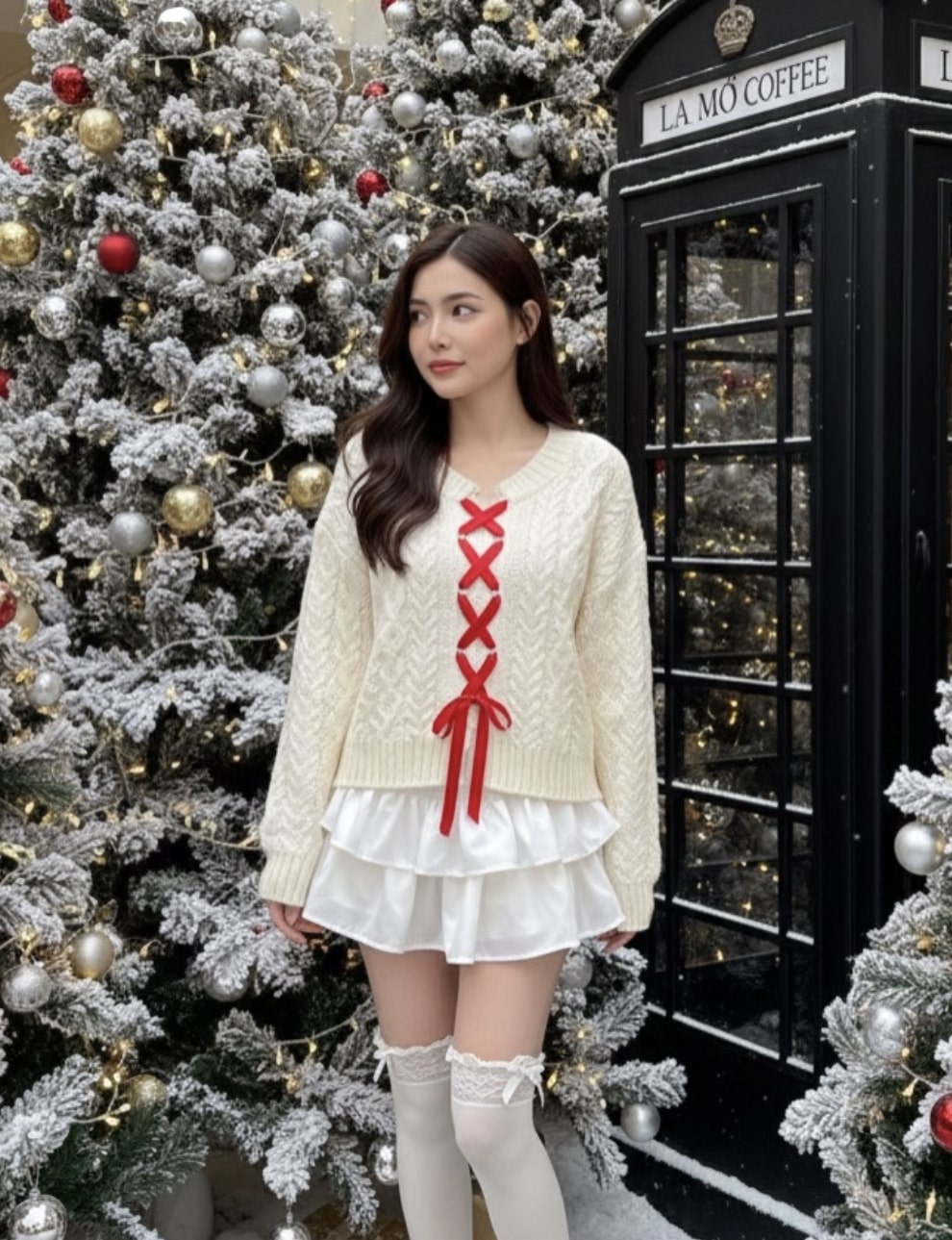
This is a dreamy winter portrait concept that blends fashion, festive mood, and realistic photography. It’s perfect for anyone who wants a premium Christmas vibe for Instagram, a reel cover, profile photos, or an AI-generated portrait.
Read Also: Cinematic Realistic Portrait AI Prompt | 2026 New Year AI Prompt
The biggest strength of this style is its cozy, elegant feel. The outfit isn’t just festive — soft textures, warm lights, and carefully planned background elements build a complete visual story. It’s especially useful for a Christmas-themed portrait, a holiday fashion edit, or a winter café aesthetic.
The theme is usually built around a soft snow effect, warm yellow lighting, rich red accents, and clean composition, giving the look a romantic, polished, slightly cinematic feel. New creators can use it for social content; advanced editors can push it toward a high-end editorial photography style.
What This Prompt Style Delivers
The output gives a rich winter atmosphere where the subject is sharply visible against a softly glowing background. Lighting is usually diffused, keeping skin tone smooth without overexposure. Warm fairy lights or festive bulbs add depth and bokeh in the background, giving the photo a premium feel.
Color palette matters a lot — cream, white, red, silver, and warm gold create a balanced Christmas aesthetic. A cream sweater or light outfit contrasts nicely with the snow effect, while red ribbon details or accessories give the image festive identity. Composition is usually centered or slightly off-center for a natural, graceful look.
Realism is a strong point too. A hyperrealistic portrait feel comes through when face details, fabric texture, snow decoration, and background props all look like a natural camera shot — so the image feels like it was really taken in an outdoor holiday café.
- Soft natural light for smooth skin and clean highlights
- Warm background lights for a cozy festive mood
- Red-and-white accents for strong Christmas identity
- Snow-dusted props for winter realism
- Shallow depth of field for subject separation
How to Use This Style on Mobile
Start by clearly understanding your photo and desired style. The subject should sit against a clean background with a soft expression and a balanced pose. On mobile, select the image first, then check lighting and crop so the base photo is strong.
Next, carefully apply the prompt or edit instructions. In an AI tool, keep subject details, outfit style, winter atmosphere, and lighting cues consistent. If editing manually, color correction, background glow, a snow overlay, and warm-tone adjustment can create the same feel.
The best result comes from making changes step by step rather than all at once. Adjust exposure first, then color balance, then background depth, then finally add festive details — this keeps the photo natural without looking over-edited.
- Choose a clear portrait photo.
- Check that the face is properly visible and the pose stable.
- Crop to make the subject the main focus.
- Apply warm light and festive color correction.
- Add snow, lights, or winter props to the background.
- Zoom in on the final image to inspect skin, hands, and edges.
- Save the output and export at the right size for social media.
Which Photos Work Best
The best photo has a clear face and a natural angle. Eye-level or slightly angled portraits work best for this festive edit, since they keep the expression calm and elegant. Too much tilt or an extreme close-up can hide the winter-fashion details.
Resolution should be high — ideally a photo that doesn’t blur when zoomed. Good lighting matters too: soft daylight, overcast outdoor light, or indoor diffused light are best. Harsh shadow or direct noon sunlight can make skin texture look inconsistent, affecting the final cinematic mood.
The background should be simple or lightly busy — a heavily cluttered background makes the edit feel heavy when festive props are added. Winter-friendly outfits — sweaters, coats, scarves, knitwear, or festive red-white combinations — work best. The more visible the outfit texture, the more realistic the edit looks.
- Angle: eye-level or slight side pose
- Resolution: high-resolution, with sharp facial details
- Lighting: soft natural light or diffused indoor light
- Background: clean, minimal, or lightly blurred outdoor setting
- Clothing: winter wear, knit textures, festive colors
- Expression: calm, subtle smile, relaxed look
Pro Tips for the Best Results
Fix the overall mood first. In a festive outdoor edit like this, outfit, background decor, lighting, and pose all need to match each other for a natural, premium look.
- Keep the pose simple and graceful so focus stays on face and outfit details.
- Spread warm lights and snow decor evenly in the background — don’t overcrowd it.
- Use a red-white combination in clothing for an instantly strong festive theme.
- Choose eye-level framing for a natural, relatable portrait.
- Keep the background softly blurred so the subject stays crisp with a dreamy bokeh effect.
Small styling details — hair placement, footwear color, ornament placement, snow texture — noticeably improve final image quality.
Common Mistakes to Avoid
The most common mistake is over-decorating the scene. When too many lights, trees, props, and textures appear together, the subject’s clarity drops — a festive feel is good, but visual clutter weakens the output.
- Too much decoration: the background gets busy and the portrait’s impact drops.
- Wrong color balance: the festive palette breaks and the image feels uneven.
- Harsh lighting: ruins the soft winter mood.
- Overly stiff pose: removes natural elegance.
- Ignoring face direction: weak gaze and framing weaken the composition.
Every element should be intentional — props should support, not dominate.
Best Use Cases
- Instagram posts: makes a festive feed feel stylish and premium.
- Profile pictures: a soft, elegant, season-friendly personal image.
- Thumbnails: makes holiday content instantly noticeable.
- Reel covers: maintains a consistent Christmas theme.
- Portfolios: strengthens fashion and editorial presentation.
This concept also adapts well to café branding, winter event flyers, seasonal greetings, and style inspiration posts.
Variations You Can Try
For a softer, cozy feel, use cream, beige, blush, and warm gold tones. For more festive drama, add deep red, emerald green, and brighter fairy lights.
- Soft romantic mood: pastel shades, gentle smile, light bokeh.
- Bold festive mood: richer reds, stronger ornaments, vivid contrast.
- Minimal luxury mood: fewer props, cleaner background, refined outfit styling.
- Snowy winter mood: more frost effect, colder tones, cozy layering.
- Cafe editorial mood: lifestyle framing with realistic outdoor ambiance.
Conclusion: Try This Style for a Magical Christmas Look
If you want an elegant, festive, visually rich winter portrait, this style is definitely worth trying. Its soft lighting, red-white festive palette, and dreamy outdoor setup make the image both stylish and warm.
FAQ: Christmas Cafe
How do I use the "Christmas Cafe" prompt?
Copy the prompt above, open Gemini or ChatGPT, upload a clear photo of yourself and paste the prompt. Generate the image and adjust the outfit or background if you want a variation.
Is this prompt free?
Yes. This prompt is free to copy and use for Instagram, reels, WhatsApp DP and profile pictures.
Which photo works best?
A sharp, front-facing, well-lit photo with no filter. A clear face helps the AI keep your identity in the final image.
Last updated: 8 October 2026

💬 Comments