Christmas Sleigh AI Prompt
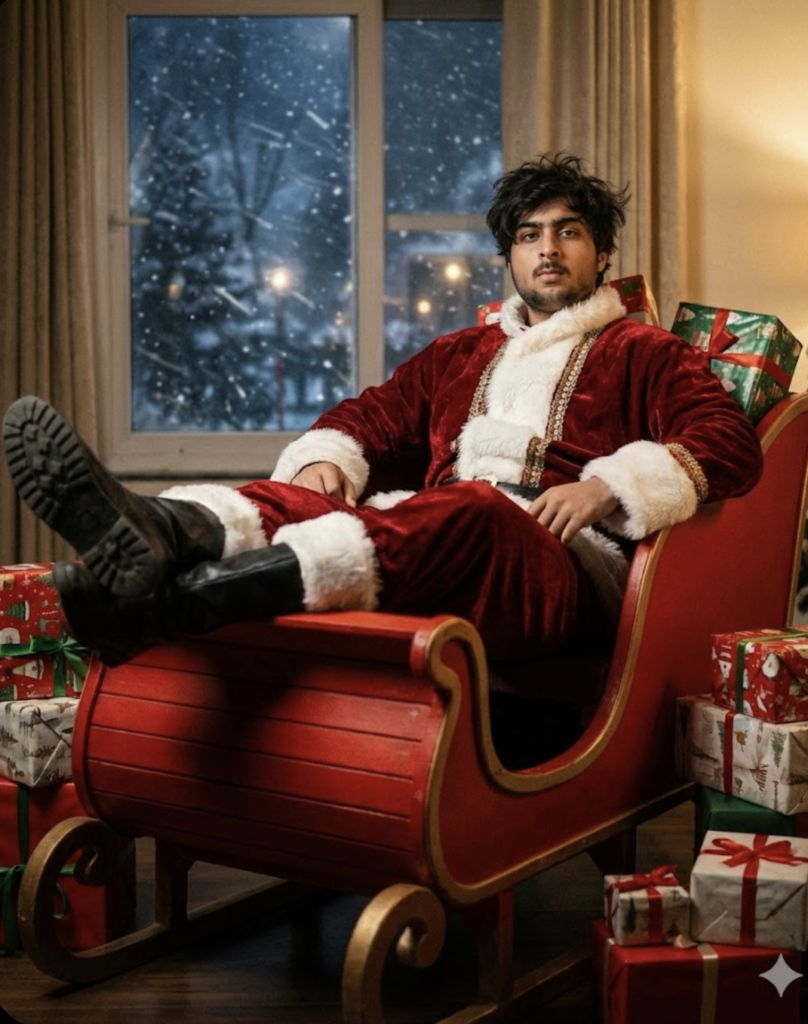
Christmas Sleigh AI Prompt: What Is This Portrait Style?
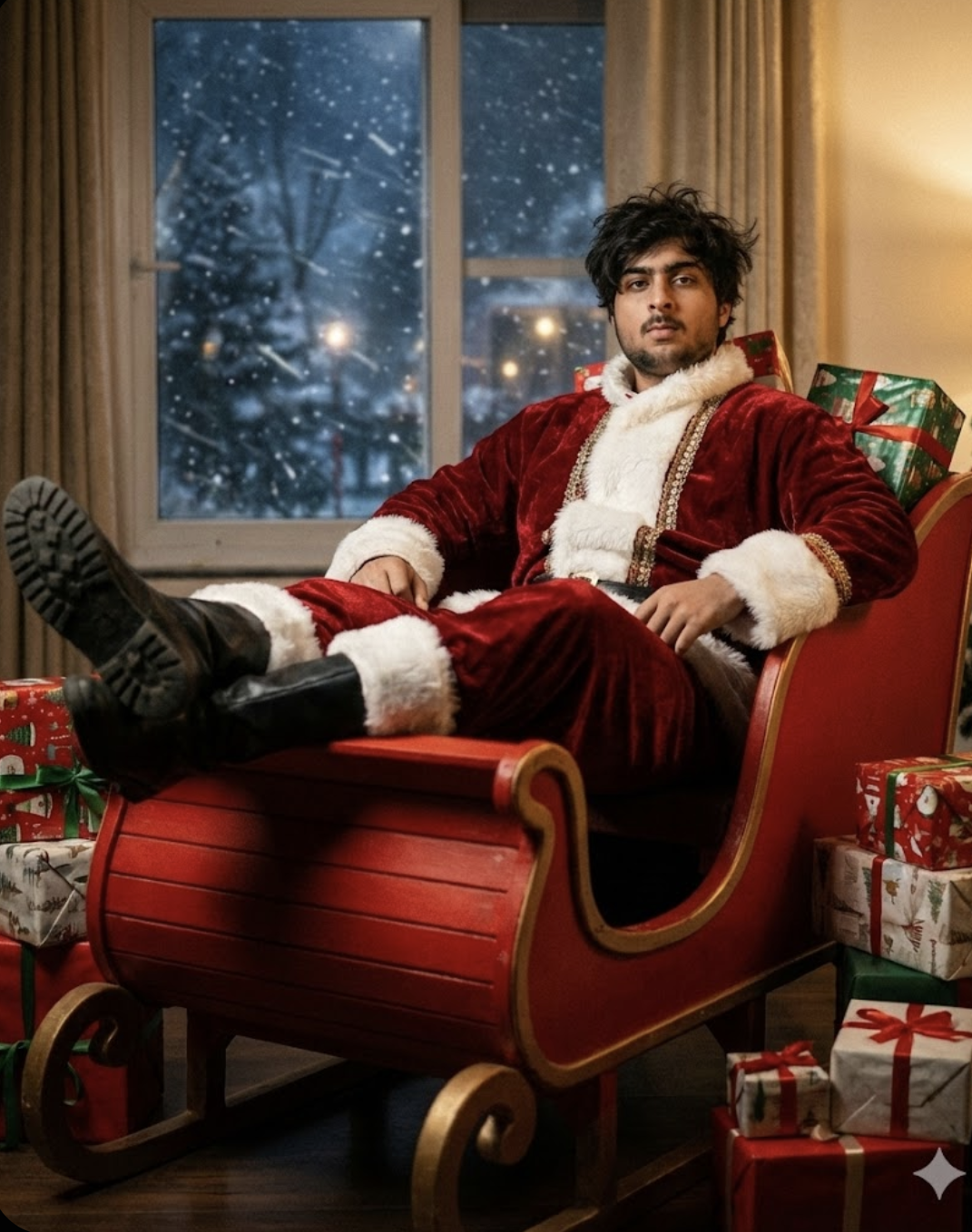
This trending editing style turns an ordinary photo into a festive, cinematic, premium look. The subject is presented with a Santa theme, winter background, red costume mood, surprise gifts, and studio-like lighting so the photo instantly looks eye-catching.
Read Also: Cinematic Realistic Portrait AI Prompt | 2026 New Year AI Prompt
This style is especially useful for anyone wanting a unique, realistic edit for Instagram, WhatsApp DP, profile picture, reels thumbnail, or a festive post. Even if you only have a simple portrait photo, the right prompt-style editing can transform it into a Christmas celebration vibe.
This kind of editing isn’t just about decoration — it also focuses on face details, pose, realism, and cinematic composition.
What Output This Photo Style Gives
This editing style’s biggest advantage is that festive mood and realism come together. The photo usually includes a red Santa-inspired outfit, a sleigh scene, a winter night window, a snow effect, and soft cinematic shadows — giving the image a storytelling look, not just a simple costume edit.
Lighting is usually dramatic and polished so the face stays clear and costume details pop. A dark winter night background, a glowing window, and subtle snowfall give the image depth. With the right composition, even viewed from the front angle, the photo looks like a professional portrait.
Colors are usually rich and festive — red, white, deep blue, and soft warm highlights. Realistic skin tone, clean facial sharpness, and balanced contrast give this look a DSLR-like finish.
- Festive Christmas mood with premium portrait feel
- Realistic face details and model-like expression
- Red, white, and winter-themed color harmony
- Cinematic lighting with soft shadows
- Strong Instagram-ready composition
How to Use This Christmas Edit: Step-by-Step Guide
Even beginners can use this style easily. First, select a clear portrait photo where the face is visible and not blurry. Then open a photo editing tool or AI-based generator on mobile and upload the image. Apply the Christmas-themed prompt style, which includes festive outfit, sleigh, snow, background window, and cinematic front angle details.
- Choose a clean, front-facing portrait photo.
- Upload the photo and select the Christmas edit / festive portrait style.
- Add specific details for outfit, background, lighting, and mood.
- Keep the aspect ratio 4:5 or Instagram-friendly format.
- After generating, carefully check face, hands, costume, and background.
- Adjust brightness, contrast, and sharpness slightly if needed.
- Save the final image in high quality and post.
Which Photos Work Best
Photo selection matters a lot in this kind of Christmas portrait editing. The best output comes when the source image is sharp, the face is clearly visible, and the subject faces front or slightly front-facing.
- Angle: front-facing or slight front angle photo
- Resolution: high-resolution image is better
- Lighting: soft natural light or evenly lit indoor photo
- Background: plain, clean, or lightly blurred background is best
- Clothing: a simple shirt, t-shirt, or dark solid outfit works well
- Face visibility: eyes, nose, and mouth should be clear
- Expression: neutral or confident expression looks most realistic
Pro Tips
- Keep a front angle so the subject’s face stays clearly visible.
- Keep accessories simple with the red Santa costume so the look doesn’t feel cluttered.
- Balance “messy hair + royal expression” for a festive vibe with model-like confidence.
- Keep the window background’s night snow effect soft; too-bright snow particles can look artificial.
- Place gift boxes naturally around the sleigh so the composition feels believable.
- Use cinematic lighting, especially for subtle highlights on face and costume folds.
Common Mistakes to Avoid
- Adding too many elements — sleigh, gifts, snow, window view, costume, and dramatic lighting all over-stylized at once feels crowded instead of realistic.
- Unnatural face proportions, body pose, and costume placement.
- Too much snow effect, which can hide face and sleigh detail.
- Over-bright red tones, which can flatten the image if shadows are missing.
- Background clutter, like extra gifts or random objects.
- Weak facial expression, which dulls the festive look.
Best Use Cases
- Instagram posts, especially Christmas and New Year themed uploads.
- Profile pictures, for a bold festive identity.
- Thumbnails, where an eye-catching face and bright red costume improve CTR.
- Reel covers, so the festive theme is instantly understood.
- Portfolios, to show creative portrait editing skill.
Variations You Can Try
- Warm golden mood: softer lights and a cozy background for an elegant Christmas portrait.
- Deep cinematic night: dark tones, dramatic contrast, and window snowfall for an intense look.
- Luxury festive style: richer red shades, glossy costume details, and premium gift arrangement.
- Snowy winter version: cooler colours, visible frost, and windy atmosphere for a natural holiday vibe.
- Royal portrait version: confident expression, refined posture, and polished lighting.
- Minimal festive edit: fewer gifts, cleaner background, simple composition.
Conclusion: Try This for a Festive Cinematic Look
If you want a Christmas-inspired portrait that feels stylish, realistic, and visually strong, this is a great option. The right pose, balanced lighting, and controlled festive details combine to make the image instantly premium.
FAQ: Christmas Sleigh
How do I use the "Christmas Sleigh" prompt?
Copy the prompt above, open Gemini or ChatGPT, upload a clear photo of yourself and paste the prompt. Generate the image and adjust the outfit or background if you want a variation.
Is this prompt free?
Yes. This prompt is free to copy and use for Instagram, reels, WhatsApp DP and profile pictures.
Which photo works best?
A sharp, front-facing, well-lit photo with no filter. A clear face helps the AI keep your identity in the final image.
Last updated: 10 September 2026
💬 Comments