Black Modern Scooter
Om Editing Top: Black Modern Scooter Photo Style ka Full Intro
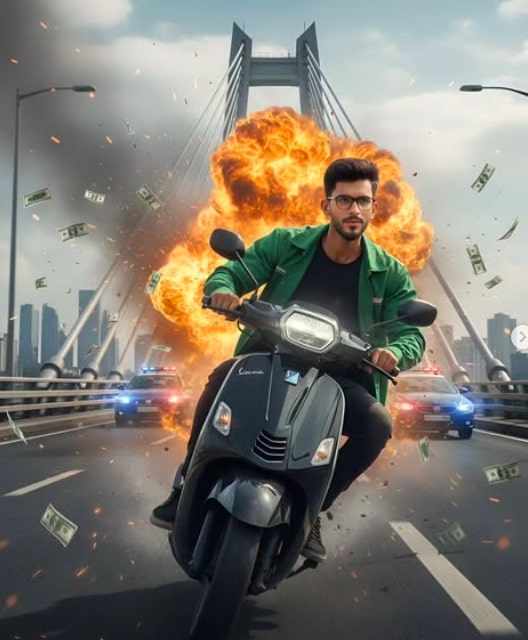
Om Editing Top ka Black Modern Scooter style un logon ke liye hai jo apni normal face photo ko ek powerful, cinematic action scene mein badalna chahte hain. Is style mein subject ko ek black modern scooter par high-speed ride karte hue dikhaya jata hai, jahan frame ka mood intense, dramatic aur movie-like hota hai.
Read Also: cinematic-style realistic portrait | 2026 New Year
Ye prompt un creators ke liye useful hai jo Instagram reels thumbnails, YouTube cover images, AI portrait edits, ya stylish profile visuals banana chahte hain. Agar aap chahte hain ki ek simple photo premium action poster jaisi lage, to Om Editing Top is type ka result especially impressive deta hai.
Iska main appeal sirf scooter nahi hai, balki uske around banaya gaya cinematic environment hai. Wide bridge, smoky atmosphere, motion blur, dynamic lighting aur realistic expression milkar image ko ek high-budget film still jaisa look dete hain. Result natural bhi lagta hai aur visually exciting bhi.
Ye This Style Prompt Photo Style Kya Deta Hai
Is style ka output usually hyper-realistic aur cinematic hota hai. Subject ka face sharp aur identity-matched rakha jata hai, jisse photo edited hone ke baad bhi asli personality se connect karti hui lagti hai. Glasses, skin texture, jawline aur expression par kaafi focus hota hai, so final image over-processed nahi lagti.
Visual mood ki baat karein to yeh style tension, speed aur drama create karta hai. Black scooter ki sleek look, background ka explosive action, aur bridge par moving traffic ka feel image ko energetic bana deta hai. Colors mein high contrast, dark tones, smoky grays, aur cinematic highlights use hote hain.
Composition bhi kaafi important hoti hai. Rider ko usually frame ke center ya slightly off-center position mein rakhkar motion ka feel diya jata hai. Background mein blur, sparks, smoke aur distant lights se depth create hoti hai, jisse image flat nahi dikhti. Ye look especially tab achha lagta hai jab aap detailed and realistic AI photo editing result chahte hain.
- High-speed action ka film-style look
- Realistic face identity aur natural expression
- Black modern scooter ka clean, premium design feel
- Dramatic lighting aur high-contrast color grading
- Background mein smoke, blur aur cinematic depth
This Style Photo Style Ko Mobile Par Kaise Use Karein
Sabse pehle apni best face photo select karein. Mobile par aisi image choose karein jisme aapka face seedha dikhe, eyes clear hon aur face par shadows zyada na ho. Ye step bahut important hai kyunki prompt ka result mostly face reference par depend karta hai.
Phir image upload karke us prompt style ko apply karein jahan black modern scooter, bridge scene aur cinematic action mood include hota hai. Agar tool me prompt box diya gaya hai, to sirf wahi use karein jo page par diya ho. Aapko prompt ko samajhna hai, repeat nahi karna. Output ko generate karne ke baad result ko zoom karke face, scooter aur background details check karein.
Beginners ke liye easiest process ye hota hai: photo upload, style choose, generate, then review. Agar first try mein image thodi off lage, to same clear face photo ke saath dobara try karein. Kabhi-kabhi lighting ya angle ki wajah se face match weak ho jata hai, isliye source image quality kaafi matter karti hai.
- Apni clear face photo choose karein.
- Ensure karein ki face poora visible ho aur blur na ho.
- Photo editor ya AI tool open karke upload karein.
- Black modern scooter style ya related preset apply karein.
- Generate button dabayein aur result wait karein.
- Output ko zoom karke face match aur background details check karein.
- Agar needed ho to better photo ke saath repeat karein.
Kaunsi Photos Sabse Achhi Kaam Karti Hain
Is style ke liye sabse achhi photos wahi hoti hain jisme face clear, sharp aur well-lit ho. Front-facing ya slight 3/4 angle wali image generally better perform karti hai, kyunki AI ko facial structure samajhne mein aasani hoti hai. Aankhon par sunglasses nahi, ya phir natural glasses ho to aur better.
Resolution bhi matter karti hai. Low-quality ya heavily compressed image se result weak aa sakta hai, especially jab style hyper-realistic ho. Daylight ya soft indoor light wali photo preferred hoti hai, kyunki hard shadows face details ko hide kar dete hain. Background simple ho to aur bhi achha hai, taaki AI focus sirf aapke face par rakhe.
Clothing ke case mein plain aur clean outfit better rehta hai. Kyunki final edit mein AI outfit change ya adapt kar sakta hai, lekin source photo mein too much clutter ya busy patterns ho to consistency kam ho sakti hai. Isi tarah headwear, extreme angles aur motion blur se bachna chahiye.
- Clear front face ya slight angle photo
- Good lighting, preferably daylight
- High-resolution image with less noise
- Simple background for better identity match
- Neutral expression ya focused look
- Clean clothing without heavy patterns
Pro Tips for the Best Results with Om Editing Top
Om Editing Top works best when you keep the face reference clear, the pose natural, and the scene details strongly connected to the action. Since this style is meant to look cinematic and realistic, small choices like lighting, motion blur, and background balance make a big difference in the final output.
If you want a stronger result, try to use a sharp source photo with good face visibility and a direct angle. A clean reference helps the edit stay close to the original identity while still giving the image that dramatic movie-still look. The more consistent the face, pose, and lighting feel, the more believable the final scooter action scene becomes.
- Use a clear, high-resolution face photo for better identity matching.
- Choose a pose that looks active but still natural, especially for riding scenes.
- Keep the background details cinematic, not cluttered, so the subject stays dominant.
- Ask for realistic fabric folds, skin texture, and shadow detail to improve realism.
- Use strong action cues like speed blur, sparks, smoke, or flying notes only where needed.
- Keep the lighting consistent with the environment, such as cloudy daylight or dramatic contrast.
- For a modern scooter edit, make sure the vehicle design matches the “black modern scooter” theme.
Another useful tip is to think about composition. A wide bridge, distant police lights, and a large explosion can create a powerful scene, but the face and body should still remain the focal point. Om Editing Top images usually look better when the subject is centered in the action, not lost inside too many effects.
Common Mistakes to Avoid in This Style Prompts
One of the biggest mistakes is overloading the image with too many effects. If the explosion, smoke, notes, lights, and background chaos are all pushed too hard at once, the subject can look messy instead of cinematic. The best Om Editing Top results usually come from controlled drama, not random visual noise.
Another common issue is using a weak or blurry face reference. If the source photo does not show the face clearly, the final edit may lose identity accuracy or create unnatural facial details. This is especially important for realistic scooter edits, where the face, glasses, and expression should remain sharp and believable.
- Do not use a low-quality reference photo, because facial details may become soft or distorted.
- Avoid too many background elements, since they can distract from the rider and reduce impact.
- Do not make the motion blur too heavy, or the scooter scene may look unclear.
- Avoid mismatched lighting, because it can make the edit look fake or inconsistent.
- Do not ignore clothing realism; unnatural folds or textures can weaken the cinematic effect.
- Avoid changing the face structure too much if the goal is identity-based editing.
It also helps to avoid vague instructions. In Om Editing Top style edits, specific details like “black modern scooter,” “city bridge,” “cloudy daylight,” or “realistic skin texture” guide the result much better than generic words. Clear direction gives the image a stronger visual story and helps keep the final scene polished.
Best Use Cases and Creative Ideas for This Style
Om Editing Top edits are perfect for social media content where a bold, cinematic look grabs attention quickly. A black modern scooter scene with action, fire, and city energy can work especially well as an Instagram post, a profile picture background, or a dramatic reel cover. The style feels fast, stylish, and high-impact, which makes it ideal for personal branding or eye-catching content.
You can also use this type of edit for thumbnails, portfolio visuals, and digital art showcases. If someone wants to present a modern, edgy, movie-like identity on their page, this kind of scooter action image creates a strong first impression. It can work for creators, editors, or anyone who wants a bold cinematic avatar-style image.
- Instagram posts: Great for cinematic portrait content and attention-grabbing feeds.
- Profile pictures: Useful when you want a strong action-based identity image.
- YouTube thumbnails: The dramatic scene can boost click appeal for lifestyle or edit content.
- Reels covers: Works well for short-form videos with a bold urban mood.
- Portfolios: Good for showcasing editing skill and high-end visual storytelling.
- Story highlights: Can be used as stylish cover art with a modern theme.
These images are also useful when you want to build different moods around the same base concept. For example, a solo riding shot can feel heroic, dangerous, futuristic, or stylish depending on the color grade and background setup. That flexibility is one reason Om Editing Top is such a strong choice for creative edits.
Variations You Can Try with This Style
Once you have the main black modern scooter concept working, you can experiment with different moods, seasons, and color tones to create fresh versions of the same scene. Small changes in atmosphere can completely change how the image feels, even when the subject and scooter stay the same. That makes this style useful for building multiple content variations from one idea.
You can shift the tone toward a darker cinematic look, a bright daytime action scene, or a more futuristic city vibe. Changing the weather, smoke density, or lighting style can also make the edit feel new. This is especially helpful if you want several posts without repeating the same visual formula.
- Mood variations: intense, heroic, rebellious, mysterious, or premium cinematic.
- Colour variations: black and blue tones, warm orange fire glow, cool grey daylight, or neon contrast.
- Setting variations: city bridge, urban highway, industrial road, or rooftop-style background.
- Season variations: cloudy monsoon feel, winter haze, summer daylight, or smoky evening atmosphere.
- Action variations: higher speed blur, sharper focus, stronger explosion glow, or more subtle cinematic motion.
You can also try changing the outfit styling while keeping the same core identity and scooter theme. A delivery-style jacket gives a practical urban look, while darker clothing can make the edit feel more dramatic and bold. These variations help readers or creators test what version of this prompt fits their personal style best.
Conclusion: Try This Style for a Cinematic Black Scooter Look
This look is a powerful way to create a black modern scooter scene that feels bold, realistic, and visually exciting. With the right face reference, strong composition, and balanced cinematic effects, you can turn a simple portrait into a high-energy action image that looks ready for a movie poster or social media showcase.
If you want a stylish, dramatic, and attention-grabbing result, this is the kind of edit worth experimenting with. Try different moods, backgrounds, and color tones, then refine the details until the final image feels polished and believable. Yeh style can give your content a striking modern edge that stands out immediately.
FAQ: Black Modern Scooter
How do I use the "Black Modern Scooter" prompt?
Copy the prompt above, open Gemini or ChatGPT, upload a clear photo of yourself and paste the prompt. Generate the image and adjust the outfit or background if you want a variation.
Is this prompt free?
Yes. This prompt is free to copy and use for Instagram, reels, WhatsApp DP and profile pictures.
Which photo works best?
A sharp, front-facing, well-lit photo with no filter. A clear face helps the AI keep your identity in the final image.
Last updated: 17 August 2026
💬 Comments