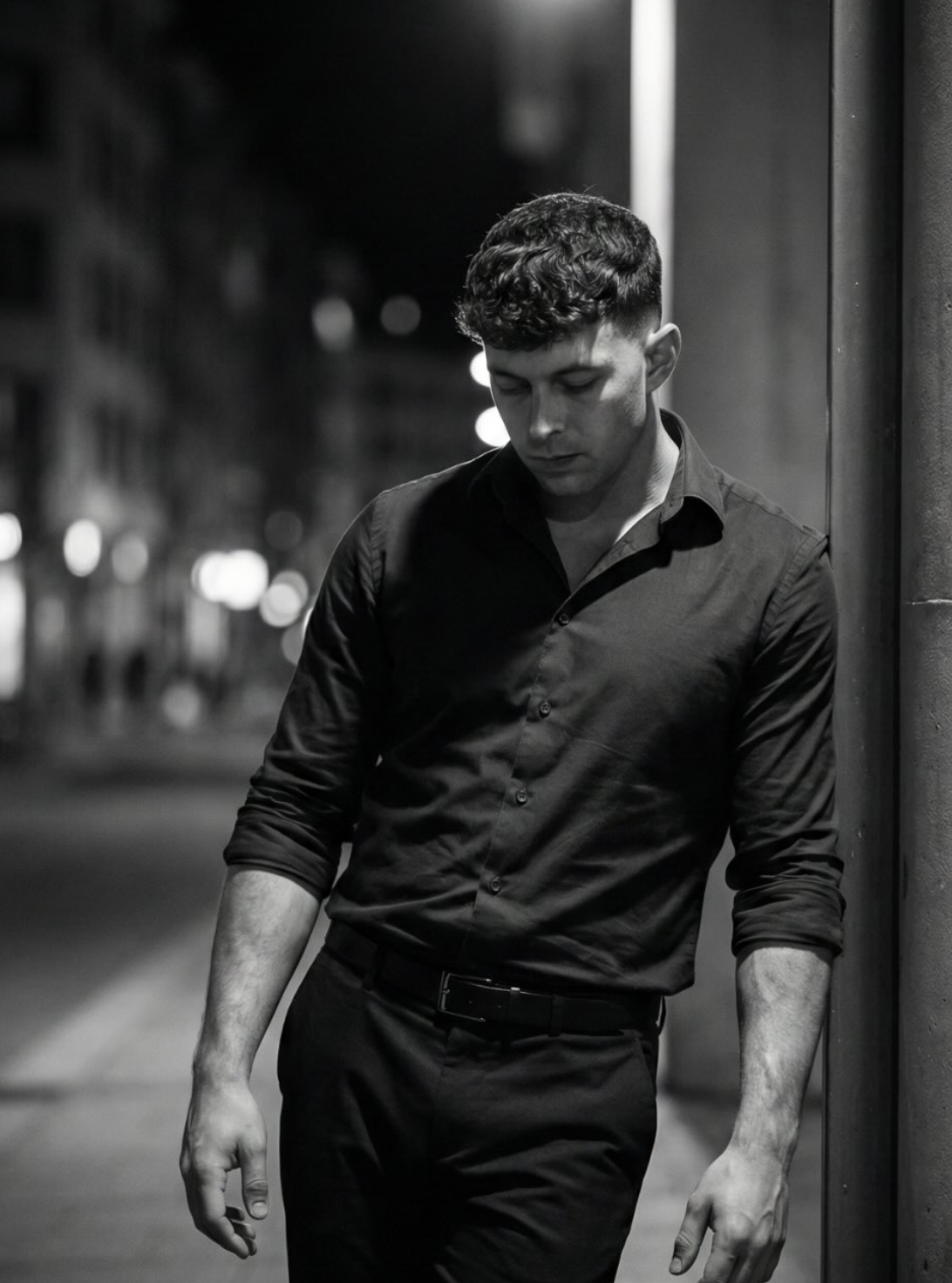
Om Editing Top style mein black and white portrait ek aisa look deta hai jo simple frame ko bhi cinematic aur powerful bana deta hai. Is type ka edit un logon ke liye best hota hai jo apni photo ko moody, classy, aur timeless feel dena chahte hain, especially raat ke urban background ke saath.
Read Also: cinematic-style realistic portrait | 2026 New Year
Ye style un creators ke liye bhi useful hai jo Instagram, WhatsApp status, portfolio, ya profile photo ke liye ek strong visual identity banana chahte hain. Black and white tone distractions ko kam karta hai, isliye attention seedha face, pose, lighting, aur expression par aati hai.
Is prompt-style output mein mostly dramatic contrast, soft background blur, aur focused subject ka look milta hai. Matlab photo raw bhi lag sakti hai aur artistic bhi, depending on light, posture, aur composition. Agar aap mobile se editing karte ho, to bhi sahi setup ke saath professional result mil sakta hai.
Is style ka sabse strong point hai high-contrast black and white mood. Bright highlights aur deep shadows together ek cinematic depth create karte hain, jo subject ko background se alag aur more impactful dikhati hai. Face, arms, aur clothing folds par light ka effect photo ko detailed aur premium feel deta hai.
Urban night background ke saath ye look aur bhi interesting ban jata hai. Softly blurred buildings, dim lights, aur street environment subject ko ek story-like presence dete hain. Isse photo sirf portrait nahi lagti, balki ek scene jaisi feel aati hai.
Is type ke result mein aapko usually ye visual elements milte hain:
Aise visuals un photos ke liye perfect hote hain jahan aap emotion, confidence, ya quiet intensity show karna chahte ho. Ye style over-edited nahi lagta, isliye classy aur realistic dono feel deta hai.
Agar aap beginner ho aur mobile par is style ka edit banana chahte ho, to sabse pehle sahi photo choose karna zaroori hai. Black and white portrait mein chhoti details bhi final output ko kaafi affect karti hain, isliye random selfie se better hai ki aap posed shot use karo.
Editing ke time par goal ye hona chahiye ki subject clear rahe, background distraction-free lage, aur contrast balanced ho. Aap Snapseed, Lightroom Mobile, PicsArt, ya kisi bhi AI photo editor me is look ko recreate kar sakte ho.
Agar aap AI prompt-based editing use kar rahe ho, to photo upload karne se pehle pose aur lighting match karna important hai. Jitna close original photo style se hoga, utna better final result aayega.
Is style ke liye best photos wahi hoti hain jisme pose natural ho aur subject ka silhouette clear ho. Slightly slouched stance, side support, ya relaxed arm position photo ko zyada cinematic banata hai. Agar body posture too stiff ho, to mood thoda flat lag sakta hai.
Resolution bhi important hai. High-resolution image mein shadows, fabric texture, aur facial features better preserve hote hain. Low-quality ya overly compressed photo mein black and white conversion ke baad grain aur detail loss zyada dikhta hai.
Practical photo tips ye hain:
Clothing mein zyada patterns ya bright colors avoid karo, kyunki black and white edit mein texture aur shape zyada visible hoti hai. Simple dark outfit se frame clean lagta hai aur subject par attention bana rehta hai.
Black-and-white portraits work best when the image has strong shape, clean lighting, and a clear subject. With Om Editing Top, the key is to guide the editing style in a way that makes the final output feel cinematic instead of flat. Since this look depends heavily on contrast, even small changes in pose, clothing texture, and light direction can make a big difference.
If you want a more premium result, think about how the subject stands in the frame, what the background is doing, and how much detail you want in the shadows. A moody monochrome edit becomes much stronger when the composition already has a story. That is why simple gestures, urban elements, and directional lighting are so effective for this style.
Another useful tip is to be specific about the mood you want. If you want a sad, reflective, stylish, or editorial atmosphere, mention that clearly in the editing direction. Om Editing Top works especially well when the prompt or editing instruction includes a clear emotional tone, because black-and-white styling often depends on feeling as much as visual detail.
One of the biggest mistakes is adding too many visual elements into the frame. Black-and-white edits rely on contrast and focus, so a crowded background can make the subject disappear. If there are too many distractions, the cinematic effect gets weaker and the portrait can start to look messy instead of intentional.
Another common problem is ignoring lighting. In monochrome editing, light and shadow do most of the storytelling. If the subject is evenly lit with no strong contrast, the image may look dull and lose its dramatic impact. That is why this style works better when the light creates depth across the face, clothes, and surroundings.
It also helps to avoid overcomplicating the scene with unnecessary color-based details. Since the final output will be monochrome, the structure of the composition matters more than colorful surroundings. When you keep the frame simple and purposeful, Om Editing Top has a much better chance of producing a polished, professional-looking image.
This style is ideal for anyone who wants a bold, editorial-looking portrait that stands out on social media. A black-and-white street portrait feels timeless, stylish, and a little mysterious, which is why it works so well for Instagram posts, profile photos, and personal branding images. It gives the subject a strong presence without needing bright colors or heavy decoration.
Om Editing Top images are also a great fit for YouTube thumbnails, especially when the creator wants a serious or cinematic vibe. The monochrome treatment draws attention to the face and expression, while the dark urban background adds depth. That makes the image feel more premium and emotionally engaging than a standard casual photo.
You can also use this type of edit for fashion branding, artist profiles, posters, and cover art concepts. Because monochrome portraits feel timeless, they fit both modern and classic visual identities. If your goal is to create something that looks mature, artistic, and a little cinematic, this style is a strong choice.
One of the best parts about Om Editing Top is how easily the style can be adjusted. Even if the core idea stays black-and-white and moody, you can change the atmosphere by shifting the setting, expression, lighting, or wardrobe. That gives you room to create multiple versions without losing the overall aesthetic.
If you want a colder and more dramatic mood, try a rainy street, wet pavement, or deeper shadows. If you want something softer, a gentle side light and a calmer facial expression can make the portrait feel thoughtful instead of intense. Small changes like these completely change the emotional result while keeping the same strong visual identity.
You can also experiment with the amount of contrast and grain in the final look. Some versions can feel polished and glossy, while others can look raw and documentary-like. By testing these variations, you can build a set of images that feel related but still unique, which is especially useful for social media content and creative portfolios.
If you want a portrait that feels dramatic, modern, and visually strong, Om Editing Top is a great style to try. It brings out the power of light, shadow, posture, and atmosphere in a way that makes even a simple street scene look cinematic and expressive.
Use the tips, avoid the common mistakes, and experiment with different moods and settings until you find the version that feels right for your content. Whether you need it for Instagram, a profile picture, a thumbnail, or a portfolio, Om Editing Top can help you create a memorable black-and-white image that stands out.
💬 Comments