world of Pandora
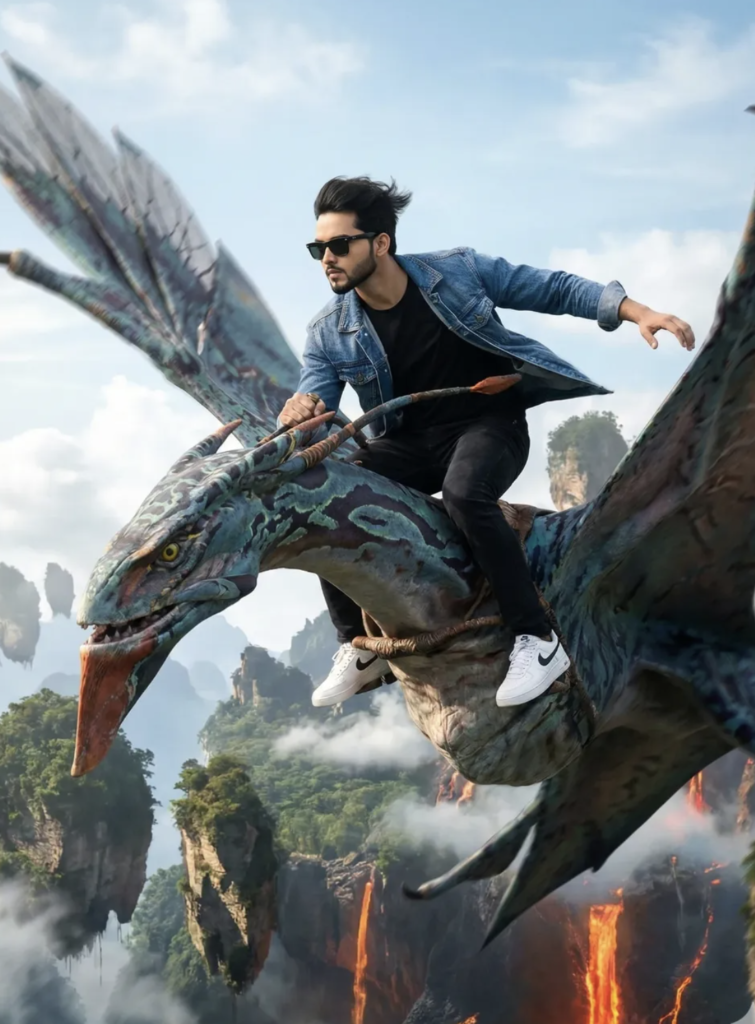
Om Editing Top के साथ world of Pandora जैसी Cinematic Fantasy Edit कैसे बनती है
Om Editing Top जैसे creative edit style का सबसे बड़ा फायदा यह है कि यह normal photo को भी epic fantasy frame में बदल देता है। अगर आप Avatar-inspired Pandora world जैसा look चाहते हैं, तो इस तरह की editing में massive scale, flying creatures, dramatic sky, और cinematic motion का feel बहुत important होता है। यह style खासकर उन लोगों के लिए useful है जो social media posts, fan art portraits, fantasy thumbnails, या AI-style photo edits बनाना चाहते हैं।
Read Also: cinematic-style realistic portrait | 2026 New Year
इस type की editing में subject सिर्फ standing pose में नहीं दिखता, बल्कि action और story के साथ दिखता है। मतलब viewer को एक ऐसा scene मिलता है जिसमें speed, height, wind, and adventure clearly feel होते हैं। यही वजह है कि Om Editing Top style prompts या edits creators, editors, और beginners — तीनों के लिए popular होते जा रहे हैं।
अगर आपका goal एक bold, cinematic, and realistic fantasy result है, तो ऐसे edits में composition, lighting, and outfit details बहुत matter करती हैं। खासकर जब background Pandora-like alien world हो, तो subject का look modern और heroic होना चाहिए ताकि contrast strong लगे और edit naturally powerful दिखे।
यह Prompt/Photo Style आपको क्या देता है
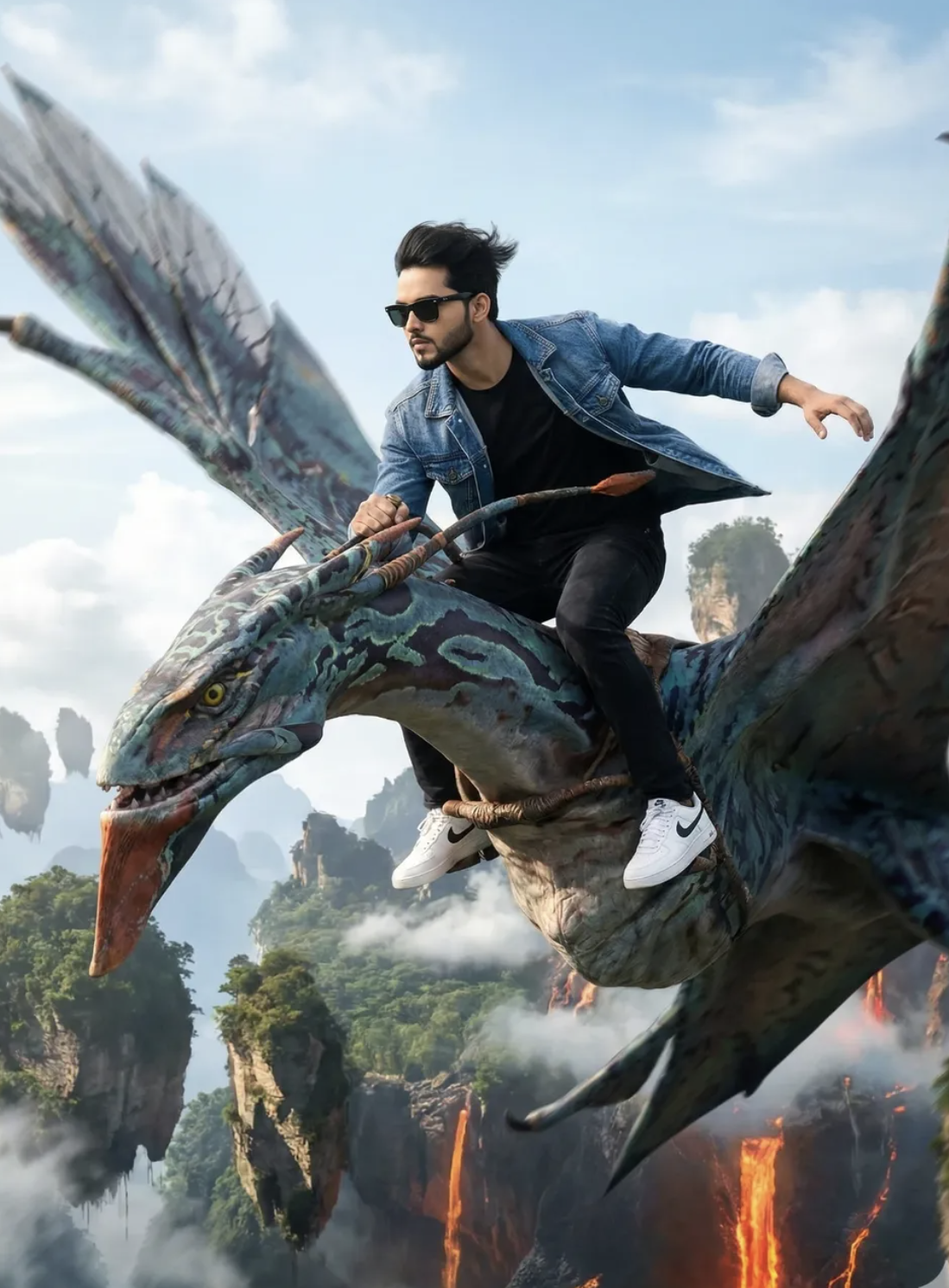
इस तरह के Om Editing Top inspired visuals में सबसे पहले जो चीज़ ध्यान खींचती है, वह है scale। Toruk जैसी विशाल flying creature, नीचे floating mountains, और दूर फैले volcanic regions scene को grand बनाते हैं। इससे image सिर्फ एक portrait नहीं रहती — वह एक full cinematic adventure frame बन जाती है।
Lighting भी इस style का major part है। Bright daylight, clear sky, accurate shadows, और realistic reflections मिलकर image को believable बनाते हैं। अगर light balance सही हो, तो blue sky, alien landscape, और rider का outfit सब naturally blend हो जाते हैं। यही realism Pandora-inspired edit को strong बनाता है।
Color palette में usually cool blues, deep blacks, natural daylight tones, और fantasy environment के bright yet soft shades अच्छे लगते हैं। जब rider का black sunglasses, blue denim jacket, black t-shirt, black jeans, और white sneakers जैसे modern clothes हों, तो contrast और भी interesting हो जाता है।
- Lighting: Bright daylight with clean natural shadows
- Mood: Heroic, adventurous, high-energy, cinematic
- Composition: Wide aerial shot, strong movement, powerful silhouette
- Realism: Natural pose, wind effect, believable outfit folds
- Background: Floating mountains, volcanic terrain, open sky, fantasy depth
This Edit को Step-by-Step कैसे Use करें
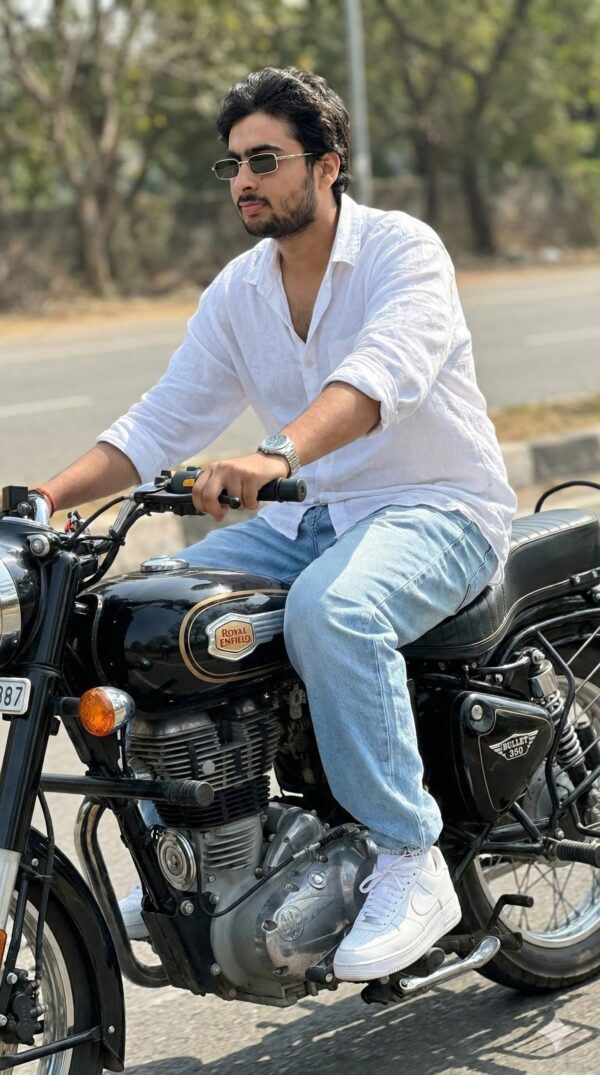
अगर आप beginner हैं, तो सबसे पहले एक साफ और clear photo चुनिए। Face visible हो, body posture simple हो, और photo में excessive blur न हो। Mobile पर editing करते समय image quality बहुत matter करती है, क्योंकि fantasy background और action pose जोड़ते समय detail loss हो सकता है।
इसके बाद subject को scene के action के हिसाब से सोचिए। इस style में rider side-leaning pose में होता है, इसलिए photo में body angle पहले से थोड़ा dynamic होना helpful है। अगर original image straight front pose में है, तब भी edit किया जा सकता है, लेकिन clean crop और proper cutout जरूरी होगा।
नीचे simple mobile workflow दिया गया है जिसे कोई भी follow कर सकता है:
- अपनी best quality photo gallery से चुनें और उसे app में open करें।
- Background remove करें ताकि subject अलग निकल आए।
- Fantasy sky या Pandora-inspired environment add करें।
- Subject को Toruk या flying creature पर place करें और angle match करें।
- Shadow, wind effect, and motion blur हल्का add करें ताकि scene natural लगे।
- Outfit colors adjust करें ताकि black, blue, and white tones clearly pop करें।
- Final color grading में cinematic contrast और daylight balance रखें।
Mobile users के लिए सबसे important tip यह है कि हर layer को zoom करके check करें। Hands, reins, shoes, and clothing edges गलत blend हो सकते हैं, इसलिए small details पर ध्यान देना जरूरी है। अगर blending clean होगी, तो पूरा edit professional लगेगा।
कौन-सी Photos इस Style के लिए सबसे Best रहती हैं
इस तरह के Om Editing Top fantasy edit के लिए हर photo suitable नहीं होती। सबसे अच्छा वही subject काम करता है जिसमें face sharp हो, body posture readable हो, और outfit clean दिखे। क्योंकि आपके final scene में subject को हवा, height, और motion के साथ दिखाना है, इसलिए photo का base जितना clear होगा, result उतना realistic आएगा।
Angle का भी बड़ा रोल है। Slightly side-facing या three-quarter pose वाली photos ज्यादा useful रहती हैं, क्योंकि Toruk riding scene में body को forward और side lean में blend करना आसान होता है। Flat straight pose से action feel कम आता है, जबकि little dynamic angle edit को more alive बनाता है।
Practical तौर पर, photos चुनते समय इन चीज़ों पर ध्यान दें:
- Resolution: High-resolution image लें, कम से कम blurred selfie न हो
- Lighting: Face और clothes दोनों पर even light हो
- Background: Simple background best रहता है, ताकि cutout clean बने
- Clothing: Solid colors वाले कपड़े अच्छी तरह blend होते हैं
- Pose: Slightly dynamic pose, relaxed arms, clear body structure
- Expression: Confident या neutral face fantasy mood में बेहतर लगता है
अगर आप black sunglasses, denim jacket, black t-shirt, black jeans, और white sneakers जैसे modern outfit elements रखना चाहते हैं, तो photo में कपड़े साफ और wrinkle-free दिखने चाहिए। इससे final render में character stylish, cinematic, और heroic लगेगा।
Best results के लिए कोशिश करें कि photo indoor yellow light में न हो, क्योंकि natural daylight blending के साथ ज्यादा smooth result देती है। Open-space या window light वाली photo this style style fantasy composition में ज्यादा naturally fit होती है।
Pro Tips for the Best Results with This Style
अगर आप this prompt style में best cinematic result चाहते हैं, तो सिर्फ subject को place करना काफी नहीं होता। Background, pose, lighting, and outfit — इन सभी elements का balance बनाना पड़ता है ताकि final image natural भी लगे और dramatic भी दिखे।
Especially जब scene Pandora जैसे fantasy world में हो, तब character का outfit modern होने के बावजूद environment के साथ merge होना चाहिए। Wind effect, sharp action pose, and wide aerial framing image को much more powerful बनाते हैं।
- Heroic look के लिए body posture slightly forward रखें, ताकि motion feel हो।
- Face expression confident और fearless रखें, क्योंकि यही cinematic impact बढ़ाता है।
- Black sunglasses जैसे bold accessories use करें ताकि modern contrast strong लगे।
- Clothing में movement दिखाना जरूरी है, especially jacket and loose fabric areas में।
- Wide-angle composition रखें ताकि Toruk, rider, और Pandora landscape—all visible रहें।
- Daylight lighting prefer करें, क्योंकि इससे alien mountains और sky details more realistic दिखते हैं।
अगर आप prompts में height, speed, and sky perspective का clear description देते हैं, तो output ज्यादा immersive आता है। “Flying high,” “banking sharply,” और “wind-blown clothing” जैसे cues image को static नहीं रहने देते। यही छोटा सा detail difference this look result को average से standout बना देता है।
Common Mistakes to Avoid in This Style
बहुत लोग cinematic fantasy edit बनाते समय subject को तो describe कर देते हैं, लेकिन scene continuity को ignore कर देते हैं। इसका result होता है awkward positioning, weak perspective, या ऐसी image जो floating feel करती है rather than flying. अगर Toruk और rider के relation को properly define नहीं किया गया, तो pose unnatural लग सकता है।
एक और common issue overloading the prompt with too many conflicting details है। जब fashion elements, fantasy background, and action pose सब मिलते हैं, तो clarity बहुत important हो जाती है। Simple, clean, and focused direction better output देती है।
- Too many extra objects जोड़ना: इससे main subject की focus line टूट जाती है और Toruk riding scene कमजोर दिखता है।
- Pose को vague रखना: अगर lean, grip, and balance clear नहीं होंगे, तो rider stiff लग सकता है।
- Lighting instructions छोड़ देना: बिना proper light direction के shadows mismatch हो सकते हैं।
- Outfit और world contrast को ignore करना: modern clothes अगर directionless हों, तो image disconnected लगेगी।
- Perspective specify न करना: high-altitude aerial look के बिना fantasy scale properly नहीं बनती।
Best practice यह है कि हर important visual part को purpose के साथ define किया जाए। Example के तौर पर, sunglasses सिर्फ style के लिए नहीं, बल्कि fearless mood के लिए भी काम करती हैं। उसी तरह denim jacket सिर्फ clothing नहीं, बल्कि wind motion और adventure energy को support करती है।
Best Use Cases and Ideas for These Images
yeh style style images कई जगह use की जा सकती हैं, खासकर वहां जहां bold and cinematic look चाहिए। ये edits Instagram posts, profile pictures, reels covers, fan edits, and portfolio visuals में बहुत अच्छे लगते हैं। Fantasy theme होने के कारण ये instantly attention grab करती हैं।
अगर आप social media पर unique identity बनाना चाहते हैं, तो ऐसी image आपके content को premium और memorable बना सकती है। Avatar-inspired sky action scene youth-centric pages, edit pages, and creative showcases के लिए perfect रहता है।
- Instagram posts: dramatic fantasy aesthetics के लिए.
- Profile pictures: fearless and stylish personal branding के लिए.
- Thumbnails: action + fantasy combo से better click appeal मिलता है.
- Portfolios: editing skill और creative direction दिखाने के लिए.
- Reels covers: cinematic theme को instantly communicate करने के लिए.
इस तरह के visuals fan art pages, adventure edits, movie-inspired content, and AI art collections में भी use होते हैं। अगर आपका goal scroll-stopping content बनाना है, तो Toruk ride वाला scene one of the strongest concepts हो सकता है, क्योंकि इसमें motion, scale, and character attitude एक साथ मिलते हैं।
Variations You Can Try with This Style
एक ही concept को कई अलग-अलग moods में reshape किया जा सकता है। this edit style में variations experiment करना बहुत useful है, क्योंकि इससे आपको पता चलता है कि कौन सा color palette, season, या atmosphere सबसे अच्छा लग रहा है। कभी bright daylight ज्यादा powerful लगता है, तो कभी golden sunset scene को more epic बना देता है।
आप environment बदलकर भी fresh results पा सकते हैं। Floating mountains के नीचे mist, distant volcano glow, storm clouds, or crystal-clear skies — हर variation image की emotion बदल देता है। यही flexibility इस theme को very reusable बनाती है।
- Different moods: fearless, intense, adventurous, royal, or mysterious.
- Different colours: bright blue sky, orange sunset, purple twilight, or cooler cinematic tones.
- Different settings: volcanic background, cloud-filled horizon, misty mountains, or open sky chase.
- Different seasons: summer clarity, rainy storm energy, or crisp winter-like atmosphere.
- Different camera feel: ultra-wide aerial view, closer action framing, or dramatic side angle.
अगर आप variations try करते हैं, तो outfit colors में भी छोटे बदलाव करके देखें। Black jacket, denim texture, reflective sunglasses, or alternate sneaker styles scene को modern street-fashion vibe दे सकते हैं। दूसरी तरफ, background tone soft रखने से character और creature दोनों more prominent दिखते हैं।
Conclusion: Try This Style for a Powerful Cinematic Look
अगर आप fantasy, fashion, and action को एक ही frame में mix करना चाहते हैं, तो this style style एक शानदार option है। Toruk ride जैसा scene न सिर्फ visually exciting होता है, बल्कि इसमें strong character presence और epic world-building दोनों मिलते हैं।
अब आप pro tips, common mistakes, use cases, और variations समझ चुके हैं, इसलिए next step simple है: अपनी preferred mood choose करें, composition clarify करें, और result test करें। सही direction के साथ this prompt edit बहुत impressive, cinematic, and share-worthy बन सकता है।
FAQ: world of Pandora
How do I use the "world of Pandora" prompt?
Copy the prompt above, open Gemini or ChatGPT, upload a clear photo of yourself and paste the prompt. Generate the image and adjust the outfit or background if you want a variation.
Is this prompt free?
Yes. This prompt is free to copy and use for Instagram, reels, WhatsApp DP and profile pictures.
Which photo works best?
A sharp, front-facing, well-lit photo with no filter. A clear face helps the AI keep your identity in the final image.
Last updated: 17 August 2026
💬 Comments