Underwater wallpaper prompt
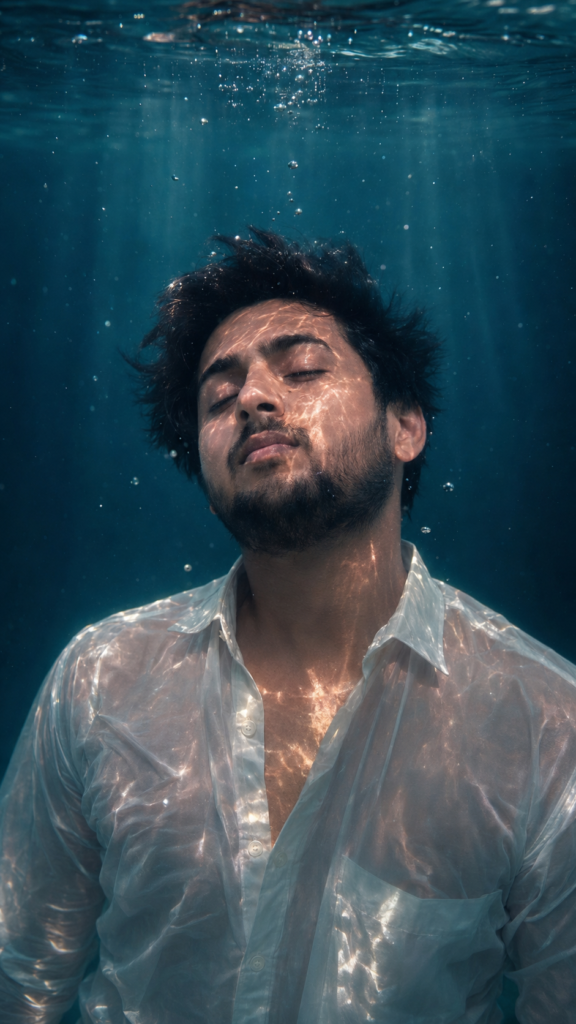
Om Editing Top Wallpaper Prompt kya hai aur kis ke liye best hai?
Om Editing Top wallpaper prompt un logon ke liye perfect hai jo cinematic, dreamy aur realistic underwater portrait style create karna chahte hain. Is type ka prompt especially un creators ke liye useful hota hai jo social media profile, wallpaper design, photo editing pages, ya AI image generation me premium-looking result chahte hain.
Read Also: cinematic-style realistic portrait | 2026 New Year
Is style ki sabse badi khasiyat ye hai ki ye normal photo ko ek emotional, film-like frame me badal deta hai. Water ke andar floating hair, soft light rays, moody colours, aur natural skin texture milkar image ko rich aur artistic bana dete hain. Agar aapko dramatic yet elegant look chahiye, to Om Editing Top style ek strong choice hai.
Ye prompt un users ke liye bhi useful hota hai jo mobile se kaam karte hain aur bina complex editing ke high-quality wallpaper banana chahte hain. Beginner ho ya advanced editor, is style ka focus clear hota hai: realistic underwater mood, centered composition, aur polished visual impact.
Ye photo style aapko kya result deta hai?
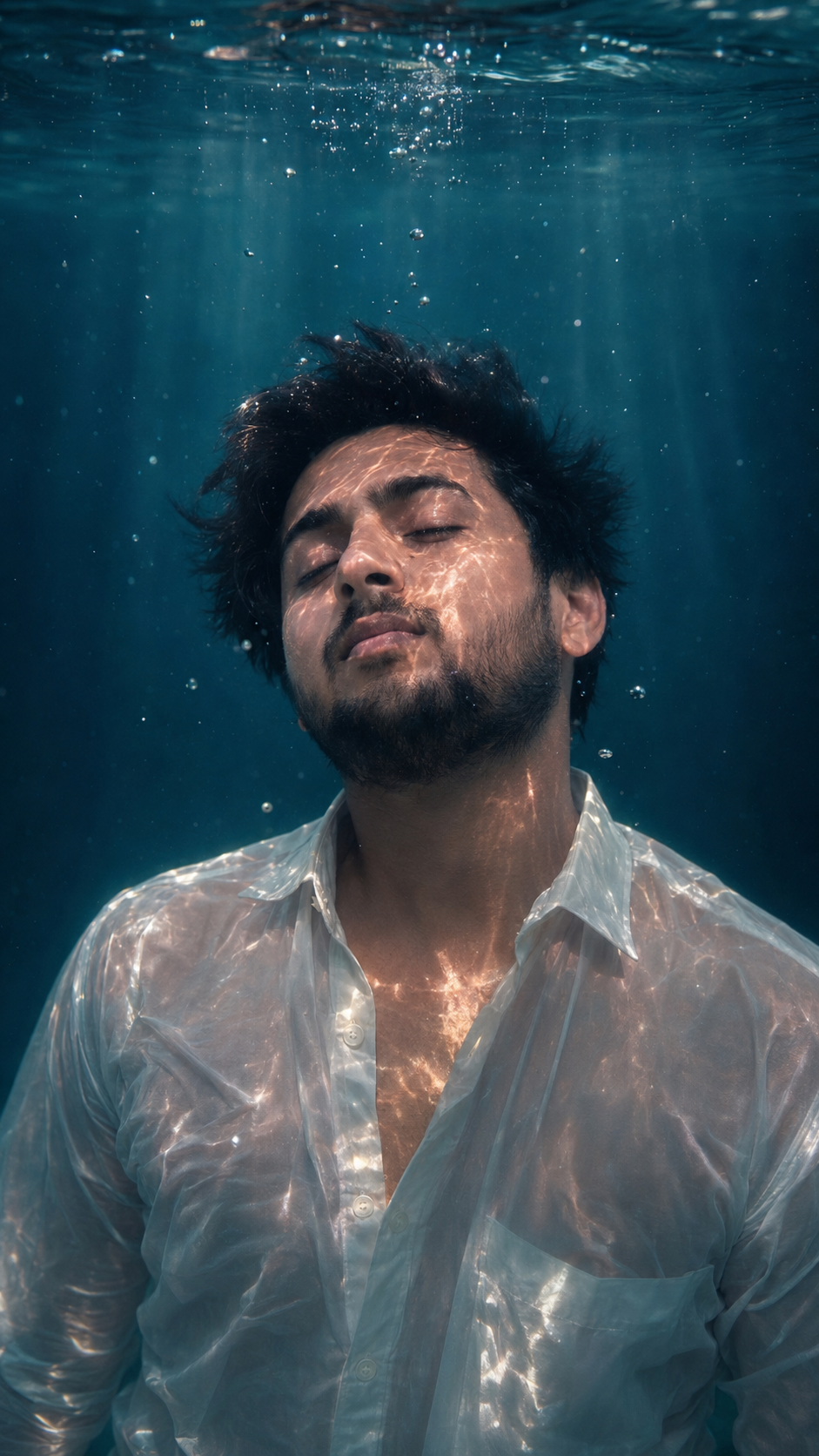
Om Editing Top prompt se aapko ek aisa underwater portrait milta hai jisme image ka mood calm, cinematic aur luxury feel deta hai. Isme light caustics, sun rays, aur teal-blue background ek dreamy environment create karte hain, jo photo ko simple snapshot se kaafi zyada premium bana deta hai.
Visual side par ye style high-detail realism par based hota hai. Face ka natural texture, wet hair ka flow, soaked fabric ka realistic fall, aur soft shadow balancing image ko believable banata hai. Isliye ye sirf artistic edit nahi lagta, balki ek polished editorial underwater photography jaisa feel deta hai.
Composition bhi is style ka important part hota hai. Subject usually center me rakha jata hai, background clean hota hai, aur extra objects avoid kiye jate hain. Isse viewer ki nazar seedha face aur overall mood par tikti hai, jo wallpaper ke liye ideal hota hai.
- Soft, dramatic underwater lighting
- Teal, blue, aur cool-toned colour grading
- Realistic floating hair and natural body posture
- Dreamy, calm, cinematic mood
- Clean frame with no distracting elements
- Editorial-style realistic finish
This Style prompt ko mobile par kaise use karein?
Agar aap beginner hain, to sabse pehle apni best photo select karein. Mobile par kaam karte waqt bhi aap simple steps follow karke strong result le sakte hain. Sabse important baat ye hai ki prompt ko sahi image ke saath use kiya jaye, warna underwater effect utna natural nahi lagega.
Editing app ya AI tool open karne ke baad, apni selected photo upload karein aur prompt box me prompt apply karein. Yahan par wajah clear honi chahiye: aapko face consistency, cinematic lighting, aur underwater realism achieve karna hai. Agar tool face reference support karta hai, to us feature ko bhi use karein taaki face same rahe.
Result generate hone ke baad hamesha output ko zoom karke check karein. Hair flow, hands, clothing edges, aur background reflections ko dekhna zaroori hai. Agar image overly bright ya artificial lage, to thoda colour balance aur contrast adjust karke final wallpaper ko aur better banaya ja sakta hai.
- Ek clear portrait photo choose karein.
- Editing app ya AI tool me image upload karein.
- Prompt box me underwater cinematic style apply karein.
- Agar face reference option ho, to use on karein.
- Generate karke result ka preview dekhein.
- Brightness, contrast aur colour tone ko lightly fine-tune karein.
- Final image ko wallpaper size me save karein.
Kaunsi photos This Style ke liye sabse achhi hoti hain?
Om Editing Top wallpaper prompt ke liye sabse achhi photo wo hoti hai jisme face clear ho, angle natural ho, aur lighting already balanced ho. Front-facing ya thoda tilted portrait zyada achha kaam karta hai, kyunki underwater effect me face ko readable rakhna important hota hai. Blurry ya overexposed image se realism kam ho jata hai.
Resolution bhi kaafi important hai. High-quality portrait photo use karne se skin details, hair strands, aur fabric texture better preserve hote hain. Agar photo dark hai ya background too busy hai, to AI effect ko clean output dene me problem aa sakti hai. Plain background usually best rehta hai, kyunki underwater composition me extra elements distract kar sakte hain.
Clothing selection bhi result ko directly affect karti hai. Light-coloured, flowy, ya semi-formal outfits underwater look ke saath zyada naturally blend karte hain. Hair agar medium ya long ho to floating effect aur strong lagta hai. Is style me expression calm aur relaxed hona chahiye, taaki dreamy mood achhe se match kare.
- Clear face wali portrait photo
- Front ya slight side angle
- High resolution image
- Soft natural lighting
- Plain ya simple background
- Light, flowy, ya neat clothing
- Calm expression aur balanced posture
Pro tips for the best results with Om Editing Top
If you want the strongest underwater-style result with Om Editing Top, focus on making the image feel natural first and cinematic second. The best edits usually start with a clean portrait, good face clarity, and a pose that already looks relaxed. When the base image is strong, the final wallpaper looks more realistic, with better light, cleaner hair flow, and smoother water effects.
Try to keep the composition simple and centered. A straight or slightly tilted head, soft facial expression, and clear upper-body framing usually work very well for this type of edit. The more balanced the source photo is, the easier it becomes to create a polished underwater wallpaper prompt result that looks premium on mobile screens and social profiles.
- Use a sharp face photo with good lighting so facial details stay clear after editing.
- Choose a plain background when possible, because it helps the subject stand out in the final wallpaper.
- Keep the pose calm and natural, since dramatic expressions can look less convincing underwater.
- Prefer front-facing or slightly angled portraits for a cleaner cinematic composition.
- Match the clothing style to the mood, so the final output feels more realistic and visually consistent.
- Ask for soft water ripples, floating hair, and light rays to add depth without making the image look crowded.
Another useful tip is to think about color balance. Teal, blue, and cool-toned water looks especially strong for Om Editing Top because it gives the image that dreamy cinematic wallpaper feel. If the tones are too bright or too warm, the underwater effect may lose its mood. A controlled color palette makes the portrait look more premium, more artistic, and more suitable for display as a lock screen or social media cover.
Common mistakes to avoid while using This Style
One of the biggest mistakes is using a blurry or low-quality face photo. If the source image is not clear, the final wallpaper may look weak, distorted, or less realistic. Since underwater edits depend heavily on facial detail and skin texture, poor input quality can reduce the impact even if the prompt is strong.
Another common issue is overloading the image with too many effects. Too much glow, too many bubbles, or excessive color saturation can make the edit feel artificial. Om Editing Top works best when the underwater atmosphere feels elegant and controlled, not noisy or overdesigned.
- Do not use an image with very busy backgrounds, because it can clash with the underwater scene.
- Avoid awkward head angles, since they may break the natural look of the portrait.
- Do not force extreme facial expressions, as calm expressions usually suit this style better.
- Avoid mismatched lighting, because harsh shadows can make the water effect look inconsistent.
- Do not over-edit hair or clothing, since the natural floating effect is what makes the result believable.
- Skip low-resolution uploads, especially if you want a sharp profile picture or wallpaper-quality output.
It also helps to avoid mixing too many style directions at once. For example, if you ask for underwater, neon, fantasy, and retro looks all together, the final image may lose focus. A clean idea with one strong visual mood usually gives a much better Om Editing Top result. Keeping the concept simple makes the portrait feel more intentional, more cinematic, and more usable for different platforms.
Best use cases and ideas for These images
These images are perfect for Instagram posts, especially if you want something artistic, moody, and eye-catching. An underwater portrait made with this style can stand out quickly in a feed because it looks different from ordinary selfies. It also works well when you want a visual style that feels emotional, editorial, and premium at the same time.
Profile pictures are another strong use case. A clean, centered underwater edit can give your account a unique identity without looking cluttered. You can also use it as a YouTube thumbnail, reels cover, or portfolio showcase if you want a creative visual that immediately grabs attention. The cinematic water look adds depth, and the floating hair effect makes the image feel dynamic even when it is used as a static wallpaper.
- Instagram profile picture: great for a stylish and memorable personal brand.
- Instagram post: works well for aesthetic feeds and portrait storytelling.
- YouTube thumbnail: useful when you want a dramatic, eye-catching cover image.
- Reels cover: gives a polished and professional look to short-form content.
- Portfolio image: ideal for showing creative editing style and visual identity.
- Mobile wallpaper: perfect for users who want a cinematic lock-screen background.
You can also use this style for themed content series, birthday edits, visual branding, or digital art collections. Because the underwater look feels emotional and elegant, it suits personal pages, creator profiles, and mood-based posts very well. This prompt makes it easy to turn one simple portrait into multiple content formats without changing the core identity of the image.
Variations you can try with This Style
One of the best things about this look is that you can experiment with many different moods while keeping the same underwater concept. If you want a softer result, go for gentle light rays, muted blue tones, and a peaceful expression. If you want a more dramatic feel, use stronger contrast, darker water, and more intense cinematic lighting.
You can also change the color palette to match different vibes. Teal and blue create a classic underwater wallpaper look, while slightly greenish tones can make the image feel deeper and more mysterious. If you prefer a luxury aesthetic, try richer highlights, cleaner skin tones, and a polished editorial finish. Small changes in tone can completely shift the emotional impact of the final edit.
- Soft mood: pale blue water, subtle bubbles, and calm facial expression.
- Dramatic mood: darker background, stronger shadows, and higher contrast.
- Dreamy mood: glowing light rays, floating hair, and smooth skin tones.
- Luxury mood: refined color grading, clean composition, and elegant framing.
- Seasonal variation: cooler tones for winter-inspired visuals, brighter cyan tones for summer-style edits.
- Creative variation: add subtle motion, mist-like water texture, or deeper depth of field for a more artistic look.
Settings can also change the final feel. A shallow underwater scene creates a softer portrait look, while a deeper background makes the subject feel more isolated and cinematic. If you want to test variations, try adjusting hair movement, bubble density, light direction, and shirt texture. These details help you discover which version of yeh style works best for your personal style.
Conclusion: try This Style for a cinematic underwater look
This edit is a powerful choice if you want a portrait that feels cinematic, calm, and visually unique. With the right photo, the right mood, and a clean composition, you can turn an ordinary image into an underwater-style wallpaper that looks polished and memorable. It works especially well for profile pictures, Instagram posts, thumbnails, and other creative uses.
If you want a result that feels premium, emotional, and modern, start experimenting with this style and try different tones, light styles, and compositions. Small changes can make a big difference, and that is what makes this style so useful for creative editing. Use it naturally, keep the image clean, and let the underwater effect do the rest.
FAQ: Underwater wallpaper prompt
How do I use the "Underwater wallpaper prompt" prompt?
Copy the prompt above, open Gemini or ChatGPT, upload a clear photo of yourself and paste the prompt. Generate the image and adjust the outfit or background if you want a variation.
Is this prompt free?
Yes. This prompt is free to copy and use for Instagram, reels, WhatsApp DP and profile pictures.
Which photo works best?
A sharp, front-facing, well-lit photo with no filter. A clear face helps the AI keep your identity in the final image.
Last updated: 17 August 2026
💬 Comments