Stranger Things 5
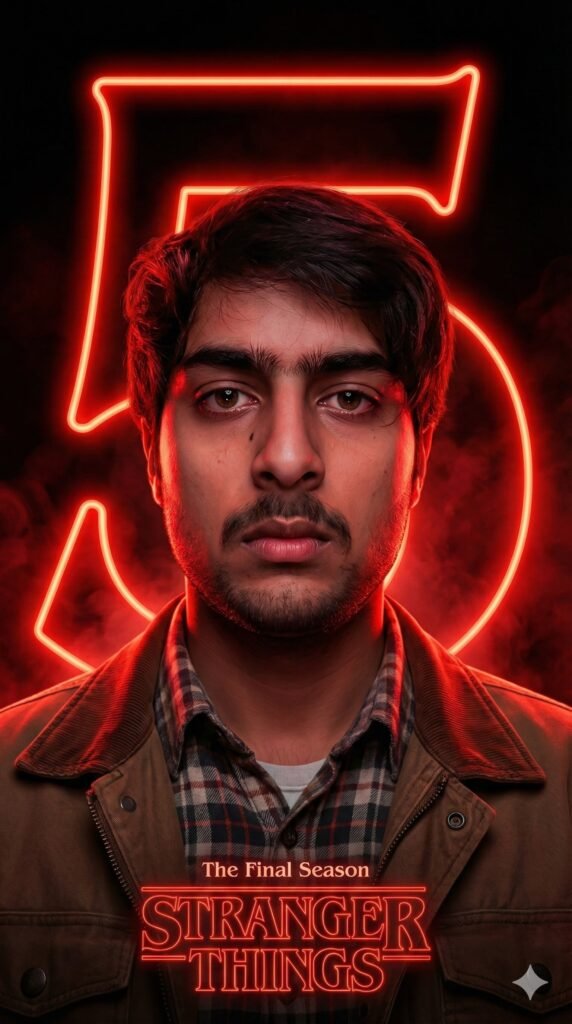
Stranger Things 5 के लिए Om Editing Top style क्या है?
Om Editing Top style में Stranger Things 5 जैसी edit का मतलब है एक ऐसा cinematic, poster-like portrait बनाना जो dark, dramatic और neon glow से भरपूर हो। इस तरह की editing खासकर उन लोगों के लिए सही है जो अपने photo को series-poster vibe, emotional mood, और high-impact fan-art look देना चाहते हैं।
Read Also: cinematic-style realistic portrait | 2026 New Year
अगर आप mobile से editing करते हैं और चाहते हैं कि आपकी photo साधारण selfie से हटकर एक Netflix-style promotional poster जैसी लगे, तो यह prompt/photo style आपके लिए बहुत useful है। इसमें background, lighting, subject pose, और color mood सभी चीज़ें मिलकर एक powerful visual effect बनाती हैं।
इस तरह की Stranger Things 5 edit में खास बात यह है कि image सिर्फ सुंदर नहीं दिखती, बल्कि उसमें suspense, nostalgia और final-chapter energy भी महसूस होती है। यही वजह है कि creators, Instagram editors, fan pages, और AI image users इसे बहुत पसंद करते हैं।
इस prompt/style से आपको क्या visual result मिलता है?
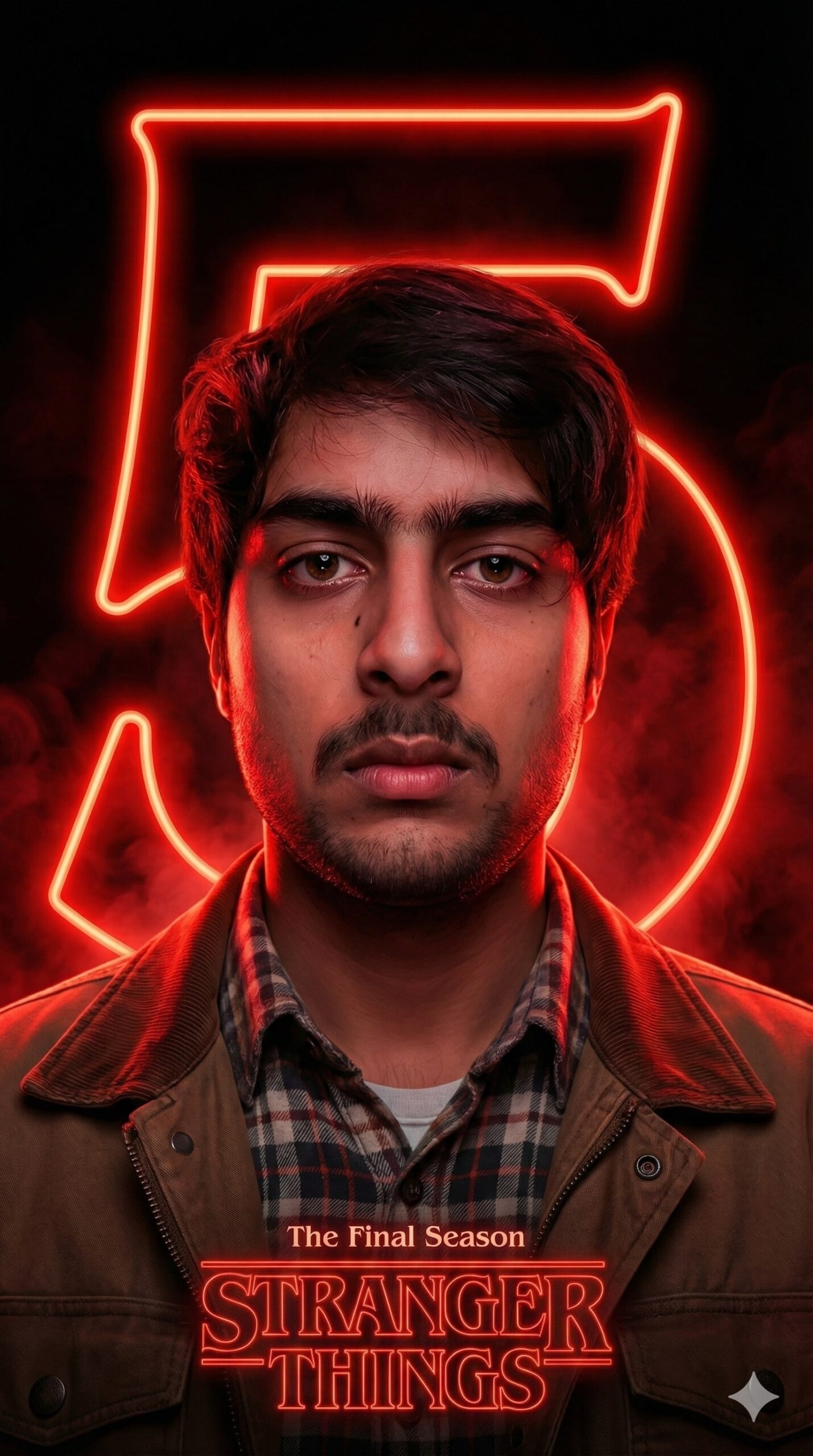
इस style का सबसे बड़ा highlight है इसका dark cinematic mood। Deep black background, smoky shadows, और red atmospheric glow मिलकर image को intense और mysterious बनाते हैं। Result ऐसा लगता है जैसे character किसी supernatural world के बीच खड़ा हो और उसके पीछे कोई बड़ी कहानी चल रही हो।
Lighting इस edit का सबसे important हिस्सा है। Face पर red neon reflections पड़ती हैं, जिससे cheekbones, jawline, brow, और overall facial structure ज्यादा defined दिखती है। यह glow subject को soft भी रखता है और dramatic भी बनाता है, इसलिए portrait realistic होने के साथ-साथ poster-worthy भी लगता है।
Composition में पीछे एक बड़ा glowing “5” होता है, जो इतना prominent होता है कि image के edges तक cut होकर दिखाई देता है। इससे frame में scale और power आती है। साथ ही नीचे title-style graphic जोड़ने से पूरी image authentic TV-poster feel देती है।
- Dark black background के साथ strong contrast
- Red neon glow और smoky shadows
- Emotional, solemn facial expression
- Retro layered clothing जैसे checkered shirt और jacket
- Poster-style framing with strong center focus
- Cinematic realism के साथ fan-art look
Om Editing Top style को mobile पर कैसे use करें?
अगर आप beginner हैं, तो भी इसे आसानी से use कर सकते हैं। सबसे पहले अपनी best photo चुनें और ध्यान रखें कि face साफ दिख रहा हो। फिर prompt box में style-based instruction use करें, ताकि AI आपके image को Stranger Things 5 vibe में transform कर सके।
Mobile users के लिए सबसे अच्छा तरीका यह है कि आप एक clear portrait upload करें, फिर desired mood और background details को prompt में रखें। अगर image editor app या AI tool background, lighting, और poster elements support करता है, तो result और भी better आएगा।
नीचे simple step-by-step guide दी गई है, जिसे कोई भी beginner follow कर सकता है:
- एक साफ और front-facing portrait photo चुनें।
- Photo को AI editor या image generation tool में upload करें।
- Prompt में dark cinematic mood, red neon lighting, और poster composition जैसी details use करें।
- Face reference को preserve करने का option on रखें, अगर available हो।
- Output size square या poster ratio में रखें ताकि title और background अच्छे दिखें।
- Generate होने के बाद brightness, contrast, और saturation हल्का adjust करें।
- Final image को save करके social media के लिए export करें।
अगर आप चाहें, तो एक बार में multiple variations generate करें। कभी-कभी same photo का दूसरा render ज्यादा cinematic, ज्यादा sharp, या ज्यादा authentic look दे देता है।
कौन-सी photos इस Stranger Things 5 edit के लिए सबसे best रहती हैं?
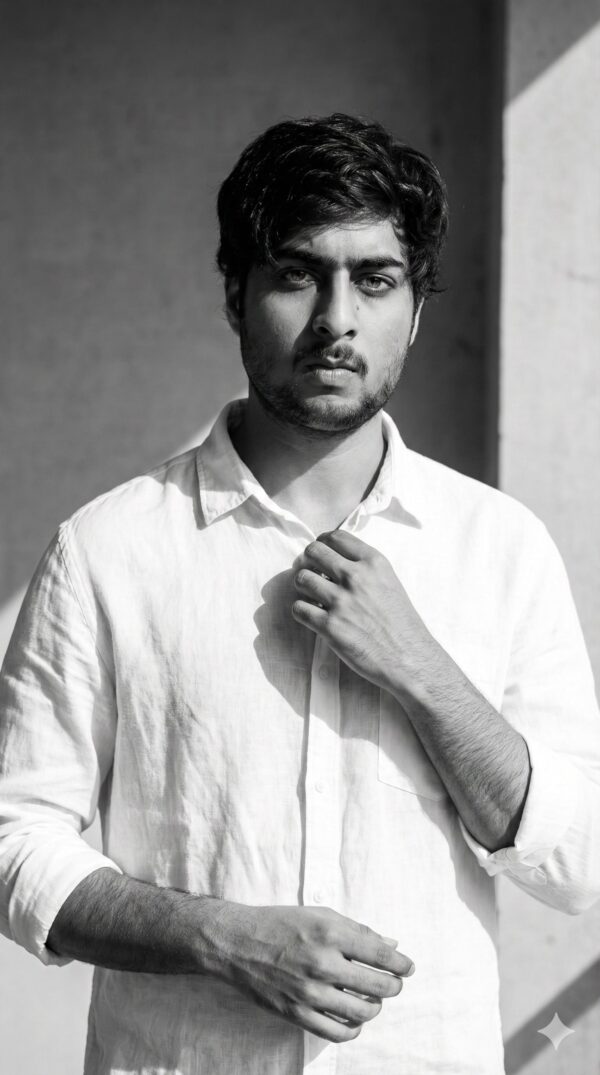
इस तरह की edit के लिए वही photos सबसे अच्छी रहती हैं जिनमें face clear हो और lighting already balanced हो। बहुत ज्यादा blurry, overexposed, या low-quality images में red neon effect उतना strong नहीं दिखता। Best results के लिए subject का face frame में dominant होना चाहिए।
Angle भी बहुत matter करता है। Front-facing या slightly turned face वाली photo सबसे natural लगती है, क्योंकि इससे AI facial features को better read कर पाता है। अगर आप dramatic poster look चाहते हैं, तो shoulders visible हों और head pose stable हो।
Clothing और background भी final output को affect करते हैं। Retro-style shirt, jacket, या layered outfit इस mood से अच्छी तरह match करता है। Background simple होना चाहिए, ताकि AI उसे easily dark cinematic scene में convert कर सके।
- Angle: front-facing या slight 3/4 angle
- Resolution: high-quality, clear face वाली photo
- Lighting: soft daylight या balanced indoor light
- Background: plain, uncluttered, easy-to-edit backdrop
- Clothing: checkered shirt, jacket, or retro layered outfit
- Expression: serious, calm, emotional, or reflective look
अगर photo में face बहुत छोटा है या background में बहुत ज़्यादा elements हैं, तो AI poster composition उतनी clean नहीं बना पाएगा। इसलिए simple, sharp, and well-lit portrait चुनना हमेशा सबसे safe option है।
Stranger Things 5 ke liye Pro Tips
Agar aap Om Editing Top style me Stranger Things 5 poster ya portrait banana chahte hain, to sabse pehle lighting aur face placement par dhyaan dena bahut zaroori hai. Is type ke dramatic neon edit me chhoti si adjustment bhi final look ko kaafi cinematic bana deti hai.
Best result ke liye subject ko background se clearly separate rakho, aur glow ko itna strong rakho ki poster ka mood instantly set ho jaye. Red neon effect tabhi premium lagta hai jab shadows soft ho, highlights controlled ho, aur overall composition balanced dikhe.
- Face par red rim light ko carefully place karo taaki cheekbones, jawline aur brow define ho jaye.
- Background ko dark aur smoky rakho, lekin pure black flat na ho—slight texture add karo.
- “5” ko oversized rakho taaki woh frame ke edge tak jaaye aur dramatic depth create kare.
- Retro clothing me earthy tones use karo, jaise brown, maroon, olive ya muted beige.
- Title graphic ko subject ke neeche clean alignment me rakho, taaki poster layout strong lage.
- Glow intensity ko overdo mat karo; thoda controlled neon effect zyada professional lagta hai.
Agar aap Instagram post, fan art, ya thumbnail version bana rahe ho, to subject ke expression ko emotional aur serious rakhna aur bhi important ho jata hai. Isse Stranger Things 5 ka final-chapter vibe naturally create hota hai.
Common Mistakes Jo Avoid Karne Chahiye
Stranger Things 5 edit banate waqt sabse common mistake hoti hai glow ko itna zyada kar dena ki face details hi kho jati hain. Neon effect ka purpose subject ko enhance karna hota hai, overwhelm karna nahi.
Ek aur issue hota hai background aur character ke beech contrast ka sahi balance na rakhna. Agar dark shadows too heavy ho gaye ya red light too weak rahi, to image flat aur less cinematic lagegi. Om Editing Top style me depth bahut important hoti hai.
- Face ke natural features ko blur mat karo, warna portrait generic lagne lagega.
- “5” ko small mat rakho; is design ka impact oversized number se hi aata hai.
- Clothing colors ko bahut bright mat karo, kyunki theme retro-dark hai.
- Title text ko uneven ya low-contrast mat rakho, warna poster readability down ho jaati hai.
- Background me unnecessary elements add mat karo; minimal smoky scene zyada effective hota hai.
- Red light ko sirf ek side par na rakho agar composition balance ki zaroorat ho.
Ye small mistakes overall output ko amateur bana sakti hain, especially jab aap social media par high-quality fan edit share karna chahte ho. Clean layering, good contrast, aur cinematic spacing hamesha better result dete hain.
Best Use Cases aur Creative Ideas
Stranger Things 5 style visual ka use aap kai places par kar sakte ho. Ye design sirf poster ke liye nahi, balki social media branding, fandom pages, aur custom profile branding ke liye bhi kaafi effective hai. Iska intense neon mood instantly attention grab karta hai.
Agar aap content creator ho ya edit pages chalate ho, to is type ka visual thumbnail aur cover art me bhi strong perform kar sakta hai. Themed artwork ki wajah se audience ko clearly pata chal jata hai ki content dark, dramatic aur fan-focused hai.
- Instagram posts: Fan art, reveal post, or character tribute ke liye perfect.
- Profile pictures: Close-cropped version me face glow bahut striking lagta hai.
- Thumbnails: Video edit, trailer reaction, ya fandom discussion ke liye ideal.
- Portfolios: Neon portrait editing skills showcase karne ke liye strong sample.
- Reels covers: Dark red theme reels ko instantly recognizable banata hai.
Aap is concept ko different platforms ke according resize bhi kar sakte ho. Square format social feed ke liye, vertical crop stories ke liye, aur wide layout banner ya header ke liye better hota hai. Is tarah Om Editing Top aesthetic har format me maintain reh sakti hai.
Variations Jo Aap Try Kar Sakte Ho
Agar aap same Stranger Things 5 concept ko baar-baar use nahi karna chahte, to mood aur color palette me changes karke naya look create kar sakte ho. Chhote creative variations se artwork fresh bhi lagta hai aur audience ko repeated feel bhi nahi hota.
Seasonal mood, weather effect, ya lighting shift karke aap har version ko slightly different story de sakte ho. Ye especially useful hai jab aap multiple edits ya carousel posts banana chahte ho.
- Darker mood: Deep shadows, less glow, aur more mystery for intense look.
- Hotter red tone: Fiery crimson light for more dramatic final-season energy.
- Cool neon variation: Red ke saath slight blue accents for contrast-heavy composition.
- Winter setting: Cold mist aur frosty atmosphere with red glow for eerie contrast.
- Autumn look: Muted browns, orange undertones, and warm retro clothing.
- Rainy effect: Wet reflections and smoky haze for cinematic poster feel.
Aap expression ke saath bhi experiment kar sakte ho—solemn, determined, emotional, ya mystery-filled. Har variation same core concept ko different emotional direction deta hai, aur isi wajah se image zyada versatile ho jaati hai.
Conclusion: Stranger Things 5 ko Cinematic Style Me Try Karo
Overall, Stranger Things 5 inspired portrait ka sabse strong point uska dramatic neon mood, emotional facial lighting, aur bold poster composition hai. Agar aap red glow, dark background, aur oversized “5” ko balance ke saath use karte ho, to output instantly cinematic aur eye-catching ban sakta hai.
Ab aap chahe Instagram ke liye edit bana rahe ho, thumbnail design kar rahe ho, ya fan art experiment kar rahe ho, Om Editing Top style me ye concept kaafi powerful result de sakta hai. Ab different moods aur color variations try karke dekho, aur apna best Stranger Things 5 visual create karo.
FAQ: Stranger Things 5
How do I use the "Stranger Things 5" prompt?
Copy the prompt above, open Gemini or ChatGPT, upload a clear photo of yourself and paste the prompt. Generate the image and adjust the outfit or background if you want a variation.
Is this prompt free?
Yes. This prompt is free to copy and use for Instagram, reels, WhatsApp DP and profile pictures.
Which photo works best?
A sharp, front-facing, well-lit photo with no filter. A clear face helps the AI keep your identity in the final image.
Last updated: 31 July 2026
💬 Comments