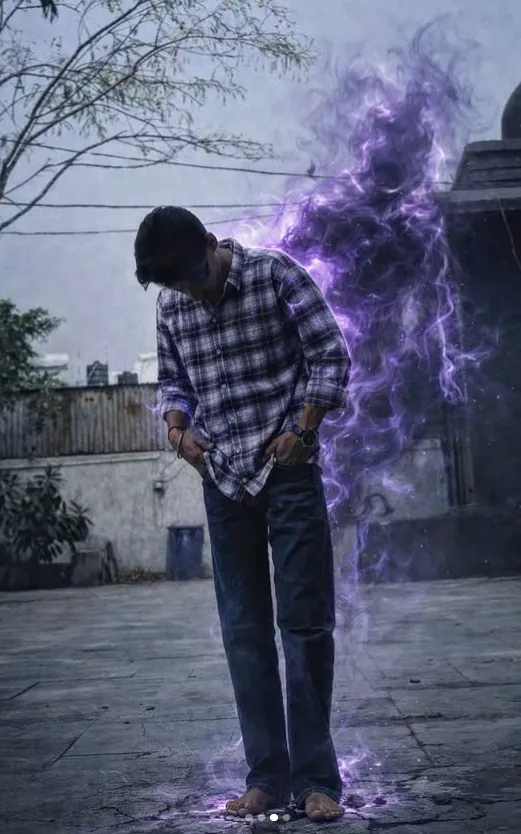
purple energy entity
Om Editing Top: purple energy entity style kya hai?
Om Editing Top style me purple energy entity ek realistic photo-manipulation effect hai jo normal street photo ko cinematic aur supernatural look deta hai. Isme person ko same rakha jata hai, lekin uske piche ya side me ek semi-transparent violet energy form add kiya jata hai, jo smoky flames jaisa feel deta hai.
Read Also: cinematic-style realistic portrait | 2026 New Year
Ye style un logon ke liye perfect hai jo apni photos ko dramatic, mysterious aur powerful banana chahte hain, bina face ya pose ko change kiye. Mobile creators, Instagram editors, reel thumbnails, WhatsApp DP edits aur AI photo editing lovers ke liye ye look kaafi popular hai.
Is prompt style ka main goal fantasy ko realism ke saath blend karna hota hai. Matlab result aisa lage jaise scene real ho, bas usme ek subtle supernatural presence add ki gayi ho. Isi wajah se light spill, natural shadows aur background blending kaafi important ho jate hain.
Ye purple energy entity photo style kya output deta hai?
Is type ki editing me final image usually dark, cinematic aur high-contrast feel deti hai. Purple flames ya energy trails person ke around aise merge hote hain ki effect overdone na lage, balki controlled aur believable lage. Road, clothes aur surrounding area par subtle violet glow bhi aa sakta hai.
Realism maintain karne ke liye body shape, face details aur clothing ko same rakha jata hai. Effect bas background me ek mysterious entity create karta hai jo partially visible hoti hai. Isse photo me story aur motion dono add ho jate hain, especially jab lighting already natural ya street-style ho.
Is style ke kuch common visual elements hote hain:
- Smoky violet flames ya purple aura
- Subtle energy trails around back and arms
- Natural light spill on clothes and ground
- Faint glow with slight cracks near the feet
- Cinematic mood, but still photo-realistic finish
Agar aap dramatic thumbnails, profile edits ya viral-style photo transformations banana chahte hain, to Om Editing Top theme ke under ye effect kaafi strong aur eye-catching result de sakta hai. Sabse important baat ye hai ki effect human subject ko overpower na kare.
This Style effect ko mobile par kaise use karein
Beginners ke liye sabse easy method ye hai ki aap ek clear, straight street photo select karein aur phir editing app ya AI tool me prompt-based enhancement apply karein. Yaad rakhein, best results tab aate hain jab input photo already clean aur sharp ho.
Mobile par use karte waqt dhyan rakhein ki subject ka face visible ho, pose simple ho aur background zyada cluttered na ho. Kyunki purple energy entity ko blend karne ke liye editor ko person ke around enough empty space chahiye hota hai. Agar background too busy hoga, to effect messy lag sakta hai.
Step-by-step process:
- Apni best street-style photo choose karein, jisme subject clearly visible ho.
- Photo ko crop karke unnecessary background ko thoda balance karein.
- Editing app ya AI generator me photo upload karein.
- Prompt me realistic photo manipulation aur purple energy entity jaisa concept use karein.
- Result me dekhain ki face, body aur clothes unchanged rahe.
- Agar glow zyada ho, to intensity kam karein; agar effect weak ho, to contrast thoda increase karein.
- Final image ko sharpen karne se pehle shadows aur light spill check karein.
Mobile editing me best practice ye hoti hai ki pehle simple version generate karein, phir usko refine karein. Isse aap control me rahenge aur image artificial nahi लगेगी. Purple energy ka effect tabhi achha dikhega jab uska glow subject ke natural lighting ke saath match kare.
Is photo style ke liye kaun si photos sabse achhi hoti hain?
Om Editing Top purple energy entity effect ke liye aisi photos best hoti hain jisme subject ka angle clean ho aur body poori ya semi-full visible ho. Side pose, front pose ya slight three-quarter angle usually sabse zyada effective hota hai, kyunki entity ko person ke piche place karna easy hota hai.
Resolution high honi chahiye, ideally clear portrait quality, taaki face aur clothes blur na hon. Low-light ya evening street photos bhi kaafi achhi lagti hain, kyunki purple glow naturally blend ho jata hai. Too bright daylight me effect kabhi-kabhi soft lag sakta hai, jab tak shadow balance sahi na ho.
Practical photo tips:
- Angle: straight ya slight side angle better hota hai
- Resolution: clear, sharp aur high-detail image use karein
- Lighting: natural shade, sunset, night street light ya moody light best hoti hai
- Background: simple road, wall, lane ya open space choose karein
- Clothing: dark ya neutral clothes par purple glow zyada premium lagta hai
- Pose: still pose better hoti hai, taaki VFX clean blend ho सके
Agar aap chahte hain ki final result realistic लगे, to aisi photo avoid karein jisme hands face ke bahut close ho, ya subject bohot crowd me ho. Empty space aur balanced composition purple energy entity style ko aur powerful bana deta hai. Isi wajah se clean framing Om Editing Top edits me sabse important step hoti hai.
Pro Tips for Best Results with Om Editing Top
If you want the strongest Om Editing Top result, the biggest secret is balance. The edit should feel powerful, but it should still look like a real street photo with cinematic energy added on top. That means the subject must stay natural, and the purple effect should support the image instead of taking over it.
Start by choosing photos with good lighting, clear body shape, and enough space around the person. A clean background helps the purple glow and smoky energy stand out without making the image look crowded. The more realistic the base photo is, the easier it becomes to create a polished final look that feels believable and eye-catching.
Here are a few practical do’s that help a lot when working with Om Editing Top style edits:
- Use a sharp, high-quality photo so the energy effect blends cleanly.
- Keep the subject facing a simple background for better contrast.
- Match the purple light spill with the direction of the existing lighting.
- Use subtle glow around the arms, back, and ground instead of heavy overeffects.
- Keep shadows natural so the edit still feels like a real outdoor shot.
- Make the entity partially visible for a more cinematic and believable look.
Another useful tip is to think about the final mood before editing. A darker street, a slightly moody sky, or a dramatic pose can make the purple energy feel more intense. On the other hand, if you want a cleaner social-media look, keep the glow softer and the cracks in the ground more subtle.
Common Mistakes to Avoid in This Style
One of the most common mistakes is making the purple energy too bright or too large. When the effect becomes overexposed, it stops looking like part of the photo and starts looking pasted on. For Om Editing Top style visuals, realism matters more than size, so a controlled effect usually works better than a loud one.
Another issue is changing the person too much. The face, body, clothes, pose, and angle should remain unchanged so the image still feels authentic. If the subject starts to look reshaped or heavily altered, the whole street-photo realism is lost, and the final output becomes less usable for posts, thumbnails, and profile-style content.
Watch out for these mistakes because they can weaken the final result:
- Overexposed glow: Too much light hides detail and reduces realism.
- Full creature shapes: A complete monster-style figure can make the image look fantasy-based instead of realistic.
- Face or body changes: This breaks the original photo identity and makes the edit feel unnatural.
- Too many effects at once: Extra smoke, lightning, and color shifts can make the image messy.
- Ignoring shadows: If the light spill does not match the scene, the edit looks fake.
It also helps to avoid adding too much detail in the background. The main subject should stay the hero of the image, while the purple energy entity works as a dramatic visual accent. Clean composition usually gives a stronger and more professional result than overcrowding the frame.
Best Use Cases for These Images
Om Editing Top images are perfect for content where you want attention, style, and a powerful visual identity. Because the edit is cinematic but still realistic, it can work across social media and portfolio content without feeling too exaggerated. This makes it a smart choice for creators who want something bold but still believable.
One of the best uses is for Instagram posts, where a striking purple energy effect can make a photo stand out in a crowded feed. It also works well for profile pictures if the effect is kept subtle enough to stay readable at small sizes. The glowing purple trails and smoky background energy can add personality without overwhelming the face.
These are some of the most useful places to use this kind of edit:
- Instagram posts: Great for cinematic feed content and visual storytelling.
- Profile pictures: Works best when the effect is clean and not too busy.
- YouTube thumbnails: Useful for dramatic branding and high-click visuals.
- Reels covers: Helps create a strong first impression on short-form content.
- Portfolios: Good for editors and creators who want to show stylized realism.
You can also use this style for gaming pages, fan edits, promo graphics, or personal branding content. If the goal is to create a powerful “energy transformation” look while keeping the original photo intact, this style gives you a flexible visual effect that fits many creative platforms.
Variations You Can Try with This Style
Once you get the basic this style look right, you can start experimenting with different moods and backgrounds. Small changes in color tone, glow strength, and atmosphere can completely change the emotional feel of the image without changing the subject itself. That is what makes this style so flexible.
You can try a darker night setting for a more intense, dramatic vibe, or a softer evening street scene for a cleaner cinematic look. If you want the purple energy to feel more mysterious, keep the smoke thinner and the glow more localized. If you want a stronger superhero-style impact, make the trails slightly brighter while still keeping the realism intact.
Here are some variation ideas to test:
- Mood: Calm, intense, mysterious, heroic, or dark cinematic.
- Colour tone: Deep violet, electric purple, soft lavender, or a mix of purple and magenta.
- Setting: Street, alley, open road, rooftop, or urban night scene.
- Season: Monsoon, winter fog, summer dusk, or a cool nighttime atmosphere.
- Effect style: Light smoke, stronger flames, subtle energy trails, or glowing ground cracks.
These changes help you find the version that fits your content best. Some creators may want a more understated social-media edit, while others may prefer a bold, cinematic transformation look. Testing different moods is the easiest way to create a unique version of this prompt that still feels realistic and polished.
Conclusion: Try This Style for a Cinematic Realistic Look
If you want an edit that feels dramatic, modern, and still believable, this look is a strong creative direction to try. The mix of semi-transparent purple energy, subtle light spill, smoky trails, and realistic street-photo style can turn a simple image into something far more striking.
Keep the person unchanged, keep the effect balanced, and focus on natural shadows and clean composition. That simple approach gives you the best chance of creating an image that looks powerful without losing realism. Try a few variations, compare the results, and choose the version that matches your style most closely.
💬 Comments